
A Roku remote that starts blinking can quickly turn a relaxing TV night into a confusing problem. The blinking light on your Roku remote is more than just an annoyance—it’s your remote’s way of asking for help. Many users, especially those new to streaming devices, get stuck when this happens. Is your Roku remote blinking because of low batteries, lost connection, or something else? This guide will help you understand what causes the blinking and show you, step-by-step, how to fix it. Even if you’re not a tech expert, you’ll find clear answers here.
Why Is My Roku Remote Blinking?
A blinking light on your Roku remote is a signal. It means something isn’t right. The exact meaning depends on the color and pattern of the blink, but most often, it relates to pairing issues, low battery, or hardware faults. Understanding these signals can save you time and frustration.
Main Reasons For Blinking
1. Pairing Mode
The remote is trying to connect with your Roku device. This usually happens after you change batteries or reset the remote.
2. Low Battery
When the battery is almost empty, the remote may blink to warn you.
3. Lost Connection
If the remote loses communication with the Roku player, a blinking light is common.
4. Button Stuck
Sometimes, a stuck or jammed button can trigger blinking.
5. Hardware Failure
Rare, but possible. Internal damage may cause the blinking.
Types Of Roku Remotes And Their Blinking Patterns
Roku offers two main types of remotes: Simple IR Remotes and Enhanced “Point Anywhere” Remotes. Each has its own blinking behavior.
| Remote Type | Pairing Needed? | Common Blinking Reason |
|---|---|---|
| Simple IR | No (uses line-of-sight) | Low battery, stuck button |
| Enhanced (RF/Bluetooth) | Yes | Lost pairing, low battery |
Most blinking problems happen with Enhanced Remotes, since they connect through Bluetooth or Wi-Fi Direct.
How To Identify The Blinking Pattern
Pay attention to how the remote blinks:
- Slow blinking (every 1-2 seconds): Usually searching for a device to pair with.
- Fast blinking (multiple times per second): Often means pairing failed or the battery is very low.
- Blinking stops after a few seconds: Normal for pairing or startup.
- Constant blinking: May signal a hardware problem.
Knowing the pattern helps you pick the right fix.
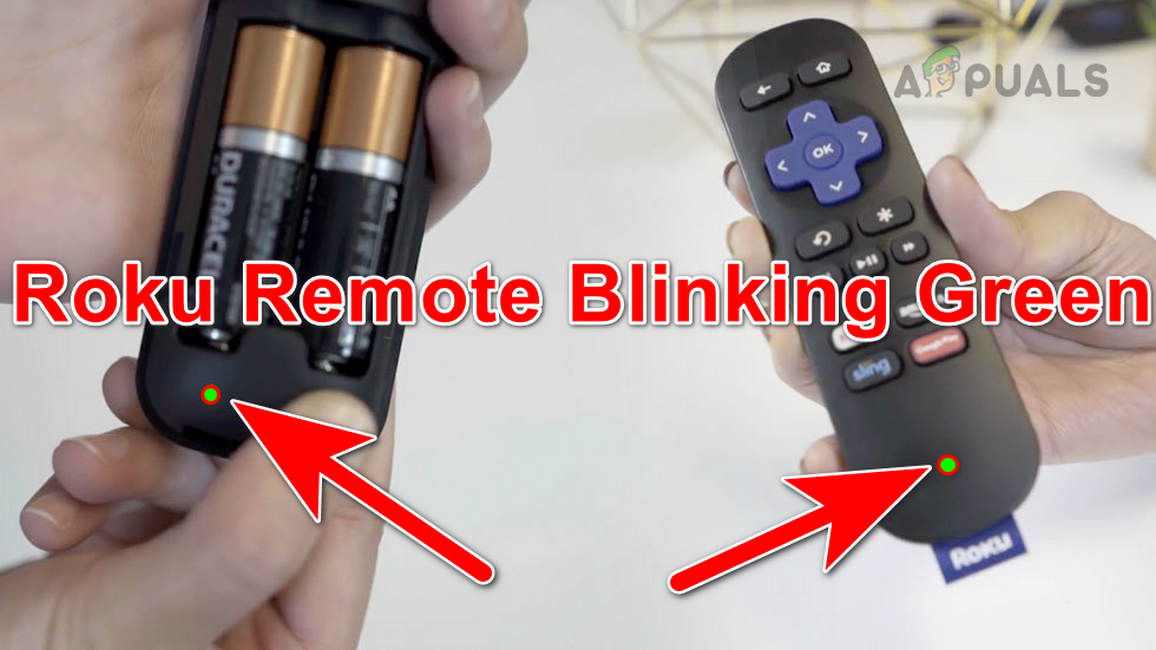
Credit: appuals.com
Step-by-step Solutions For Roku Remote Blinking
Solving a blinking Roku remote is not hard if you follow the right steps. Start with the simplest solution and work towards more advanced fixes if needed.
1. Check And Replace The Batteries
Low power is the most common reason for blinking. Here’s what to do:
- Remove the battery cover.
- Take out both batteries.
- Wait 10 seconds.
- Put in fresh, high-quality batteries (preferably alkaline).
- Watch the blinking light—if it stops, the problem was the batteries.
Tip: Avoid mixing old and new batteries. This can cause odd behaviors.
2. Re-pair The Remote
If changing the batteries doesn’t help, try pairing the remote again.
How to re-pair:
- Unplug your Roku player’s power cable.
- Wait 10 seconds, then plug it back in.
- When the Roku logo appears on your TV, open the remote’s battery cover.
- Find the small pairing button (usually near the bottom or under the battery cover).
- Hold the button for 5 seconds, or until the pairing light starts blinking.
- Wait for the Roku device to recognize the remote (this may take up to 30 seconds).
If the blinking stops and the remote works, you’re done.
3. Check For Stuck Buttons
A stuck button can send continuous signals and cause the remote to blink.
- Press each button on your remote one by one.
- Listen and feel for any buttons that are hard to press or do not pop back.
- If you find a stuck button, gently clean around it with a soft cloth or cotton swab.
4. Restart Both The Roku Device And The Remote
Sometimes, both the device and remote need a fresh start.
- Unplug the Roku device from power.
- Remove the remote’s batteries.
- Wait 30 seconds.
- Plug in the Roku device and wait for it to boot up.
- Insert the batteries back into the remote.
- Try using the remote again.
This simple reset solves many odd glitches.
5. Try Another Remote Or The Roku Mobile App
If your remote still blinks after all the above steps, try controlling your Roku device with the Roku mobile app (free for iOS and Android). This can help you see if the problem is with the remote or the player.
If the app works but your remote doesn’t, your remote may be faulty.
6. Check For Interference
Wireless signals from other devices (like routers, cordless phones, or microwaves) can disrupt Roku remotes.
- Move your Roku device away from other electronics.
- Try turning off other wireless devices temporarily.
- See if the blinking stops.
7. Factory Reset The Roku Remote (advanced)
If nothing else works, a factory reset can help.
- Remove the batteries.
- Hold the pairing button for 20 seconds.
- Release the button and wait 10 seconds.
- Reinsert the batteries and try pairing again.
This method erases any saved data in the remote and often fixes deep problems.
When To Replace Your Roku Remote
Sometimes, a blinking light means your remote is truly broken. If you’ve tried all the steps above and still see blinking, it may be time for a replacement.
Signs you need a new remote:
- Blinking continues even with new batteries and after pairing attempts.
- Buttons do not work at all.
- Remote is physically damaged (cracked, water damage).
You can buy a genuine replacement from the official Roku website or trusted retailers. Avoid cheap third-party remotes, as they may not work well.

Credit: www.youtube.com
Differences Between Roku Remote Models
Roku remotes have changed over the years, and not all models behave the same way. Here is a quick comparison of popular Roku remote types and their features:
| Remote Model | Pairing Light? | Voice Control? | Private Listening? | Works with All Rokus? |
|---|---|---|---|---|
| Simple IR Remote | No | No | No | No (only IR-compatible) |
| Enhanced Voice Remote | Yes | Yes | Yes | Most (not all models) |
| Voice Remote Pro | Yes | Yes | Yes | Most (latest models) |
Non-obvious tip: If your Roku box is hidden behind the TV (or in a cabinet), you must use an Enhanced Remote. Simple IR remotes need a clear line of sight.
Common Mistakes When Troubleshooting A Blinking Roku Remote
Many users accidentally make things worse or waste time by missing key steps. Here are some common mistakes to avoid:
1. Ignoring The Blinking Pattern.
Not all blinks mean the same thing. Fast and slow blinks have different causes.
2. Mixing Battery Brands Or Types.
Always use two fresh, matching batteries.
3. Forgetting To Check For Stuck Buttons.
Even a small bit of dirt can cause trouble.
4. Not Waiting Long Enough After Resets.
Sometimes, pairing takes up to 30 seconds.
5. Trying To Pair An Ir Remote.
Simple IR remotes don’t need pairing—only Enhanced models do.
6. Assuming The Remote Is Broken Too Soon.
Most blinking issues are simple to fix.
How To Keep Your Roku Remote Working Well
A few small habits can help you avoid blinking problems in the future.
- Change batteries every 6 months, even if the remote is working.
- Store the remote in a dry place, away from water or heat.
- Clean the remote with a soft, dry cloth to keep buttons from sticking.
- If you have pets or kids, keep the remote out of reach to prevent drops or spills.
Non-obvious insight: Using rechargeable batteries is fine, but some cheaper brands may not provide enough voltage for certain Roku remotes, leading to blinking issues.
Comparing Roku Remote Blinking To Other Streaming Devices
Are Roku remote blinking issues unique? Let’s compare Roku to other popular streaming devices:
| Device | Remote Blinking Issue? | Most Common Cause | Fix Complexity |
|---|---|---|---|
| Roku | Yes | Pairing, battery, interference | Easy to Medium |
| Amazon Fire TV | Yes | Pairing, battery | Easy |
| Apple TV | No (uses different signals) | Battery, software | Easy |
| Google Chromecast | Yes (newer models) | Pairing | Easy |
As you can see, remote blinking is a common issue across many brands. Roku is not alone, and the steps above work for most streaming remotes.

Credit: www.youtube.com
Frequently Asked Questions
Why Does My Roku Remote Blink But Not Work?
A blinking light often means your remote is searching for your Roku device or has lost connection. Start by replacing the batteries, then try pairing the remote again. If it still doesn’t work, try the Roku mobile app to control your device.
Can I Use My Phone If My Roku Remote Keeps Blinking?
Yes, you can download the official Roku app from the App Store or Google Play. It lets you control your Roku player, search for shows, and even use voice commands.
How Long Should Roku Remote Batteries Last?
With normal use, high-quality batteries should last 2–6 months. If you find yourself changing batteries every few weeks, check for stuck buttons or consider replacing the remote.
Do All Roku Remotes Have A Pairing Light?
No, only Enhanced Remotes have a pairing light. Simple IR remotes do not. The pairing light is usually found under the battery cover.
Where Can I Get Help If My Roku Remote Still Blinks?
You can visit the official Roku Support page for more advanced troubleshooting or to order a replacement remote.
Getting your Roku remote back to normal doesn’t have to be a headache. By understanding what the blinking means and following the right steps, you can fix most problems in minutes. Next time your remote starts blinking, you’ll know what to do—and your favorite shows will be just a click away.