
Many Samsung fridge owners get confused when they see the temperature display blinking. It can be worrying—especially if you just loaded your fridge with groceries or noticed your food isn’t cold enough. But what does this blinking mean? And, more importantly, how can you fix it quickly? Understanding the reasons behind a blinking temperature display helps you protect your food, avoid unnecessary repairs, and keep your fridge running smoothly.
This guide explains why your Samsung fridge temperature blinks, the common causes, and how to resolve them. If you want peace of mind and a reliable refrigerator, read on. You’ll also find practical troubleshooting steps, data tables for easy comparison, and a helpful FAQ at the end.
What Does A Blinking Temperature Mean?
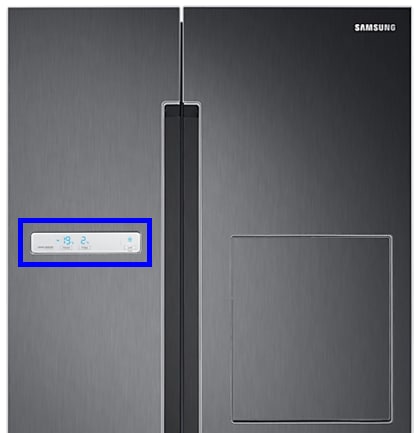
When the temperature number on your Samsung fridge display blinks, it’s a warning sign. The fridge is trying to tell you that something is not right with the temperature inside. Usually, it means that the temperature has gone too high or too low, or there’s an issue with a sensor. Sometimes, it happens after a power outage or when the fridge is just plugged in.
A blinking display does not always mean a serious problem. Often, it’s a simple issue you can fix at home. But ignoring this sign can lead to food spoilage or more expensive repairs later.
Common Causes Of Blinking Temperature In Samsung Fridges
Several situations can cause the temperature display to blink on a Samsung fridge. Here are the most frequent reasons:
1. Power Outage Or Power Surge
When the fridge loses power and then restarts, it may blink to show that the temperature inside is not at the set level.
2. Door Left Open
If the fridge or freezer door is not closed properly, warm air enters, causing the temperature to rise and the display to blink.
3. High Internal Temperature
If the fridge or freezer gets too warm, perhaps after adding a lot of groceries, the display blinks to warn you.
4. Faulty Temperature Sensor
A damaged or disconnected sensor cannot measure temperature correctly, so the display blinks as an error signal.
5. Blocked Vents Or Overfilled Fridge
If air cannot circulate, some areas get warmer, and the fridge may blink due to uneven cooling.
6. Defrost System Problems
If frost builds up and blocks airflow, the fridge struggles to cool properly, causing a blinking display.
7. Malfunctioning Control Board
Rarely, the main control board can fail and send false signals to the display.

Credit: www.spinchill.com
How To Troubleshoot A Blinking Temperature Display
You don’t always need a technician. Follow these steps to identify and fix the problem:
1. Check Power And Reset The Fridge
- Make sure the fridge is plugged in securely.
- After a power outage, give the fridge time to cool down (up to 24 hours).
- To reset, unplug the fridge for 1-2 minutes, then plug it back in.
- Wait to see if the display stops blinking.
2. Inspect The Doors
- Check if the fridge and freezer doors are fully closed.
- Look for any food or containers blocking the seal.
- Clean the door gaskets so they close tightly.
3. Let The Fridge Stabilize
- If you just installed the fridge or loaded it with groceries, give it time to reach the right temperature.
- Avoid opening the doors often during this period.
4. Check The Temperature Setting
- Make sure the set temperatures are correct: 37°F (3°C) for the fridge and 0°F (-18°C) for the freezer.
- If you adjusted the settings, the display may blink until the inside matches the new temperature.
5. Look For Error Codes
- Some Samsung fridges blink numbers along with letters (like “5E” or “88 88”).
- Check your user manual or search online to decode these messages.
6. Inspect For Blocked Vents
- Air vents must be clear for proper cooling.
- Rearrange food so that vents inside the fridge and freezer are not blocked.
7. Test The Temperature Sensor
- If the fridge is not cooling and the display keeps blinking, the sensor might be faulty.
- This usually needs a technician, but you can check if the sensor wire is loose (if you’re comfortable opening the back panel).
8. Run A Self-diagnosis (if Available)
- Some Samsung models have a self-diagnosis feature.
- Press and hold specific buttons (see your manual) to start the test.
- The display may show error codes that point to the problem.
9. Consider Professional Help
- If you’ve tried all the above and the display still blinks, call Samsung support or a certified technician.
Quick Reference: Common Causes And Fixes
Here’s a handy table to help you match the problem with the solution:
| Cause | How to Fix | When to Call a Technician |
|---|---|---|
| Power Outage | Wait for cooling; reset fridge | No |
| Door Left Open | Close door; check seal | No |
| Overfilled Fridge | Clear vents; rearrange food | No |
| Sensor Fault | Check connection; replace sensor | Yes |
| Control Board Issue | Reset fridge; replace board | Yes |
How Samsung Fridge Temperature Sensors Work
The temperature sensor (also called a thermistor) monitors the air inside the fridge and freezer. It sends data to the control board, which then adjusts the compressor and fans to keep the right temperature. If the sensor fails, the control board gets incorrect readings and the display may blink.
Example: If you place hot leftovers directly in the fridge, the sensor will detect a sudden rise in temperature. The display might blink until the fridge cools down again.
When Is Blinking Normal?
Not all blinking means something is wrong. Sometimes, a Samsung fridge will blink:
- For a few hours after being plugged in for the first time
- After a power outage, until the set temperature is reached
- When you change the temperature setting
- During defrost cycles
If the blinking stops after a few hours and the fridge is cooling, you don’t need to worry.
Credit: www.samsung.com
Table: Blinking Patterns And What They Mean
Samsung fridges can show different blinking patterns. Here’s a quick guide:
| Blinking Pattern | Possible Meaning | Action Needed |
|---|---|---|
| Single number blinks | Temperature too high/low | Wait or check doors |
| All digits blink | Power issue or error code | Reset fridge; check manual |
| Numbers and letters blink | Specific error (e.g., sensor) | Check code; call support if needed |
| Blinking after loading food | Fridge warming up | Wait for cooling |
Preventing Temperature Blinking Problems
Most blinking issues can be avoided with simple habits:
1. Keep Doors Closed
Open the fridge only when needed, and close the doors firmly.
2. Don’t Overfill
Leave space around vents and shelves for air to circulate.
3. Set The Right Temperature
Use the recommended settings: 37°F (fridge), 0°F (freezer).
4. Allow Cooling Time
After restocking or a power outage, be patient while the fridge cools down.
5. Regular Cleaning
Clean door seals and remove frost buildup to help the fridge work efficiently.
6. Check For Updates
Some newer Samsung models support firmware updates that fix bugs. Check the manual or Samsung’s website for details.

Credit: www.youtube.com
Comparing Samsung With Other Brands
Wondering if Samsung fridges are more likely to have blinking temperature issues? Here’s a comparison based on user reports and reliability ratings:
| Brand | Blinking Temperature Complaints | Average Repair Cost |
|---|---|---|
| Samsung | Moderate | $150 – $400 |
| LG | Low | $130 – $350 |
| Whirlpool | Low | $120 – $300 |
| GE | Moderate | $140 – $370 |
Insight: Samsung fridges are advanced, but their sensitive sensors sometimes lead to more blinking warnings than older or simpler models. However, this feature also helps you catch problems early, before food spoils.
Practical Tips Most Owners Miss
Many people overlook these simple but effective actions:
- Wait a Full Day Before Worrying: If your fridge is new or just restocked, give it 24 hours before calling for service. The temperature needs time to stabilize.
- Check the Room Temperature: If your kitchen is very hot or cold, it can affect the fridge’s operation. Try to keep the room temperature between 50°F and 110°F for best results.
- Avoid Large Warm Loads: Putting many warm items in the fridge at once can cause the sensor to trigger blinking. Cool leftovers at room temperature before storing.
- Use a Fridge Thermometer: Sometimes, the display sensor fails but the fridge is still cold enough. A separate thermometer helps you check the real temperature.
When To Call For Service
Some problems require a professional:
- The display blinks for more than 24 hours and the fridge is not cooling
- Error codes keep appearing after reset
- Food is spoiling or freezing inside the fridge
- You hear strange noises or see water leaks
Samsung offers a warranty and official support. Find more details at the official Samsung support site.
Frequently Asked Questions
Why Does My Samsung Fridge Temperature Display Keep Blinking After A Power Outage?
After a power outage, the fridge may need several hours to reach the right temperature again. The display blinks as a warning until the inside is cool enough. If blinking lasts more than 24 hours, check for blocked vents or faulty sensors.
How Do I Reset My Samsung Fridge Temperature Display?
Unplug the fridge for 1-2 minutes, then plug it back in. Some models have a reset button—check your manual. If blinking continues, try the self-diagnosis feature or call support.
Is Food Safe If The Fridge Temperature Is Blinking?
If the fridge is still cold (below 40°F) and the blinking started recently, your food is usually safe. If the fridge feels warm or blinking continues for more than a day, check your food carefully and avoid eating anything that smells or looks spoiled.
What Error Codes Should I Look For On A Samsung Fridge?
Common codes include 5E (defrost sensor), 88 88 (power issue), and 33E (ice maker). Your manual or Samsung’s support website lists all codes and solutions.
Can I Fix A Blinking Temperature Display Myself?
You can fix many issues yourself, like closing the door, clearing vents, or resetting the fridge. If the problem is with a sensor or control board, it’s safer to call a professional.
A blinking temperature display on your Samsung fridge doesn’t have to be stressful. With the right steps, you can solve most issues yourself and keep your fridge running smoothly. Stay alert to warning signs, act quickly, and your food will stay safe and fresh.