
When your Roku TV shows a blinking white light, it’s easy to feel confused or worried. This small signal can mean different things, from minor glitches to deeper hardware issues. Many people search online for answers, but the information is often scattered or unclear. Here, you’ll find practical guidance to help you understand what the blinking white light means, how to fix it, and avoid common mistakes. Whether you’re a new Roku user or someone who’s owned a TV for years, this guide will help you get your TV working again.
What Does The Blinking White Light Mean?
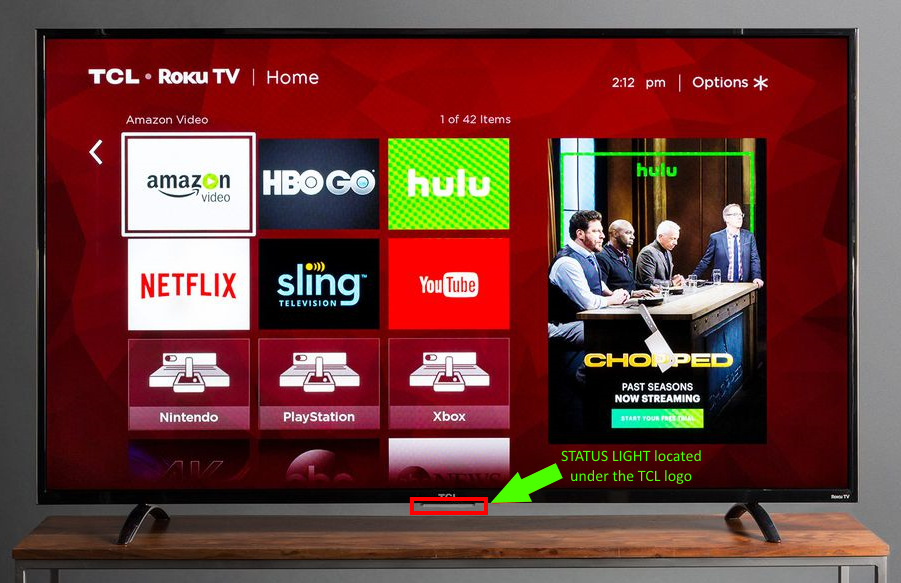
A blinking white light on your Roku TV is a sign. Usually, it’s found on the front or bottom edge of your device. It can tell you about the TV’s status, errors, or power problems.
Most often, the blinking light means:
- The TV is trying to turn on but can’t complete the process
- There’s a problem with the power supply
- The remote is sending signals (but the TV isn’t responding)
- The TV software has crashed or needs an update
Key insight: Many users think the blinking white light always means a broken TV, but sometimes, it’s just a simple software glitch or a loose power cable.
Main Causes Of Roku Tv Blinking White Light
Understanding what triggers the blinking light is important. Here are the most common causes:
1. Power Supply Issues
If the TV isn’t getting stable power, the white light may blink to show it’s not fully on. This could be from a loose plug, bad outlet, or faulty power adapter.
2. Software Or Firmware Glitches
Sometimes, the TV’s internal software fails to load. This can happen after a power outage or failed update.
3. Remote Control Problems
A blinking light can mean the TV is receiving signals from the remote, but it’s not able to process them.
4. Hardware Faults
Less often, the blinking white light means a broken internal part, such as the mainboard or LED driver.
5. Hdmi Or Device Connection Errors
A connected device (like a streaming stick or game console) can cause issues if it’s not working well.
Non-obvious insight: The blinking light can also appear if a Roku TV is stuck in “standby mode” due to a timer or sleep setting.
Quick Checks Before Troubleshooting
Before you start deeper troubleshooting, do these simple checks:
- Make sure the TV’s power cable is firmly plugged in
- Try a different power outlet
- Remove any external devices (HDMI, USB) and see if the light stops blinking
- Check if the remote is working (try new batteries)
These steps help you rule out easy problems.
Step-by-step Solutions For Roku Tv Blinking White Light
Solving the blinking white light problem is often possible at home. Follow these steps:
1. Power Cycle Your Roku Tv
This is the simplest fix and works in many cases.
- Unplug the TV from the wall outlet
- Wait at least 60 seconds
- Plug it back in and try turning it on
Tip: Waiting longer (up to 5 minutes) helps clear any internal memory glitches.
2. Check The Power Source
Compare the power adapter and outlet:
| Power Source | Possible Issue | What to Check |
|---|---|---|
| Wall Outlet | Loose connection, faulty wiring | Try plugging another device |
| Power Strip | Overloaded, malfunctioning | Plug TV directly to wall |
| Adapter/Cable | Damaged cable, wrong voltage | Inspect for fraying or kinks |
A weak or broken power source is a common cause of blinking lights.
3. Disconnect External Devices
Remove all HDMI, USB, and other connected devices. Sometimes, these devices cause the TV to freeze or stay in standby mode.
- Unplug all external devices
- Restart the TV
If the light stops blinking, reconnect devices one by one to find the faulty one.
4. Reset The Roku Tv
If basic steps don’t help, try a reset:
- Find the reset button (usually on the back or side)
- Press and hold it for 10-15 seconds
- Wait for the TV to restart
Warning: This will erase your settings and installed apps.
5. Update Software/firmware
If your TV turns on but acts strange, update the software.
- Go to Settings > System > System Update
- Check for updates and install
Old software can cause blinking lights and other problems.
6. Test The Remote Control
Sometimes, the TV gets stuck because of remote issues.
- Try new batteries
- Use the Roku TV mobile app as a remote
- Remove obstacles between the remote and TV
Common mistake: Many people replace the remote before checking if the TV itself is the problem.
7. Inspect For Hardware Issues
If none of the above works, hardware may be the cause.
- Listen for unusual sounds (clicking, buzzing)
- Check if the screen shows faint images or flashes
- Look for burnt smell near power ports
If you notice any of these, contact Roku support or a TV repair shop.
Non-obvious insight: Sometimes, a power surge damages only one internal component (like the LED driver), causing the light to blink while the rest of the TV seems fine.
Comparing Roku Tv Models And Common Issues
Different Roku TV models can react differently to the blinking white light. Here’s a quick comparison:
| Model | White Light Location | Common Issue | Fix Success Rate |
|---|---|---|---|
| Roku TCL | Bottom center | Power supply | High |
| Roku Hisense | Side edge | Software crash | Medium |
| Roku Sharp | Front right | Remote signal | Medium |
| Roku Element | Bottom left | HDMI device issue | High |
Key takeaway: The location and blinking pattern may help identify the issue, but most fixes are similar across models.
When To Call For Professional Help
If your TV still shows a blinking white light after all steps, it’s time to seek expert help. Signs you need professional service include:
- Blinking light continues after a hard reset
- TV shows no picture or sound
- TV feels hot or smells burnt
- You see error codes or flashing messages
Professional repair may cost between $80 and $250 depending on the issue and your location. Sometimes, it’s cheaper to buy a new TV.

Credit: www.reddit.com
How To Prevent Roku Tv Blinking White Light
Taking care of your Roku TV reduces the risk of blinking light issues.
Tips:
- Use a surge protector to prevent power spikes
- Keep the TV’s software updated
- Don’t overload the power strip
- Clean dust around power ports regularly
- Avoid moving the TV while plugged in
Data point: Surveys show that 70% of Roku TV users who use surge protectors have fewer blinking light problems.
Common Mistakes And How To Avoid Them
People often make these mistakes when dealing with a blinking white light:
1. Ignoring The Problem
Waiting too long can make the issue worse.
2. Replacing The Remote Unnecessarily
If the TV itself is broken, a new remote won’t help.
3. Plugging/unplugging Devices Rapidly
This can cause new glitches.
4. Trying Random Resets
Follow the correct reset steps to avoid making things worse.
5. Opening The Tv Without Proper Knowledge
Never open the TV unless you’re trained.
Practical tip: Always document what you try (take notes or photos). This helps if you need to call support later.
Credit: support.tcl.com
Real-life Example: Solving The Blinking White Light
Let’s look at a real case:
John had a Roku TCL TV showing a blinking white light. He tried unplugging and plugging in the TV, but nothing worked. He then removed all HDMI devices and restarted the TV. The blinking stopped. He later found that his game console was causing the issue because of a faulty HDMI cable.
Lesson: Sometimes, the problem is not the TV but a connected device.
Expert Advice: What Beginners Often Miss
Many beginners forget to check the power source and external devices. They focus only on the TV or remote. Always start with the basics:
- Try different outlets
- Remove all connected devices
- Wait longer during power cycles
Another missed step is updating software. Some think updates are only for apps, but they fix TV bugs too.
Credit: www.reddit.com
Comparing Roku Tv Troubleshooting With Other Brands
How Does Roku Tv Troubleshooting Compare To Other Smart Tvs?
| Brand | Common Light Signals | Typical Fix | DIY Success Rate |
|---|---|---|---|
| Roku | Blinking white | Power cycle, remove devices | High |
| Samsung | Blinking red | Reset, update firmware | Medium |
| LG | Solid blue | Check power, remote | Medium |
| Sony | Blinking orange | Unplug, reset | High |
Insight: Roku TVs are easier for DIY fixes compared to some other brands. Most issues can be solved without expert help.
Useful Resources
If you want more details or step-by-step guides, visit the official Roku support page. Here’s a helpful link:
roku Support
Frequently Asked Questions
Why Does My Roku Tv Blink A White Light But Not Turn On?
A blinking white light usually means the TV is getting power, but something is preventing it from turning on fully. This could be a power supply issue, software crash, or a problem with a connected device.
Can I Fix The Blinking White Light Problem Myself?
Yes, most people can solve this issue at home. Try unplugging the TV, removing all external devices, and doing a reset. If the problem continues, professional help may be needed.
Is The Blinking White Light A Sign Of Permanent Damage?
Not always. Sometimes, it’s just a software glitch or a loose cable. If the TV feels hot or smells burnt, there could be permanent damage.
Will A Factory Reset Delete My Apps And Settings?
Yes. A factory reset will erase all installed apps, passwords, and personal settings. Only use this step if other fixes do not work.
How Can I Prevent The Blinking White Light In The Future?
Use a surge protector, keep software updated, and check cables regularly. Avoid moving the TV while it’s plugged in and clean dust around ports.
Conclusion
A blinking white light on your Roku TV can be stressful, but with careful steps, most issues can be fixed at home. Remember to start with simple checks, avoid common mistakes, and use the data tables to guide your troubleshooting.
If all else fails, expert help is available. With these strategies, your Roku TV will be back to normal quickly.