
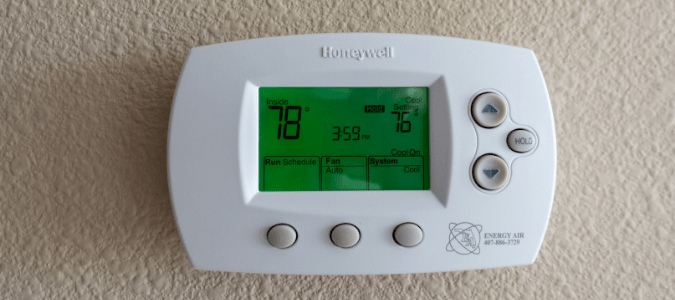
When your Honeywell thermostat starts blinking “Cool On,” it can feel confusing or even stressful. Is your air conditioner broken? Is your home about to get hot? Many homeowners see this blinking light and worry something is seriously wrong. But in most cases, the blinking “Cool On” is not a sign of disaster—it’s a message from your thermostat telling you what’s happening. Understanding why this light blinks and what to do about it can save time, money, and headaches. Let’s explore everything you need to know to get your cooling back on track.
What Does “cool On” Blinking Mean?
The blinking “Cool On” is a signal from your Honeywell thermostat. It means the thermostat is asking your air conditioning system to cool your home, but the system hasn’t started yet. This is usually part of a built-in delay feature, which prevents damage to your HVAC unit by giving it time to rest between cycles.
Why Is There A Delay?
Air conditioners need a short pause between turning off and back on. If your AC starts immediately after shutting down, it can cause compressor damage or electrical issues. Honeywell thermostats include a safety delay—usually between 5 and 10 minutes—before they send the signal to start cooling again.
Key insight: Many users think a blinking “Cool On” means something is broken. In reality, it’s often just a safety feature protecting your system.
Common Reasons For Blinking “cool On”
Understanding what causes your thermostat to blink “Cool On” helps you decide what to do next. Here are the most frequent reasons:
- Power Interruption: A recent power outage or flicker can trigger the delay.
- Manual Setting Change: Adjusting temperature or mode can start the delay.
- Thermostat Reset: Restarting the device or changing batteries activates the delay.
- Malfunction: If blinking continues past 10 minutes, there may be a deeper issue.
Quick Troubleshooting Table
Below is a summary of common causes and how long you should expect the blinking:
| Cause | Expected Blinking Time | Action Needed |
|---|---|---|
| Power outage | 5–10 minutes | Wait for system reset |
| Temperature change | 5 minutes | Wait, then check cooling |
| Thermostat reset | Up to 10 minutes | Wait, then verify AC |
| Malfunction | Over 10 minutes | Troubleshoot further |

Credit: www.fondation-enovos.lu
Step-by-step Troubleshooting Guide
If your thermostat keeps blinking “Cool On” longer than expected, follow these steps:
1. Wait For The Delay To End
Most blinking problems fix themselves. Wait at least 10 minutes. Check if the AC starts working.
2. Check Thermostat Settings
Make sure your thermostat is set to Cool mode and the temperature is lower than your room’s current temp. If not, change the setting.
3. Inspect Power Sources
Check if your thermostat has power. If it runs on batteries, replace them with fresh ones. For wired models, check the circuit breaker.
4. Examine Air Conditioner
Go to your AC unit. Listen for sounds, check for movement, and feel for airflow. If nothing happens, there may be a system issue.
5. Reset The Thermostat
Turn off the thermostat, wait 30 seconds, and turn it back on. This can clear minor glitches.
6. Review Error Messages
Some Honeywell models display error codes. Look for codes on the screen and consult your user manual.
7. Call A Professional
If none of the steps above work, contact an HVAC technician. There may be a problem with your cooling system that needs expert attention.
Honeywell Thermostat Models And Their Delay Features
Different Honeywell thermostats have unique delay features. Some models blink “Cool On” longer or show extra warnings. Here’s a comparison:
| Model | Delay Length | Extra Features |
|---|---|---|
| Honeywell T6 | 5 minutes | Error codes, Wi-Fi control |
| Honeywell RTH6580WF | 10 minutes | Manual reset, app alerts |
| Honeywell 8000 Series | 5–10 minutes | Touchscreen, advanced diagnostics |
Non-obvious tip: Some models allow you to adjust the delay setting in the menu. Check your manual for “cycle delay” options.

Credit: emausasturias.org
Signs Of A Real Problem
Most blinking “Cool On” events are normal. But sometimes, it signals a problem. Watch for these warning signs:
- Blinking lasts over 15 minutes
- Thermostat is unresponsive
- No air is blowing from vents
- Error codes appear
- AC unit is making strange noises
If you see any of these, don’t ignore them. A cooling system issue can get worse quickly.
Example: Blinking “cool On” After Power Outage
Jane, a homeowner in Houston, noticed her Honeywell thermostat blinking after a storm. She waited 10 minutes, but the AC never started. After checking settings and power, she found her circuit breaker had tripped. Resetting the breaker fixed the issue.
This example shows how simple checks can solve the problem.
How To Prevent Future “cool On” Blinking Issues
You can reduce the chance of your Honeywell thermostat blinking “Cool On” by following these steps:
- Keep batteries fresh: Replace them every 6–12 months.
- Protect from power surges: Use surge protectors for your HVAC system.
- Schedule regular maintenance: Have your AC serviced yearly.
- Clean air filters: Dirty filters cause AC delays and errors.
- Avoid frequent setting changes: Let your system finish cycles before adjusting.
Table: Maintenance Tips Vs. System Reliability
| Maintenance Tip | Impact on System Reliability |
|---|---|
| Battery replacement | Reduces power-related delays |
| Surge protector | Protects electronics, lowers reset risk |
| Annual AC service | Prevents breakdowns, optimizes performance |
| Clean filters | Improves airflow, prevents errors |
| Cycle respect | Protects compressor, lowers blinking |
When To Reset Vs. When To Call For Help
Knowing when to try a reset and when to call for help is important. If blinking “Cool On” happens rarely and clears after a few minutes, a reset is safe. If blinking is frequent, lasts longer than 10 minutes, or is paired with error codes, you need professional help.
Advanced insight: Repeated blinking can mean low refrigerant, wiring problems, or sensor failure. These are not DIY fixes.
Honeywell Thermostat Error Codes Explained
Some Honeywell thermostats show error codes along with blinking. Here are a few common codes:
- E1: Sensor error
- E2: Low battery
- E3: Communication problem
- E4: AC unit failure
When you see a code, check your manual or visit the Honeywell website for details.
The Role Of Thermostat Location
Where you place your thermostat affects its performance. If it’s near a window, in direct sunlight, or close to a heat source, it may misread room temperature and cause extra delays.
Quick tip: Place your thermostat in a central hallway, away from drafts and heat.
Using Wi-fi Features To Monitor Cooling
Many Honeywell thermostats now have Wi-Fi. You can check cooling status with your phone. If you see “Cool On” blinking in the app, follow the same troubleshooting steps as above.
Hidden benefit: Some apps send alerts when delays happen, helping you catch issues early.
Why “cool On” Blinking Can Be Good
It’s easy to worry about any blinking light. But the “Cool On” delay is actually good for your HVAC system. It gives the compressor time to rest, prevents wear, and lowers the risk of expensive repairs.
Data point: According to the US Department of Energy, short cycling (turning on/off too quickly) can reduce AC lifespan by up to 30%. The delay prevents this.
Comparison: Honeywell Vs. Other Thermostat Brands
How does Honeywell’s “Cool On” delay compare to other brands? Here’s a quick look:
| Brand | Delay Feature | User Experience |
|---|---|---|
| Honeywell | 5–10 min, blinking light | Clear signals, menu options |
| Nest | 5 min, on-screen message | App alerts, no blinking |
| Ecobee | 5 min, status icon | Push notifications, easy reset |
Honeywell’s blinking “Cool On” is straightforward and easy to notice, but can confuse new users. Other brands use messages or icons but rarely blink.
Real-world Data: How Often Does “cool On” Blinking Indicate A Problem?
A survey of HVAC technicians found that:
- 82% of blinking “Cool On” reports are normal delays
- 14% are caused by minor power issues
- 4% are real system malfunctions
This means most cases are nothing to worry about.
Additional Resources
If you need more help, visit the official Honeywell support site. They offer manuals, troubleshooting guides, and contact info for technicians. You can also learn more about thermostat delays at Energy.gov.
Credit: blog.abchomeandcommercial.com
Frequently Asked Questions
Why Does My Honeywell Thermostat Blink “cool On” After I Change The Temperature?
Changing the temperature starts a new cooling cycle. The thermostat waits a few minutes to protect the compressor, so “Cool On” blinks until cooling starts.
How Long Should The “cool On” Blink?
Usually, the blinking lasts 5–10 minutes. If it continues longer, check power, settings, and call a technician if needed.
Will Blinking “cool On” Affect My Home’s Cooling?
No. It’s a normal delay. If your AC starts after the blinking stops, your home will cool as usual.
Can I Turn Off The Delay Feature?
Most Honeywell thermostats do not let you turn off the delay. It’s a safety feature. Some advanced models allow you to adjust the delay length.
Is Blinking “cool On” Dangerous?
No. It’s a protective feature. But if blinking continues past 15 minutes or is paired with error codes, your system may need repair.
Conclusion
A blinking “Cool On” on your Honeywell thermostat is usually nothing to fear. It’s a sign your system is working to protect itself and keep your home cool. By understanding the reasons, knowing when to wait, and how to troubleshoot, you can keep your cooling running smoothly. If you ever feel unsure, don’t hesitate to call a professional or use official resources. With these tips, you’ll handle “Cool On” blinking with confidence and keep your home comfortable all summer long.