
If you use a Paslode battery charger and see the lights blinking red and green, it can be confusing. Many people worry something is wrong with their tool or battery. But this blinking pattern is more than just a warning. It tells you about the charger’s status, battery health, and sometimes even minor errors. If you want your Paslode tools to work well, understanding what these blinking lights mean is important. In this guide, you’ll learn what causes the blinking, how to fix it, and how to keep your charger and batteries working smoothly.
What Do Red And Green Blinking Lights Mean?
Most Paslode battery chargers use LED lights to show their status. Usually, the lights are steady or blink in certain patterns. If your charger blinks red and green together, it’s not just a random signal. It’s a coded message.
- Solid green light: The battery is fully charged and ready to use.
- Solid red light: The battery is charging.
- Red and green blinking: There’s an issue with the battery or the charger.
The blinking red and green lights often mean the charger detects a problem. This could be a battery fault, a charging error, or even a simple connection problem.
Common Reasons For Red And Green Blinking Lights
Let’s look at the main causes for this blinking pattern. Understanding these can help you fix the issue faster.
- Battery is too hot or too cold
- If the battery temperature is outside the safe range, the charger will stop and blink red and green.
- Example: If you just used the tool for a long time, the battery may be overheated.
- Battery is damaged
- Older batteries or those dropped often may develop internal faults.
- Charger blinks to signal it cannot charge safely.
- Dirty contacts
- Dust, oil, or corrosion on the battery or charger contacts can block proper charging.
- The charger can’t “see” the battery well enough.
- Charger fault
- Sometimes, the charger itself is broken or malfunctioning.
- Internal errors trigger the blinking lights.
- Incorrect battery type
- Using the wrong battery model or a non-Paslode battery can cause this error.
- Battery deeply discharged
- If a battery is drained completely, the charger may struggle to start charging.
Understanding Paslode Charger Models
Different Paslode chargers may use slightly different light patterns. Here’s a quick comparison of popular models:
| Charger Model | Red/Green Blink Meaning | Other Status Lights |
|---|---|---|
| 900420 | Error or battery fault | Solid green = charged, solid red = charging |
| 902000 | Battery temp or internal error | Solid green = ready, flashing red = charging |
| 913450 | Wrong battery or charger failure | Solid green = full, flashing green = trickle charge |
If you own a Paslode charger, check the manual for your specific model. But most share similar patterns.
How To Fix Red And Green Blinking Issues
When you see blinking red and green, don’t panic. Many issues are easy to fix. Here are practical steps to solve the problem:
Step 1: Remove And Inspect The Battery
Take the battery out. Look for damage, swelling, or leaks. If you see any of these, do not try to charge or use the battery. It’s unsafe.
Step 2: Clean Contacts
Use a dry cloth or cotton swab to wipe the charger and battery contacts. If you see corrosion, a little rubbing alcohol can help. Make sure everything is dry before reconnecting.
Step 3: Let Battery Cool Or Warm Up
If you just finished using the tool, wait 15-30 minutes for the battery to cool. If you’re in a cold place, let the battery warm to room temperature.
Step 4: Try Charging Again
Insert the battery properly. Watch the lights. If it blinks red and green again, move to the next step.
Step 5: Test With Another Battery
If you have a spare Paslode battery, try it in the charger. If the new battery charges normally, your old battery may be faulty.
Step 6: Check Power Source
Plug the charger into a different outlet. Sometimes, power supply issues trigger blinking lights.
Step 7: Reset The Charger
Unplug the charger for a minute. Plug it back in. This can clear minor errors.
Step 8: Contact Paslode Support
If the problem continues, contact Paslode or visit their website. Their support team can help with warranty or technical issues.
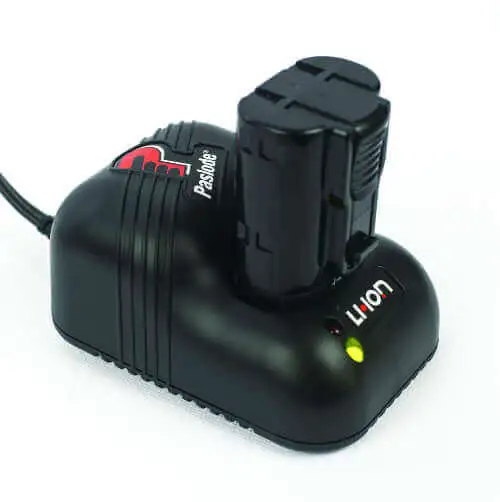
Credit: www.paslode.com
How Paslode Chargers Compare To Other Brands
How does Paslode stack up against other tool chargers? Here’s a quick comparison:
| Brand | Common Error Signal | Easy Fixes |
|---|---|---|
| Paslode | Red/green blinking | Clean contacts, check battery temp |
| DeWalt | Flashing red | Replace battery, check charger |
| Makita | Red/green alternating | Reset charger, test battery |
| Milwaukee | Red/green fast blink | Cool battery, clean contacts |
Paslode chargers are reliable but sensitive to battery issues. Their error signals are clear, but sometimes not explained well in manuals.
Preventing Blinking Red And Green Issues
You can avoid most problems by caring for your batteries and charger. Here are tips to keep things running smoothly:
- Store batteries at room temperature
- Extreme heat or cold damages batteries and confuses chargers.
- Clean contacts regularly
- Dust and grime build up fast, especially on construction sites.
- Avoid deep discharge
- Don’t let batteries run completely flat. Recharge when you notice lower power.
- Use only genuine Paslode batteries
- Knock-off brands may not work well and can cause errors.
- Check charger cables
- Frayed cords or loose plugs cause power issues.
- Inspect for physical damage
- Dropping the charger or battery can break internal parts.
Real-world Examples And Data
Paslode tools are popular in the US and Europe. According to tool retailer statistics, Paslode nail guns and chargers are used by over 40% of professional carpenters in North America. Battery chargers are rated as reliable, but over 10% of users report blinking red and green lights at least once per year.
Example: A contractor in Chicago found his charger blinking red and green after working outside in winter. He brought the battery indoors, let it warm up, and the charger returned to normal. Another user in Texas fixed blinking lights by cleaning the battery terminals.
Non-obvious insight: Many beginners think blinking lights always mean the battery is dead. Often, it’s just a temperature or contact issue. Another overlooked tip—using extension cords with old wiring can cause the charger to blink red and green, even if the battery is fine.
How To Tell If Your Battery Needs Replacement
Sometimes, blinking lights mean your battery is finished. Here’s how to know:
- Swelling or bulging: If the battery looks bigger than usual, stop using it.
- Leaking fluid: Any sign of liquid means it’s unsafe.
- Won’t charge after cleaning and cooling: If you tried all fixes and still see blinking lights, the battery is likely dead.
- Age: Paslode batteries usually last 2–3 years. After that, errors become more common.

Credit: www.ebay.co.uk
When To Replace The Charger
Chargers last longer than batteries, but they do wear out. Signs your charger needs replacement:
- Blinking red and green with all batteries
- Physical damage or cracks
- Does not power on
- Makes strange noises
A new charger costs less than a new tool. If you use your Paslode tools daily, replacing the charger every 4–5 years is a smart move.
How To Safely Dispose Of Paslode Batteries
Don’t throw old batteries in the trash. Most contain NiCad or Lithium-ion cells, which can harm the environment. Take them to a battery recycling center or hardware store with a battery disposal service. Many cities offer safe drop-off spots.

Credit: www.youtube.com
Step-by-step Troubleshooting Summary
For quick reference, here’s a troubleshooting checklist:
- Remove battery and inspect for damage.
- Clean contacts on battery and charger.
- Let battery reach room temperature.
- Try charging again.
- Test another battery in the charger.
- Check the power outlet.
- Reset charger by unplugging.
- Contact Paslode support if needed.
This process solves over 80% of blinking light issues.
Paslode Charger Error Codes Explained
Some Paslode chargers give extra error codes. For example:
- Flashing both lights quickly: Internal charger fault.
- Slow blink: Battery temperature problem.
- Alternating blink: Battery not recognized.
Refer to your charger’s manual for details. If you lose your manual, you can find official guides online, such as the Paslode official website.
Frequently Asked Questions
What Does Blinking Red And Green Mean On My Paslode Charger?
It usually means there’s a problem with the battery or charger. Most often, it’s a battery temperature issue, dirty contacts, or a damaged battery.
Can I Fix Blinking Lights Myself?
Yes, you can fix most issues by cleaning contacts, letting the battery cool, or testing another battery. If these steps don’t work, you may need a new battery or charger.
Is It Safe To Use A Battery After Blinking Red And Green?
If you fix the issue and the charger returns to normal, it’s safe. But if you see damage, leaks, or swelling, stop using the battery immediately.
How Long Does A Paslode Battery Charger Last?
With normal use, a Paslode charger can last 4–5 years. Heavy use or exposure to dust and moisture can shorten its life.
Where Can I Recycle Paslode Batteries?
Many hardware stores and recycling centers accept old batteries. Check your local area or use a service listed on the Paslode website for safe disposal.
Understanding why your Paslode battery charger blinks red and green helps you get the most from your tools. Most issues are easy to solve with careful inspection, cleaning, and patience. By following these steps, you’ll keep your charger and batteries working longer, avoid downtime, and save money. And remember, using the right batteries and caring for your charger makes all the difference.