
If you use a Stiiizy pod and suddenly see it blinking but not hitting, you’re not alone. This is a common issue that can be frustrating, especially if you rely on your device for relaxation or pain relief. While Stiiizy pods are designed for simplicity and convenience, they’re not immune to technical problems. Understanding why your Stiiizy pod is blinking but not hitting can save you time and money—and help you avoid unnecessary stress.
This guide breaks down the main reasons behind this problem, practical steps to fix it, and tips to prevent it in the future. Whether you’re a beginner or an experienced vaper, you’ll find clear answers and actionable solutions here.
How A Stiiizy Pod Works
Before you can fix any issue, it helps to know how the device functions. The Stiiizy system is made up of two main parts: the Stiiizy pod (which holds the oil and coil) and the Stiiizy battery (which powers the coil to produce vapor).
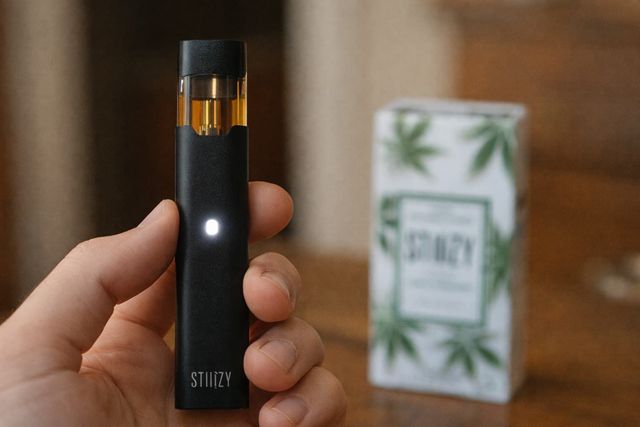
When you inhale, the battery activates, sending electricity to the coil inside the pod. This heats the oil and creates vapor. A small LED light on the battery gives you feedback. If everything works, you get a smooth hit and the light glows.
But when there’s a problem, the light blinks instead—and you don’t get any vapor.
What Does A Blinking Stiiizy Pod Mean?
A blinking light is the device’s way of telling you something’s wrong. The color and pattern of the blinking can give clues:
- White blinking: Often a connection problem or pod not recognized.
- Red blinking: Usually a low battery or short circuit.
- Multiple rapid blinks: Could signal a pod issue, battery malfunction, or even user error.
Not every blink means the same thing. Knowing what each pattern means helps you troubleshoot faster.
Most Common Causes: Stiiizy Pod Blinking But Not Hitting
Several issues can trigger your Stiiizy pod to blink and stop delivering vapor. Here are the main ones:
1. Low Or Dead Battery
If the battery charge is too low, the device can’t heat the coil. The light often blinks red.
2. Poor Pod Connection
Dirt, oil, or debris on the pod or battery contacts can block the electrical circuit.
3. Faulty Or Empty Pod
If the coil is burnt out or the pod is empty, the device may blink instead of hitting.
4. Device Overheating
Frequent or long puffs can overheat the battery, causing it to blink and shut off as a safety feature.
5. Short Circuit
A damaged coil or internal wiring issue can cause the device to blink and stop working.
6. Counterfeit Pods Or Batteries
Fake or incompatible products often don’t work properly and may cause blinking errors.
7. Firmware Or Sensor Issue
Rarely, the internal sensor or software may malfunction and misread the pod status.
Understanding these causes is the first step. But how can you tell which one is affecting your device?
Quick Diagnostic Steps
To find out why your Stiiizy is blinking, follow these steps:
1. Check The Battery Level
Plug your battery into the charger. If it blinks while charging, let it fully charge.
2. Inspect Pod And Battery Contacts
Remove the pod. Look for oil, dust, or debris on the metal contacts. Clean gently with a cotton swab and isopropyl alcohol.
3. Try A Different Pod
If you have a spare pod, insert it. If the device works, the original pod may be faulty.
4. Test The Pod In Another Device
If possible, try your pod in a friend’s Stiiizy battery. This can help you figure out if the issue is with the pod or the battery.
5. Observe The Led Pattern
Note the color and number of blinks. Check the official Stiiizy website or manual for specific meanings.
6. Let The Device Cool Down
If you’ve been using it heavily, set it aside for 10–15 minutes.
By following these steps, you can usually narrow down the problem quickly.
Cleaning And Maintenance: The Overlooked Solution
One of the most common (and most overlooked) reasons for a blinking Stiiizy pod is dirty contacts. E-liquid residue, pocket lint, or even fingerprints can block the connection.
How to clean Stiiizy contacts:
- Remove the pod from the battery.
- Dip a cotton swab in isopropyl alcohol.
- Gently rub the metal contacts on both the pod and the battery.
- Let them dry completely before reassembling.
Doing this simple cleaning every week can prevent most connection problems. Many beginners forget this step, but it makes a big difference.
Battery Issues: Charging And Replacement
If your battery is low, the device won’t fire. Here’s how Stiiizy battery levels usually work:
| LED Color | Battery Status | What to Do |
|---|---|---|
| White (solid) | Fully charged | Ready to use |
| Red (blinking) | Low or dead | Recharge the battery |
| White (blinking) | Connection/pod issue | Check contacts or pod |
If your Stiiizy battery no longer holds a charge or blinks even after charging, it may be time for a replacement. Most Stiiizy batteries last several months to a year, depending on usage. Avoid letting the battery drain completely too often—this can shorten its lifespan.
Pod Problems: Empty, Burnt, Or Defective
A Stiiizy pod can cause blinking for several reasons:
- Empty pod: If there’s little or no oil left, the device may blink to warn you.
- Burnt coil: After heavy use, the coil can burn out, causing a bad taste or no vapor.
- Defective pod: Sometimes, pods are faulty right out of the box.
Signs your pod is the problem:
- You see air bubbles but no oil movement.
- There’s a burnt or metallic taste.
- The device works with another pod.
Pods are not meant to be refilled or repaired. If your pod is empty or defective, replacing it is usually the best solution.
Dealing With Counterfeit Pods And Batteries
Fake Stiiizy products are common, especially if you buy from unverified sellers. Counterfeit pods can cause blinking, leaks, or even damage your battery.
How to avoid fake products:
- Buy only from licensed dispensaries or the official Stiiizy website.
- Check for authenticity codes or holograms on packaging.
- Be wary of unusually cheap prices.
If you suspect you have a fake, stop using it. Counterfeit products can be unsafe.
Credit: fioridelivery.com
Less Obvious Causes And Fixes
Some issues aren’t immediately clear, but can still cause a blinking Stiiizy pod:
- Loose pod fit: If the pod doesn’t click firmly into place, try gently pressing it down.
- Extreme temperatures: Using your device in very cold or hot conditions can affect performance.
- Airflow blockage: Pocket lint or debris can block the pod’s airflow holes. Clean with a toothpick or compressed air.
Many users overlook these small details. They might not seem important, but they can make a big difference.
Troubleshooting Steps: What To Do When Stiiizy Blinks But Won’t Hit
Let’s break down the fixes step-by-step:
- Charge the Battery Completely
- Use the original charger.
- Wait until the light turns solid white.
- Avoid using the device while charging.
- Clean All Contacts
- Remove the pod.
- Clean both the battery and pod contacts with isopropyl alcohol.
- Dry thoroughly before reassembling.
- Try a New Pod
- Insert a new, authentic Stiiizy pod.
- If the device works, the old pod was likely the problem.
- Check for Overheating
- If the device feels hot, let it cool for 15–20 minutes.
- Avoid chain vaping.
- Inspect for Physical Damage
- Look for cracks, dents, or leaks.
- If the battery or pod is damaged, replace it.
- Test Pod in Another Device
- Ask a friend with a Stiiizy battery to help.
- If your pod works in their device, the issue is with your battery.
- Reset or Replace the Battery
- If all else fails, try a different battery.
- Stiiizy batteries are affordable and widely available.
This process solves most blinking issues for users.

Credit: www.reddit.com
Comparing Common Stiiizy Pod Errors
Here’s a quick comparison of typical Stiiizy pod problems, what the device does, and what you should try first:
| Problem | LED Behavior | First Fix to Try |
|---|---|---|
| Low battery | Red blinking | Charge battery |
| Poor contact | White blinking | Clean contacts |
| Burnt coil | Blinks, no vapor | Replace pod |
| Short circuit | Multiple blinks | Change pod/battery |
| Overheating | Rapid blinks | Let cool down |
Preventing Stiiizy Pod Issues
It’s easier to prevent problems than to fix them. Here’s how to keep your Stiiizy running smoothly:
- Clean contacts weekly to prevent buildup.
- Charge before battery is fully dead to extend battery life.
- Store pods upright to avoid leaks and clogs.
- Keep device away from extreme heat or cold.
- Buy only from trusted sources to avoid fakes.
- Don’t overuse: Too many puffs in a row can overheat the coil.
Many beginners miss the importance of regular cleaning and proper storage. These simple habits can prevent most common issues.
When To Seek Professional Help
If you’ve tried all troubleshooting steps and your Stiiizy pod is still blinking but not hitting, it may be time to contact customer support or visit a licensed retailer. Manufacturers can test for deeper problems like internal wiring faults or firmware errors.
Some stores offer warranty exchanges for defective batteries or pods. Keep your receipt and packaging if possible.
Safety Tips For Stiiizy Users
While Stiiizy devices are generally safe, using damaged or counterfeit products can be risky. Follow these guidelines:
- Never use a visibly damaged battery or pod.
- Don’t try to refill or repair pods—they’re meant to be single-use.
- Store out of reach of children and pets.
- Dispose of used pods responsibly—many dispensaries offer recycling programs.
Vaping safely is just as important as solving device errors.
Stiiizy Pod Vs. Other Vape Brands: Reliability
How does Stiiizy compare to other popular vape systems when it comes to blinking and not hitting?
| Brand | Common Blinking Issues | Ease of Fix | Counterfeit Risk |
|---|---|---|---|
| Stiiizy | Connection, battery, pod faults | Easy to clean/swap | High (buy from licensed shops) |
| Pax Era | Pod misalignment, battery drain | Medium | Medium |
| JUUL | Pod leaks, charging errors | Easy | High |
| Vuse | Overheating, pod errors | Easy | Low |
Stiiizy is known for simple design and easy fixes, but it also faces one of the highest risks of counterfeiting due to its popularity.
Two Non-obvious Insights Most Beginners Miss
- Not all pods fit perfectly—even among real, brand-new Stiiizy pods, slight differences in manufacturing can cause connection issues. Try swapping the pod’s position or gently pressing it until it clicks into place.
- Airflow matters more than you think—clogged airflow holes can stop vapor production even if the coil and battery are fine. Always check for blockages if cleaning contacts and swapping pods does not work.
Expert Guidance: When To Replace Vs. Repair
If you’ve cleaned contacts, tried multiple pods, and fully charged the battery but your device still blinks, it’s time to replace either the battery or the pod. Stiiizy batteries are affordable, but using a damaged or malfunctioning unit can create more problems.
Don’t try to repair pods or open the battery case—this can void warranties and may be dangerous.
Reliable Resources For More Help
If you need more in-depth guidance or want to check for recalls and updates, the official Stiiizy Support page offers troubleshooting guides and customer service contact info.

Credit: www.reddit.com
Wrapping Up: Keep Your Stiiizy Running Smooth
A blinking Stiiizy pod can be annoying, but it’s rarely a sign of a serious problem. With a few simple steps—like charging the battery, cleaning contacts, and checking for pod defects—you can solve most issues in minutes. Remember to buy from trusted sources, avoid counterfeits, and maintain your device regularly.
If you find your Stiiizy pod blinking but not hitting, don’t panic. Try the solutions above, and you’ll likely be back to vaping in no time. If all else fails, reach out to Stiiizy support or your dispensary for expert help.
Frequently Asked Questions
Why Does My Stiiizy Blink Three Times And Not Hit?
When your Stiiizy blinks three times, it often means there’s a connection problem between the pod and the battery. Remove the pod, clean the contacts with isopropyl alcohol, and try reinserting it. If it still blinks, try a new pod or battery to see which one is faulty.
Can I Fix A Burnt Stiiizy Pod?
No, you cannot fix a burnt Stiiizy pod. Once the coil inside is burnt, it cannot be repaired. Using a burnt pod can give a harsh taste and may be unhealthy. Replace it with a new, authentic pod for the best experience.
Is It Safe To Use A Blinking Stiiizy Battery?
A blinking battery usually means there’s a problem—low charge, short circuit, or faulty connection. It’s best to stop using the device until you solve the issue. Continued use when the device is malfunctioning can cause further damage or even safety risks.
How Do I Know If My Stiiizy Pod Is Fake?
Check for details like package quality, hologram stickers, and QR codes. Always buy from licensed dispensaries. Fake pods often don’t fit well, taste odd, or cause device errors. For more info, visit the official Stiiizy support site.
What Should I Do If None Of The Fixes Work?
If you’ve tried all troubleshooting steps—charging, cleaning, swapping pods and batteries—and your Stiiizy still blinks but won’t hit, contact Stiiizy customer support or visit an authorized retailer. You may be eligible for a warranty replacement or further technical help.