
If you own a Winix air purifier, you expect it to work quietly in the background, cleaning your air and making your home healthier. But one day, you notice a red light blinking on the machine. Suddenly, you’re not sure if your air is clean or if something is wrong. For many Winix users, a blinking red light feels worrying—especially if you’re not sure what it means or how to fix it. This article will guide you through everything you need to know about the Winix air purifier red light blinking issue. You’ll learn what the blinking red light means, why it happens, how to troubleshoot, and how to keep your air purifier running smoothly. If you want clear answers and real solutions, keep reading.
What The Blinking Red Light Means
The red light on a Winix air purifier is not just a decoration. It’s a signal from the device, telling you that something needs attention. Usually, this red light is linked to either the air quality sensor or the filter indicator. Here’s what each means:
- Filter Replacement Indicator: The most common reason for a red light is the filter replacement alert. When your filter is old or clogged, the machine can’t clean the air properly. The red light tells you it’s time for a change.
- Air Quality Sensor Alert: Many Winix models check the air and show a red light if the air quality is poor. Sometimes, the light blinks instead of staying solid to show a sudden spike in dust, smoke, or other particles.
- Error or Malfunction: In rare cases, a blinking red light can signal a system error or sensor problem. This is less common but important to know.
How To Read The Light
Not all Winix models use lights the same way. Some models have a single light that changes color. Others have separate lights for each alert. It’s smart to check your user manual for your specific model, but most follow these basics:
- Blue or Green: Good air quality
- Amber or Yellow: Moderate air quality or filter nearing replacement
- Red (Solid): Poor air quality or filter needs immediate replacement
- Red (Blinking): Immediate action required (usually filter change or severe air pollution)
If you notice a blinking red light, start by checking the filter and air quality. That’s where most problems start.
Why The Red Light Blinks: Main Causes
When the red light starts blinking, it’s not random. Your purifier is trying to get your attention for a reason. Let’s look at the most common causes and what they mean for your air purifier and your health.
1. Filter Needs Replacement
The HEPA filter and carbon filter inside your Winix purifier trap dust, pollen, and smells. Over time, these filters fill up and can’t hold more particles. Most Winix models use a timer or sensor to track filter life. When it’s time to change, the red light blinks.
- HEPA filters usually last 12 months.
- Carbon filters may need changing every 3-6 months, depending on use.
2. Air Quality Sensor Detects Poor Air
Winix purifiers have sensors that check the air for particles like dust and smoke. If the air quality suddenly drops—maybe from cooking, smoking, or outside pollution—the sensor may trigger a blinking red light. In some cases, the light blinks to show the sensor is working hard to handle a high load.
3. Sensor Malfunction Or Dusty Sensor
Sensors can get dirty over time. If dust covers the sensor, it might give false readings, causing a red light even if your air is clean. Sometimes, a blinking light means the sensor itself needs cleaning or has stopped working.
4. Incorrect Filter Installation
If you recently changed the filter but the red light is still blinking, check if the filter is installed correctly. A loose or misaligned filter can stop the machine from working right.
5. General System Error
Rarely, a blinking red light can mean a more serious problem, like an internal error. This is uncommon but worth considering if none of the above fixes work.

Credit: www.youtube.com
How To Troubleshoot A Blinking Red Light
If you see a blinking red light on your Winix air purifier, don’t panic. Follow these steps to find the cause and fix it. Most users can solve the problem without calling a technician.
Step 1: Check The Filter
- Turn off the purifier and unplug it for safety.
- Open the front panel. On most models, this is easy to remove without tools.
- Check the HEPA filter and carbon filter for dust and discoloration. If they are very dirty or clogged, replace them.
- Make sure the new filters are correctly seated. Some models have arrows or guides to help.
- Close the panel and plug the purifier back in.
Step 2: Reset The Filter Indicator
After changing the filter, the red light may keep blinking until you reset the indicator. Each Winix model has a slightly different reset method, but most follow these steps:
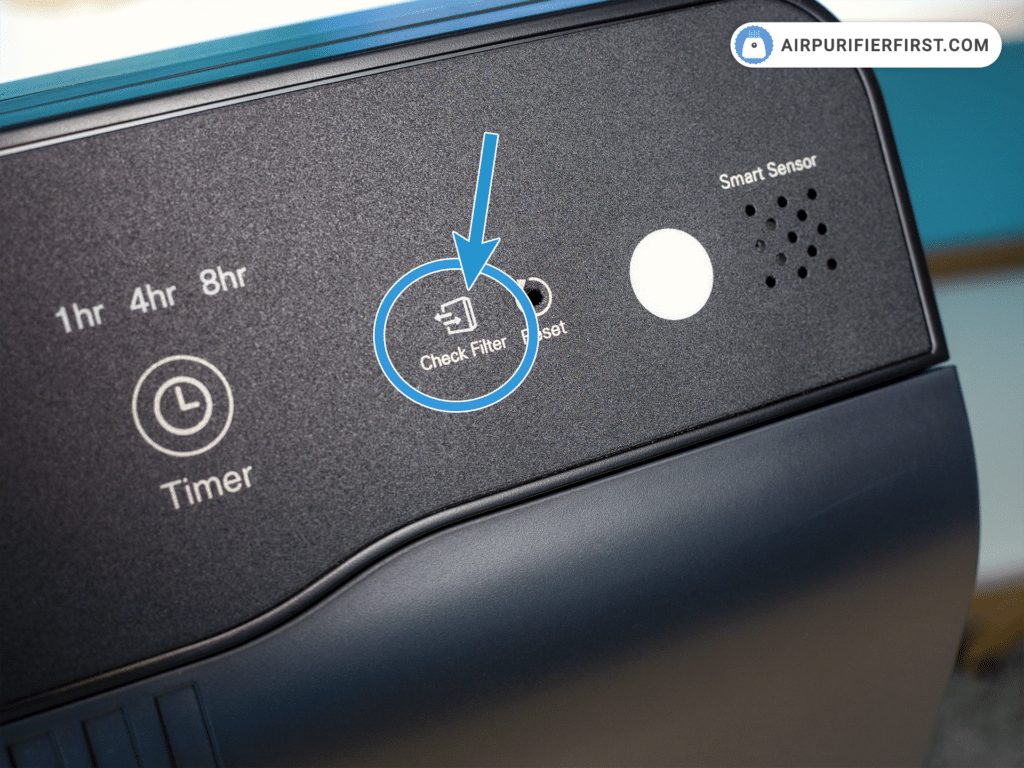
- Hold down the Filter Reset button (sometimes labeled as “Reset” or “Check Filter”) for 3–5 seconds.
- Wait for a beep or for the light to change from red to blue or green.
If you’re unsure, check the user manual for your model.
Step 3: Clean The Air Quality Sensor
If the red light blinks even after changing the filter, the air quality sensor may be dirty.
- Locate the sensor (usually on the side or back of the unit).
- Open the sensor cover.
- Use a soft brush or cotton swab to gently remove dust.
- Some models recommend using a small amount of water or rubbing alcohol on the swab—check your manual first.
Let the sensor dry, close the cover, and restart the purifier.
Step 4: Check For Air Quality Issues
- If you just cooked, smoked, or cleaned with strong chemicals, wait a few minutes. The red light may turn off as the air gets cleaner.
- Open windows to help clear the air faster.
Step 5: Inspect For System Errors
If none of the above steps work, unplug the purifier for a few minutes, then plug it back in. If the red light keeps blinking, the unit may have a system error. Contact Winix customer support for further help.
Understanding Filter Types And Lifespan
Knowing your filter types helps you care for your air purifier and avoid common mistakes.
| Filter Type | Main Function | Typical Lifespan | Signs of Replacement |
|---|---|---|---|
| HEPA Filter | Removes dust, pollen, pet dander | 12 months | Red light, visible dirt, musty smell |
| Carbon Filter | Removes odors, VOCs, smoke | 3-6 months | Odors return, red light |
| Pre-Filter | Catches large particles, extends main filter life | Wash monthly | Visible dust buildup |
Insider Tip: Don’t Wait For The Red Light
Many users wait for the red light before changing filters. In dusty homes or with pets, filters may clog faster than the timer expects. If you notice a drop in airflow or a return of odors, change your filter even if the light is not on yet.
This keeps your air cleaner and extends the life of your purifier.
Cleaning And Maintenance Best Practices
A well-maintained air purifier lasts longer and works better. Here’s how to keep your Winix running smoothly and avoid the blinking red light in the future.
1. Clean Or Replace Filters Regularly
- Check filters every 1–2 months, even if the red light is not on.
- Mark your calendar for filter changes, especially if you have pets or allergies.
2. Clean The Sensor Often
- Dust can build up quickly on sensors, especially in kitchens or near windows.
- Clean the sensor every 3–6 months with a brush or swab.
3. Wipe Down The Exterior
- Use a damp cloth to remove dust from the outside of the unit.
- Make sure vents are clear for good airflow.
4. Keep The Area Around The Purifier Clear
- Place the purifier at least 12–18 inches away from walls and furniture.
- Avoid placing the purifier near sources of steam or smoke for more accurate readings.
5. Use Genuine Filters
Some users try to save money with off-brand filters. These may not fit well or filter as effectively, leading to more frequent red lights or even damage to your unit. Always use filters recommended by Winix.
Comparing Winix Models: Blinking Red Light Behavior
Not all Winix air purifiers show alerts the same way. Here’s a quick comparison of popular models and how they handle the red light.
| Model | Filter Alert | Air Quality Light | Reset Method |
|---|---|---|---|
| Winix 5500-2 | Blinking red for filter | Color ring (Blue/Amber/Red) | Hold Filter Reset 5 sec |
| Winix C535 | Blinking red for filter | LED color bar | Hold Filter Reset 5 sec |
| Winix HR900 | Filter light turns red | Separate air quality light | Hold Reset 5 sec |
| Winix AM90 | Blinking red for filter | Color ring | App or hold Reset |
Non-obvious Insight: The Reset Sequence Can Differ
Some older models need you to press two buttons at once or follow a sequence (like unplugging, then holding Reset). Always check your specific manual for the correct reset steps.
Air Quality Sensor: How It Works And Why It Matters
The air quality sensor is one of the most important parts of your Winix air purifier. It’s what helps the machine adjust fan speed and show the right light color. Here’s how it works:
- The sensor pulls in a small amount of air and checks for dust, smoke, or chemicals.
- If it finds a lot of particles, it tells the purifier to speed up and shows a red or blinking red light.
- As the air gets cleaner, the light will change to amber or blue.
Why A Dirty Sensor Causes Problems
If the sensor gets covered in dust, it may always “see” dirty air—even if your home is clean. This leads to the red light staying on or blinking when it shouldn’t. Cleaning the sensor is often a fast fix.
Advanced Tip: Sensor Sensitivity Can Be Adjusted
On some models, you can adjust how sensitive the sensor is using the app or a hidden switch. If you live in a very dusty or humid area, reducing sensitivity can prevent unnecessary red lights.
Common User Mistakes That Trigger The Red Light
Many users find themselves dealing with a blinking red light because of simple mistakes. Here’s how to avoid the most common ones:
1. Not Removing Filter Packaging
New filters often come sealed in plastic. Forgetting to remove this plastic means no air can pass through, and the red light will blink soon after starting the purifier.
2. Using The Wrong Filter Type
Off-brand or incorrect filters may not fit tightly. This reduces filtration and can confuse the sensors.
3. Ignoring Regular Maintenance
Waiting for the red light every time means you might let filters get too dirty. This makes the purifier work harder, shortens its life, and can even damage the motor.
4. Placing The Purifier In A Bad Spot
Putting your purifier near open windows, vents, or in a corner can cause dust to build up inside or around the sensor, leading to false alerts.
5. Skipping The Reset Step
Changing the filter without resetting the indicator means the red light keeps blinking, even if everything else is fine.
When The Blinking Red Light Is Not A Problem
Sometimes, a blinking red light is a normal part of your air purifier’s operation:
- After cooking, cleaning, or opening windows: The purifier senses a spike in dust or smells and works harder, showing a red light.
- During filter replacement cycles: The machine is reminding you to check or reset the filter.
- While running in Auto mode: The light may change quickly as the air quality changes.
If the light goes back to blue or amber after a few minutes, there’s usually nothing to worry about.
Troubleshooting: Advanced Tips
For stubborn red light issues, here are deeper troubleshooting steps:
1. Power Cycle The Device
Unplug the purifier for at least 60 seconds. This resets the system and can clear minor software glitches.
2. Check For Firmware Updates (smart Models)
Some Winix purifiers connect to Wi-Fi and receive updates. Check the Winix app for any available updates, which can fix bugs related to sensor readings.
3. Inspect Internal Connections
If you’re comfortable, open the filter compartment and check for loose wires or connectors. If you see damage, it’s best to contact support.
4. Check Voltage And Power Source
Using the wrong voltage adapter or a faulty outlet can cause errors. Make sure your purifier is plugged into a standard, grounded outlet.
5. Contact Winix Support
If all else fails, reach out to Winix. Describe the problem, mention what you’ve tried, and provide your model and serial number. They can guide you through more advanced fixes or arrange for repairs.

Credit: housefresh.com
Comparing Winix To Other Brands: Filter Alert Systems
How does Winix’s blinking red light system compare to other air purifiers? Here’s a look at three popular brands and their filter alert features.
| Brand | Filter Alert Method | Sensor Sensitivity | Ease of Reset |
|---|---|---|---|
| Winix | Blinking red light, color ring | Medium-High | Button hold, app (some models) |
| Dyson | LCD display, app notification | High | App or button |
| Honeywell | Solid red light, timer-based | Medium | Button hold |
| Levoit | Solid red, app notification | Medium | Button hold |
Winix stands out for its clear light system and easy reset process. However, its sensors can be sensitive, so regular cleaning is important.
How To Extend The Life Of Your Winix Purifier
A few simple habits can help your Winix last longer and avoid annoying red light issues:
- Use the purifier in the right-sized room (check your model’s coverage area).
- Change filters on time, not just when the light blinks.
- Clean the exterior and sensor regularly.
- Avoid running the purifier in very damp places, which can clog filters faster.
- Use genuine Winix filters for best results.
Credit: www.airpurifierfirst.com
When To Seek Professional Help
If you’ve tried all troubleshooting steps and the red light keeps blinking, it’s time to call for help. Signs you need professional support:
- The red light stays on or blinks after replacing filters and cleaning sensors.
- The purifier makes strange noises or won’t turn on.
- You notice a burning smell or smoke coming from the unit.
- The machine’s airflow drops suddenly and does not recover.
Winix support can provide advice or arrange for repairs. Most units come with a 1–2 year warranty, so check your purchase details.
Frequently Asked Questions
Why Is My Winix Air Purifier Red Light Still Blinking After I Changed The Filter?
The most common reason is that the filter reset button was not pressed after replacing the filter. Hold the reset button for 3–5 seconds to clear the alert. If the light still blinks, check that the filter is installed correctly and that you removed all packaging.
How Often Should I Change The Filters In My Winix Air Purifier?
Most HEPA filters last about 12 months, while carbon filters need changing every 3–6 months. If you have pets, allergies, or live in a dusty area, you may need to change filters more often.
Can I Use Off-brand Filters In My Winix Air Purifier?
It’s possible, but not recommended. Off-brand filters may not fit well or clean as effectively. This can lead to more red light alerts or even damage your unit. Always use genuine Winix filters for best performance.
How Do I Clean The Air Quality Sensor On My Winix?
Find the sensor on the side or back of the unit. Open the cover and gently clean with a cotton swab or soft brush. If allowed by the manual, use a small amount of water or rubbing alcohol. Let it dry fully before closing.
Where Can I Get More Help If My Air Purifier Still Shows A Red Light?
Contact Winix customer support directly or visit their official website for troubleshooting guides and support options. You can also find model-specific help and manuals online, such as this Winix Support page.
A blinking red light on your Winix air purifier can be annoying, but it’s usually easy to fix with the right steps. By understanding what the light means, keeping up with regular maintenance, and using the right filters, you can enjoy clean air and peace of mind.
Remember, your air purifier is there to help you breathe easier—so a little care goes a long way.