
If you see a blinking snowflake on your White Rodgers thermostat, you might feel confused or even worried. Is something wrong with your air conditioner? Will your home get too hot or too cold? Many homeowners see this symbol and wonder what it means. The truth is, the blinking snowflake is a message from your thermostat — and understanding it can help you solve problems, save energy, and keep your HVAC system healthy.
Let’s break down why this symbol appears, what it means for your comfort, and how you should respond. You’ll also learn how to prevent future issues and when to call in a professional.
What The Blinking Snowflake Means
The snowflake symbol on a White Rodgers thermostat usually relates to cooling mode. When it’s blinking, the thermostat is not just telling you it’s set to cool. It’s sending a specific message about the system’s status.
In most cases, a blinking snowflake means the thermostat has put the air conditioner into a delay mode, sometimes called compressor protection or short cycle delay. This feature helps protect your equipment from damage caused by rapid cycling — when the compressor turns on and off too quickly.
Why Does The Thermostat Delay The Ac?
Air conditioners use a compressor to pump refrigerant and cool your home. If the compressor turns on and off too often (for example, if you change settings repeatedly), it can overheat or wear out faster. To prevent this, modern thermostats like White Rodgers automatically add a delay — usually 5 minutes — before the AC turns back on. During this time, the snowflake blinks to let you know it’s waiting.
Common Triggers
- Power loss: If your home loses power or there’s a brief outage, the system will delay restarting the compressor.
- Changing modes: Switching quickly from heat to cool, or off to cool, triggers the delay.
- Adjusting the temperature: Lowering the set point a lot in cooling mode can start the delay.
This delay is not a malfunction. It’s a protective feature designed to help your AC last longer.
How White Rodgers Thermostats Work
Understanding how your White Rodgers thermostat operates makes it easier to interpret symbols like the blinking snowflake.
Key Features
- Mode selection: Cool, heat, auto, fan, off
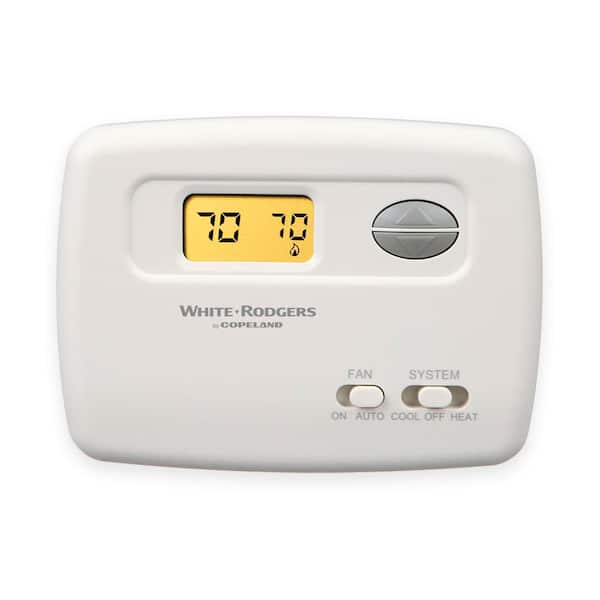
- Digital display: Shows set temperature, room temperature, and symbols (like the snowflake)
- Compressor protection: Adds a time delay to prevent short cycling
- Error messages: Alerts when something is wrong
Why Use Symbols?
Thermostats use symbols for fast, clear communication. The snowflake always means cooling, and a blinking snowflake specifically points to a delay or waiting period. Some models may flash the symbol differently, but most use blinking to show a delay, not a system error.
Typical Delay Time
Most White Rodgers thermostats have a 5-minute delay after any event that could cause short cycling. This includes power resets or mode changes. The display returns to normal once the delay ends and the AC starts.
Troubleshooting A Blinking Snowflake
It’s important to know when the blinking snowflake is normal and when it points to an issue. Here’s how you can approach the situation.
Step 1: Wait And Observe
If you just adjusted the thermostat or power was recently restored, wait 5-10 minutes. If the snowflake stops blinking and your AC starts, everything is working as designed.
Step 2: Check Basic Settings
- Thermostat mode: Ensure it’s set to “Cool”
- Set temperature: Confirm it’s lower than the current room temperature
- Fan setting: AUTO is best for regular cooling
Step 3: Inspect The System
If the blinking continues longer than 10 minutes:
- Check the circuit breaker for the AC unit. Reset if tripped.
- Look at the furnace or air handler for any error lights.
- Check the outdoor unit. Is it running or silent?
Step 4: Power Cycle The Thermostat
Remove the thermostat from its base (if possible), wait 1 minute, then snap it back in place. Or, turn off the HVAC breaker for 2-3 minutes and turn it back on. This resets the system.
Step 5: Rule Out Common Issues
- Dead batteries: Replace if your model uses them.
- Loose wiring: Gently check behind the thermostat.
- Dirty air filter: Replace if clogged.
When To Call A Professional
If the blinking snowflake stays on and the AC never starts, you may have a deeper issue. Call an HVAC technician if:
- The unit outside does not come on at all
- You hear strange noises or smell burning
- The display shows other error codes
- The snowflake blinks for over 15 minutes with no cooling
Comparing White Rodgers Models
Not all White Rodgers thermostats display information the same way. Here’s a quick look at several popular models and how they handle cooling delay:
| Model | Delay Symbol | Customizable Delay? | Notes |
|---|---|---|---|
| 1F78-151 | Blinking snowflake | No | Standard 5-min delay |
| 1F86U-42WF | Blinking snowflake & message | Yes (installer menu) | Smart Wi-Fi |
| 1F83C-11NP | Blinking snowflake | No | Simple programmable |
| 1F95EZ-0671 | Blinking & solid snowflake | Yes (advanced menu) | Touchscreen model |
If you’re not sure which model you have, check the back of the thermostat or the user manual.

Credit: www.reddit.com
How The Delay Protects Your System
Short cycling is a leading cause of AC breakdowns. The delay feature is more than an annoyance — it’s vital for your system’s health.
What Is Short Cycling?
Short cycling happens when your compressor starts and stops in rapid bursts. This puts stress on parts, increases energy use, and leads to breakdowns.
Benefits Of Compressor Delay
- Prevents overheating: Lets pressure in the system equalize before starting.
- Extends compressor life: Fewer starts mean less wear.
- Saves energy: Reduces unnecessary cycles.
Example Scenario
Suppose you lose power on a hot day. Without a delay, the compressor might try to restart under high pressure, straining the motor and possibly causing a failure. The blinking snowflake tells you the thermostat is holding off — protecting your AC.
Common Misunderstandings About The Snowflake
Many people misunderstand what the blinking snowflake means. Here are some myths — and the reality.
- Myth: It means the AC is broken.
- Reality: It’s usually just a delay, not a malfunction.
- Myth: I should reset the thermostat every time I see it.
- Reality: Most of the time, waiting is best.
- Myth: The delay wastes energy.
- Reality: It actually saves energy by stopping short cycling.
- Myth: All delays are the same length.
- Reality: Some models let you adjust the delay; check your manual.
Preventing Unnecessary Delays
While you can’t avoid all delays, you can reduce how often you trigger them. Here’s how:
- Avoid changing modes (heat/cool/off) rapidly
- Don’t repeatedly adjust the temperature in a short time
- Schedule temperature changes instead of manual toggling
- Keep your home’s power stable, if possible (use surge protectors)
When The Blinking Snowflake Signals A Problem
Sometimes, a blinking snowflake does mean trouble. Learn the warning signs:
- AC never turns on: Could be a blown fuse, bad wiring, or failed compressor.
- Other error codes show: Some thermostats show numbers or letters along with the snowflake (like “E1” or “Lo”).
- Outdoor unit is silent: If the outdoor fan and compressor never start, power or control issues may be present.
- Flashing lasts over 15 minutes: Most delays end in 5-10 minutes.
If you notice these, basic troubleshooting may not solve the problem. Contact a licensed HVAC technician.
How To Read Your White Rodgers Thermostat Display
Thermostat screens can be confusing. Here’s a quick guide to typical display symbols:
| Symbol | Meaning |
|---|---|
| Blinking snowflake | Cooling delay active |
| Solid snowflake | Cooling mode, AC running |
| Flame icon | Heating mode |
| Fan icon | Fan is running (manual or auto) |
| Battery icon | Low battery warning |
Always check your model’s manual for exact symbols, as they can vary.
Quick Guide: What To Do If Your Thermostat Blinks A Snowflake
- Wait 5 minutes after any change or power loss.
- If the AC starts and the snowflake stops blinking, all is normal.
- If not, check batteries, power, and settings.
- Reset the thermostat (remove from base or flip breaker).
- If nothing works, call a professional.
How To Reset A White Rodgers Thermostat
A reset can clear minor errors and help the thermostat recover from glitches. Here’s how to safely reset most White Rodgers models:
Battery Models
- Remove the faceplate from the wall.
- Take out the batteries.
- Wait 2 minutes, then reinstall.
- Reattach the faceplate.
Hardwired Models
- Turn off the circuit breaker for your HVAC system.
- Wait 2-3 minutes.
- Turn the breaker back on.
Factory Reset (if Available)
Some digital models have a reset button or menu option. Hold the button for 5-10 seconds or follow the on-screen prompts.
Differences With Other Thermostat Brands
White Rodgers is not the only brand with a blinking snowflake feature. Here’s how it compares to others:
| Brand | Delay Symbol | Typical Delay Time |
|---|---|---|
| White Rodgers | Blinking snowflake | 5 minutes |
| Honeywell | Blinking “cool on” | 5 minutes |
| Nest | Animated cooling icon | 3-5 minutes |
| Emerson Sensi | Blinking snowflake | 5 minutes |
If you switch thermostats or move homes, the symbols may look different — but the cooling delay is a standard safety feature.

Credit: www.youtube.com
Real-world Example
Maria, a homeowner in Texas, noticed her White Rodgers thermostat was blinking a snowflake on a hot afternoon. Her house was warming up, and she worried her AC was broken. Instead of panicking, she waited 5 minutes. The snowflake stopped blinking, the AC kicked on, and the house cooled down.
Maria learned that the delay kept her compressor safe after a quick power flicker.
Many homeowners have similar stories. The key is patience and understanding the thermostat’s signals.
Tips For Better Thermostat Use
Get the most from your White Rodgers thermostat:
- Learn your model: Read the manual for your exact model.
- Use programmable schedules: Set regular temperature changes instead of manual adjustments.
- Change filters often: Dirty filters slow cooling.
- Keep the thermostat clean: Dust can interfere with sensors.
- Test before hot weather: Turn on cooling in spring to check for issues before summer starts.
When To Upgrade Your Thermostat
If your thermostat is old or has repeated problems, consider an upgrade. Modern thermostats offer:
- Wi-Fi control: Adjust settings from your phone.
- Smart schedules: Better comfort and energy savings.
- Clearer displays: Easier to read and understand.
- Better diagnostics: Advanced error messages and support.
A new thermostat can reduce confusion and improve system performance.
Energy And Cost Implications
A blinking snowflake doesn’t just protect your AC — it can save money over time.
- Fewer repairs: Compressor replacements are expensive.
- Lower energy bills: Less short cycling means less wasted power.
- Longer system life: Good maintenance and smart controls reduce breakdowns.
According to the U. S. Department of Energy, proper thermostat use and HVAC maintenance can cut cooling costs by up to 10% a year.
Where To Find More Information
Always refer to your thermostat’s user manual for the most accurate instructions. For deeper troubleshooting, the White Rodgers (now Emerson) website provides manuals and support. You can also visit trusted resources like the U.S. Department of Energy for energy-saving tips.
Frequently Asked Questions
Why Does My White Rodgers Thermostat Snowflake Keep Blinking?
A blinking snowflake usually means your thermostat is in a cooling delay mode, protecting your air conditioner’s compressor. This is normal after power loss, rapid mode changes, or temperature adjustments. If it blinks for over 10-15 minutes, check for power issues or call a technician.
Can I Bypass The Cooling Delay?
No, the delay is a built-in safety feature. It cannot be bypassed on most models. Some advanced thermostats allow installers to adjust the delay length, but it should never be set to zero.
Is A Blinking Snowflake A Sign My Ac Is Broken?
Not necessarily. In most cases, it’s just a normal delay. If your AC never starts, or you see other error codes, you might have a problem that needs professional help.
How Long Should The Snowflake Blink Before The Ac Turns On?
The typical delay is 5 minutes. Some models may use 3-10 minutes. If the snowflake blinks much longer and the AC does not start, check for power, reset the thermostat, and call for service if needed.
What If The Snowflake Is Solid, Not Blinking?
A solid snowflake means your system is in cooling mode and the air conditioner is running. This is normal when your home is being cooled.
Conclusion
A blinking snowflake on your White Rodgers thermostat is often nothing to worry about. Understanding what it means can save you stress, money, and help you keep your home comfortable all year long. With proper use and maintenance, your thermostat will serve you well for years to come.
Credit: www.tanker.ee