
A blinking red light on your Tesla charger can feel worrying, especially if you depend on your car for daily travel. Instead of guessing or panicking, knowing what causes this issue and how to fix it can save you time and stress.
Many Tesla owners face this problem, but the blinking red light is not always a sign of a major fault. Sometimes, it is just a warning of a minor error that you can solve yourself. Understanding the reasons behind the blinking red light and learning how to troubleshoot can help you keep your Tesla running smoothly.
This guide explains everything you need to know, from the basics to advanced troubleshooting, so you feel confident the next time your charger blinks red.
What Does A Blinking Red Light On A Tesla Charger Mean?
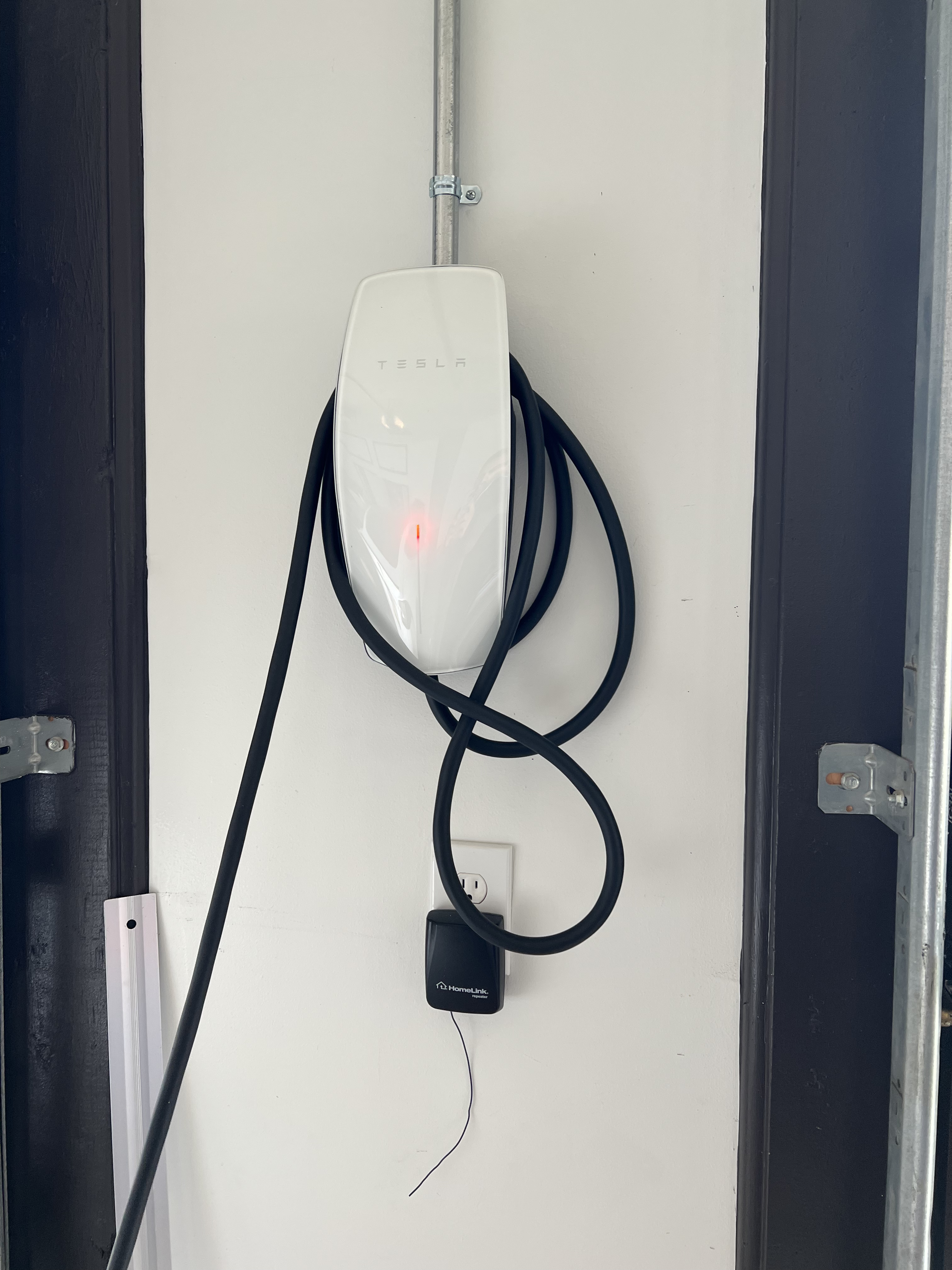
The blinking red light on a Tesla charger is a warning signal. Tesla chargers, especially the Wall Connector and Mobile Connector, use colored lights to show their status. Green lights usually mean charging is working well. But a blinking red light means something is wrong.
The number of blinks matters. For example:
- One red blink means a ground issue.
- Two red blinks suggest a power problem.
- Three red blinks point to a relay or internal error.
- Four or more blinks can mean different faults, often more serious.
These patterns help owners and technicians know what to check first. Tesla makes these signals easy to see, so you do not have to open the charger or use special tools.
Why Tesla Uses Light Codes
Tesla chargers cannot speak, so they use lights to “communicate.” The blinking red light is part of a system that tells you:
- When power is on
- If charging is happening
- If an error needs your attention
This system is reliable and quick. Most owners notice the blinking red light before they see any problem with charging. If you learn to read these signals, you can solve issues faster.
Common Causes Of A Blinking Red Light
A blinking red light can come from many sources. Here are the most frequent reasons:
- Poor Ground Connection
- If the charger cannot connect to the ground wire, it blinks red once. This is a safety feature. Charging stops to protect you and your car.
- Voltage or Power Supply Issues
- Two red blinks usually mean the charger is not getting stable power. Maybe the circuit breaker tripped, or there is a wiring problem.
- Internal Relay Fault
- Three red blinks suggest the charger’s internal relay is not working. This can be a hardware issue.
- Overheating
- Some chargers blink red if they get too hot. Overheating can come from poor ventilation, old wiring, or high ambient temperatures.
- Cable Problems
- A damaged charging cable or connector can cause a blinking red light. Inspect for visible damage or wear.
- Firmware Errors
- Sometimes, the charger’s software has a bug. Tesla updates firmware often, but errors can still happen.
- Loose Connections
- Inside the charger or the wall outlet, loose wires can trigger the blinking red signal.
These causes range from simple to complex. Most can be fixed without professional help, but some need an expert or Tesla service.

Credit: www.reddit.com
How To Troubleshoot A Tesla Charger Blinking Red
Troubleshooting is not just guesswork. Follow these steps to find and fix the problem:
Step 1: Check The Blink Pattern
Count the red blinks between pauses. Each number points to a specific issue:
- 1 blink: Ground issue
- 2 blinks: Power supply problem
- 3 blinks: Relay fault
- 4+ blinks: Other faults
Write down the pattern, so you can explain it if you need help.
Step 2: Inspect The Charger And Outlet
Look for obvious damage:
- Burn marks
- Loose wires
- Broken plastic
- Frayed cables
If you see physical damage, stop using the charger. It may be unsafe.
Step 3: Reset The Charger
Unplug the charger from the wall outlet or turn off its circuit breaker. Wait 10–30 seconds, then reconnect. Sometimes, a simple reset clears software errors.
Step 4: Check Power Supply
Make sure the outlet or circuit is working. Plug in another device to test. If the outlet is dead or the breaker is tripped, fix that first.
Step 5: Inspect Ground Connection
If there’s only one red blink, the ground wire may be loose or missing. Check your electrical panel or hire an electrician to inspect the wiring.
Step 6: Examine The Charging Cable
Look for kinks, cuts, or exposed wires. Damaged cables can cause faults and should be replaced.
Step 7: Update Firmware
Connect your charger to Wi-Fi, if possible. Check the Tesla app or charger manual for firmware updates. Software bugs sometimes cause blinking red lights.
Step 8: Contact Tesla Support
If the problem persists after these steps, call Tesla service. Provide details:
- Charger model
- Blink pattern
- Steps you tried
Tesla can guide you further or send a technician.
Practical Example
Sarah owns a Model 3 and notices a blinking red light every time she plugs in her Wall Connector. She counts two blinks. After checking her breaker, she finds it tripped. Resetting the breaker fixes the problem. If she saw three blinks, she would call Tesla support, since that points to a relay fault.
Comparing Tesla Chargers: Wall Connector Vs Mobile Connector
Tesla offers different charger types. Each has unique features and error signals. The blinking red light means similar things, but troubleshooting can vary.
Here is a comparison:
| Charger Type | Main Use | Blinking Red Light Meaning | Reset Method |
|---|---|---|---|
| Wall Connector | Home charging | Ground, power, relay, or internal faults | Turn off breaker, wait, turn on |
| Mobile Connector | Portable charging | Ground or cable faults | Unplug, wait, replug |
Wall Connectors have more advanced signals and diagnostics. Mobile Connectors are simpler, but still use blinking red lights for errors.
Safety Tips When Handling A Blinking Red Charger
Safety should always come first. Here are key tips:
- Never use a damaged charger or cable.
- Avoid touching exposed wires.
- If you smell burning or see smoke, unplug the charger immediately.
- Do not open the charger unless you are trained.
- Always turn off power at the breaker before inspecting wiring.
Tesla chargers are designed for safety, but mistakes can happen. If you are unsure, call a professional.
Real Data: How Often Do Tesla Chargers Blink Red?
According to Tesla forums and owner surveys, about 5–10% of chargers show a blinking red light at least once in their lifetime. Most cases are caused by minor wiring issues or temporary power faults. Serious faults are rare but can happen, especially after storms, power surges, or physical damage.
Many users report that simple resets fix the problem. But ignoring repeated red blinks can lead to bigger problems, including charger failure or electrical hazards.
Credit: uber.energy
Preventing Charger Issues: Maintenance And Best Practices
Preventing problems is easier than fixing them. Here are practical steps:
- Inspect Your Charger Monthly
- Look for damage or wear.
- Keep the Area Clean and Dry
- Water and dirt can cause faults.
- Update Firmware Regularly
- Check for software updates via the Tesla app or website.
- Avoid Overloading Circuits
- Make sure the charger has its own dedicated circuit.
- Use Correct Outlets
- Only use outlets rated for EV charging.
- Check Grounding
- Good grounding prevents many faults.
- Hire Qualified Electricians
- For installation, upgrades, or repairs, always use certified professionals.
Following these tips reduces the chance of seeing the blinking red light.
Tesla Charger Blink Codes: Quick Reference
Tesla’s blink codes help diagnose issues fast. Here’s a handy guide:
| Blink Pattern | Possible Cause | Recommended Action |
|---|---|---|
| 1 blink | Ground error | Check wiring, call electrician |
| 2 blinks | Power issue | Check breaker, outlet |
| 3 blinks | Relay fault | Contact Tesla support |
| 4+ blinks | Internal charger fault | Contact Tesla support |
This quick reference helps you know what to do as soon as you see the blink pattern.
Common Mistakes When Dealing With A Blinking Red Light
Even experienced Tesla owners make mistakes. Here are the most common:
- Ignoring the Blink Pattern
- Not counting blinks leads to wrong diagnosis.
- Using Damaged Chargers
- This can cause fires or electric shocks.
- Resetting Without Fixing the Cause
- Problems can return if you only reset.
- Trying DIY Repairs Without Training
- Opening the charger can void warranty and be dangerous.
- Delaying Professional Help
- Waiting too long can make issues worse.
Avoiding these mistakes keeps your charger and car safe.
When To Call A Professional
Some problems need expert help. Call a professional if:
- The charger blinks red after every reset.
- You see burn marks or smell smoke.
- You have no experience with electrical repairs.
- The blink pattern is not listed in Tesla manuals.
- Your car does not charge even after troubleshooting.
Tesla support and certified electricians have special tools and knowledge. They can fix faults and keep your warranty valid.
Tesla Charger Warranty And Support
Tesla chargers come with a warranty, usually 4 years for Wall Connectors and 2 years for Mobile Connectors. If your charger is under warranty, contact Tesla for repairs or replacements. Keep your purchase receipt and charger serial number ready.
Tesla’s support team is known for quick responses. They often help over the phone or via the Tesla app. For more details, visit the official Tesla support page: Tesla Support.
Advanced Troubleshooting: For Experienced Owners
If you have electrical knowledge, you can try these advanced steps:
- Use a multimeter to check voltage and ground.
- Inspect the charger’s internal wiring (only if warranty allows).
- Check for firmware logs using Tesla’s online tools.
- Test the charger with another Tesla vehicle.
These steps are risky and not recommended for beginners. Always follow safety guidelines.
Environmental Factors: How Location Affects Charger Performance
Where you install your charger matters. Chargers in garages stay cleaner and cooler. Outdoor chargers face dust, rain, and heat. High humidity or salty air can cause corrosion.
Tesla recommends:
- Installing chargers indoors if possible.
- Keeping outdoor chargers covered.
- Checking for rust or corrosion every year.
Example: John installed his charger outside. After a rainy season, he saw a blinking red light. Cleaning and drying the charger fixed the issue.
Future Developments: Smarter Diagnostics
Tesla is working on smarter chargers that send alerts to your phone when errors happen. Future models may explain faults in plain language, not just blinking lights. These updates will help owners solve problems faster.
Credit: www.reddit.com
Frequently Asked Questions
What Should I Do First If My Tesla Charger Blinks Red?
Count the number of red blinks, then check the charger and outlet for visible damage. Try resetting the charger. If the problem continues, follow the blink code guide for next steps.
Is A Blinking Red Light Dangerous?
It can be, especially if caused by wiring faults or overheating. Never use a charger with visible damage, burning smell, or exposed wires. If unsure, call Tesla support or an electrician.
Can I Fix A Blinking Red Light Myself?
Many issues, like power supply faults or minor wiring errors, can be fixed by owners. But serious faults (like relay or internal errors) need professional help.
How Often Do Tesla Chargers Show Blinking Red Lights?
About 5–10% of chargers will show this error at least once, mostly from temporary faults or power issues. Regular maintenance reduces the chance.
Will The Charger Still Work After Fixing The Blinking Red Light?
If you fix the cause (like restoring power or grounding), the charger usually returns to normal. If it blinks red again, there may be a deeper issue needing expert repair.
Conclusion
Taking care of your Tesla charger keeps your car ready for every journey. A blinking red light is a warning, not a disaster. With the right knowledge and steps, you can solve most problems quickly and safely. Always follow safety tips and call professionals when needed.
This way, your Tesla stays charged and reliable, every day.