
If you own a Lookah Snail vape and notice it blinking green, you may feel confused or worried. This small but powerful device is popular for its compact design and easy operation. However, a blinking green light can mean different things, depending on the situation.
Understanding these signals can save you time, prevent frustration, and help you get the best performance from your Lookah Snail. In this guide, you’ll learn what the blinking green light really means, how to fix it, and how to avoid common mistakes.
You’ll also see practical comparisons, troubleshooting steps, and tips that most beginners miss.
What Is The Lookah Snail?
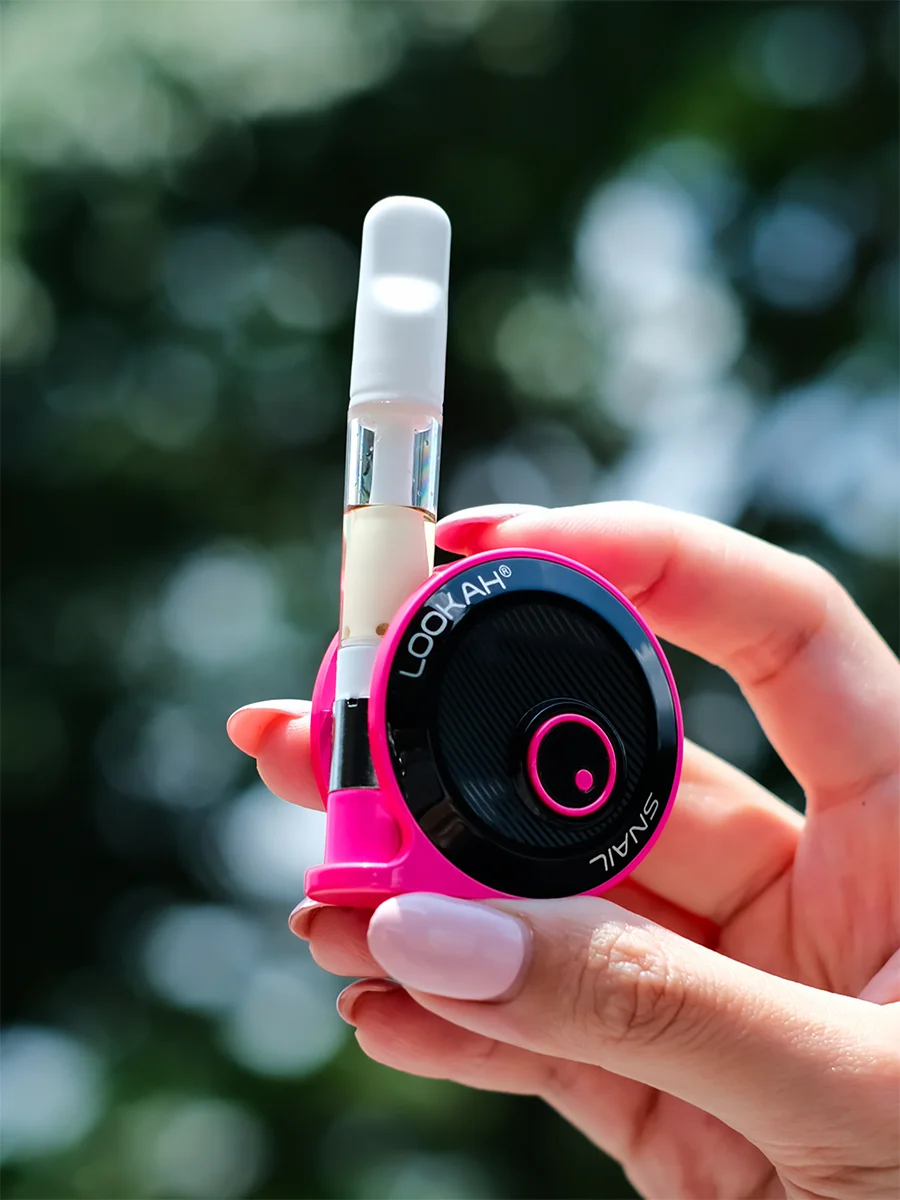
The Lookah Snail is a portable vaporizer made for oil cartridges and concentrates. Its snail-shaped body fits comfortably in the hand and pocket. With a 350mAh battery, three voltage settings, and a simple single-button control, the Lookah Snail appeals to both beginners and experienced users. The LED indicator, which can blink different colors, is your main guide to the device’s status.
Key Features of Lookah Snail:
- Compact, lightweight design
- Works with 510-thread cartridges
- Three voltage levels (3.2V, 3.6V, 4.2V)
- USB charging
- Easy, one-button operation
What Does “blinking Green” Mean?
A blinking green light on your Lookah Snail is not random. It’s a coded signal. Depending on the context, it can mean:
- Battery Level: Green often signals medium battery.
- Voltage Setting: Green shows you’ve selected the middle voltage (3.6V).
- Error Status: If the green light blinks rapidly or strangely, it may signal a connection or hardware problem.
Most users confuse battery and voltage signals with error alerts, but the blinking pattern and timing matter. Let’s break down each scenario.
| Green Light Type | Meaning | Action Needed |
|---|---|---|
| Solid Green | Medium battery or voltage selected | None |
| Blinking Green (slow) | Voltage change confirmation | None |
| Blinking Green (fast/repeated) | Error, cartridge or connection issue | Check and fix device |

Credit: smokersdepotus.com
Common Reasons For Blinking Green
The green blinking light is most often caused by:
- Voltage Change: When you click the button three times, the voltage changes. Green means you’re on the middle setting (3.6V).
- Battery Level: If you check battery status, green means it’s neither full nor low.
- Cartridge Connection Issues: If the cartridge is loose, incompatible, or dirty, the device can blink green rapidly.
- Overuse Protection: If you hold the button too long (usually over 10 seconds), the device will blink green to prevent overheating.
- Short Circuit or Error: If there’s a hardware fault, the light may blink green quickly.
Surprisingly, many users think a blinking green light always means low battery, but this is not true for the Lookah Snail.
How To Troubleshoot Blinking Green
If your Lookah Snail blinks green and doesn’t work, follow these steps:
1. Check Cartridge Connection
- Remove the cartridge.
- Clean the connection points with a cotton swab.
- Reinsert firmly but gently.
- Try a different cartridge if you have one.
2. Inspect Battery Status
- Press the button twice to check battery level.
- If green, battery is medium; if it still blinks rapidly, it’s not a battery issue.
3. Change Voltage Setting
- Press the button three times quickly.
- Watch for solid green (middle voltage).
- If the blinking stops, you fixed the issue.
4. Look For Overuse Protection
- If you held the button too long, wait 1–2 minutes before trying again.
5. Reset The Device
- Turn off the device with five quick button presses.
- Wait 10 seconds, then turn it back on.
6. Charge The Device
- Plug into a USB charger.
- Wait until fully charged (look for solid white or blue light).
7. Inspect For Short Circuit
- Look for visible damage, leaks, or corrosion.
- If found, stop using and contact Lookah support.
How The Lookah Snail Compares To Other Vapes
Understanding the Lookah Snail’s blinking signals is easier when you compare it with similar devices. Here’s a quick comparison:
| Device | Battery Size | Blinking Green Meaning | Voltage Options |
|---|---|---|---|
| Lookah Snail | 350mAh | Voltage, battery, or error | 3.2V / 3.6V / 4.2V |
| Yocan Uni | 650mAh | Battery low or cartridge issue | 3.0V / 3.5V / 4.0V |
| CCELL Silo | 500mAh | Battery low | Fixed voltage |
Notice that the Lookah Snail uses blinking green for more signals than many competitors. This can confuse users but also offers more information about device status.
Tips To Prevent Blinking Green Errors
Most blinking green errors are avoidable. Follow these practical tips:
- Use compatible cartridges: Only use 510-thread cartridges. Others may cause errors.
- Clean connection points: Dirt or oil blocks the circuit, causing blinking.
- Don’t over-tighten cartridges: Too much force can damage the connector.
- Charge regularly: Avoid using the device when battery is very low.
- Store safely: Keep away from water, dust, and extreme heat.
A non-obvious tip: The Lookah Snail’s battery can lose connection after strong impacts, like drops. If you notice blinking green after dropping the device, check the battery and cartridge.
Credit: www.lookah.com
Hidden Insights Most Beginners Miss
- Voltage setting affects blinking: Many think voltage selection doesn’t matter, but the green light directly shows which voltage is active. If you want stronger hits, switch to red (highest voltage).
- Blinking green can signal cartridge mismatch: Even if the cartridge fits physically, electrical mismatch can cause green blinking. Always check compatibility, not just thread size.
When To Seek Professional Help
If you’ve tried all troubleshooting steps and the device still blinks green, it may be a hardware failure. Signs include:
- Blinking green even with no cartridge inserted
- Device gets hot without working
- LED flashes in unusual patterns
Contact Lookah support or visit a vape shop for help. Do not try to fix internal electronics yourself, as this can void warranty and cause further damage.
How To Interpret Lookah Snail Blinking Patterns
To read the blinking signals accurately, watch the timing and context:
- Single blink: Voltage change confirmation
- Rapid blinking (10 times): Cartridge or connection error
- Blinking while charging: Battery status update
Understanding these patterns helps you react correctly. For example, rapid blinking means stop and check for errors, while a single blink is just information.
Battery Life And Charging
The Lookah Snail battery lasts 1–2 days with moderate use. Charging takes about 1 hour. The LED shows battery status:
- White: Full battery
- Green: Medium battery
- Blue: Low battery
If you see green blinking while charging, it means the battery is halfway charged. Wait for white before unplugging.
| Battery Level | LED Color | Estimated Use Time |
|---|---|---|
| Full | White | 8–12 hours |
| Medium | Green | 4–8 hours |
| Low | Blue | 1–3 hours |
Credit: www.lookah.com
Safety Features And Green Blinking
The Lookah Snail includes safety features to prevent overheating or electrical faults. Green blinking often signals these protections:
- Overuse cut-off: Blinks green if button held too long
- Short circuit protection: Blinks green rapidly if fault detected
- Automatic shut-off: Device powers down after inactivity
If you see green blinking and the device feels hot, stop use and let it cool down.
How To Reset Lookah Snail
Sometimes, resetting fixes persistent blinking:
- Turn off device (five clicks).
- Wait 30 seconds.
- Turn on device (five clicks).
- Try with a different cartridge.
If the blinking continues, try charging or contact support.
Lookah Snail User Experiences
Many users share their Lookah Snail stories online. Some say blinking green was due to a dirty cartridge, others found charging issues. Here are a few real examples:
- “My Snail blinked green after I switched cartridges. Cleaning the contacts fixed it.”
- “I saw rapid green blinking. Turns out my cartridge was defective.”
- “Green blinking happened when I over-tightened the cartridge. Loosening it solved the problem.”
These stories show that most blinking green issues are easy to fix if you know what to look for.
Pros And Cons Of The Lookah Snail
Understanding the strengths and weaknesses helps you decide if this device is right for you.
Pros:
- Compact and portable
- Easy operation
- Multiple voltage settings
- Good battery life
Cons:
- Blinking signals can confuse beginners
- Sensitive to cartridge compatibility
- Not ideal for thick concentrates
If you want a simple, pocket-sized vape with clear LED signals, the Lookah Snail is a strong choice. If you use extra-thick oils, look for a device with higher voltage and more robust heating.
Maintenance And Cleaning
Keeping your Lookah Snail clean reduces blinking errors. Here’s a basic cleaning routine:
- Remove cartridge.
- Use a dry cotton swab to clean connection points.
- If sticky residue is present, use a little rubbing alcohol.
- Let dry completely before reassembling.
Do this once a week for best performance.
How To Use Lookah Snail Correctly
To avoid blinking errors and get smooth hits, follow these steps:
- Charge the device fully.
- Insert a compatible cartridge gently.
- Turn on with five quick button presses.
- Select voltage (three clicks for green/middle).
- Hold button while inhaling.
- Release button and enjoy.
If you see green blinking at any step, refer to the troubleshooting guide above.
Common Mistakes Beginners Make
- Using the wrong cartridge: Only use 510-thread.
- Ignoring cleaning: Dirty contacts cause blinking errors.
- Over-tightening: Damages connector and creates errors.
- Holding the button too long: Triggers safety shut-off.
- Not reading manual: Many skip instructions and miss key details.
A useful tip: Keep a spare cartridge and charger for emergencies. This prevents downtime if blinking green happens.
Where To Find Reliable Information
For official guidance, visit the Lookah website or trusted vape forums. You can also check Lookah Official Site for updates and troubleshooting tips.
Frequently Asked Questions
Why Does My Lookah Snail Blink Green When I Insert A Cartridge?
The device blinks green to signal a voltage setting or a cartridge connection issue. If it blinks once, it’s confirming voltage. If it blinks rapidly, check the cartridge for dirt, incompatibility, or damage.
Can I Use Any 510-thread Cartridge With Lookah Snail?
Most 510-thread cartridges work, but some may not match electrically. If you see green blinking, try a different cartridge. Avoid thick concentrates unless the cartridge is designed for them.
How Do I Change The Voltage On Lookah Snail?
Press the button three times quickly. The LED will blink to show the selected voltage: blue for low, green for medium, red for high. Green is the middle setting (3.6V).
What Should I Do If Green Blinking Continues After Troubleshooting?
If blinking persists after cleaning, changing cartridges, and charging, contact Lookah support or visit a vape shop. It may be a hardware issue.
Is Blinking Green Dangerous For My Device?
Blinking green is a warning, not a danger. It signals errors or settings. Fixing the cause prevents damage. If the device feels hot or smells strange, stop use and seek help.
Every Lookah Snail user will face blinking green at some point. Now you know how to read, fix, and prevent it. With these tips and insights, you can keep your vape running smoothly and enjoy every session.