
When you see your GFCI outlet blinking red, it’s easy to feel nervous. Many people worry it means something is dangerously wrong with their electrical system. Others simply ignore the blinking, thinking it’s a minor issue. But the truth is, a blinking red light on a GFCI (Ground Fault Circuit Interrupter) is a direct message from your device. It’s telling you something important—sometimes urgent—about your home’s electrical safety. Understanding these signals can prevent shocks, electrical fires, and costly repairs. This article will guide you through everything you need to know about a GFCI blinking red, from what it means, to how to fix it, and when you should call a professional.
What Is A Gfci And Why Does It Blink Red?
A GFCI outlet is a special safety device you’ll find in kitchens, bathrooms, garages, or anywhere water and electricity are close. Its job is to cut off power instantly if it senses a ground fault—this means electricity is leaking out of the normal path, which can be very dangerous. Most GFCI outlets have a small button and sometimes a light. When that light blinks red, it’s acting as an alert system.
Understanding Gfci Indicator Lights
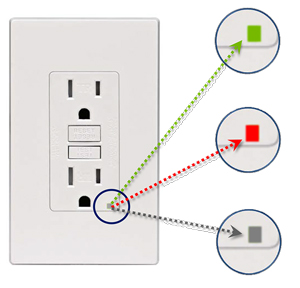
Not all GFCIs are the same, but most modern ones use lights to tell you their status:
- Solid Green: Working properly
- Solid Red: Problem detected (often after a self-test)
- Blinking Red: Error, malfunction, or failed self-test
- No Light: No power, or the outlet may be off
A blinking red light is not a “one size fits all” message. The meaning can change by manufacturer. However, it almost always means something needs attention.
Why Do Gfci Outlets Have Self-tests?
Since 2015, the US National Electrical Code requires GFCIs with self-testing features. These outlets run quick checks on themselves, often every few minutes or when you press the test button. If the outlet finds a problem (like it’s not able to protect you from shocks), it warns you by blinking red. This feature helps prevent silent failures that could put you at risk.
Common Causes Of A Gfci Blinking Red
Seeing your GFCI blink red is rarely random. Here are the most common reasons:
- Failed Self-Test: The outlet checked itself and found a problem.
- Wiring Issues: Loose, reversed, or damaged wires can confuse the GFCI.
- Ground Fault Detected: The outlet senses electricity leaking to the ground.
- Moisture or Water Intrusion: Water inside the outlet can trigger errors.
- End of Life: GFCIs generally last 7-10 years; an old outlet may blink red when it needs replacing.
- Electrical Overload: Too many devices plugged in or a device with a fault can cause issues.
Some GFCIs blink red after a power surge or blackout, even if there’s no real damage. But you should never just ignore the signal.
How To Respond When Your Gfci Is Blinking Red
Many homeowners panic or ignore the light. Instead, follow these steps to stay safe and possibly fix the problem yourself.
Step 1: Unplug All Devices
Remove everything plugged into the GFCI and outlets downstream (on the same circuit). Sometimes, a faulty device is the cause.
Step 2: Press The Reset Button
Most GFCIs have a small RESET button. Press it firmly. If the red light stops blinking, plug your items back in one at a time. If it blinks again, you’ve likely found a problematic device.
Step 3: Test The Outlet
Press the TEST button. This should cut power to the outlet. Then press RESET again. If the blinking continues, the outlet itself may be faulty.
Step 4: Check For Moisture
If the GFCI is in a bathroom, kitchen, or outdoors, moisture may have gotten inside. Look for wetness or condensation around the outlet. If you suspect water, leave the outlet alone and allow it to dry for several hours before resetting.
Step 5: Inspect For Obvious Damage
Look for cracked covers, burn marks, or a loose outlet. If you see these, turn off power at the breaker and call a licensed electrician.
Step 6: Replace The Gfci (if Needed)
If all else fails, replacing the GFCI is often the safest fix. GFCIs are not expensive, and modern models are easy to install if you follow safety guidelines.
When To Call An Electrician
- The blinking red light will not reset or clear.
- You smell burning, hear buzzing, or see sparks.
- The outlet is warm or hot to the touch.
- You’re uncomfortable working with electricity.
It’s better to be safe. Electrical issues can lead to fires or shocks if ignored.
Major Gfci Brands And Their Blinking Red Codes
Different brands use different light codes. Here’s a quick guide to help you decode what your outlet is telling you.
| Brand | Blinking Red Meaning | Typical Solution |
|---|---|---|
| Leviton | Failed self-test or wiring problem | Reset, check wiring, replace if needed |
| Legrand | End-of-life or ground fault detected | Replace GFCI |
| Eaton | Wiring issue or failed test | Inspect wiring, reset, replace if needed |
| GE | Self-test failed, not safe | Replace outlet |
Always check your GFCI’s manual for exact meanings. Some brands use red/green combinations, and a few may use yellow or orange.
Gfci Blinking Red Vs. Other Light Signals
A red blinking light is just one type of GFCI warning. Here’s how it compares to other light signals you might see:
| Light Signal | Common Meaning | Action Needed |
|---|---|---|
| Solid Green | Normal operation | No action |
| Blinking Green | Testing mode, sometimes normal | Wait, then reset |
| Solid Red | Serious problem, failed test | Replace or repair |
| Blinking Red | Error or malfunction | Troubleshoot or call electrician |
| No Light | No power or failed device | Check breaker, wiring, or replace |
Troubleshooting A Gfci That Is Blinking Red
Let’s dig deeper into troubleshooting. Here’s a step-by-step checklist for when you see a blinking red light:
- Safety First: Turn off power at the breaker before touching wires.
- Test Other Outlets: If other outlets on the same circuit are also off or blinking, the problem may be further up the line.
- Check for Moisture: Even small leaks can trigger a GFCI.
- Test for Ground Fault: Use a plug-in tester if you have one. These are cheap and available at hardware stores.
- Inspect Wires: Look for loose or disconnected wires behind the outlet (if you are comfortable opening the cover).
- Replace Suspect Devices: Sometimes a hair dryer, phone charger, or lamp with a wiring fault will cause a GFCI to blink red.
- Replace the GFCI Outlet: If the above steps don’t help, the GFCI may be at the end of its lifespan.
Two Non-obvious Insights
- Aging outlets: Even if your GFCI resets and works, if it’s more than 7-10 years old, a blinking red light may be a sign it’s losing sensitivity. GFCIs wear out quietly.
- Downstream protection: Devices plugged into outlets *after* the GFCI (downstream) can trigger the red blink. Sometimes the real problem isn’t the GFCI at all, but another outlet or device it protects.

Credit: www.reddit.com
How Gfci Self-test Technology Works
Modern GFCI outlets are smart. They have a tiny circuit inside that checks for faults many times per day. If the outlet fails its own test, it will often blink red and may even lock itself out so you can’t reset it. This feature is called auto-monitoring.
Why Is This Important?
Without self-tests, a GFCI could fail silently—meaning you think you’re protected when you’re not. Self-test GFCIs are much safer, especially in older homes.
Example: A Real-world Scenario
Maria lives in a 20-year-old house. Her bathroom GFCI starts blinking red every few days, but she resets it and it works again. She ignores it. A month later, she gets a small shock from a plugged-in hair dryer. The GFCI had quietly stopped protecting her.
If Maria had replaced the outlet when it first started blinking red, she would have avoided the shock. This is why self-tests and their warnings are critical.
The Importance Of Gfci Outlets In Home Safety
GFCI outlets are not just a modern convenience—they save lives. The Consumer Product Safety Commission reports that GFCIs have reduced home electrocutions by 83% since the 1970s. They are especially important in wet areas, where even small shocks can be fatal.
Key Data
- 83% reduction in home electrocutions since GFCIs became common
- Over 300 lives saved each year by GFCIs (CPSC data)
- In 2023, over 60% of all home electrical accidents involved outlets without GFCI protection
When your GFCI blinks red, it’s doing its job—alerting you to a risk you may not see.
Comparing Gfci Outlets With And Without Self-testing
It’s useful to compare older GFCI models with modern self-testing versions.
| Feature | Standard GFCI (Old) | Self-Testing GFCI (New) |
|---|---|---|
| Manual Test Required | Yes | No, automatic |
| Warns of Failure | Rarely | Blinks red or locks out |
| Lifespan | 7-10 years (variable) | 7-10 years (more reliable) |
| Code Compliant | No (since 2015) | Yes |
| Average Cost | $10-15 | $20-30 |
Self-testing GFCIs cost a bit more, but the extra safety is worth it.
Signs Your Gfci Needs Replacement
A blinking red light is a big clue, but here are other signs you should replace your GFCI outlet:
- It resets but trips again right away, even with nothing plugged in
- You hear buzzing or see sparks
- The outlet is warm or discolored
- The test or reset button is stuck
- The outlet is more than 10 years old
Remember: replacing a GFCI is a simple DIY project if you’re comfortable, but never work with live wires. Turn off the breaker and double-check with a voltage tester.
Cost And Difficulty Of Fixing A Blinking Red Gfci
Fixing a blinking GFCI is usually not expensive. Here’s what you can expect:
- DIY replacement: $20–$30 for a new GFCI, 15–30 minutes of your time
- Electrician visit: $100–$200 depending on your area and the problem
If the issue is with the wiring behind the outlet or in your electrical panel, costs can be higher. But for most homeowners, swapping the GFCI solves the problem.
Preventing Future Gfci Problems
You can avoid most GFCI headaches with a few simple habits:
- Test monthly: Press the TEST and RESET buttons every month.
- Replace old outlets: If your GFCI is over 10 years old, consider replacing it, even if it’s working.
- Keep outlets dry: Install weather covers on outdoor or bathroom outlets.
- Don’t overload circuits: Avoid plugging too many high-wattage devices into one GFCI.
- Watch for warning signs: Never ignore blinking lights, buzzing, or heat.
Credit: www.304inspect.com
When Ignoring A Blinking Red Gfci Becomes Dangerous
It’s tempting to put off electrical problems, but ignoring a blinking red GFCI can have serious risks:
- Increased shock risk: The outlet may not protect you during a fault
- Fire hazard: Faulty wiring can overheat
- Appliance damage: Devices plugged into a faulty GFCI may be harmed
- Insurance issues: If an accident happens and you ignored warnings, claims may be denied
If you’re unsure, always err on the side of caution.
Expert Tips For Gfci Maintenance
- Label your GFCI outlets: Mark which outlets are protected by each GFCI. This helps troubleshooting.
- Record installation dates: Write the install date on the outlet or your electrical panel.
- Use plug-in testers: Cheap testers will quickly show if your GFCI is wired and working correctly.
- Upgrade when remodeling: Always use self-testing GFCIs in new work.
- Check local codes: Some areas require GFCIs in basements, laundry rooms, and even bedrooms.
Official Resources And Further Reading
If you want to dive deeper, the US Consumer Product Safety Commission provides guides and safety data on GFCIs. You can read more at the CPSC Home Electrical Safety Guide.
Frequently Asked Questions
What Should I Do First When My Gfci Starts Blinking Red?
Unplug all devices and try pressing the RESET button. If the light keeps blinking, check for moisture or damage. If you’re not sure, or if the blinking continues, call a licensed electrician.
Is A Blinking Red Gfci Dangerous?
Yes, it can be. It means the outlet may not protect you from shocks. Do not ignore the signal—investigate and fix the problem as soon as possible.
Can I Fix A Blinking Red Gfci Myself?
Yes, in many cases. Simple fixes include resetting the outlet, drying any moisture, or replacing the outlet if it’s old. If you see burned wires, hear noises, or feel uncomfortable, call a professional.
How Long Do Gfci Outlets Last?
Most GFCI outlets last 7 to 10 years. After this, they may become less reliable, even if they seem to work. Always replace old GFCIs, especially if they blink red.
Why Does My Gfci Keep Blinking Red Even After Replacement?
If a new GFCI blinks red, the problem may be with the circuit wiring or another outlet downstream. It could also be a faulty device plugged in. If you can’t find the cause, contact an electrician.
A blinking red GFCI isn’t just a small annoyance—it’s a warning sign. By understanding what it means, how to fix it, and when to ask for help, you can keep your home safe from hidden electrical dangers. Take blinking red lights seriously, and your GFCI will do its job: protecting you and your loved ones for years to come.

Credit: diy.stackexchange.com