
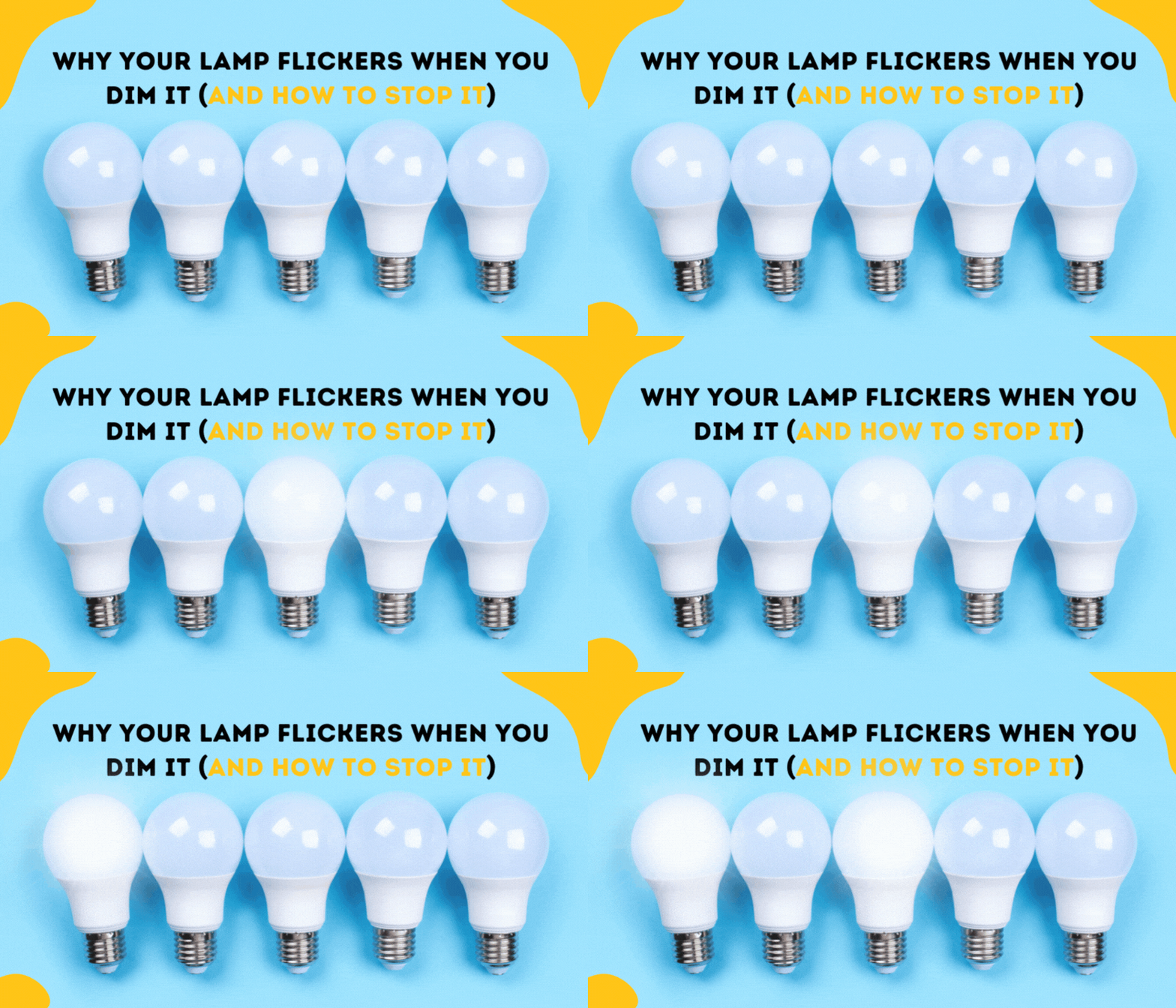
Most people switch to LED lights because they save energy and last longer. But sometimes, when you use a dimmer switch with LED bulbs, the lights start blinking or flickering. This can be annoying, distracting, and even worrying if you don’t know why it happens. In this article, you will learn why LED lights blink on dimmers, how to fix the problem, and what you need to know to avoid it in the future. You’ll also see practical comparisons, real-life examples, and expert advice to help you make better decisions.
Why Led Lights Blink On Dimmer Switches
LED lights are different from old bulbs like incandescent or halogen. These older bulbs use simple technology. When you change the dimmer, you reduce the power, and the bulb dims smoothly. LEDs work differently. They need a constant current and have electronic parts inside that control the light. If the dimmer switch is not made for LED bulbs, it can cause problems.
Many dimmers in homes are designed for incandescent bulbs, not for LEDs. When you connect an LED to the wrong dimmer, the circuit may not deliver the correct voltage or current. This mismatch makes the LED blink, flicker, or sometimes stay off.
How Led Technology Differs
LED bulbs have a driver circuit inside. This circuit converts the power from your wall into the right kind of electricity for the LED. Dimmers work by cutting the power on and off very quickly. If the LED driver cannot handle this, the bulb blinks. This is why using the right dimmer is so important.
Typical Signs Of Blinking
Some signs that your LED is blinking due to the dimmer:
- The light flickers when you change the brightness
- The LED blinks or turns off at low brightness
- The bulb flashes quickly or randomly
- Multiple LED bulbs blink together
If you notice these signs, the problem is likely the dimmer or the bulb.
Common Causes Of Led Blinking On Dimmers
Understanding why blinking happens helps you fix it faster. Here are the main reasons:
- Incompatible dimmer switch: Most old dimmers are made for bulbs that draw more power. LEDs use less power, so the dimmer may not work correctly.
- Low wattage load: If you use only one or two LED bulbs, the total power may be too low for the dimmer to control.
- Poor quality LED bulb: Cheap bulbs may not have good driver circuits. They can flicker, blink, or fail with dimmers.
- Faulty wiring: Loose or damaged wires can cause blinking. This is less common but possible.
- Electrical interference: Other devices in the home can create interference, causing blinking.
- Old dimmer design: Some dimmers use technology that does not work with LEDs, especially “leading edge” dimmers.
Let’s compare dimmer types to see which works best with LEDs.
| Dimmer Type | Works with LED? | Typical Problems |
|---|---|---|
| Leading Edge | No | Blinking, flickering, no dimming |
| Trailing Edge | Yes | Smoother dimming, less blinking |
| Universal | Yes | Works with most bulbs |
Trailing edge dimmers are made for low-wattage bulbs like LEDs. Universal dimmers can handle both old and new bulb types.
Credit: www.myplanetled.com
How To Fix Led Blinking On Dimmer Switches
Solving the blinking problem is usually simple if you know what to check. Here are the steps you should take:
1. Check Dimmer Compatibility
Look at your dimmer switch. Is it made for LED bulbs? The packaging or the switch itself should say “LED compatible,” “trailing edge,” or “universal.” If you see “incandescent” or “leading edge,” it’s probably not compatible.
2. Try A Different Led Bulb
Not all LEDs are equal. Some brands work better with dimmers. Try using a high-quality bulb labeled “dimmable” and “compatible with LED dimmers. ” Avoid cheap, no-name bulbs. If the blinking stops, the problem was the bulb.
3. Replace The Dimmer Switch
If your dimmer is old or not made for LEDs, replace it. Choose a trailing edge or universal dimmer. This usually solves the problem. Installing a dimmer is simple for most people, but if you’re not sure, ask an electrician.
4. Increase The Load
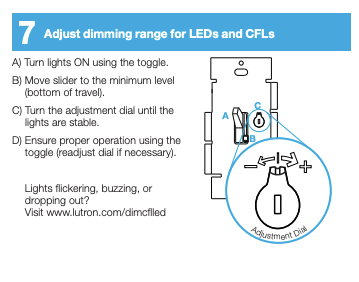
If you use only one LED bulb, the dimmer may not see enough load. Try adding another bulb or use a dummy load (a small resistor or device that adds power). Some LED dimmers have a minimum load requirement.
5. Check Wiring And Connections
Loose wires can cause blinking. Turn off the power, open the switch, and check connections. If wires are loose or damaged, fix them. If you’re not comfortable, call a professional.
6. Reduce Electrical Interference
Unplug other devices or move them away from the dimmer circuit. Sometimes interference from appliances or electronics causes blinking.
7. Update Bulb Firmware
Some smart LED bulbs have software updates. If you use smart bulbs, check the app for updates. This can fix blinking caused by software bugs.
| Fix | Success Rate | Best For |
|---|---|---|
| Switch to LED-compatible dimmer | 90% | Most homes |
| Use quality dimmable LED | 80% | Single bulb issues |
| Increase load | 70% | Small circuits |
| Check wiring | 50% | Old homes |
Choosing The Right Dimmer For Led Lights
Picking the right dimmer is key to avoiding blinking. Here’s what you should look for:
- LED compatibility: Make sure the dimmer says “LED compatible” or “trailing edge.”
- Wattage range: Check the minimum and maximum wattage. LED bulbs use less power. If the dimmer has a high minimum, it may not work.
- Quality and brand: Stick to trusted brands. Cheap dimmers may cause problems.
- Number of bulbs: If you have many bulbs, check the total wattage. Some dimmers cannot handle large loads.
Common Mistakes When Buying A Dimmer
- Ignoring compatibility: Many buyers do not check if the dimmer works with LEDs.
- Buying cheap products: Low-cost dimmers often fail with LED bulbs.
- Not checking wattage: If you use too few bulbs, the dimmer may not work.
- Mixing bulb types: Using LED and incandescent bulbs together can cause blinking.
- Skipping professional advice: If you are unsure, ask an expert.
Real-life Examples Of Led Blinking Issues
Let’s look at some real-world cases to understand how blinking happens and how people fix it.
Example 1: Blinking In Living Room
Sarah installed new LED bulbs in her living room. She used her old dimmer switch, which was made for incandescent bulbs. When she dimmed the lights, they started blinking. After checking the dimmer, she found it was a leading edge type.
She replaced it with a trailing edge dimmer, and the blinking stopped.
Example 2: Flickering At Low Brightness
John used cheap LED bulbs in his bedroom. When he set the brightness low, the bulbs flickered and sometimes turned off. He switched to premium, dimmable LEDs and the problem went away.
Example 3: Smart Bulb Firmware
Mike installed smart LED bulbs with an app. After a software update, the bulbs started blinking randomly. He checked for new firmware in the app and updated the bulbs. The blinking stopped.
Example 4: Electrical Interference
In a small office, LED lights blinked when the copier was used. The copier created electrical noise that affected the dimmer circuit. Moving the copier to a different outlet solved the problem.
Technical Insights: Why Dimmer Circuits Cause Blinking
Behind the scenes, dimmers control brightness by cutting the power in rapid cycles. There are two main types:
- Leading edge: Cuts the power at the start of each cycle. Works with high-wattage bulbs but poorly with LEDs.
- Trailing edge: Cuts the power at the end of each cycle. Designed for low-wattage bulbs like LEDs.
LED drivers can handle trailing edge dimmers better. If the driver is not good, or the dimmer is not matched, the bulb blinks.
Advanced Example: Minimum Load Issues
LED bulbs are so efficient that they use very little power. Old dimmers expect at least 40W or more. If you install just one 8W LED, the dimmer cannot control it correctly, causing blinking. Adding more bulbs or using a dummy load fixes this.
Cost Impact And Savings
Blinking LEDs may seem like a small problem, but they can waste energy and reduce the lifespan of the bulb. Old dimmers can damage LEDs, making you replace bulbs more often.
Comparing Costs: Led Vs Incandescent
| Bulb Type | Avg Price | Avg Lifespan | Energy Used (per year) |
|---|---|---|---|
| LED | $5 | 25,000 hours | 60 kWh |
| Incandescent | $1 | 1,200 hours | 330 kWh |
LEDs save money over time, but only if you use them with the right dimmer.
Tips For Smooth Led Dimming
If you want your LEDs to dim smoothly and without blinking, follow these practical tips:
- Always buy dimmable LED bulbs from trusted brands.
- Use trailing edge or universal dimmers.
- Check the wattage limits on your dimmer.
- Install more than one LED bulb if your dimmer has a minimum load.
- Avoid mixing bulb types on the same dimmer.
- Update smart bulbs regularly.
- If you notice blinking, try different bulbs or dimmers until you find the best match.
Many beginners forget to check the minimum load or the dimmer type. This is a common mistake that leads to blinking issues.

Credit: www.support.getzooz.com
Led Dimming In Smart Homes
Smart homes use LED bulbs that can be controlled by apps or voice assistants. These bulbs often have built-in dimming. If you use a smart bulb with a regular dimmer, blinking can happen. Always use smart bulbs with standard switches or their own dimming system.
Example: Smart Bulb Dimming
If you have Philips Hue bulbs, dim them with the app or smart switch. Using a wall dimmer may cause blinking or damage the bulb.
Expert Advice: When To Call An Electrician
Most blinking problems can be solved by replacing the dimmer or bulb. But sometimes, wiring issues or complex setups need a professional. If you are not sure, or the problem doesn’t go away after trying fixes, call an electrician. Safety comes first.
Credit: diy.stackexchange.com
Led Dimmer Compatibility Checklist
Before buying or installing, check these points:
- Is the dimmer labeled “LED compatible”?
- Does the dimmer support the wattage of your bulbs?
- Are your LED bulbs labeled “dimmable”?
- Are you using only LED bulbs on the circuit?
- Is the wiring secure and correct?
- Have you updated smart bulb firmware?
Checking these points saves time and money.
Non-obvious Insights For Beginners
- Minimum load matters: Most people forget that dimmers need a minimum wattage. If your circuit has too few LEDs, the dimmer cannot control them. Always check the minimum load.
- Mixing bulb types increases problems: Using LED and incandescent bulbs together can confuse the dimmer circuit, causing blinking. Stick to one bulb type per dimmer.
- Smart dimmers and bulbs may conflict: If you use smart dimmers with smart bulbs, their signals can clash, causing blinking or failure.
These points are often missed by new users but are critical for smooth operation.
Frequently Asked Questions
Why Do Led Lights Blink On My Old Dimmer Switch?
Old dimmer switches are designed for incandescent bulbs. They do not work with LED technology because LEDs use much less power and need a different type of dimmer. This mismatch causes blinking or flickering.
Can I Use Any Dimmer Switch With Led Bulbs?
No, you need a trailing edge or LED-compatible dimmer. Using the wrong dimmer can cause blinking, poor dimming, or even damage the bulb.
How Do I Know If My Led Bulb Is Dimmable?
Check the packaging or the bulb itself. It should say “dimmable. ” If it doesn’t, the bulb will not work with dimmers and may blink or turn off.
Is It Safe If My Led Lights Blink On Dimmer?
Blinking is usually not dangerous, but it can reduce the life of the bulb and waste energy. If blinking continues, check the dimmer and bulb compatibility, or call an electrician.
What’s The Best Way To Fix Led Blinking?
The best fix is to use a dimmable LED bulb and a trailing edge or universal dimmer. If you still see blinking, check wiring, increase the load, or try a higher-quality bulb.
LED lighting is a great way to save energy and money, but only if you set it up right. Blinking on dimmers is a common issue, but with the steps and advice above, you can solve it quickly. Always check compatibility, buy quality products, and make sure your wiring is secure. If you run into trouble, expert help is just a call away. For more in-depth technical explanations, visit Wikipedia. With the right setup, your LED lights will shine bright—without blinking—every time you dim them.