
When your Hart battery refuses to charge and shows a blinking red light, it can quickly turn a productive day into a stressful one. Whether you’re a seasoned DIY enthusiast or just getting started with cordless tools, battery problems can be confusing and frustrating. Understanding what this blinking red light means, why it happens, and how to fix it can save you time, money, and unnecessary headaches. This guide explores every angle of the issue, from quick checks to deeper troubleshooting, so you can get your tools back in action.
What Does The Blinking Red Light On A Hart Battery Charger Mean?
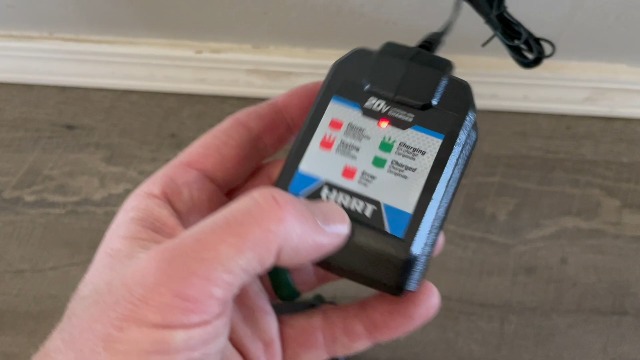
A blinking red light is more than just an annoyance. On Hart battery chargers, this signal is designed to warn you of a problem. But not all blinking red lights mean the same thing. Here’s what you need to know:
- Steady red light: Charging normally.
- Flashing red light: Fault detected, charging stopped.
The charger’s manual usually explains the light codes, but many users miss the small print or lose the booklet. The blinking red light is most often related to battery or charger problems like temperature issues, connection faults, or cell imbalance.
Common Causes
- Battery too hot or too cold: Lithium-ion batteries are sensitive to temperature extremes.
- Poor connection: Dirt, dust, or corrosion on the contacts.
- Deep discharge: Battery voltage has dropped too low.
- Charger malfunction: Internal charger error.
- Battery fault: One or more cells are damaged or out of balance.
It’s important to remember that the charger is programmed to protect both itself and the battery. If it detects a risk, it will stop charging and alert you with a blinking red light.
How Hart Batteries And Chargers Work Together
Hart uses lithium-ion battery technology for most of its cordless tools. These batteries deliver high energy density and long life but require careful management. The charger communicates with the battery through small data pins, checking the battery’s health, temperature, and voltage.
If the charger detects a problem, it interrupts the process and flashes the red light. This built-in safety system is meant to prevent overheating, overcharging, and even fires.
Key Charger And Battery Features
- Automatic shut-off to prevent overcharging.
- Temperature sensors inside the battery pack.
- Cell balancing to keep all cells at similar voltages.
- Error codes shown through light sequences.
Understanding these features helps you troubleshoot more confidently and prevents accidental damage.
Credit: www.amazon.com
Quick Troubleshooting Steps For A Blinking Red Light
When you see that blinking red light, don’t panic. Many issues are simple to fix. Follow these steps to narrow down the problem:
1. Remove And Reseat The Battery
Sometimes, the battery is not seated correctly. Take it out, inspect the contacts, and insert it firmly until you hear a click. This solves the problem in many cases.
2. Check For Dirt And Debris
Dust, wood shavings, or even a drop of oil can block the contacts. Use a soft brush or a dry cloth to clean both the battery terminals and the charger contacts. Avoid using water or harsh chemicals.
3. Test A Different Battery Or Charger
If you have another Hart battery or charger, swap them to isolate the problem. Here’s a simple comparison:
| Test | Result | Likely Problem |
|---|---|---|
| Different battery, same charger | Only one battery blinks | Battery is faulty |
| Same battery, different charger | Only one charger blinks | Charger is faulty |
| All combinations blink | Both blink | Possible contact or compatibility issue |
4. Let The Battery Cool Down Or Warm Up
If you just used the tool heavily, the battery may be too hot. Let it rest for 30–60 minutes at room temperature. In cold weather, bring the battery indoors to warm up.
5. Look For Physical Damage
Check for cracks, swelling, or leaking fluid. If you see any of these, stop using the battery immediately. Damaged lithium-ion batteries are dangerous and should not be recharged.
Deeper Diagnostic Steps
If the quick checks do not solve the problem, try these steps before considering replacement.
Measuring Battery Voltage
A digital multimeter can measure your battery’s voltage. Compare your reading to the battery’s rated voltage. For example, a fully charged 20V Hart battery should read close to 20 volts (actually about 18–21V).
If the voltage is far below normal (for example, 5V on a 20V battery), the battery may be deeply discharged. Chargers often refuse to charge deeply discharged batteries for safety.
Checking Charger Output
Use the multimeter to test the charger’s output. The correct output voltage is usually printed on the bottom of the charger. If your charger is not delivering any voltage, it could be defective.
Trying A Slow “waking Up” Method
Some users have had success with “jump-starting” a deeply discharged battery. This involves briefly connecting the dead battery in parallel with a charged battery to raise its voltage above the charger’s safety threshold. However, this method carries risks and should only be attempted by those comfortable with electronics.
If unsure, it’s best to avoid this technique.
Common Problems And Solutions
Let’s look at the most frequent issues and how to address them, using real-world examples.
Problem 1: Battery Is Too Hot Or Too Cold
Example: You finish drilling a series of holes and immediately place the battery on the charger. The red light blinks.
Solution: Wait 30–60 minutes until the battery returns to room temperature, then try charging again.
Problem 2: Dirty Or Corroded Contacts
Example: The charger is kept in a dusty garage. The red light blinks no matter which battery you use.
Solution: Clean all contacts carefully with a dry cloth or a cotton swab dipped in rubbing alcohol.
Problem 3: Deeply Discharged Battery
Example: You forgot the battery in the tool for weeks. Now it won’t charge and shows a blinking red light.
Solution: Try “jump-starting” with a parallel connection (only if you are confident). Otherwise, replacement may be necessary.
Problem 4: Charger Failure
Example: The charger has been dropped or exposed to moisture. Now it flashes red with all batteries.
Solution: Test with a known good charger. If it works, replace the faulty charger.
Problem 5: Battery Cell Failure
Example: The battery was dropped from a height and now shows a blinking red light.
Solution: Discontinue use and recycle the battery at a proper facility. Do not attempt to repair swollen or leaking lithium-ion batteries.
How To Prevent Future Charging Problems
Prevention is easier than repair. Here’s how you can protect your investment and avoid the blinking red light:
- Store batteries indoors where temperatures are moderate.
- Charge only at room temperature—avoid hot garages or freezing sheds.
- Clean contacts regularly to maintain a good connection.
- Don’t leave batteries on the charger once fully charged.
- Use the correct charger for your battery model.
- Cycle batteries regularly—don’t let them sit unused for months.
- Inspect batteries for damage before charging.
Following these simple habits extends battery life and reduces unexpected failures.
Comparing Hart Batteries And Chargers With Other Brands
Hart tools are popular for their value and compatibility. But how do their batteries and chargers compare to brands like DeWalt or Ryobi?
| Feature | Hart | DeWalt | Ryobi |
|---|---|---|---|
| Battery Voltage | 20V (18V nominal) | 20V Max (18V nominal) | 18V |
| Temperature Protection | Yes | Yes | Yes |
| Cell Balancing | Basic | Advanced | Basic |
| Warranty | 3 Years | 3 Years | 3 Years |
| Charger Error Codes | Red/Green LEDs | LEDs + LCD (on some) | LEDs |
Insight: Higher-end brands sometimes offer more advanced diagnostics and protections. However, Hart batteries are reliable for most common DIY tasks when maintained correctly.
When To Replace Your Hart Battery Or Charger
No battery lasts forever. Even with good care, lithium-ion batteries degrade over time. Here are signs that replacement is the best option:
- Battery holds charge for only a short time
- Charger never completes charging
- Swelling or leaking battery pack
- Physical cracks or damage
Hart batteries typically last for 2–5 years with regular use. Chargers may last longer but can fail if exposed to moisture or impact.
If you’re unsure whether to replace the battery or charger, use the comparison test described earlier. If both are several years old, replacing both may be the most reliable solution.

Credit: www.reddit.com
Real-world User Experiences
Many users share their struggles and solutions with Hart battery blinking red light problems on forums and social media. Here are a few examples:
- User 1: “My battery was left in the cold garage overnight. It wouldn’t charge in the morning. After bringing it inside for an hour, it started charging normally.”
- User 2: “I tried to charge a battery that hadn’t been used for six months. Got the blinking red light. I tried another charger at my neighbor’s house, and it worked fine—the problem was my charger.”
- User 3: “I cleaned the contacts with a pencil eraser and my battery started charging again.”
These stories show that most issues have simple fixes, but sometimes replacement is necessary.
Safety Tips When Dealing With Faulty Lithium-ion Batteries
Lithium-ion batteries, while safe when used correctly, can be hazardous if damaged or misused. Here are important safety guidelines:
- Never puncture, crush, or open the battery pack.
- Do not expose batteries to water or fire.
- Recycle faulty batteries at a certified collection point. Do not throw in the trash.
- If a battery leaks or swells, handle with gloves and store it in a fireproof container until it can be disposed of safely.
For more detailed safety information, you can consult the EPA’s lithium-ion battery recycling guidelines.
How To Maximize Hart Battery Life
Getting the most out of your Hart batteries means following a few best practices:
- Avoid complete discharge: Recharge batteries before they run completely flat.
- Store partially charged: If storing for weeks, keep the battery at about 50% charge.
- Use the correct charger: Only use official Hart chargers for the safest, most reliable performance.
- Don’t mix old and new cells: Always use batteries of the same age and type with your tools.
- Label your batteries: If you own several, mark the purchase date to track their age.
These small habits can extend your batteries’ usable life by 30–50%.
The Environmental Impact Of Battery Disposal
Throwing old lithium-ion batteries in the trash is not just unsafe—it’s harmful to the environment. Batteries contain metals and chemicals that can leak into soil and water.
Proper disposal: Always recycle batteries at local collection centers or home improvement stores that accept them. Many states have laws requiring proper disposal.
Tip: Before recycling, tape over the battery terminals to prevent accidental short circuits during transportation.

Credit: www.youtube.com
Advanced Troubleshooting: Cell Balancing And Resetting
Some advanced users attempt to “reset” a battery by briefly applying a low current from a power supply or balancing individual cells. However, this method is risky and can void your warranty.
If you’re comfortable with electronics and safety precautions, you can:
- Open the battery case (not recommended for most users).
- Test each cell with a voltmeter.
- Balance cell voltages with special chargers.
But for most users, replacement is safer and more reliable.
Warranty And Support Options
Hart offers a 3-year warranty on most batteries and chargers. If your product is within the warranty period and you have proof of purchase, contact Hart customer support. They can often arrange a replacement if the battery or charger is defective.
Keep your purchase receipts and register your tools online for faster service.
Frequently Asked Questions
Why Does My Hart Battery Charger Blink Red And Green Alternately?
This usually means the charger is in diagnostic mode or the battery is not recognized. Remove and reseat the battery, clean the contacts, and try again. If the problem persists, the battery or charger may be faulty.
Can I Charge A Hart Battery With A Different Brand’s Charger?
No. Hart batteries are designed for their own chargers. Using a different brand can damage the battery, void the warranty, and create safety risks.
How Long Does It Take To Fully Charge A Hart Battery?
Charging time depends on the battery’s capacity and the charger model. For example, a 2.0Ah Hart battery typically takes about 60 minutes. Higher capacity batteries (4.0Ah, 6.0Ah) will take longer.
Are There Signs That My Battery Is About To Fail?
Yes. Watch for reduced runtime, difficulty charging, swelling, or the charger blinking red with every attempt. These signs mean the battery is nearing the end of its life.
Where Can I Recycle Hart Batteries Safely?
Most home improvement stores and local recycling centers accept lithium-ion batteries. You can find locations through the EPA’s guidelines or your local municipality.
Getting a blinking red light on your Hart battery charger is never fun, but it’s rarely the end of the road. With the right troubleshooting steps, you can often solve the problem quickly and safely. And if a replacement is needed, Hart’s warranty and recycling programs make it easy to stay safe and responsible. Take care of your batteries, and they’ll take care of your projects for years to come.