
If your Kenmore washer lid lock light is blinking, it can be confusing and frustrating. Many people worry their machine is broken or that expensive repairs are needed. But a blinking lid lock is often a signal from your washer—a way of telling you something is wrong or needs attention. This guide will help you understand what the blinking means, why it happens, and what you can do about it. You’ll also discover simple troubleshooting steps, tips for avoiding common mistakes, and answers to the most frequent questions about this problem.
What Does The Lid Lock Blinking Mean?
When you see the lid lock light flashing on your Kenmore washer, it’s not just a random event. The blinking light is a built-in alert system. It’s your washer’s way of telling you that either the lid is not locked, the lock system is malfunctioning, or there’s a safety issue preventing the cycle from starting or continuing.
Here’s what the blinking can indicate:
- The lid isn’t closed all the way
- The lock mechanism is jammed or faulty
- The washer senses a problem with the cycle
- There’s an issue with the control board or wiring
Each of these possibilities has its own solution. Understanding the cause is the first step to fixing the problem.
How The Kenmore Washer Lid Lock System Works
The lid lock system is a safety feature. It prevents the washer from running when the lid is open. This helps avoid accidents, especially during the high-speed spin cycle. When you close the lid and start a cycle, the washer sends an electric signal to the lock. If the lock detects the lid is secure, it sends a message back to the control board, and the cycle continues.
If any part of this process fails, the light will start blinking. This means:
- The washer is not sure the lid is safe to lock
- It won’t start or continue the cycle until the issue is fixed
Knowing how this safety system works helps you troubleshoot more confidently.
Common Causes Of Lid Lock Blinking
Several things can make the lid lock light blink. Here are the most frequent causes:
1. Lid Not Fully Closed
Sometimes clothes, detergent caps, or even a slight misalignment can stop the lid from closing properly.
2. Lock Mechanism Is Dirty Or Jammed
Soap residue, lint, or small objects can block the latch, preventing it from engaging.
3. Faulty Lid Lock Switch
The switch that senses the lid’s position can wear out or break.
4. Control Board Issues
The washer’s “brain” might send the wrong signals or fail to detect the lock.
5. Wiring Or Connection Problems
Loose wires or worn connectors inside the washer can interrupt signals.
6. Power Interruptions
Surges or brief outages during a cycle can confuse the washer, causing the lock light to blink.
7. Washer Paused Mid-cycle
Opening the lid during a cycle or power loss can leave the washer stuck.
8. Broken Actuator
Some Kenmore models use an actuator to sense the lid position. If it’s broken, the light may blink.
It’s important to check these causes one by one. Often, the fix is simple—like removing an item blocking the lid.
How To Troubleshoot A Blinking Lid Lock
Fixing a blinking lid lock doesn’t always need a repair technician. Many problems can be solved at home. Here’s how you can troubleshoot:
1. Pause And Reset The Washer
Many times, the washer just needs a simple reset.
- Press the Pause/Cancel button
- Wait for one minute
- Try starting the cycle again
If the light keeps blinking, unplug the washer for 1–2 minutes, then plug it back in. This resets the control board.
2. Check The Lid And Lock Area
- Make sure the lid is fully closed. Press down gently to confirm.
- Look for any objects blocking the latch—like socks or detergent caps.
- Clean around the lock area with a damp cloth to remove dust or residue.
3. Listen For The Lock
When you start a cycle, you should hear a “click” as the lock engages. If you don’t, the lock or switch may be faulty.
4. Test The Lock Mechanism
Some Kenmore washers let you run a diagnostic test. Check your user manual for instructions.
If you can’t hear or feel the lock engaging, the part might need replacement.
5. Inspect Wiring And Connections
Unplug the washer and look at the wires leading to the lock.
- Check for loose, broken, or corroded connections.
- Tighten any loose wires, but be careful not to damage them.
6. Look For Error Codes
Many Kenmore washers show error codes on the display. If you see a code (like F5, F7, or dL), look it up in your manual. It will tell you exactly what’s wrong.
7. Try A Hard Reset
If everything looks fine but the light still blinks, do a “hard reset”:
- Unplug the washer
- Wait 5–10 minutes
- Plug it back in and try again
This can clear glitches in the control board.
8. Replace The Lid Lock (if Needed)
If all else fails, the lid lock switch or actuator may be faulty.
- Find your washer’s model number (it’s usually on a sticker under the lid or on the back)
- Order the correct replacement part
- Follow a step-by-step guide or call a professional if unsure
Replacing the lock is not too difficult for someone handy with tools.
Kenmore Washer Lid Lock Blinking: Models And Differences
Kenmore washers come in many models, and each may handle the lid lock a little differently. Some have simple switches, while others use electronic sensors or actuators. Here’s a quick look at common Kenmore models and how their lid lock system works:
| Kenmore Model Series | Lid Lock Type | Common Blinking Issues |
|---|---|---|
| 400/500 Series | Mechanical switch | Latch jam, loose wiring |
| Elite Series | Electronic sensor | Sensor failure, error codes |
| HE Top Load | Actuator/switch combo | Actuator break, misalignment |
Always check your user manual for specific troubleshooting steps for your model.
Signs The Lid Lock Needs Replacement
Sometimes, repair is not enough. If you notice these signs, the lid lock probably needs to be replaced:
- The light blinks every cycle, even after reset
- The lock doesn’t click or engage at all
- The washer won’t start any cycle
- The lid can be opened during a cycle
If these symptoms are present, a new lock is often the only solution.
How To Replace A Kenmore Lid Lock
Replacing the lid lock may sound difficult, but it can be done with simple tools. Here’s a step-by-step overview:
- Unplug the washer to avoid electric shock.
- Lift the top panel (you may need to remove screws at the back).
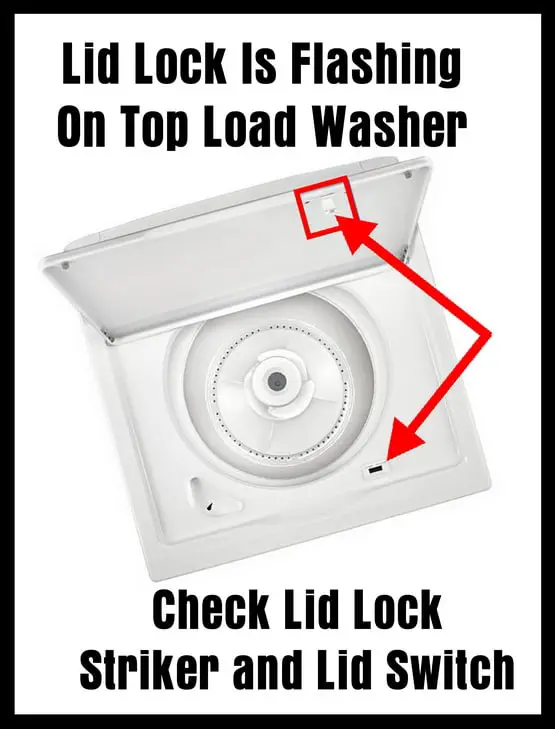
- Locate the lid lock assembly—it’s usually near the front under the lid.
- Disconnect the wire harness by gently pulling apart the connector.
- Remove mounting screws and take out the old lock.
- Install the new lock, secure it with screws.
- Reconnect the wire harness and close the top panel.
- Plug in the washer and test the cycle.
Tip: Take a photo before removing wires for easier reassembly.
When To Call A Professional
While many fixes are DIY-friendly, there are times when you should call a professional:
- If you’re not comfortable opening the washer
- If you see signs of electrical burning or melted wires
- If the new lock does not solve the problem
- If error codes persist even after reset and replacement
A technician can quickly diagnose complicated issues with the control board or wiring.
Preventing Future Lid Lock Problems
You can avoid many lid lock issues with simple habits:
- Always close the lid gently—slamming can damage the switch.
- Keep the lock area clean by wiping it weekly.
- Do not overload the washer; heavy loads strain the lock.
- Avoid opening the lid during cycles unless necessary.
- Check for small items (like coins or hairpins) that could fall into the latch area.
A little maintenance goes a long way toward preventing headaches.
Comparing Diy Vs. Professional Repair
Wondering whether to fix the lid lock yourself or call a pro? This comparison can help:
| Aspect | DIY Repair | Professional Repair |
|---|---|---|
| Cost | $20–$60 (parts only) | $100–$250 (parts & labor) |
| Time | 30–60 minutes | Same day to a few days |
| Skill Level | Basic tools and care | Professional expertise |
| Warranty | None (unless part warranty) | Work is usually guaranteed |
DIY is often cheaper and faster for simple fixes, but professionals are best for complex or uncertain problems.
Credit: www.ifixit.com
Real-world Example: Fixing A Kenmore 500 Series Lid Lock
Let’s walk through a common case. Maria owns a Kenmore 500 series top-loader. One day, the lid lock light starts blinking, and the washer won’t start. Here’s what she does:
- She checks for items stuck in the latch—finds a small sock.
- Removes the sock and closes the lid tightly.
- The light still blinks. She unplugs the washer for 2 minutes to reset.
- After plugging it back in, the light stops blinking, and the washer works.
If the problem returned, Maria would have checked wiring, then replaced the lock if needed.
Insight: Many blinking lid lock problems are fixed by simply checking for obstructions and resetting the machine. Replacement is only needed if these steps fail.
Common Mistakes To Avoid
It’s easy to make errors when trying to fix a lid lock blinking issue. Here are some mistakes to watch out for:
- Forcing the lid closed can break the lock.
- Ignoring the blinking light and running the washer can damage internal parts.
- Replacing the lock without checking for obstructions or loose wires often wastes time and money.
- Skipping the reset step can leave the washer stuck in error mode.
- Not unplugging the washer before repairs can cause electric shock.
Taking your time and following safe steps is always best.
Data: How Often Do Lid Locks Fail?
Kenmore washers are reliable, but lid lock failures are not rare. Based on repair data:
- About 10–15% of all Kenmore washer service calls are for lid lock issues.
- The most common age for lid lock failure is after 3–5 years of regular use.
- Machines in homes with children (where lids are opened mid-cycle) have a higher failure rate.
This means if your washer is a few years old, you’re not alone in facing this problem.
What To Do If The Light Blinks During A Cycle
If the lid lock light starts blinking in the middle of a wash:
- Stop the cycle and unplug the washer.
- Open the lid and check for anything stuck or blocking the lock.
- Close the lid and plug the washer back in.
- Restart the cycle.
If the light keeps blinking, run a diagnostic or call a pro.

Credit: www.youtube.com
Are Lid Locks Covered By Warranty?
Most Kenmore washers come with a 1-year warranty covering parts and labor. Some extended warranties may last longer. However:
- Lid locks are often considered wear-and-tear parts
- After the first year, you may need to pay for replacement
Always check your warranty terms before buying new parts.
Table: Symptoms, Causes, And Fixes
A quick reference for lid lock blinking issues:
| Symptom | Possible Cause | Likely Fix |
|---|---|---|
| Light blinks, washer won’t start | Lid not closed, lock jammed | Clear obstruction, reset washer |
| Light blinks during cycle | Power surge, lock failure | Reset washer, replace lock if needed |
| No lock “click” sound | Broken switch or actuator | Replace lock mechanism |
| Error code on display | Control board detects fault | Look up code, follow manual |
Credit: removeandreplace.com
Extra Tips For A Long-lasting Kenmore Washer
- Use only recommended detergent. Too much soap can build up around the lock.
- Balance loads to avoid violent shaking, which can loosen lock parts.
- Schedule yearly checks if your washer is over 5 years old.
- Teach family members not to open the lid during cycles.
These simple steps help keep your washer running smoothly.
When Is It Time To Replace The Washer?
If your Kenmore washer is over 10 years old and lid lock or control board problems keep returning, it may be time for a new machine. Modern washers offer better efficiency and advanced safety features. For a full overview of your options, visit the official Kenmore Washer Product Page.
Frequently Asked Questions
Why Does My Kenmore Washer Lid Lock Keep Blinking Even After Closing The Lid?
This usually happens when the lock mechanism is dirty, jammed, or faulty. It can also be caused by loose wiring or a malfunctioning control board. Try cleaning the lock area, resetting the washer, and checking the wires. If the problem continues, replacement may be needed.
Can I Bypass The Lid Lock On My Kenmore Washer?
Bypassing the lid lock is not recommended for safety reasons. The lock is designed to protect you from moving parts during the cycle. Tampering with safety features can cause injury or void your warranty. Always repair or replace the lock properly.
How Much Does It Cost To Fix A Blinking Lid Lock?
DIY replacement usually costs $20–$60 for the part. Professional repair can cost $100–$250, depending on labor and your location. If the issue is wiring or the control board, costs may be higher.
Is It Safe To Use My Washer If The Lid Lock Light Is Blinking?
No, you should not use the washer until the problem is fixed. The blinking light means the safety feature is not working. Running the washer this way can cause further damage or safety risks.
Where Can I Find The Correct Lid Lock Part For My Kenmore Washer?
Check your washer’s model number (often under the lid or back panel), then search for the matching lid lock assembly at appliance parts stores or the official Kenmore website. Bring the old part or a photo to ensure an exact match.
A blinking Kenmore washer lid lock can be stressful, but it’s often a simple problem with a clear solution. By understanding what the blinking means, checking the common causes, and following safe troubleshooting steps, you can fix most issues yourself. If not, a professional can help. Regular care and attention will help your washer last for years to come.