
When your LG dryer suddenly starts blinking the Dry light, it can feel confusing and frustrating. You just want your clothes to dry, but instead you see a flashing signal and maybe your dryer stops working as expected. Many people face this issue, but few truly understand what it means—or how to fix it without calling a technician. This guide explains why the LG dryer Dry light blinks, what you can do about it, and how to avoid common mistakes. With the right steps, you can save time, money, and frustration.
What Does The Dry Light Blinking Mean?
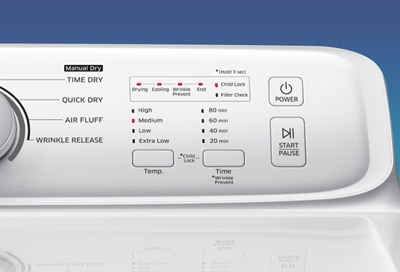
The Dry light on an LG dryer is a part of the control panel that tells you about the drying cycle’s progress. When this light blinks, it is usually a warning from the machine. It’s not just a random glitch—your dryer is trying to tell you something is wrong or needs attention. Understanding the meaning behind the blinking is the first step toward a solution.
Most of the time, a blinking Dry light means one of these:
- The dryer has detected a problem with airflow.
- There is a sensor or control system issue.
- The load is too small or too large.
- There is a blockage or lint build-up.
Ignoring these signs can lead to bigger problems, like overheating or damage to your dryer. It’s important to take action as soon as you see the light blinking.
Common Causes Of The Blinking Dry Light
Several issues can trigger the blinking Dry light. Let’s look at the most frequent causes and why they matter.
1. Blocked Lint Filter
The lint filter collects fibers from your clothes during drying. If it’s full, airflow is reduced. The dryer senses this and warns you by blinking the Dry light.
- Always clean the lint filter before every cycle.
- Built-up lint can cause overheating and even fires.
2. Ventilation Problems
Your dryer pushes hot, moist air out through a vent. If the vent is blocked or crushed, airflow drops and the dryer’s sensors respond.
- Check for kinked, squashed, or blocked vent hoses.
- Make sure the outdoor vent cap opens easily and is not clogged with lint.
3. Sensor Issues
LG dryers use moisture and temperature sensors to control drying. If these sensors are dirty or faulty, they may trigger the Dry light.
- Wipe sensors gently with a soft cloth—avoid harsh chemicals.
- Sensors can fail over time and may need replacement.
4. Overloaded Or Undersized Loads
Dryers work best with medium-sized loads. Overloading makes it hard for air to move, while too small a load confuses sensors.
- Try not to fill the drum more than three-quarters full.
- If drying only one or two items, add a few clean towels to help the sensors read correctly.
5. Control Board Errors
The main control board is the dryer’s “brain.” Sometimes, power surges or software glitches cause the board to send false warnings.
- Unplug the dryer for 5 minutes, then plug it back in.
- If the light keeps blinking, the board may need professional attention.
Credit: www.samsung.com
Diagnosing The Problem Yourself
Before you call a technician, try some basic troubleshooting steps. Many problems are easy to fix at home.
Step 1: Power Reset
Unplug the dryer from the wall. Wait at least 5 minutes. Plug it back in. This can clear minor glitches in the control system.
Step 2: Check The Lint Filter
Remove the lint filter and clean it. Even a thin layer of lint can reduce airflow.
Step 3: Inspect The Vent Hose
Pull the dryer away from the wall. Check the vent hose for kinks, blockages, or crush points. Remove the hose from the dryer and look inside for lint clogs. Reattach it carefully.
Step 4: Clean The Moisture Sensors
Locate the two metal bars inside the drum, often below the door. Wipe them with a soft cloth dampened with a bit of vinegar or water. Dry them well.
Step 5: Test With A Proper Load
Try drying a medium-sized load (for example, 5-6 bath towels). If the blinking stops, your problem may have been an undersized or overloaded drum.
If these steps do not fix the blinking Dry light, the issue may be more serious.
When To Call A Technician
Some dryer problems require expert help. If you have tried the basic steps above and the blinking continues, it’s time to call a professional. Here are clear signs you need help:
- The dryer will not start at all.
- The drum does not turn.
- You smell burning or see smoke.
- The Dry light blinks with an error code (e.g., “d80”, “d90”, “d95”).
Trying to fix electrical or control board issues yourself can be dangerous. Professionals have the right tools and experience.
Error Codes Related To The Blinking Dry Light
LG dryers often show an error code along with the blinking Dry light. Each code has a meaning.
Here’s a quick reference for common error codes:
| Error Code | What It Means | What To Do |
|---|---|---|
| d80, d90, d95 | Airflow restriction | Check and clean vents, lint filter |
| tE1, tE2 | Temperature sensor fault | Check sensors, call for service if needed |
| nP | Incorrect power supply | Check outlet voltage, call electrician |
| CL | Child lock on | Hold child lock button for 3 seconds to turn off |
| FO | Filter not fitted properly | Re-insert and secure lint filter |
If you see an error code, look up the meaning in your dryer’s manual or on the LG support website.
How Lg Dryer Sensors Work
Modern LG dryers use several sensors to monitor temperature, moisture, and airflow. These sensors help the dryer decide when clothes are dry and keep the machine safe.
Types Of Sensors
- Moisture sensors: Detect how wet your clothes are. When moisture is low, the cycle ends.
- Temperature sensors: Check the heat inside the drum to prevent overheating.
- Airflow sensors: Make sure hot air is moving out of the dryer.
If any sensor gives the wrong reading (due to dirt, lint, or failure), the dryer may blink the Dry light as a warning.
Common Sensor Problems
- Buildup of fabric softener or detergent on the moisture sensors.
- Lint on the temperature or airflow sensors.
- Physical damage from coins or objects left in pockets.
Cleaning sensors regularly can prevent most issues.
Maintenance Tips To Prevent Blinking Dry Light
Regular care can keep your LG dryer running smoothly and avoid unwanted warnings. Here are some practical tips:
- Clean the lint filter after every load.
- Check the vent hose monthly for blockages.
- Wipe moisture sensors with a damp cloth every few weeks.
- Vacuum behind and under the dryer every 3-6 months.
- Avoid using too many dryer sheets, as these leave a film on sensors.
- Do not overload the dryer—follow the user manual for load size.
For homes with pets or heavy laundry use, increase the frequency of these tasks.
Comparing Lg Dryers With Other Brands
If you’re considering buying a new dryer or want to know how LG compares to others, look at these factors:
| Feature | LG Dryer | Samsung Dryer | Whirlpool Dryer |
|---|---|---|---|
| Sensor Accuracy | High | High | Medium |
| Control Panel | Modern, intuitive | Modern, touch-based | Traditional, dial-based |
| Common Error Warnings | Clear codes + lights | Clear codes | Basic lights |
| Maintenance Needs | Moderate | Moderate | Low |
| Repair Costs | Medium | Medium-High | Low-Medium |
LG dryers are known for their precise sensors and clear error warnings. However, their advanced features mean you must keep up with regular maintenance.
Real-world Examples
Let’s look at two real situations where the LG dryer Dry light blinking caused confusion:
Sarah’s Story: The Blocked Vent
Sarah noticed her LG dryer’s Dry light blinking after every load. She checked the lint filter, but it was clean. After reading her manual, she checked the vent hose and found a large clump of lint blocking the air. Once she cleaned it out, her dryer worked perfectly.
Insight: Sometimes, problems are not where you expect. Always check both the lint filter and the vent hose.
Mike’s Story: Sensor Confusion
Mike only dried one shirt at a time. The dryer kept blinking the Dry light and stopping early. When he added a few towels with his shirt, the blinking stopped and the clothes dried completely.
Insight: Too-small loads can make sensors read incorrectly. Add extra items to help the dryer “see” the real moisture level.
Cost Of Repairs And When To Replace
How much does it cost to fix a blinking Dry light problem? It depends on the cause.
| Problem | DIY Cost | Professional Repair Cost | Replacement Needed? |
|---|---|---|---|
| Clean lint filter/vent | $0-$20 | $50-$100 | No |
| Replace sensors | $15-$60 | $120-$250 | No |
| Control board | N/A | $200-$400 | Sometimes |
| New dryer | N/A | N/A | $700-$1200 |
Most blinking Dry light issues are easy and cheap to fix. Only rarely will you need to replace the whole dryer.
Two Non-obvious Insights
- Humidity in your laundry room can affect the sensors. If the room is very humid, the dryer may think clothes are still wet. Try to keep the area well-ventilated.
- Using high-efficiency (HE) detergents in the washing machine reduces residue on clothes, so less buildup gets on the dryer’s sensors. This can prevent sensor-related blinking problems.
Safety Tips When Dealing With Your Dryer
- Always unplug your dryer before cleaning or inspecting inside.
- Never block the vent with furniture or boxes.
- If you smell burning, stop using the dryer immediately and call for help.
- Do not use water directly on electrical parts or inside the control panel.
- Keep children and pets away from the dryer during troubleshooting.

Credit: www.lg.com
Resources For Further Help
If you need more information, the LG official support website has manuals and troubleshooting guides. Many home improvement forums and YouTube channels also offer step-by-step videos. For in-depth airflow or code issues, contact a local appliance repair service.
For a deeper understanding of how clothes dryers work and safety standards, the Wikipedia page on clothes dryers is a helpful resource.
Frequently Asked Questions
Why Does My Lg Dryer Dry Light Keep Blinking Even After Cleaning The Lint Filter?
If the blinking continues after you clean the lint filter, check the vent hose and outside vent for blockages. Also, make sure you are not overloading or underloading the dryer. If everything looks clean and the load is correct, the sensors may need cleaning or replacement.
Can I Use My Lg Dryer While The Dry Light Is Blinking?
It’s not safe to keep using your dryer with a blinking Dry light. The warning means something is wrong—usually with airflow or sensors. Ignoring it could damage your dryer or cause overheating. Fix the problem before running more cycles.
How Often Should I Clean My Lg Dryer’s Vent?
Clean the vent hose and outdoor vent at least every 3-6 months. If you notice longer drying times, burning smells, or frequent warnings, check it sooner. Homes with pets or heavy laundry use should clean vents more often.
Does A Blinking Dry Light Mean My Dryer Is Broken?
Not always. The blinking Dry light is usually a warning, not a sign of serious damage. Most problems are simple to fix—like cleaning the lint filter or vent. If the dryer shows error codes or will not run, call a technician.
Where Can I Find My Lg Dryer’s Error Code List?
You can find error codes in your dryer’s user manual or on the official LG support website. Some dryers also display explanations on the control panel. If you’re not sure, look up your model number online for details.
—
A blinking Dry light on your LG dryer is not something to ignore, but it’s rarely a cause for panic. Most of the time, a little cleaning and attention will solve the problem. Stay safe, follow the tips above, and your dryer will keep your clothes fresh for years to come.
Credit: www.lg.com