
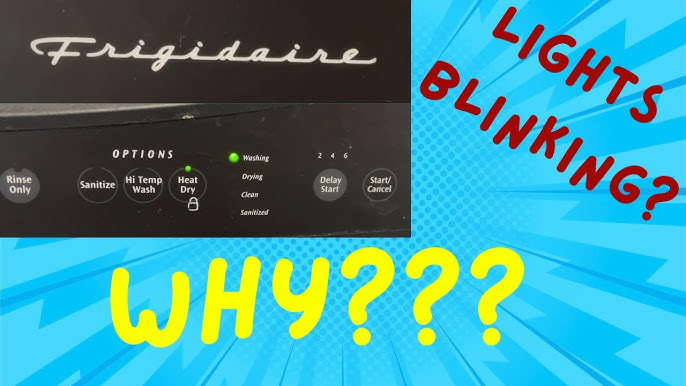
If your Frigidaire dishwasher is flashing lights at you, it’s more than just a minor annoyance. For many people, blinking lights mean the dishwasher won’t start, won’t wash, or gets stuck mid-cycle. These error codes are not random: they are the machine’s way of telling you something is wrong. But what do these blinking lights actually mean? And, more importantly, how can you fix them? Understanding Frigidaire dishwasher blinking lights error codes can save you time, stress, and money on unnecessary repairs.
This guide will help you decode those flashing signals, explain what each common error code means, and give you step-by-step solutions. Whether you’re a homeowner, renter, or maintenance worker, you’ll learn how to get your dishwasher running smoothly again—even if you’re not a technical expert.
Let’s uncover the secrets behind those blinking lights and get your kitchen back on track.
Why Frigidaire Dishwashers Use Blinking Light Codes
Frigidaire dishwashers, like many modern appliances, use blinking light error codes as an easy way to communicate problems without a digital display. These codes allow even basic models to show what’s wrong, such as a water supply issue, door latch problem, or faulty sensor. Instead of guessing or calling a technician right away, users can often diagnose and sometimes even fix the problem themselves.
The blinking lights usually appear on the control panel—sometimes on the Start/Cancel button, other times on Wash, Dry, or Clean indicators. The pattern and speed of the blinks are key. Some codes involve a specific button blinking a set number of times, while others use a sequence of different lights. Understanding the pattern is the first step to solving the issue.
How To Read Frigidaire Dishwasher Blinking Lights
Before you can fix the problem, you need to know what the blinking lights mean. Here’s how to approach it:
- Count the Blinks: Watch carefully and count how many times the light blinks before pausing or repeating.
- Check the Sequence: Some errors use two or more lights blinking in a certain order.
- Refer to the Manual: If you have your dishwasher’s manual, it should list the main error codes. If not, many can be found online.
- Model Variations: Different Frigidaire models (e.g., Gallery, Professional, standard) may use slightly different codes, so check your model number.
- Look for Accompanying Sounds: Beeps, clicks, or other noises can give extra clues.
If you’re unsure, take a quick video with your phone. You can show this to a repair technician or search online forums for your exact code.
Common Frigidaire Dishwasher Blinking Lights Error Codes
Let’s break down the most common blinking light codes you’ll see on Frigidaire dishwashers, what they mean, and how you can fix them.
1. Start/cancel Button Blinking
When the Start/Cancel light blinks, it’s often a signal for a door latch issue or cycle interruption.
- 1 Blink: Usually means the door isn’t fully closed or the latch isn’t engaged. Double-check the door and latch.
- 2 Blinks: Indicates the control board has detected a cycle interruption. This can happen if the door is opened mid-cycle.
- 3 Blinks: Points to a problem with the wash motor or water supply.
How to Fix:
- Make sure the door is firmly closed.
- Inspect the latch for damage or debris.
- Reset the dishwasher by unplugging it for 2 minutes.
- If the issue continues, you may need to replace the door latch assembly.
2. Clean Light Blinking
The Clean indicator usually blinks when the dishwasher senses a problem at the end of a cycle.
- 7 Blinks: This is the most common, meaning a heating element error. The dishwasher didn’t reach the right temperature to sanitize dishes.
How to Fix:
- Check if your home’s hot water supply is working.
- Inspect the heating element for damage (burn marks, breaks).
- Test the heating element with a multimeter if you have one.
3. Wash Or Dry Light Blinking
If the Wash or Dry lights blink, it could be a sign of a water fill issue or a drain problem.
- Wash Light (4 blinks): Water is not entering the dishwasher.
- Dry Light (6 blinks): Water is not draining out properly.
How to Fix:
- Make sure the water supply valve is open.
- Check for kinks or clogs in the inlet hose.
- Clean the dishwasher’s filter and check the drain hose for blockages.
4. Error Code Sequences (flashing Patterns)
Some Frigidaire dishwashers show error code numbers by flashing two lights in a pattern (e.g., Wash and Rinse lights blinking together). Here’s a comparison of the most reported codes:
| Error Code | Blinking Pattern | Meaning | Typical Solution |
|---|---|---|---|
| i10 | 1 blink, pause, 0 blinks | Low water level | Check water supply, inlet valve |
| i20/i30 | 2 blinks, pause, 0 or 3 blinks | Drainage issue or leak detected | Clean filter, check drain hose, inspect for leaks |
| i50 | 5 blinks | Wash motor error | Reset dishwasher, check motor connections |
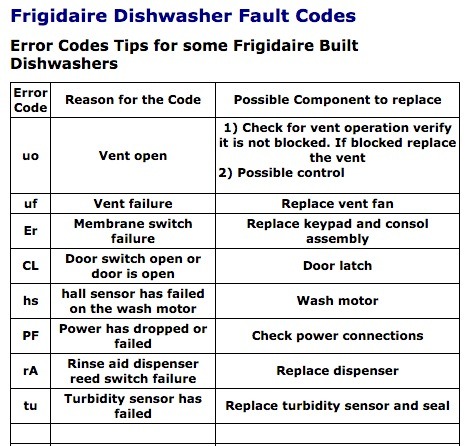
| UO | Varies | Vent open | Check vent assembly |
Not all codes show up on every model, but these are the most common.
Troubleshooting Steps For Blinking Lights
When you see blinking lights, don’t panic. Follow these steps to diagnose and solve the problem:
Step 1: Power Cycle The Dishwasher
Unplug the dishwasher or turn off the circuit breaker for at least two minutes. This resets the control board and can clear minor glitches. Plug it back in and try running a cycle. If the lights are still blinking, move to the next step.
Step 2: Inspect The Door And Latch
A loose or damaged door latch is a very common cause of blinking lights.
- Check if the door closes tightly.
- Look for cracks, broken parts, or debris.
- If the latch feels loose, consider replacing it.
Step 3: Check Water Supply And Drainage
Dishwashers need steady water flow and proper drainage.
- Make sure the water inlet valve is open and not clogged.
- Examine the hose for twists or blockages.
- Clean the filter at the bottom of the tub.
- Ensure the drain hose is not kinked and is properly connected.
Step 4: Look For Leaks
Some codes mean the dishwasher has detected water where it shouldn’t be, often underneath the unit.
- Remove the bottom panel and check for standing water.
- Dry any wet spots and see if the error clears after a reset.
- If leaks continue, inspect the door seal, pump, and hoses for damage.
Step 5: Test The Heating Element
If your dishwasher stops at the sanitize or dry stage, the heating element could be the issue.
- Visually check for burns or breaks.
- Use a multimeter to test for continuity.
- Replace the element if it’s damaged or fails the test.
Step 6: Examine Sensors And Switches
Modern dishwashers rely on sensors for water level, door position, and temperature.
- Faulty sensors can cause blinking errors.
- If other steps fail, these may need professional diagnosis and replacement.
Credit: www.youtube.com
Frigidaire Dishwasher Error Code Reference Table
Here’s a quick reference for the most common blinking light codes and their meanings:
| Blinking Light | Number of Blinks | Problem Area | Likely Cause |
|---|---|---|---|
| Start/Cancel | 1 | Door Latch | Door not closed |
| Start/Cancel | 3 | Wash Motor | Motor error |
| Clean | 7 | Heating Element | Failed to heat |
| Wash | 4 | Water Supply | No water entering |
| Dry | 6 | Drainage | Water not draining |
If you see a code not listed here, check your user manual or the manufacturer’s website for your exact model.
Advanced Tips For Diagnosing Frigidaire Dishwasher Blinking Lights
Even with the basic troubleshooting steps, some blinking light errors are stubborn. Here are a few advanced insights that many beginners miss:
- Check for Loose Wire Connections: Sometimes, vibration or age can cause internal wires to become loose. If you’re comfortable opening the access panel, look for any disconnected or frayed wires, especially near the door latch and main control board.
- Control Board Reset Sequence: Some Frigidaire models let you do a “hard reset” using the control panel. Press and hold the Start/Cancel button for 3 seconds, then release. Wait for all lights to go off before starting a new cycle.
- Error Code Retrieval Mode: On select models, you can enter a diagnostic mode by pressing a specific button sequence (for example: “Hi-Temp Wash” and “Start” together for 3 seconds). This will force the machine to display stored error codes through a series of blinks.
- Watch for Repeated Errors: If the same code keeps coming back after resetting, there may be a deeper problem like a failing control board or a bad sensor. At this point, it’s often best to call a professional.
- Don’t Ignore Water Under the Dishwasher: Even a small leak can trigger sensors and cause blinking codes. Water in the base pan will keep the dishwasher from running until it dries out or is removed.

Credit: www.reddit.com
Preventing Future Blinking Light Errors
A little maintenance goes a long way. Here’s how to avoid most blinking light issues in the future:
- Clean the filter every month to prevent clogs.
- Check the spray arms for food debris and rinse them as needed.
- Inspect hoses and connections for leaks or wear.
- Run hot water at the sink before starting the dishwasher to ensure proper heating.
- Don’t overload the dishwasher—leave room for water to flow freely.
Taking these steps will reduce the risk of error codes and keep your dishwasher working efficiently.
When To Call A Professional
While many blinking light issues can be fixed at home, some problems require expert help:
- Control board failure: If you’ve tried all steps and the lights won’t stop blinking, the control board may need replacement.
- Internal leaks: Persistent leaks or standing water under the unit may need professional repair.
- Electrical issues: If you smell burning or see sparks, turn off power and call a technician immediately.
Repair costs can vary. Replacing a door latch might cost $50–$100, while a new control board could be $200 or more. Always get a quote before agreeing to repairs.
Credit: www.caconnect.biz
How Frigidaire Blinking Light Codes Compare To Other Brands
Every dishwasher brand uses its own error code system. Here’s a quick comparison:
| Brand | How Error Codes Display | User-Friendliness |
|---|---|---|
| Frigidaire | Blinking lights, no display | Moderate |
| Bosch | Digital codes on display | High |
| Whirlpool | Flashing lights and beeps | Moderate |
| GE | LED indicators | Moderate |
| Samsung | Digital codes and sounds | High |
Frigidaire’s system is simple but can be confusing if you don’t have the code guide. Other brands often use digital displays for clearer error messages.
Real-world Example: Solving A Blinking Light Error
Sarah, a homeowner in Ohio, noticed her Frigidaire dishwasher’s Clean light blinking seven times. She found her dishes weren’t drying. After checking this guide, she realized it was a heating issue. She unplugged the dishwasher, checked the heating element for visible damage, and ran a multimeter test. The element had failed. After ordering a new part for $40 and following a video tutorial, she installed it herself. The blinking light stopped, and her dishwasher worked like new.
This shows that with the right information, many blinking light codes can be solved without a service call.
Frequently Asked Questions
What Should I Do First When My Frigidaire Dishwasher Starts Blinking Lights?
Start by counting the blinks and identifying which lights are blinking. Then unplug the dishwasher for two minutes to reset it. If the code returns, look up the pattern in your manual or this guide to see what the error means.
Can I Use My Dishwasher If The Lights Are Blinking But It Still Runs?
It’s not recommended. Blinking lights indicate a problem that could get worse. Running the dishwasher with an unresolved error could lead to water leaks, poor cleaning, or even electrical damage.
How Do I Reset My Frigidaire Dishwasher After An Error Code?
Most models can be reset by unplugging for 2–5 minutes or turning off the circuit breaker. Some models also reset by holding the Start/Cancel button for 3 seconds. Always wait until all lights turn off before restarting.
Why Does My Dishwasher Keep Showing The Same Error Even After I Fix The Problem?
If the code won’t clear, the control board may need a hard reset or there could be a lingering issue such as moisture in the base pan, a faulty sensor, or a loose wire. If you’re sure the original problem is fixed, try a full power reset. If the code returns, call a technician.
Where Can I Find More Details About Frigidaire Dishwasher Error Codes?
For the most complete and up-to-date information, check your user manual or visit the official Frigidaire Support page. They offer downloadable manuals and troubleshooting guides by model number.
Conclusion
Solving blinking light error codes on your Frigidaire dishwasher doesn’t have to be a mystery. With careful observation, a bit of troubleshooting, and the help of this guide, you can get your dishwasher back in service—and keep it running smoothly for years to come.