
When you see your Honeywell thermostat blinking Cool, it often feels confusing or worrying. Is your air conditioning broken? Is the thermostat trying to tell you something? If you’re not sure what this blinking signal means, you’re not alone. Many homeowners run into this problem, especially during hot months when their AC systems work overtime. The good news is, this blinking message is usually not an emergency—but it does mean you should pay attention. Understanding why your Honeywell thermostat blinks “Cool” can help you fix small issues before they become big headaches. This article will guide you step by step, using simple language and clear examples, to explain what causes the blinking, how to fix it, and how to avoid common mistakes.
What Does “blinking Cool” Mean On Honeywell Thermostats?
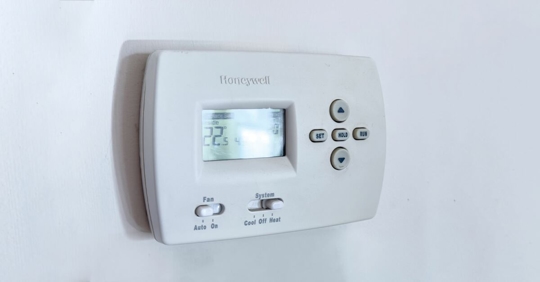
Honeywell thermostats use simple signals to communicate with users. When you see Cool blinking, the thermostat is trying to tell you something about your air conditioning system.
Typical Meaning
Most Honeywell thermostats blink “Cool” when the thermostat is set to cool, but the cooling system is not running. This usually happens right after you change the temperature or mode. The blinking is a delay warning. It means the thermostat is waiting before turning on your air conditioner.
Why A Delay?
Modern thermostats include a compressor protection delay. This delay protects your air conditioner from damage caused by rapid cycling (turning on and off too quickly). When the thermostat asks the AC to start, it waits about 5 minutes before sending the signal. During this time, the thermostat blinks “Cool.”
Other Causes
- System errors: Sometimes blinking means there’s a problem, like a wiring issue.
- Low voltage: If your system doesn’t have enough power, the thermostat may blink to signal a problem.
- Lost communication: If the thermostat loses connection to the AC, it can blink “Cool.”
Models That Blink
Most Honeywell digital thermostats—including T Series, RTH Series, and VisionPRO models—use this blinking system. Older analog models do not.
Common Reasons For Honeywell Thermostat Blinking Cool
The blinking “Cool” is usually a normal delay, but sometimes it signals a deeper issue. Here are the most common causes:
- Compressor delay: Protects the AC from damage.
- Recent temperature or mode change: The delay starts when you switch modes.
- Power loss: If power is interrupted, the system needs time to restart.
- Faulty wiring: Loose or broken wires can stop the AC from working.
- Low battery: If your thermostat uses batteries, low power can cause blinking.
- Dirty filters: Poor airflow can trigger system delays.
- Tripped breaker: If your AC breaker trips, the thermostat may blink.
Example
Imagine it’s a hot day. You set your thermostat to “Cool” and lower the temperature. Instead of cooling right away, the thermostat blinks “Cool” for several minutes. This is the compressor delay working to protect your system.

Credit: emausasturias.org
How To Fix Honeywell Thermostat Blinking Cool
If your thermostat keeps blinking “Cool,” follow these steps to fix the issue. Most solutions are easy and do not require special tools.
Step 1: Wait For The Delay To Finish
The most common reason for blinking is the 5-minute delay. Wait for 5-10 minutes. If the AC starts, everything is normal.
Step 2: Check Power Supply
- Make sure your thermostat screen is on.
- Check circuit breakers for the AC unit.
- If your thermostat uses batteries, replace them.
Step 3: Inspect Air Filter
Dirty filters can cause cooling delays. Replace the filter if it looks dirty or clogged.
Step 4: Examine Wiring
Turn off power to the thermostat. Remove the cover and check for loose wires. Reconnect any wires that look loose, and secure them.
Step 5: Reset The Thermostat
Many Honeywell thermostats have a reset option. Find the reset button, or remove the batteries for 30 seconds and reinstall them.
Step 6: Check Ac Unit Outside
Go outside and look at your AC condenser. Is it running? If not, check for signs of damage or ice. If you see ice, turn off the AC and let it thaw.
Step 7: Call A Professional
If you try all these steps and the thermostat still blinks “Cool,” call a qualified HVAC technician. There may be a deeper problem.
Practical Tips
- Always turn off power before touching wires.
- Keep filters clean for best performance.
- Don’t ignore blinking for more than one hour.
Key Features Of Honeywell Thermostats
Honeywell thermostats are popular for their reliability and ease of use. Here are some features that help prevent or explain blinking “Cool”:
- Compressor protection: Built-in to avoid damage.
- Smart delay alerts: Warns users before the AC starts.
- Clear display messages: Helps users understand system status.
- Battery backup: Keeps thermostat running during power loss.
- Wi-Fi connectivity: Some models send alerts to your phone.
Comparison Of Honeywell Thermostat Models
Here’s a quick look at some popular Honeywell thermostat models and how they handle “Cool” blinking:
| Model | Blinking Cool Feature | Compressor Delay | Wi-Fi Support |
|---|---|---|---|
| Honeywell T9 | Yes | 5 mins | Yes |
| RTH6580WF | Yes | 5 mins | Yes |
| VisionPRO 8000 | Yes | 5 mins | Yes |
| RTH2300B | Yes | 5 mins | No |
Troubleshooting Honeywell Thermostat Issues
You can solve most blinking issues yourself. Here’s how to troubleshoot like a pro.
Check The Thermostat Display
If the display is blank, the thermostat may have lost power. Check batteries or wiring.
Verify System Settings
Make sure the thermostat is set to “Cool” mode, and the temperature is below room temperature.
Listen For Ac Sounds
If you hear the AC start after a few minutes, the delay worked. If there’s no sound, check the AC unit.
Inspect Fuses And Breakers
Find your electrical panel. Check that the breaker for the AC is on. If not, reset it.
Look For Error Codes
Some Honeywell thermostats show error codes. Look for codes like “E1” or “E2. ” These codes can guide you to the problem.
Advanced Troubleshooting Tips
- Check for short cycling (AC turns on/off quickly).
- Look for condensation or water leaks near the AC.
- Use a voltmeter to test wires if you have experience.
Preventing Honeywell Thermostat Blinking Cool
You can prevent most blinking issues with simple maintenance.
Keep Filters Clean
Replace your AC filter every 1-3 months. Dirty filters cause delays.
Schedule Ac Service
Professional service once a year keeps your system healthy.
Check Batteries
Replace thermostat batteries every 6-12 months.
Protect Against Power Surges
Use surge protectors to avoid electrical issues.
Keep Vents Open
Closed vents reduce airflow and can trigger delays.
Monitor Thermostat Settings
Set the thermostat to a comfortable temperature and avoid sudden changes.
Compare Maintenance Practices
Here’s a quick table comparing maintenance tasks and their effect on blinking issues:
| Maintenance Task | Frequency | Impact on Blinking |
|---|---|---|
| Replace Filter | Monthly | Prevents delays |
| Check Batteries | Every 6 months | Prevents power loss |
| Service AC | Annually | Prevents system errors |
| Check Wiring | Annually | Prevents blinking due to faults |
Honeywell Thermostat Blinking Cool: Real-life Examples
Understanding real-life situations can help you learn faster. Here are three examples from users:
Example 1: Compressor Delay
Sarah in Texas changed her thermostat to “Cool” after a power outage. The thermostat blinked “Cool” for 5 minutes, then the AC started. This was a normal delay.
Example 2: Wiring Problem
John in Florida saw “Cool” blinking for 30 minutes. He checked the wires and found one loose. After reconnecting, the blinking stopped, and the AC worked.
Example 3: Low Battery
Maria in California noticed blinking and a dim display. She replaced the batteries, and the blinking ended.
Non-obvious Insight
Many users think blinking always means a problem. But most times, it’s a normal delay. Only if blinking lasts more than 10 minutes should you look for deeper issues.
Honeywell Thermostat Blinking Cool Vs Other Brands
Honeywell thermostats are not alone in using delay signals. Here’s a quick comparison with other brands:
| Brand | Blinking Cool Feature | Compressor Delay | Display Message |
|---|---|---|---|
| Honeywell | Yes | 5 mins | Blinking “Cool” |
| Nest | No | Yes | Timer Icon |
| Ecobee | No | Yes | Delay Message |
| Emerson | Yes | 5 mins | Blinking “Cool” |
Non-obvious Insight
Honeywell’s blinking “Cool” is easier for beginners because it’s clear and direct. Other brands often use icons or codes, which can confuse users.

Credit: lekk.nl
When To Call A Professional
Most blinking issues are easy to fix. But if you notice any of these problems, call an HVAC technician:
- Blinking lasts more than 15 minutes with no cooling.
- The thermostat shows error codes.
- The AC unit outside makes strange noises or is silent.
- You see water leaks or ice on the AC.
- You’re not comfortable checking wires.
What Technicians Do
A professional will check wiring, test voltage, inspect the AC unit, and fix any issues. They can also reset advanced thermostats.
Understanding Honeywell Thermostat Error Codes
Some Honeywell thermostats show codes when there’s a problem. Here are common codes:
- E1: Lost communication with AC unit.
- E2: Wiring error.
- E3: Low voltage.
- E4: System failure.
If you see a code, check your thermostat manual or visit Honeywell’s official support site.
Cost Of Fixing Honeywell Thermostat Blinking Cool
Fixing blinking issues can be free or cost money. Here’s what to expect:
- DIY fixes: Changing batteries or filters costs $5–$20.
- Professional service: Checking wiring or AC unit costs $80–$200.
- Replacing thermostat: New Honeywell thermostats cost $40–$200.
Money-saving Tips
- Try simple steps before calling a technician.
- Keep filters and batteries fresh.
- Use your warranty if the thermostat is new.
Safety Tips When Handling Thermostat Issues
Safety is important when dealing with electrical devices.
- Turn off power before touching wires.
- Use insulated tools.
- Don’t touch wet surfaces.
- If unsure, call a professional.
Credit: www.premierwellbeing.ie
Frequently Asked Questions
Why Does My Honeywell Thermostat Blink “cool” After Changing The Temperature?
When you change the temperature, the thermostat starts a compressor delay. This protects the AC from damage. The blinking “Cool” means the system is waiting to start. After about 5 minutes, the AC should turn on.
How Long Should The “cool” Blinking Last?
The blinking usually lasts 5 minutes. If it lasts longer than 10–15 minutes, check for issues like power loss, wiring problems, or dirty filters.
Can Blinking “cool” Mean My Ac Is Broken?
Not always. Most times, it’s a normal delay. But if the AC never starts or the blinking doesn’t stop, there may be a problem with wiring, power, or the AC unit.
What Should I Do If The Blinking “cool” Does Not Stop?
First, check power, filters, and wiring. Reset the thermostat. If blinking still does not stop after 15 minutes, call a professional technician.
Is It Safe To Use My Thermostat When It’s Blinking “cool”?
Yes, it’s safe. The thermostat is protecting your AC. Avoid changing settings too quickly. If blinking lasts too long, investigate further.
Understanding your Honeywell thermostat blinking Cool helps you keep your AC system healthy, saves money, and keeps your home comfortable. With regular maintenance and quick troubleshooting, most issues are easy to fix. Stay calm, follow the steps, and your Honeywell thermostat will keep your home cool and safe.