
When your LG dryer’s Flow Sense light starts blinking, it’s easy to feel confused or worried. Many people panic, thinking their appliance is broken, but this signal is actually a helpful warning. It tells you that your dryer is not venting air properly, which can affect drying performance and even create safety risks. If you ignore this blinking light, your clothes may stay damp, and your dryer could use more energy than it should. Understanding why the Flow Sense light blinks and knowing how to fix it can save you time, money, and stress.
This guide covers everything you need to know about the LG Flow Sense blinking issue: what it means, common causes, how to troubleshoot, and ways to prevent future problems. Whether you’re a homeowner, renter, or technician, you’ll find practical advice and clear explanations. By the end, you’ll feel confident handling Flow Sense warnings and keeping your dryer running efficiently.
What Is Lg Flow Sense?
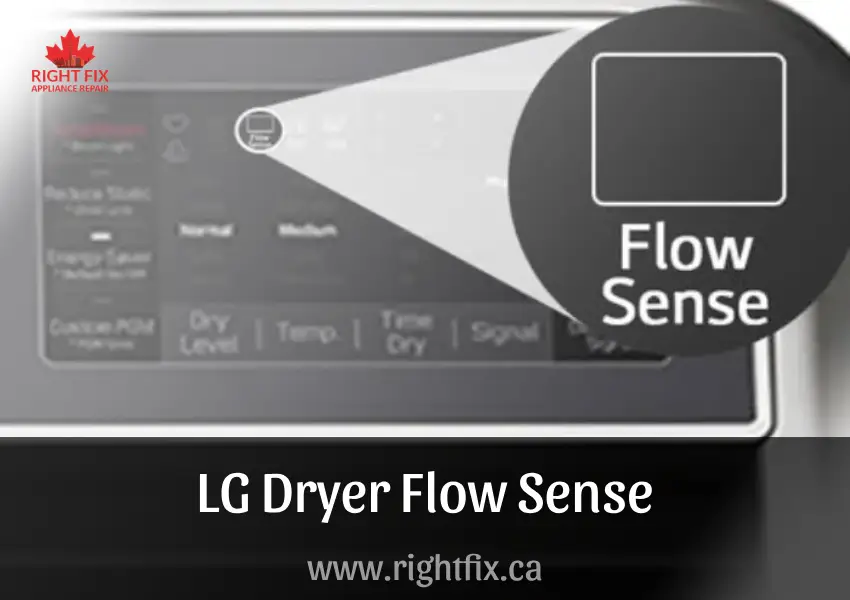
The Flow Sense feature is built into most LG dryers. It monitors the airflow through the dryer’s vent system. If the dryer detects restricted airflow, the Flow Sense indicator lights up or blinks to warn you.
This technology is important for two reasons:
- Energy Efficiency: Good airflow means your dryer uses less energy and dries clothes faster.
- Safety: Poor airflow can cause lint buildup, which increases fire risk.
Flow Sense does not detect every problem in the dryer. It focuses specifically on airflow issues, mostly related to the vent and lint filter. If you see the Flow Sense warning, it’s not usually a sign of a broken dryer, but rather a venting issue.
Why Does The Flow Sense Light Blink?
A blinking Flow Sense light means the dryer senses restricted airflow. This can be caused by several factors:
- Blocked vent duct
- Dirty lint filter
- Crushed or kinked vent hose
- Too many bends in the vent pipe
- Vent pipe is too long
- Outside vent cap is blocked
Sometimes, the warning appears after a new dryer installation, especially if the vent system was not set up correctly. It can also happen if you use your dryer often without cleaning the lint filter or vent.
How Lg Flow Sense Works
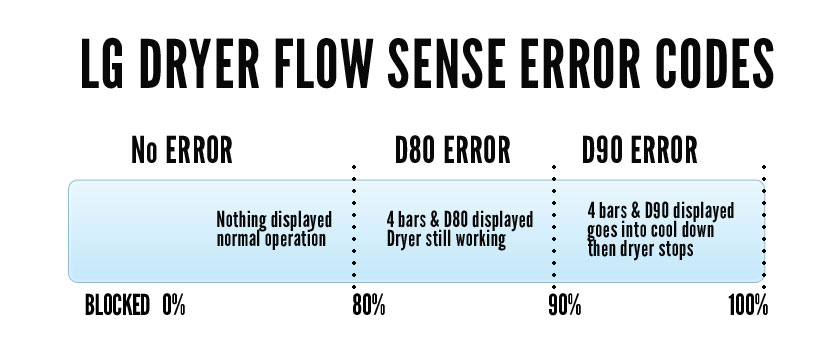
LG dryers use sensors to measure how much air moves through the vent. When the air flow drops below a safe level, the sensor activates the warning light. Some models show a D80, D90, or D95 code along with the blinking light, indicating the level of blockage.
- D80: About 80% blocked
- D90: About 90% blocked
- D95: About 95% blocked
These codes help you understand how serious the blockage is. If you see D95, stop using the dryer until you fix the issue.
Common Causes Of Flow Sense Blinking
Understanding the main reasons for the Flow Sense warning can help you solve the problem faster.
1. Lint Filter Issues
The lint filter traps lint from your clothes. If you don’t clean it regularly, lint builds up and blocks airflow.
- Always clean the lint filter after every load.
- If the filter is damaged, replace it.
2. Blocked Vent Duct
The vent duct carries air from your dryer to the outside. Over time, lint and dust collect inside, reducing airflow.
- Lint buildup is the most common cause of Flow Sense blinking.
- Birds or animals can also block the outside vent.
3. Poor Vent Installation
If the vent hose is too long, has too many bends, or is crushed behind the dryer, it blocks airflow.
- Use a straight, short vent hose when possible.
- Avoid sharp bends and kinks.
4. Outside Vent Cap Obstructions
The vent cap outside your home can be blocked by leaves, snow, or dirt.
- Check the vent cap regularly.
- Make sure the cap opens and closes freely.
5. Wrong Vent Materials
Using plastic vent hoses or flexible foil ducts increases fire risk and blocks airflow more easily. Metal ducts are safer and more efficient.
6. Dryer Overload
Putting too many clothes in the dryer can reduce airflow and trigger the Flow Sense warning.
7. Internal Dryer Blockage
Rarely, lint can get inside the dryer itself and block internal passages. This usually happens if you ignore maintenance for a long time.
Diagnosing Flow Sense Problems
Before you call a technician, try these steps to find out what’s causing the blinking Flow Sense light.
Step 1: Check The Lint Filter
Remove the lint filter and clean it thoroughly. Look for holes, tears, or signs of damage. If the filter is old or damaged, buy a new one.
Step 2: Inspect The Vent Hose
Unplug the dryer and pull it away from the wall. Check the vent hose for kinks, crushing, or bends. Make sure it’s not too long. A vent hose longer than 8 feet, or with more than two bends, can cause problems.
Step 3: Examine The Outside Vent Cap
Go outside and look at the vent cap. Remove any blockages like leaves, lint, or snow. Open the cap to check for trapped debris.
Step 4: Clean The Vent Duct
Disconnect the vent hose and use a vent cleaning brush or vacuum attachment to clean inside the duct. You can buy special dryer vent cleaning kits online or at hardware stores.
Step 5: Run A Test Cycle
After cleaning, reconnect everything and run a short drying cycle. If the Flow Sense light stops blinking, you fixed the problem. If it still blinks, there may be a deeper issue.
Step 6: Check For Error Codes
Look for D80, D90, or D95 codes on the display. These codes tell you how serious the blockage is.
Step 7: Internal Inspection
If all outside parts are clear, the blockage might be inside the dryer. This requires opening the dryer cabinet, which is best done by a professional.
Comparing Vent Materials
Choosing the right vent material can prevent Flow Sense problems. Here’s a comparison:
| Material | Airflow Efficiency | Fire Safety | Durability |
|---|---|---|---|
| Rigid Metal | High | Excellent | Long-lasting |
| Semi-rigid Metal | Good | Good | Moderate |
| Flexible Foil | Medium | Poor | Short lifespan |
| Plastic | Poor | Very poor | Short lifespan |
Always choose rigid metal ducts for best results.
Cleaning And Maintenance Tips
Proper maintenance prevents Flow Sense warnings and keeps your dryer safe.
- Clean the lint filter after every use
- Vacuum around the dryer monthly
- Clean the vent duct every 6–12 months
- Inspect the outside vent cap regularly
- Use short, straight vent hoses
- Avoid overloading the dryer
- Check vent material for damage
Some people forget to clean the vent duct because it’s out of sight. Set a reminder or schedule professional cleaning once a year.
Lg Dryer Flow Sense Codes Explained
LG uses specific codes to show how much the airflow is blocked. Knowing what these codes mean helps you act quickly.
| Code | Meaning | Action Needed |
|---|---|---|
| D80 | 80% blocked | Clean vent & filter |
| D90 | 90% blocked | Clean vent & filter immediately |
| D95 | 95% blocked | Stop use, deep clean needed |
If your dryer shows D90 or D95, stop using it until you fix the blockage. Dryers with this level of restriction may overheat.
How To Fix Lg Flow Sense Blinking
Here’s a step-by-step guide to solving the blinking Flow Sense problem.
Step 1: Clean The Lint Filter
- Remove and wash the filter with warm, soapy water.
- Let it dry completely before putting it back.
Step 2: Clean The Vent Hose
- Disconnect the vent hose from both the dryer and the wall.
- Shake out loose lint.
- Use a long brush or vacuum to clean inside.
Step 3: Clean The Vent Duct
- Insert a vent cleaning brush into the duct.
- Move it back and forth to loosen lint.
- Vacuum any remaining debris.
Step 4: Check The Outside Vent
- Remove the vent cap.
- Clean inside and outside.
- Make sure the flap moves easily.
Step 5: Reconnect Everything
- Attach the vent hose firmly.
- Avoid bends or kinks.
- Push the dryer back gently.
Step 6: Run The Dryer
- Test with a small load.
- Check if the Flow Sense light goes off.
Step 7: Call A Technician If Needed
If the warning stays on after cleaning everything, call a professional. There may be a hidden blockage or a sensor problem.
Credit: rightfix.ca
Lg Dryer Maintenance Schedule
Regular maintenance keeps your dryer running smoothly and prevents Flow Sense blinking.
| Task | Frequency | Notes |
|---|---|---|
| Clean lint filter | After every load | Essential for safety |
| Clean vent duct | Every 6–12 months | Use brush or vacuum |
| Inspect vent hose | Monthly | Look for kinks, damage |
| Check outside vent cap | Quarterly | Clear debris, ensure movement |
| Professional cleaning | Yearly | Deep clean, safety check |
Following this schedule reduces risk and improves dryer performance.
Practical Tips Most Owners Miss
Many people miss these practical tips when dealing with Flow Sense issues:
- Don’t ignore short loads: Even if your dryer dries small loads well, poor venting affects larger loads more. Always fix vent problems, not just adjust load size.
- Don’t rely on new installation: New dryers can still have vent problems if the old vent system is dirty or poorly designed.
- Check for animal nests: Birds and rodents sometimes build nests in outside vent caps, causing sudden blockages.
- Don’t use tape inside vents: Tape can come loose and block airflow. Use proper vent connectors and clamps.
- Monitor drying times: If your clothes take longer to dry, even without a Flow Sense warning, check the vent system.

Credit: www.lg.com
Energy Efficiency And Safety
A blinking Flow Sense light is not just a minor annoyance. Poor airflow can raise your energy bill and create a fire hazard. According to the US Fire Administration, dryers cause over 2,900 home fires each year, mostly from lint buildup in the vent system.
A well-maintained vent system:
- Reduces drying time by 30–50%
- Saves up to $20–$50 per year in energy costs
- Lowers fire risk
If your dryer is more than five years old, it’s even more important to check the vent regularly.
When To Call A Professional
You can fix most Flow Sense issues yourself, but call a technician if:
- The warning stays on after cleaning everything
- You see error codes like D90 or D95 repeatedly
- You find damage to the vent hose, duct, or dryer parts
- You suspect internal dryer blockage
Professional dryer vent cleaners use special tools to reach deep inside ducts. They can also check for hidden problems like broken sensors or wiring issues.
Upgrading Your Dryer Vent System
If you keep having Flow Sense blinking problems, consider upgrading your vent system:
- Switch from flexible foil or plastic to rigid metal ducts
- Shorten the vent run if possible
- Reduce the number of bends
- Install a high-quality outside vent cap
Some modern vent caps have bird guards or self-cleaning flaps. These features help prevent blockages.
Real-life Example: Solving Flow Sense Blinking
Let’s look at a practical example.
Sarah noticed her LG dryer’s Flow Sense light blinking after every load. She cleaned the lint filter, but the warning stayed on. She checked the vent hose and found it was crushed behind the dryer. After replacing it with a short, rigid metal duct, she cleaned the vent duct using a brush kit.
The Flow Sense warning stopped blinking, and her dryer ran more efficiently.
This example shows that even small changes, like replacing a vent hose, can make a big difference.
Credit: dryerventcleaner.ca
Comparing Lg Flow Sense To Other Brands
LG’s Flow Sense feature is more advanced than many other brands. Here’s how it compares:
| Brand | Airflow Monitoring | Error Codes | User Warnings |
|---|---|---|---|
| LG | Yes (Flow Sense) | D80, D90, D95 | Blinking light, display codes |
| Samsung | Yes (Vent Blockage Sensor) | Check Vent | Warning light |
| Whirlpool | No | None | No direct warning |
| GE | No | None | No direct warning |
LG’s system gives clear, direct feedback, making it easier to prevent problems.
Smart Dryer Technology And Flow Sense
Modern LG dryers come with smart features. Some models let you check Flow Sense status from your phone. You can receive warnings and maintenance reminders through the LG ThinQ app.
This technology helps busy people stay ahead of maintenance tasks. If you travel often or rent out your home, these alerts can be very useful.
Preventing Flow Sense Issues From The Start
If you’re installing a new LG dryer, follow these steps to avoid Flow Sense blinking:
- Use rigid metal vent ducts
- Keep vent runs short and straight
- Install a quality outside vent cap
- Clean the vent system before connecting the dryer
- Check for leaks or loose connections
Proper installation prevents most common Flow Sense warnings.
Frequently Asked Questions
What Does The Flow Sense Blinking Light Mean On My Lg Dryer?
The Flow Sense blinking light warns you about restricted airflow in your dryer’s vent system. This means air is not moving freely, often because of lint buildup, blocked vents, or a damaged vent hose.
Can I Use Flexible Foil Or Plastic Vent Hoses?
It’s not recommended. Rigid metal ducts provide better airflow and are safer. Flexible foil and plastic hoses can crush easily, trap lint, and increase fire risk.
How Often Should I Clean My Dryer Vent?
Clean your dryer vent duct every 6–12 months. Clean the lint filter after every load. If you use your dryer heavily, consider cleaning the vent duct more often.
Will A New Dryer Fix Flow Sense Blinking?
Not always. If your vent system is blocked or poorly designed, a new dryer will still show Flow Sense warnings. Always check and clean the vent system before installing a new dryer.
Who Can Help If I Can’t Solve Flow Sense Blinking Myself?
A professional dryer vent cleaner or appliance technician can diagnose and fix complex Flow Sense issues. They have special tools to clean deep inside ducts and check for hidden blockages.
Conclusion
By understanding and maintaining your LG dryer’s vent system, you can avoid Flow Sense blinking, improve drying performance, and make your home safer. If you need more technical details, visit the official LG support site or trusted resources like Consumer Reports for expert advice.
Staying alert to blinking Flow Sense warnings protects your dryer and your home. With these tips, you’ll be ready to fix problems quickly and enjoy worry-free laundry days.