
When you see your AirPods light blinking orange, it can be confusing and a bit frustrating. Many users rely on their AirPods every day for music, calls, or podcasts. Suddenly, a flashing orange light interrupts your routine, and you’re left wondering what it means and how to fix it. The good news is, this small light is actually trying to help you. It’s a signal that something needs your attention. Understanding what the orange light means, what causes it, and how to solve it can save you time and prevent bigger issues.
This guide will walk you through everything you need to know about the blinking orange light on AirPods. You’ll learn what the different light signals mean, why the orange light appears, troubleshooting steps, and tips to keep your AirPods working smoothly.
Whether you use AirPods Pro, AirPods 2nd or 3rd generation, or AirPods Max, this article will help you understand and resolve the blinking orange light problem confidently.
What Does The Airpods Orange Light Mean?
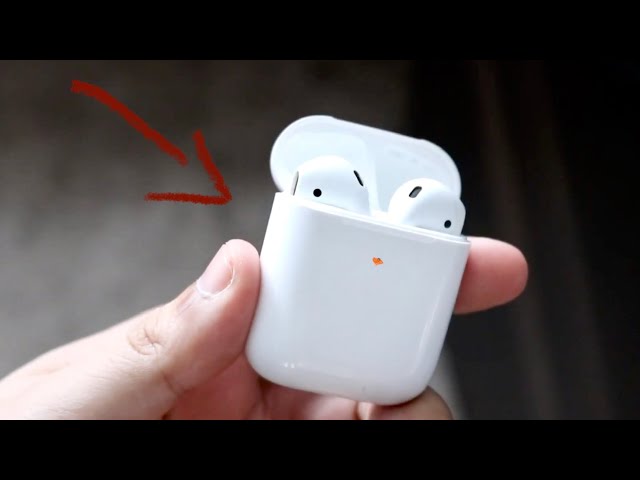
The small light on your AirPods case is more than decoration. It gives you quick information about your device’s status. The color and pattern—steady or blinking—matter.
- Steady orange (amber): The AirPods are charging.
- Steady green: Fully charged.
- Blinking white: AirPods are in pairing mode.
- Blinking orange (amber): There’s a problem. This is not normal.
When the AirPods light blinks orange, it usually means one of these things:
- The AirPods are having trouble pairing with your device.
- There’s a firmware or software problem.
- The AirPods or case have a hardware issue.
- There’s a battery or charging problem.
A blinking orange light is a warning. AirPods want your attention, so don’t ignore it. Taking action quickly can prevent further issues or damage.
Airpods Models And Status Light Location
Different AirPods models show the status light in different places. It helps to know where to look.
| AirPods Model | Status Light Location |
|---|---|
| AirPods (1st & 2nd Gen) | Inside charging case, between earbuds |
| AirPods (3rd Gen) & AirPods Pro | Front of the charging case |
| AirPods Max | Right ear cup (near the Lightning port) |
Knowing the location helps you check the light easily when troubleshooting any problem.

Credit: care-med.ca
Main Causes Of Airpods Light Blinking Orange
The orange blinking light can appear for different reasons. Some are simple, and others need more work to fix. Here are the most common causes:
1. Pairing Problems
If the AirPods can’t connect to your device, the orange light blinks. This happens if:
- The AirPods are too far from the device
- Bluetooth is off or malfunctioning
- The AirPods are already paired with another device nearby
2. Firmware Or Software Glitches
Sometimes, the AirPods’ internal software gets confused or stuck. This can cause connection errors, pairing failures, or battery problems, leading to the orange light blinking.
3. Charging Issues
If the AirPods case or the earbuds themselves have battery problems, you might see the orange light. This can be due to:
- Poor contact between the AirPods and case
- Dirty charging connectors
- Faulty charging cable or adapter
4. Hardware Faults
Physical damage to the AirPods or the case, or a manufacturing defect, can trigger the orange light. This is less common but possible, especially if your AirPods have been dropped or exposed to moisture.
5. Outdated Firmware
Apple updates AirPods firmware to fix bugs and improve performance. If your AirPods have an old version, they might not work well with the latest iOS or devices, causing connection issues and the blinking orange light.
6. Account Or Icloud Sync Issues
Rarely, problems with your Apple ID or iCloud can confuse AirPods, especially if you switch between devices or accounts often.
How To Fix Airpods Light Blinking Orange
If your AirPods light is blinking orange, don’t panic. Most problems can be fixed at home. Here’s a step-by-step guide to solve the issue.
1. Check The Basics
Before trying advanced solutions, make sure:
- The AirPods and case have enough charge. Plug in for at least 15-20 minutes.
- Bluetooth is turned on in your device.
- The AirPods are close to your device.
2. Reconnect Airpods To Device
Sometimes, a simple disconnect and reconnect solves the issue.
- Open Bluetooth settings on your device.
- Forget or remove your AirPods from the list.
- Put AirPods in the case, close the lid, and wait 30 seconds.
- Open the case, press and hold the setup button (back of the case) until the light flashes white.
- Reconnect to your device.
3. Reset Your Airpods
Resetting clears most glitches or errors.
- Place AirPods in the case and close the lid for 30 seconds.
- Open the lid.
- Press and hold the setup button (on the back) for 15 seconds until the light flashes amber, then white.
- Release the button.
- Reconnect to your device.
This often stops the orange light from blinking.
4. Clean Airpods And Charging Case
Dirt or debris can block charging. Clean the contacts with a soft, dry brush or cotton swab. Avoid water or harsh chemicals.
5. Update Device And Airpods Firmware
Keeping your devices updated prevents many problems.
- Update your iPhone or iPad to the latest iOS.
- To update AirPods, connect them to your device, keep the case plugged in, and stay near your device with Wi-Fi on. Updates install automatically.
6. Try A Different Device
Connect your AirPods to another Apple device. If they work, the issue might be with your original device. If not, the problem is likely with the AirPods.
7. Check For Hardware Damage
Inspect the AirPods and case for cracks, water damage, or bent connectors. Hardware damage often needs professional repair.
8. Contact Apple Support
If nothing works, contact Apple Support or visit an Apple Store. Sometimes, AirPods need repair or replacement.
Airpods Blinking Orange Vs. Other Light Patterns
Understanding other light patterns helps you diagnose problems faster. Here’s a quick comparison:
| Light Color & Pattern | Meaning |
|---|---|
| Steady green | Fully charged |
| Steady orange (amber) | Charging, not full |
| Blinking white | Pairing mode |
| Blinking orange (amber) | Error or problem |
| No light | Battery dead or not working |
Remember, only the blinking orange means an error. The others are normal status signals.
Common Mistakes When Fixing Airpods Orange Light
Many users make simple mistakes when trying to fix AirPods. Avoid these to save time:
- Not resetting properly: Holding the setup button for too short or too long can prevent a proper reset.
- Skipping cleaning: Even a little dust or lint can block charging or connection.
- Ignoring software updates: Outdated software can cause repeated errors.
- Using third-party accessories: Cheap cables or chargers sometimes cause problems. Use genuine Apple accessories if possible.
- Not checking for device issues: Sometimes, the problem is with your phone, not the AirPods.
When To Seek Professional Help
Not all problems can be fixed at home. If you notice any of these, ask for expert help:
- Physical damage: Cracks, chips, or water inside the AirPods or case.
- Battery won’t charge: Even after cleaning and using different cables.
- Constant blinking: Orange light keeps blinking after all troubleshooting.
- One AirPod not working: Even after reset and cleaning.
Apple offers support for AirPods. Check your warranty status or AppleCare coverage. You may qualify for a free or low-cost repair or replacement.
Preventing Airpods Blinking Orange In The Future
It’s easier to prevent problems than fix them. Here are tips to keep your AirPods healthy:
- Charge regularly: Don’t let the battery get too low too often.
- Clean connectors: Wipe down the charging contacts every few weeks.
- Store in the case: When not using, put AirPods back in the case.
- Avoid water and drops: AirPods are not waterproof. Keep them dry and handle gently.
- Update software: Keep all devices and AirPods firmware updated.
A little care can make your AirPods last longer and avoid annoying problems.
Data And Real-world Examples
AirPods are one of Apple’s most popular products. According to a 2022 report, over 27 million pairs of AirPods are sold each quarter worldwide. With so many users, even a small percentage with issues means thousands face the orange blinking light each day.
Many users report seeing the orange light after updating their iPhone or using AirPods with multiple devices. In online forums, about 30% of AirPods problems involve connection or pairing errors, which often trigger the blinking orange light.
Real example: Sarah, a student, noticed her AirPods blinking orange after dropping them. Cleaning and resetting didn’t help. At the Apple Store, she learned the charging case was damaged inside. A replacement solved the problem.
Airpods Blinking Orange: Quick Troubleshooting Table
If you want a fast reference for what to do when you see the orange blinking light, use this summary:
| Problem Sign | Likely Cause | What to Try First |
|---|---|---|
| Blinking orange light | Pairing error | Reset AirPods, reconnect |
| Light blinks after charging | Charging issue | Clean contacts, use Apple cable |
| Light blinks after update | Firmware glitch | Update device, reset AirPods |
| Constant orange blinking | Hardware damage | Contact Apple Support |

Credit: naturaconnect.eu
Non-obvious Insights Most Beginners Miss
While many guides cover basic troubleshooting, here are two less obvious points:
- Interference from Other Devices: If your AirPods are near multiple Bluetooth devices (like someone else’s phone or tablet), pairing can fail and trigger the orange light. Try moving away from other electronics during setup.
- Partial Firmware Updates: If your AirPods disconnect during a firmware update, the process can fail, causing persistent blinking. Keep the case plugged in and your device unlocked during updates to avoid this.
Should You Worry About The Orange Light?
A blinking orange light is a warning, but it’s not always serious. Most issues are temporary and can be fixed at home. However, ignoring the light or repeatedly forcing connections can make problems worse. Always try the steps above before seeking professional help.
Airpods Max: Special Case
If you use AirPods Max, the orange blinking light means the same thing: a problem with pairing or firmware. Resetting AirPods Max is a bit different:
- Press and hold the noise control button and the Digital Crown for 15 seconds, until the LED flashes amber, then white.
- Release and reconnect.
Because AirPods Max are more expensive, handle with care and contact Apple if the problem continues.
How Airpods Compare To Other Wireless Earbuds
Many wireless earbuds use lights to show status, but Apple’s AirPods system is especially simple. Here’s a quick comparison:
- AirPods: Single light, clear signals, easy reset.
- Samsung Galaxy Buds: Lights on both buds and case, more colors.
- Jabra Elite: Light patterns for charging, pairing, and errors, but less standardized.
Apple’s system is easier for beginners, but only if you know what the lights mean.
When To Replace Airpods Or The Case
If your AirPods are old (more than 2–3 years), battery problems and errors become more common. If you see the orange blinking light often, and nothing works, it might be time to replace the AirPods or just the charging case.
Sometimes, only one part is faulty.
Apple offers replacement parts. Compare the cost of repair vs. buying new AirPods. For many, a new case is enough to solve charging and connection problems.
Useful Resources
For official information and troubleshooting, visit the Apple Support AirPods page. You’ll find the latest updates, manuals, and warranty details.
Credit: www.mostrischio.it
Frequently Asked Questions
Why Is My Airpods Light Blinking Orange Even After Charging?
If the light blinks orange after charging, there might be a connection or firmware problem. Try resetting your AirPods, cleaning the connectors, and reconnecting to your device. If the problem continues, check for hardware damage or contact Apple Support.
Can Low Battery Cause The Airpods Light To Blink Orange?
A low battery usually shows a steady orange light, not blinking. Blinking orange is more often a sign of connection or firmware issues. Make sure your AirPods and case are fully charged, then follow troubleshooting steps.
How Do I Reset Airpods To Fix The Blinking Orange Light?
Place AirPods in the case, close the lid for 30 seconds, open the lid, then press and hold the setup button for 15 seconds. The light will flash amber, then white. After this, reconnect your AirPods to your device.
Is The Orange Blinking Light The Same For Airpods Pro, Airpods Max, And Regular Airpods?
Yes, a blinking orange light means an error or pairing problem for all AirPods models. The reset steps are similar, but the button location and process differ slightly for AirPods Max.
How Can I Tell If My Airpods Need Repair Or Replacement?
If you’ve reset, cleaned, and updated everything but the orange light still blinks, and your AirPods are out of warranty or show signs of physical damage, it’s time to consider repair or replacement.
—
If your AirPods light is blinking orange, don’t let it stress you. Most issues are temporary and can be fixed at home with patience and the right steps. Understanding what the light means helps you respond quickly and avoid bigger problems. Take care of your AirPods, keep them clean and updated, and enjoy the wireless experience Apple designed for you. If you ever need more help, Apple Support is always available to guide you further.