
A Dyson hair dryer is an investment in your haircare routine. Its modern design, intelligent heat control, and powerful airflow make it a favorite among both professionals and home users. But what happens when you see blinking red lights on your Dyson hair dryer? For many owners, this warning is worrying and sometimes confusing. Red lights can mean several things, from simple maintenance needs to more serious issues.
This article will help you understand what Dyson hair dryer blinking red lights mean, why they happen, and how to fix or prevent them. You’ll get practical troubleshooting steps, deeper insights that most guides miss, and clear advice to keep your device running smoothly.
Whether you’re a first-time Dyson user or a regular, you’ll find useful information here.
What Do Dyson Hair Dryer Blinking Red Lights Mean?
When your Dyson hair dryer shows blinking red lights, it’s trying to tell you something. Dyson designed these indicators to help users catch problems early. The main reasons for a blinking red light are:
- Overheating
- Blocked filters
- Internal faults
Let’s break down what each signal means.
Overheating Warning
If your dryer is getting too hot, it will show a blinking red light and usually stop working. This protects both the device and your safety. Overheating can be caused by blocked airflow, dirty filters, or using the dryer for long periods without a break.
Blocked Or Dirty Filter
A very common reason for the blinking red light is a clogged filter. Dust, hair, and styling products can build up, blocking the airflow. The motor has to work harder, which leads to overheating. Dyson recommends cleaning the filter regularly—ideally once a month, or more often if you use it daily.
Internal Faults
If there is a more serious problem, such as a sensor failure or a damaged part inside the dryer, the red light can also blink. In these cases, the dryer might not work at all, or it might turn off soon after you switch it on.
How To Diagnose The Problem
Finding out why your Dyson hair dryer is blinking red can save time and money. Here’s a step-by-step way to diagnose the issue.
Step 1: Check The Filter
- Unplug the hair dryer and let it cool for at least 10 minutes.
- Remove the filter cage at the base.
- Inspect for visible dust, lint, or hair inside the filter mesh.
- If dirty, clean the filter (more on this in the next section).
Step 2: Look For Blocked Air Vents
- Check all air vents for blockages or buildup.
- Use a soft brush or a dry cloth to gently remove dust.
Step 3: Test For Overheating
- After cleaning, let the dryer rest and cool fully.
- Plug it back in and turn it on.
- If the red light is gone, overheating was likely the cause.
Step 4: Try A Different Power Outlet
Sometimes, power supply issues can cause error lights. Test your dryer in a different, known working outlet.
Step 5: Listen For Unusual Sounds
If you hear rattling, grinding, or high-pitched noises, there could be a mechanical fault inside. These often need professional repair.
Step 6: Check For Software Updates
Dyson hair dryers don’t update like smartphones, but sometimes, a reset can help. Unplug the dryer for 30 seconds, then plug it in again to “soft reset” the electronics.
How To Clean A Dyson Hair Dryer Filter
Keeping the filter clean is one of the easiest ways to prevent red light errors. Here’s how to do it the right way.
What You’ll Need
- A soft, dry cloth or soft brush
- The Dyson cleaning brush (comes with most models)
- A bowl of warm water (no soap or chemicals)
Cleaning Steps
- Make sure the hair dryer is unplugged and cool.
- Twist off the filter cage at the base.
- Use the brush to gently remove dust and lint from the mesh screen.
- Rinse the filter cage in warm water. Do not use soap or harsh cleaners.
- Let the filter cage dry completely before putting it back on.
Tip: Never use the dryer without the filter cage. This can damage the motor.
How Often To Clean
- If you use your dryer daily: Clean every 2-4 weeks
- For occasional use: Clean every 1-2 months
Neglecting filter cleaning is the number one cause of red light errors.
What If Cleaning Doesn’t Fix The Red Light?
Sometimes, cleaning isn’t enough. If the red light keeps blinking, try these next steps.
Try A Hard Reset
Some Dyson dryers can be reset by unplugging for 5-10 minutes. This can clear minor software glitches.
Check For Warranty
Look at your receipt or Dyson account. Most Dyson hair dryers come with a 2-year warranty. If your device is still under warranty, contact Dyson support for repair or replacement.
Professional Repair
If your warranty is expired and you’ve tried all steps above, you may need professional help. Do not try to open the dryer yourself—this can be dangerous and void any remaining warranty.
Dyson Hair Dryer Red Vs. White Lights
Not all blinking lights mean the same thing. Here’s a quick comparison to help you understand the signals better.
| Light Color | Meaning | User Action Needed |
|---|---|---|
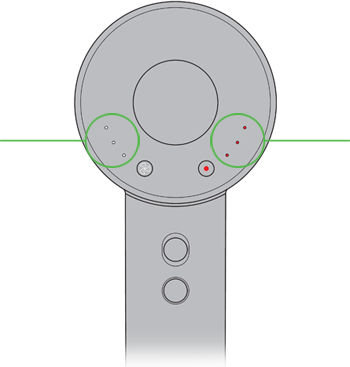
| Red (blinking) | Overheating, blocked filter, or internal fault | Clean filter, check for blockages, reset, contact support if needed |
| Red (solid) | Serious fault or motor failure | Unplug and contact Dyson support |
| White (blinking) | Filter needs cleaning soon | Clean filter soon, but dryer still works |
| White (solid) | Normal operation | No action needed |
Non-obvious insight: Many users ignore a white blinking light, thinking it’s not serious. If you clean the filter when you first see the white light, you can often avoid the red warning completely.
Most Common Causes Of Blinking Red Lights
Let’s look at what typically triggers the blinking red warning:
- Neglected filter cleaning: The top reason for red lights is a dirty or clogged filter.
- Blocked air inlets: Buildup of dust or hair around the air intake area.
- Long, continuous use: Using the dryer for over 30 minutes without a break.
- High humidity environments: Using the dryer in a steamy bathroom can cause moisture inside the electronics.
- Internal sensor faults: Rare, but possible if the device has been dropped or exposed to water.

Credit: www.youtube.com
How To Prevent Dyson Hair Dryer Red Light Warnings
Prevention is always easier than repair. Here are simple habits that keep your Dyson dryer in top shape:
- Clean the filter regularly (set a reminder on your phone)
- Store your dryer in a dry, clean area
- Avoid using the dryer near open water or high humidity
- Let the dryer cool down between uses if you need to style for a long time
- Handle the device gently to avoid drops
When To Contact Dyson Support
Some issues are best left to professionals. Contact Dyson support if:
- The red light stays on after cleaning and resetting
- You hear strange noises or smell burning
- The dryer will not power on at all
- The device is under warranty
Dyson’s support team can guide you through extra troubleshooting or arrange for repair. You can find their contact info on the official Dyson support page.
Real-world Examples: User Experiences
Hearing what other users have faced can help you avoid their mistakes or find solutions faster.
Example 1: The “forgotten Filter”
Maria, a salon owner, used her Dyson hair dryer for six months without cleaning the filter. One day, the dryer stopped mid-blowout and showed a blinking red light. After cleaning the filter and letting the dryer cool, it worked again.
Example 2: The Humid Bathroom
John noticed his dryer blinked red after he used it post-shower in a steamy bathroom. He moved his styling routine to a drier room, cleaned the filter, and the problem disappeared.
Example 3: The Persistent Warning
Sarah cleaned her filter and checked for blockages, but the red light stayed. She contacted Dyson, who found a faulty sensor. The dryer was replaced under warranty.
Insight: Even with good maintenance, some problems need professional help. Don’t be afraid to use your warranty.
Key Differences: Dyson Vs. Other Hair Dryers
Why do Dyson hair dryers have these warning lights, when many others do not?
| Feature | Dyson Hair Dryer | Traditional Hair Dryer |
|---|---|---|
| Smart warning lights | Yes (red, white) | No or simple (on/off only) |
| Filter sensor | Yes | Rare |
| Automatic shut-off | Yes, for safety | Rare |
| Heat control | Intelligent, adjusts to prevent damage | Manual, basic |
Dyson uses advanced sensors and safety features to protect both the dryer and your hair. These extra warnings can seem annoying, but they reduce the risk of permanent damage.
What Not To Do When You See A Blinking Red Light
Some mistakes can make the problem worse. Avoid these:
- Do not ignore the light and keep using the dryer. This can burn out the motor.
- Do not use sharp tools (like pins or knives) to clean the filter. This can damage it.
- Do not open the dryer or try to fix the inside yourself unless you are a qualified technician.
- Do not use water directly on the main dryer body.
Practical tip: Always unplug before cleaning or checking the dryer.
How Dyson Hair Dryer Sensors Work
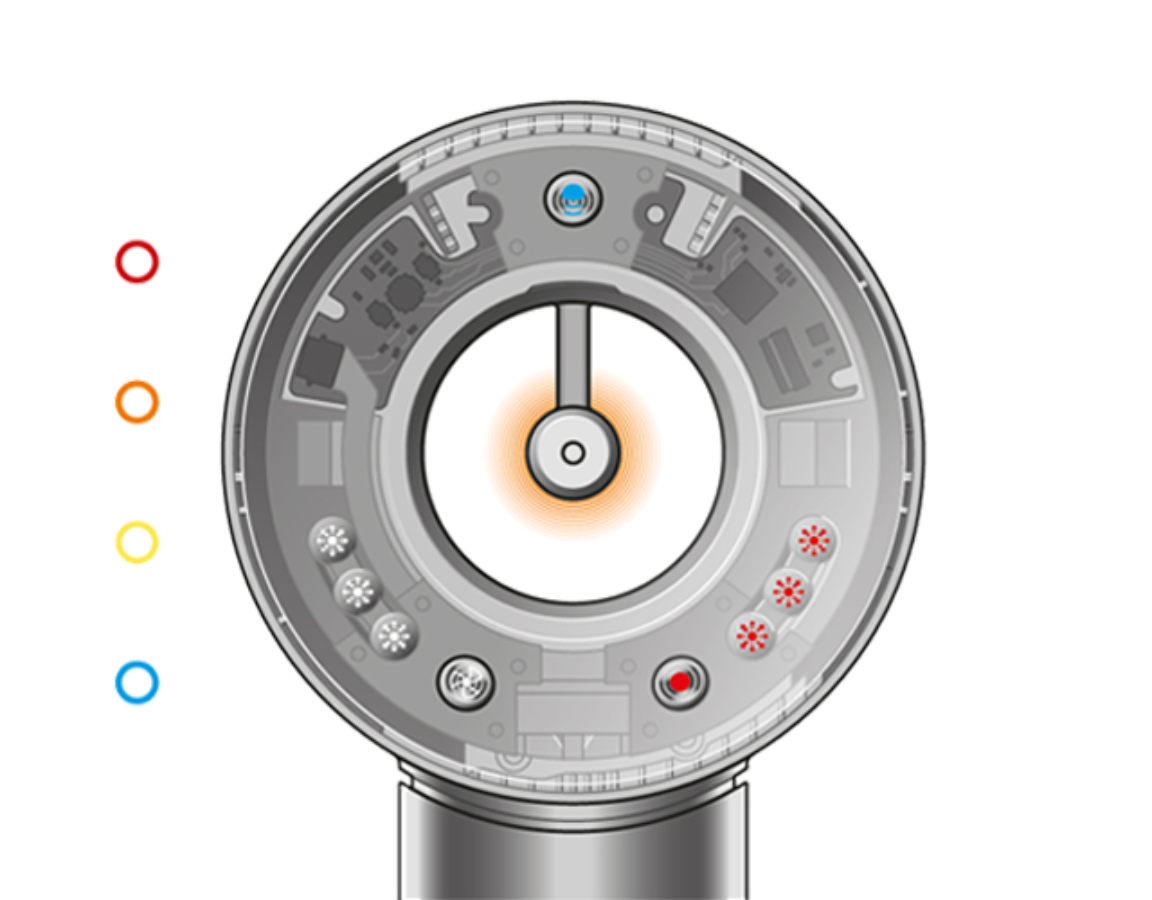
You may wonder why the Dyson hair dryer is so sensitive. Inside, there are several sensors:
- Thermal sensors: Monitor temperature to prevent overheating.
- Current sensors: Watch for electrical issues.
- Airflow sensors: Check if air is moving freely.
If any of these sensors detect a problem, the dryer will blink a red light and often shut down to protect itself.
Non-obvious insight: Sensor errors can sometimes fix themselves after a full power-down and cool-off period. Try unplugging overnight before seeking repair.
Credit: support.dyson.co.nz
Is A Blinking Red Light Dangerous?
A blinking red light is mainly a warning, not an emergency. The Dyson dryer is designed to shut down before anything dangerous happens. However, if you see smoke, smell burning, or if the body is hot to the touch, unplug it immediately and do not use again until checked by a professional.
Cost Of Repair And Replacement
If your dryer is out of warranty, you might wonder about repair costs. Here’s a general idea:
| Issue | Average Repair Cost | Replacement Cost |
|---|---|---|
| Filter replacement | $20 – $40 | Not needed |
| Sensor or motor fault | $80 – $150 | $400 – $430 (new dryer) |
| Out-of-warranty service | $100 – $200 | $400 – $430 (new dryer) |
Sometimes, repair is close in price to buying a new unit. Always ask for an estimate first.
How To Extend The Life Of Your Dyson Hair Dryer
You can avoid many problems and save money with smart care:
- Clean the filter as recommended
- Store the dryer in a safe, dry place
- Avoid wrapping the cord too tightly (this can cause power issues)
- Use only original Dyson parts and accessories
A well-maintained Dyson hair dryer can last for years without problems.
Frequently Asked Questions
Why Is My Dyson Hair Dryer Blinking Red And Won’t Turn On?
A blinking red light often means overheating or a blocked filter. Unplug the dryer, let it cool, and clean the filter. If it still won’t turn on, there may be a more serious fault—contact Dyson support.
How Often Should I Clean The Dyson Hair Dryer Filter?
For daily use, clean the filter every 2-4 weeks. If you use it less often, clean every 1-2 months. Regular cleaning prevents most red light warnings.
Can I Use My Dyson Hair Dryer With A Blinking Red Light?
No. The red light is a warning to stop use. Continuing to use the dryer can cause permanent damage. Always address the cause before using it again.
Is A Dyson Blinking Red Light Covered Under Warranty?
Yes, if your dryer is within the 2-year warranty period and you have followed maintenance guidelines, Dyson will usually repair or replace the device.
What If The Red Light Stays On After Cleaning And Resetting?
If the red light remains after filter cleaning and resetting, the dryer may have an internal fault. Contact Dyson support for professional help.
A Dyson hair dryer is a high-quality device, but even the best technology needs care. Blinking red lights are a sign to stop and check your device—not a reason to panic. With simple maintenance and smart use, you can avoid most problems and enjoy years of great hair days.
If issues do come up, now you know exactly what to do.
Credit: support.dyson.co.nz