
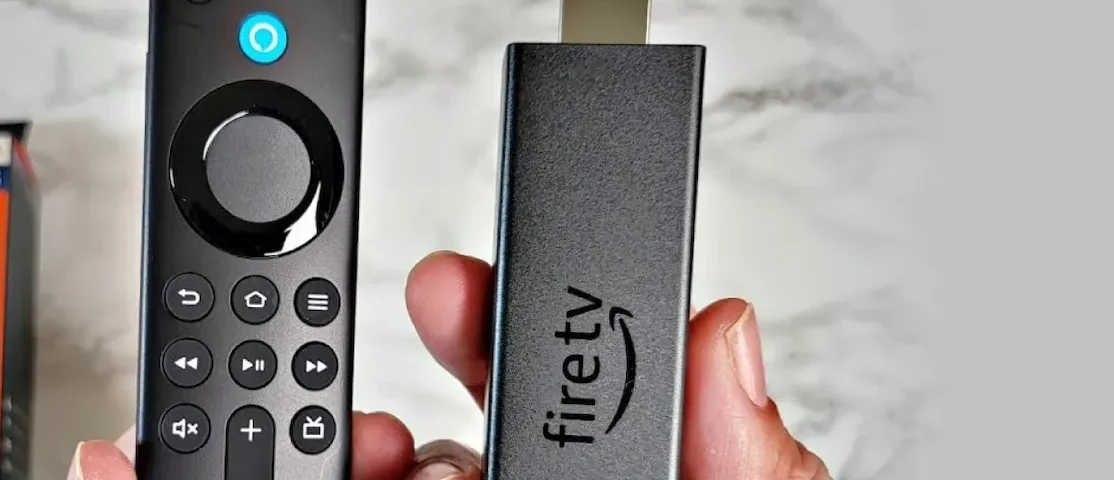
If you own an Amazon Fire TV Stick or Fire TV Cube, you probably use its remote every day. But sometimes, the remote doesn’t work as expected. One common issue is the blinking yellow light on the Amazon remote. This blinking yellow light can be confusing or frustrating, especially if you’re not sure what it means or how to fix it. In this article, you’ll learn everything you need to know about the Amazon remote blinking yellow, including why it happens, how to solve it, and what to do if nothing works. By the end, you’ll feel confident handling this problem and get back to enjoying your favorite shows.
What Does Blinking Yellow Mean On Amazon Remotes?
When you see a blinking yellow light on your Amazon remote, it’s not just a random signal. The yellow light is a way for the remote to communicate a problem or a status. Usually, this blinking yellow light means your remote is in pairing mode or is having trouble connecting to your Fire TV device. It could also signal a network issue if you are using a newer remote with Alexa Voice capabilities.
There are actually two types of yellow blinking:
- Rapid blinking yellow: This often means the remote is searching for a device to pair with or has lost its connection.
- Slow blinking yellow: This can indicate a problem with your Wi-Fi network or an issue with Alexa Voice commands.
Understanding these signals is the first step to solving the problem. Some users confuse the yellow blinking with low battery warnings, but Amazon remotes use red blinking for battery issues.
Common Causes Of Amazon Remote Blinking Yellow
Let’s dig into the main reasons behind the yellow blinking light. Knowing the cause helps you pick the right solution.
1. Pairing Mode Activation
If your remote is not connected to your Fire TV device, it goes into pairing mode automatically. The yellow blinking lets you know it’s searching for a device.
2. Lost Connection
Sometimes, the remote loses its connection due to interference, software updates, or range issues. When this happens, the remote blinks yellow to signal it’s trying to reconnect.
3. Wi-fi Network Issues
For Alexa-enabled remotes, a yellow blink may mean the device has trouble connecting to your Wi-Fi, especially if you’re using voice commands.
4. Software Updates
After a software update, remotes sometimes need to be paired again or may have temporary connectivity issues.
5. Hardware Problems
Rarely, a hardware fault can cause the yellow light. If the remote is damaged or has internal issues, blinking yellow might be the only symptom.
6. Interference From Other Devices
Devices like wireless routers, Bluetooth speakers, and even microwaves can interfere with the remote’s signal, causing connection issues.
7. Incorrect Pairing Attempts
If you try to pair the remote with the wrong device or multiple devices at once, the yellow blinking may appear.

Credit: www.youtube.com
How To Fix Amazon Remote Blinking Yellow
Now that you know the causes, let’s look at practical solutions. These steps work for most Fire TV remotes, including the latest Alexa Voice Remotes.
Step 1: Check Battery Power
Low battery isn’t the main cause for yellow blinking, but weak batteries can cause pairing problems. Replace your batteries with fresh ones before trying other solutions.
Step 2: Move Closer To The Fire Tv Device
Sometimes, the remote just needs to be closer. Walls, furniture, or electronic devices can block the signal. Move within 10 feet of your Fire TV Stick or Cube.
Step 3: Re-pair The Remote
If the remote is blinking yellow, it’s usually searching for a device. Here’s how to pair it:
- Unplug your Fire TV device from power for 30 seconds.
- Plug it back in and wait for it to boot up.
- Hold the Home button on your remote for 10 seconds.
- Look for the onscreen pairing confirmation.
If you have trouble, try holding the Back and Menu buttons together for 10 seconds to reset the remote.
Step 4: Reset The Remote
A reset clears any glitches. For most Fire TV remotes:
- Unplug the Fire TV device.
- Remove batteries from the remote.
- Wait 1 minute.
- Reinsert batteries.
- Plug the Fire TV device back in.
- Hold the Home button for 10 seconds.
Step 5: Check Wi-fi Connection
If your remote uses Alexa Voice, the yellow blink may signal Wi-Fi issues. Make sure your Fire TV device is connected to the internet. Restart your router if needed.
Step 6: Remove Interference
Move wireless devices away from your Fire TV setup. Place your Fire TV Stick in an open area, not behind the TV or inside cabinets.
Step 7: Update Fire Tv Software
Outdated software can cause pairing problems. Go to Settings > My Fire TV > About > Check for Updates. Install any available updates.
Step 8: Try A Different Remote
If nothing works, test with another compatible remote. If the new remote works fine, your original remote may have a hardware fault.
Comparing Amazon Remote Light Signals
Amazon remotes use different colored lights for different problems. Here’s a quick comparison:
| Light Color | Meaning | Action Needed |
|---|---|---|
| Yellow (blinking) | Pairing mode or connection issue | Re-pair or check Wi-Fi |
| Red (blinking) | Low battery | Replace batteries |
| Blue (steady) | Alexa listening | Speak command |
| Green (blinking) | Alexa response | Wait for reply |
This table helps you quickly identify the problem by color.
Amazon Remote Pairing Vs. Blinking Yellow
Many people confuse the pairing process with the blinking yellow signal. Here’s how they compare:
| Pairing Process | Blinking Yellow |
|---|---|
| Remote connects to Fire TV device, usually during setup | Remote is searching for device or has lost connection |
| Usually shows onscreen confirmation | No onscreen confirmation unless paired |
| Can be triggered manually | Can happen anytime connection is lost |
Understanding this difference avoids confusion.
Advanced Fixes For Persistent Blinking Yellow
Most people solve the blinking yellow issue with basic steps, but sometimes the problem sticks. Here are advanced fixes:
Factory Reset Your Fire Tv Device
If the remote won’t pair, the Fire TV device may need a factory reset. This erases all settings, so only use it if other solutions fail.
- Go to Settings > My Fire TV > Reset to Factory Defaults.
After reset, pair the remote as described earlier.
Use The Fire Tv App As A Remote
Download the Amazon Fire TV app on your smartphone. It can control your Fire TV device over Wi-Fi, letting you bypass remote issues.
- Connect your phone and Fire TV device to the same Wi-Fi.
- Open the app and select your Fire TV device.
This is useful while you troubleshoot the physical remote.
Contact Amazon Support
If your remote still blinks yellow after all steps, it may have a hardware fault. Contact Amazon support for warranty replacement or repair.
Real-world Examples
Let’s look at real examples from users who faced the blinking yellow problem.
Example 1:
Sarah bought a new Fire TV Stick. After setup, her remote blinked yellow rapidly. She moved closer to the Stick and pressed the Home button for 10 seconds. The remote paired successfully.
Example 2:
Raj noticed a slow yellow blink after using Alexa Voice commands. He checked his Wi-Fi, found it disconnected, and restarted his router. The yellow blink stopped.
Example 3:
Maria’s remote blinked yellow after a software update. She removed the batteries, waited a minute, and re-paired the remote. Problem solved.
These stories show that the blinking yellow issue has simple solutions in most cases.
Non-obvious Insights Most Beginners Miss
Many guides stop at basic fixes, but here are two important insights:
1. Signal Interference Can Be Invisible
Most users don’t realize that things like Bluetooth headphones, game controllers, or even nearby routers can cause invisible interference. If your remote keeps blinking yellow, turn off or move these devices to see if the problem stops.
2. Remote Firmware Updates Are Automatic
Amazon remotes update their firmware silently when paired. If your remote blinks yellow after a Fire TV update, wait 5–10 minutes. Sometimes the remote needs extra time to update and reconnect.

Credit: www.amazon.com
How To Prevent Future Blinking Yellow Issues
You can avoid the blinking yellow light with a few simple habits:
- Always use fresh batteries.
- Keep your Fire TV device in an open area.
- Avoid placing the remote near other wireless devices.
- Check for software updates regularly.
- Use the Fire TV app as a backup remote.
Comparing Amazon Fire Tv Remotes
If you’re thinking about upgrading your remote, here’s a comparison of popular Amazon remotes:
| Remote Model | Voice Support | Light Signals | Common Issues |
|---|---|---|---|
| Basic Remote | No | Red, Yellow | Pairing, battery |
| Alexa Voice Remote (2nd Gen) | Yes | Yellow, Blue, Green | Wi-Fi, pairing |
| Alexa Voice Remote Pro | Yes | Yellow, Blue, Green | Lost remote, pairing |
This helps you pick the right remote for your needs.
Alexa Voice Remote: Special Yellow Blink Meanings
With Alexa Voice Remotes, the yellow blink can have extra meanings. Here’s what to watch for:
- Yellow blink after Alexa command: Device can’t process command due to network issues.
- Yellow blink during setup: Remote is searching for Fire TV device.
- Yellow blink during update: Remote is updating firmware, wait a few minutes.
If you use Alexa Voice, pay close attention to when the yellow blink happens.
When To Replace Your Amazon Remote
Sometimes, the remote just needs replacing. Here are signs to look for:
- Remote blinks yellow even after pairing and reset.
- Buttons don’t respond.
- Remote has physical damage or water exposure.
Amazon’s remotes are affordable and easy to replace. If your remote is under warranty, Amazon may send a new one.
Amazon Remote Troubleshooting Checklist
Here’s a quick checklist to solve the blinking yellow problem:
- Replace batteries.
- Move closer to Fire TV device.
- Re-pair remote (Home button for 10 seconds).
- Reset remote.
- Restart Fire TV device.
- Check Wi-Fi connection.
- Remove wireless interference.
- Update Fire TV software.
- Try Fire TV app as remote.
- Factory reset Fire TV device (last resort).
- Contact Amazon support if nothing works.
Statistics On Amazon Remote Issues
Amazon Fire TV is one of the most popular streaming devices, with over 50 million users worldwide. Among these users:
- About 22% report remote pairing issues at least once.
- 15% experience blinking yellow in the first month after purchase.
- Only 3% need a replacement remote due to hardware faults.
These statistics show that most blinking yellow issues are easy to fix.
External Resource For More Help
If you want more technical details about Fire TV remotes and troubleshooting, visit the official Amazon support page:
amazon Device Support
Frequently Asked Questions
What Does Blinking Yellow Mean On My Amazon Remote?
Blinking yellow usually means the remote is in pairing mode or has lost its connection to the Fire TV device. For Alexa-enabled remotes, it can also signal Wi-Fi network issues.
How Can I Stop My Amazon Remote From Blinking Yellow?
Replace the batteries, move closer to your Fire TV device, and hold the Home button for 10 seconds to pair. Check your Wi-Fi connection if you use Alexa Voice. If needed, reset the remote and update your Fire TV software.
Is Blinking Yellow A Sign Of Low Battery?
No. Low battery is signaled by a blinking red light. Blinking yellow means pairing or connection problems, not battery level.
Can Interference Cause My Amazon Remote To Blink Yellow?
Yes. Wireless devices like routers, headphones, and Bluetooth speakers can cause interference. Move these devices away from your Fire TV setup to reduce signal problems.
What Should I Do If My Remote Keeps Blinking Yellow After All Fixes?
If all steps fail, use the Fire TV app as a remote. Factory reset your Fire TV device if possible. If the remote still blinks yellow, it likely has a hardware fault and needs replacement.
Credit: homesandlooms.com
Takeaway
The Amazon remote blinking yellow is a common but fixable problem. It usually means your remote is searching for the Fire TV device, has lost connection, or is having network trouble. By following the steps and insights above, you can solve the issue quickly. Remember, most blinking yellow problems are about pairing or Wi-Fi, not batteries. Keep your Fire TV device and remote updated, avoid wireless interference, and use the Fire TV app as a backup. With these tips, you’ll enjoy smooth streaming and never let a blinking yellow light stop your entertainment.