
When you rely on power tools for work or home projects, you expect your batteries to charge smoothly. That’s why it’s so frustrating when your Dewalt charger starts blinking red. The blinking light can mean different things—sometimes it’s a minor issue, other times a sign of something wrong with the battery, the charger, or even how you’re using them. If you’re staring at a blinking red light and not sure what to do, this article will explain what’s happening, why it matters, and how to fix it.
Dewalt’s chargers are popular for their reliability, but like any tool, they can sometimes seem confusing. Users often worry when they see a red blinking light instead of the steady green that signals a full charge. Knowing what each blink pattern means can save you both time and money.
This guide will walk you through the main reasons for a Dewalt charger blinking red, how to troubleshoot the issue, and ways to keep your charger working well for years.
Understanding Dewalt Charger Indicator Lights
Before jumping into causes and solutions, it’s important to know what the indicator lights mean. Dewalt chargers use different light patterns to communicate their status. These patterns aren’t just random—they’re designed to help users diagnose problems quickly.
Common Dewalt Charger Light Signals
- Solid Red: The battery is charging normally.
- Blinking Red: There’s a problem with the battery, charger, or environment.
- Solid Green: The battery is fully charged.
- Red and Green Alternating: The charger is in evaluation mode or the battery is too hot or cold.
Understanding these signals is the first step to solving any charging issue. For most users, the blinking red light is the most confusing, so let’s focus on what it really means.
What Does A Blinking Red Light Mean On A Dewalt Charger?
A blinking red light usually means the charger has detected an error. This error can come from different sources:
- Battery is too hot or too cold
- Battery is damaged or defective
- Battery is not making good contact
- Charger malfunction
- Power supply problem
Each of these causes has its own solution, and sometimes the charger provides extra clues. For example, a fast blink might mean something different from a slow blink. Always check your charger’s manual for the specific blink codes, but this article covers the main causes and fixes.
Main Causes Of Dewalt Charger Blinking Red
Let’s break down the most common reasons you’ll see a blinking red light—and how to respond to each.
1. Battery Temperature Issues
Dewalt batteries are designed to operate within a certain temperature range. If the battery is too hot or too cold, the charger will refuse to charge it to protect the battery.
- Too Hot: This can happen if you just finished using the tool and the battery is still warm.
- Too Cold: This is common if you store your tools in a cold garage or shed.
Solution:
Remove the battery and let it rest at room temperature for 15–30 minutes. Try charging again. If the light turns solid red, the battery is now charging normally.
2. Damaged Or Defective Battery
If your battery is old, has physical damage, or has been deeply discharged many times, it may no longer hold a charge. Dewalt chargers can detect internal problems and will blink red to warn you.
Signs of a damaged battery:
- The battery gets very hot during use or charging.
- The battery case is cracked or swollen.
- The battery no longer powers your tool for long.
Solution:
Try charging another Dewalt battery in the same charger. If the other battery charges fine, your original battery is likely defective and needs replacing.
3. Poor Battery-charger Contact
Sometimes, dust, debris, or corrosion on the battery contacts can cause a poor connection. The charger will blink red because it cannot “see” the battery properly.
Solution:
Remove the battery and clean the metal contacts on both the charger and the battery with a dry, clean cloth. Do not use water or cleaner—if there is heavy corrosion, a cotton swab with rubbing alcohol can help.
4. Charger Problems
Chargers can also fail over time, especially if exposed to dust, drops, or power surges. If the charger itself is damaged, it might blink red with every battery, even new ones.
Solution:
Test your charger with a battery you know works. If it blinks red no matter which battery you use, the charger may need repair or replacement.
5. Power Supply Issues
If the charger doesn’t get enough voltage, it may show a blinking red light. This can happen if you use extension cords that are too long or thin, or plug into an unstable outlet.
Solution:
Plug the charger directly into a wall outlet. Avoid using extension cords. Try a different outlet if possible.
How Dewalt Chargers Compare: Light Patterns And Error Codes
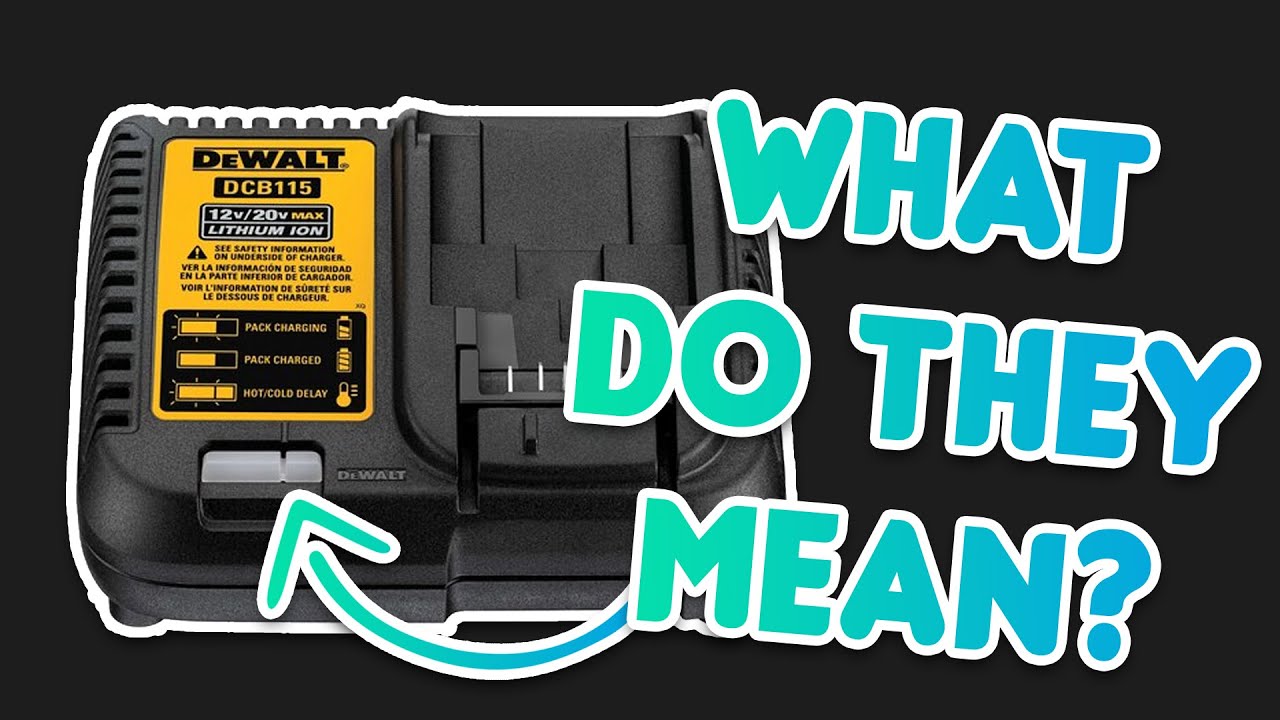
Different Dewalt chargers may use slightly different light codes. The table below compares some popular Dewalt charger models and their main indicator light behaviors.
| Charger Model | Blinking Red Meaning | Other Key Codes |
|---|---|---|
| DCB115 | Charging error (battery/temperature) | Red/Green alternate: battery too hot/cold |
| DCB107 | Charging error (battery issue) | Solid green: charged |
| DCB118 (Fast Charger) | Charging error, usually battery fault | Flashing red/green: evaluation mode |

Credit: www.youtube.com
Quick Troubleshooting Steps For Dewalt Charger Blinking Red
If your Dewalt charger is blinking red, follow these steps in order:
- Let the battery cool or warm up (15–30 min at room temp).
- Clean the contacts on both battery and charger.
- Try another battery in the charger (to check if the charger is at fault).
- Try the battery in another charger (to see if the battery is the issue).
- Plug charger into a different outlet.
If the problem continues after these steps, you may need to replace the battery or charger.
Deeper Dive: Battery Health And Maintenance
Many Dewalt charger issues can be avoided by taking care of your batteries. Here’s how to get the most life from your power tool batteries.
How To Extend Dewalt Battery Life
- Charge batteries after each use, but don’t leave them on the charger for days.
- Store batteries at room temperature—avoid very hot or cold places.
- Don’t run batteries completely dead; recharge when you feel power dropping.
- Clean contacts regularly with a dry cloth to prevent poor connections.
Signs Your Battery Needs Replacement
Even with the best care, all batteries wear out eventually. Some signs you need a new battery:
- Blinking red light, even after troubleshooting.
- Battery charges quickly but discharges very fast.
- Battery feels very hot or swollen.
- Charger does not recognize the battery.
Common Mistakes To Avoid
A few common habits can shorten battery and charger life—or cause the dreaded blinking red light.
Leaving Batteries On The Charger
Many people think leaving batteries on the charger keeps them ready, but it can actually overheat and wear out the cells. Dewalt chargers stop charging when full, but it’s still best to remove batteries once charged.
Using Non-dewalt Batteries Or Chargers
Aftermarket batteries or chargers may not match Dewalt’s safety or communication protocols. They can cause errors, shorter life, or even damage. Always use genuine Dewalt products when possible.
Charging In Bad Environments
Charging in a very hot garage or cold shed can confuse the charger’s sensors. Always bring batteries inside to charge if the temperature is below 40°F (4°C) or above 105°F (40°C).
When To Contact Dewalt Support
If you’ve tried all troubleshooting steps and still have a blinking red light, it may be time to reach out to Dewalt support. Dewalt offers warranties on many batteries and chargers, and their technical support can help diagnose less common issues.
What to have ready before you call:
- Model and serial numbers of your charger and battery
- Description of the light pattern
- Steps you’ve already tried
Dewalt’s official support page is a reliable place to start: Dewalt Support.
Advanced Troubleshooting: Reading Error Patterns
Some Dewalt chargers use different blink speeds or combinations to signal specific errors. Here’s a quick guide to what these patterns often mean:
| Blink Pattern | Possible Meaning | Action to Take |
|---|---|---|
| Slow red blink | Battery too cold | Warm battery, try again |
| Fast red blink | Battery too hot | Let battery cool, retry |
| Red/green alternately | Battery evaluation or error | Wait, or try another battery |
| Solid red, no green | Charger error or dead battery | Contact support |
Not all chargers use these exact patterns, but this gives you a good starting point. Always check your charger’s manual for the most accurate codes.
Safety Tips For Using Dewalt Chargers
Safety should always be a priority when working with any power tool batteries and chargers. Mistakes can lead to damaged tools, injury, or even fire.
- Never attempt to open or repair a charger or battery yourself.
- Avoid water or moisture near your charging station.
- Unplug chargers when not in use for long periods.
- Inspect batteries regularly for cracks, bulges, or leaks.
If you notice anything strange—like smoke, a burning smell, or extreme heat—unplug the charger immediately and move the battery outside if it’s safe.
Credit: www.youtube.com
Real-world Examples: Dewalt Charger Blinking Red
Let’s look at two examples from real users to better understand how the blinking red light issue appears in everyday life.
Case 1: The Cold Garage
Mark stores his Dewalt tools in his garage, where temperatures often drop below freezing in winter. One morning, his charger blinks red when he tries to recharge his battery. Mark brings the battery inside, lets it sit for half an hour, and tries again.
The charger now works as normal. The problem was simply a cold battery.
Case 2: The Old Battery
Lisa’s Dewalt battery is over four years old and has been recharged hundreds of times. Recently, the charger blinks red every time she tries to charge it, even after cleaning the contacts. She borrows a friend’s battery, which charges fine.
This shows Lisa’s original battery has reached the end of its life.
Both examples show how a blinking red light is often the charger’s way of protecting you and your tools.
How Dewalt Chargers Stack Up Against Other Brands
Many tool users wonder if Dewalt chargers are better or worse than competitors like Milwaukee or Makita. Here’s a quick comparison:
| Brand | Error Light System | Temperature Detection | Warranty |
|---|---|---|---|
| Dewalt | Multi-color, blink codes | Yes | 3 years typical |
| Milwaukee | Red/green, blink codes | Yes | 2-5 years |
| Makita | Red/green, audible alerts | Yes | 3 years |
Dewalt’s system is reliable and offers strong protection for both user and battery, though it can sometimes feel less “talkative” than Makita’s audible alerts.
Preventive Maintenance For Long Charger Life
Taking care of your charger is just as important as looking after the batteries.
- Keep the charger clean and dry.
- Do not cover the charger during use; allow airflow.
- Avoid dropping or shaking the charger.
- Label your batteries and rotate them so they all get similar use.
This reduces the chance of errors and extends the life of both charger and batteries.
When To Upgrade Your Charger
If you often work with large tools or multiple batteries, upgrading to a fast charger can save time and reduce frustration. Dewalt’s fast chargers have better cooling and charge batteries in half the time. If your current charger is slow or unreliable, an upgrade can be a smart investment.
Final Thoughts
A Dewalt charger blinking red is rarely a reason to panic. In most cases, it’s a built-in safety feature designed to protect your battery and tools. By understanding what the blinking light means, following simple troubleshooting steps, and caring for your batteries and charger, you can keep your tools running reliably for years.
If all else fails, Dewalt’s support is there to help.
Trouble with your charger is often a sign to slow down, check your setup, and make sure you’re using your tools safely and smartly. This approach will save you money and frustration in the long run.
For deeper technical details, consider looking at the official Dewalt documentation or trusted third-party guides like this one: Wikipedia: Rechargeable Battery.
Frequently Asked Questions
Why Does My Dewalt Charger Blink Red With A New Battery?
A blinking red light with a new battery usually means there’s a temperature issue or a poor connection. Make sure the battery is at room temperature and the contacts are clean. If the battery is truly new and the issue continues, it could be a rare defect.
Can I Fix A Dewalt Charger That Always Blinks Red?
If cleaning contacts, trying different batteries, and changing outlets don’t help, the charger likely needs professional repair or replacement. Do not try to open or fix it yourself—it could be unsafe.
Will Using A Non-dewalt Battery Cause The Charger To Blink Red?
Yes, using third-party or counterfeit batteries can cause communication errors. Dewalt chargers are designed for Dewalt batteries and may refuse to charge non-genuine products.
Is It Safe To Use A Battery After The Charger Blinks Red?
If the charger blinks red only once and works after cleaning or warming the battery, it’s usually safe. If the red blink is constant and the battery gets hot, swollen, or leaks, do not use the battery.
How Long Should A Dewalt Battery Last Before The Charger Blinks Red?
Most Dewalt batteries last 2–5 years, depending on use and care. If you see a blinking red light after this period, it’s a normal sign the battery may need to be replaced.
Credit: www.reddit.com