
If you own a Dyson vacuum, you expect powerful cleaning with little hassle. But when the Dyson battery starts blinking red, it can be confusing and worrying. This flashing light isn’t just for show—it’s your vacuum’s way of telling you something is wrong. The meaning behind that red blinking light isn’t always clear, especially if you don’t have the manual nearby or if English isn’t your first language.
This article explains, in simple English, why the Dyson battery blinks red, what it means for your vacuum, and how to fix it. You’ll learn how to tell the difference between normal signals and real problems, how to troubleshoot step by step, and when it’s time to replace your battery.
We’ll also include data tables comparing symptoms, causes, and solutions for Dyson cordless models, and answer the questions most users ask.
What Does The Dyson Battery Blinking Red Mean?
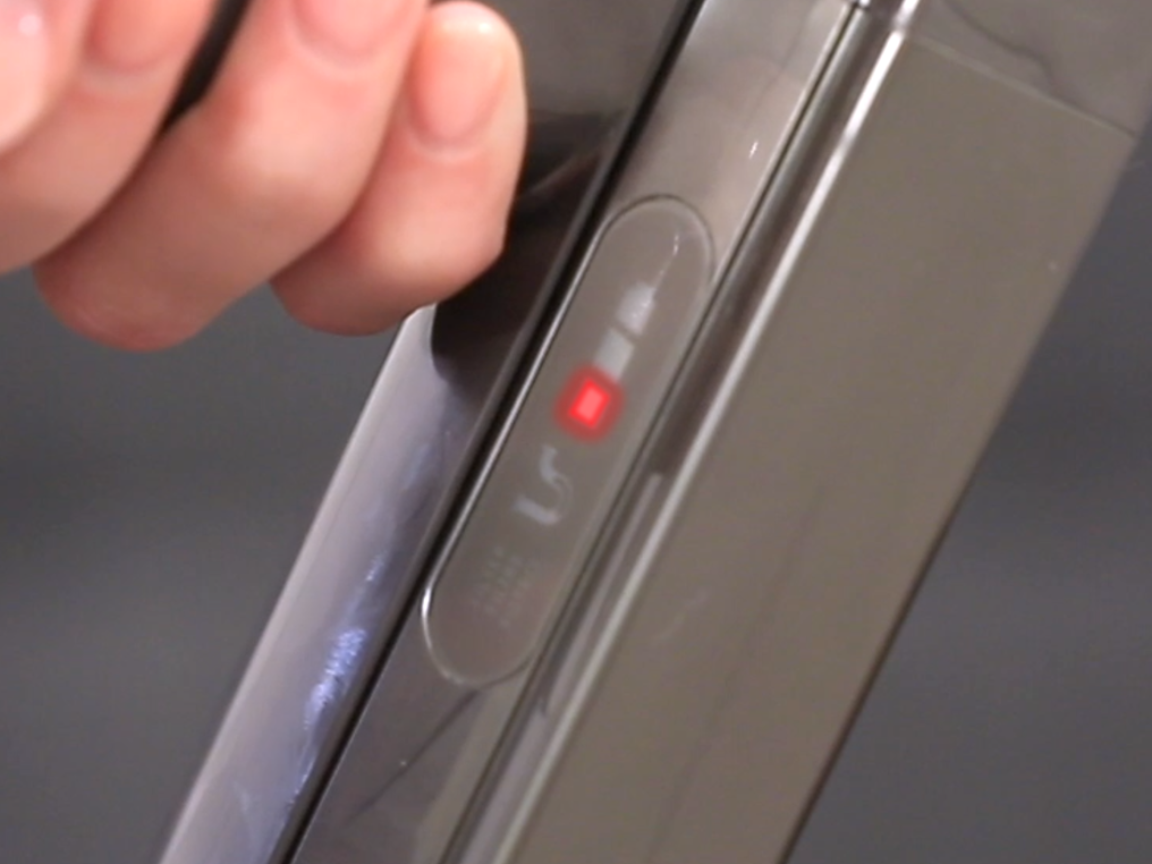
When you see a blinking red light on your Dyson vacuum’s battery, it usually means there’s a problem with the device. Dyson uses a simple system:
- A solid blue light means the vacuum is working normally.
- A flashing blue light shows the battery is charging.
- A blinking red light is a warning—something is wrong.
The red light can blink a few times or keep flashing. The number of flashes sometimes gives a clue about the problem, but with most Dyson models, any red blinking usually means an error or failure. Unlike some brands, Dyson does not use many different error codes, so the red light is a catch-all warning for issues like:
- Battery problems
- Overheating
- Electronic faults
- Charging issues
If you see the red light blinking after charging, during use, or even when the vacuum is off, don’t ignore it. It’s your vacuum’s way of asking for help before it stops working completely.
Common Reasons For Dyson Battery Blinking Red
Several things can cause the Dyson battery to blink red. Here are the most common:
1. Battery Failure
Lithium-ion batteries (used in Dyson cordless vacuums) lose their ability to hold a charge after many cycles. If your vacuum is over two years old or used heavily, battery failure is likely. Signs include the battery not charging, quick power loss, or the vacuum not turning on at all.
2. Charging Issues
If the charger, power outlet, or charging port is faulty, the battery may not charge properly. The vacuum detects this and flashes red as a warning.
3. Overheating
Continuous use, blocked airways, or clogged filters can make the vacuum motor or battery too hot. When this happens, the Dyson blinks red and usually stops working until it cools down.
4. Electronic Faults
Internal electronics can fail due to moisture, dust, or manufacturing defects. If sensors, circuit boards, or contacts are damaged, the vacuum may flash red and stop.
5. Loose Or Dirty Connections
If the battery is not clicked in properly or the contacts are dirty, the vacuum may not get power. This is a small fix but common, especially if you often remove the battery.
Non-obvious Insight 1
Sometimes, a new Dyson battery can blink red if it’s not compatible with your vacuum model. Many buyers miss this when buying replacement batteries from third-party sellers.
Non-obvious Insight 2
If your Dyson vacuum has been stored for a long time without use, the battery can enter a “deep sleep” mode. In this state, the battery may blink red and refuse to charge, needing a special reset or replacement.
Credit: support.dyson.com.au
How To Troubleshoot A Dyson Battery Blinking Red
Troubleshooting is the process of finding out what’s wrong. Here’s a step-by-step guide to help you fix your Dyson vacuum.
Step 1: Count The Blinks
Some Dyson models blink red a certain number of times to show specific errors:
- 10 or 12 blinks: Usually battery failure
- Other numbers: May show less common faults
If you have your manual, check the meaning of the blinks. If not, treat any red blinking as a sign to check the battery and connections.
Step 2: Check The Battery And Charger
- Remove the battery from the vacuum.
- Inspect the contacts (the metal parts that touch the vacuum). If dirty, clean gently with a dry cloth.
- Try charging the battery in another outlet and with another charger if you have one.
- Reinsert the battery and listen for a click.
If the battery still blinks red, it’s likely faulty.
Step 3: Let The Vacuum Cool Down
If you’ve used the vacuum for a long time, or it feels hot, let it rest for 30 minutes. Overheating can cause the red light. Try turning it on after cooling down.
Step 4: Clean Filters And Check For Blockages
Clogged filters or blockages can cause the vacuum to overheat and blink red:
- Remove and wash filters (follow instructions in your manual)
- Check all air pathways for clogs: Wand, brush bar, cyclone
- Let filters dry for at least 24 hours before reinserting
Step 5: Test With A Different Battery (if Possible)
If you know someone with a similar Dyson model, try their battery. If your vacuum works, your original battery is bad.
Step 6: Reset The Vacuum
Some Dyson models can be reset:
- Remove the battery
- Hold the trigger for 10 seconds
- Release, then reinstall the battery
This sometimes clears simple errors.
Step 7: Contact Dyson Support
If none of these steps work, your vacuum may have an internal fault. Dyson support can guide you or arrange a repair.
Comparing Dyson Models And Red Light Codes
Different Dyson cordless models (like V6, V7, V8, V10, V11, V15) may show the red blinking light in slightly different ways. Here’s how some popular models behave:
| Dyson Model | Red Light Blinking Pattern | Likely Cause | User Action |
|---|---|---|---|
| Dyson V6 | Flashes 10 or 12 times | Battery failure or electronics | Replace battery or contact support |
| Dyson V7/V8 | Continuous blinking | Battery or charger issue | Try new charger, check battery |
| Dyson V10/V11/V15 | Blinks until error resolved | Overheat, blockage, or battery | Cool down, clean, or replace battery |
When To Replace The Dyson Battery
Batteries do not last forever. Most Dyson batteries last 2-4 years with regular use. Here’s how you know it’s time to replace:
- The vacuum does not run for long (less than half the original time)
- The battery does not charge or loses charge quickly
- The red light blinks even after trying all fixes
A genuine Dyson battery is safest, but third-party batteries can work if you match the model exactly. Beware: Some third-party batteries cause red blinking due to compatibility issues.
Battery Life Comparison
Below is a table showing average battery life by Dyson model:
| Model | Original Run Time (minutes) | Years Before Replacement (avg.) | Common Battery Issue |
|---|---|---|---|
| V6 | 20 | 2-3 | Blinks after charging |
| V8 | 40 | 3-4 | Quick discharge |
| V10/V11 | 60 | 3-5 | Red blink, won’t charge |
How To Replace A Dyson Battery Safely
If you decide to change your Dyson battery, follow these steps for safety and best performance:
- Turn off the vacuum and unplug from any charger.
- Remove the battery: Most Dyson batteries are attached with screws (usually three). Use a Phillips screwdriver.
- Check the model number on your old battery. Only buy a new battery with the same voltage and compatible part number.
- Install the new battery by aligning it and tightening the screws.
- Charge the new battery fully before first use (usually 3-4 hours).
Tip: Never mix old and new batteries or use a battery that looks swollen or damaged.
Comparison: Genuine Vs. Third-party Batteries
Here’s how genuine Dyson batteries compare with third-party options:
| Feature | Genuine Dyson | Third-Party |
|---|---|---|
| Compatibility | Guaranteed | Sometimes issues |
| Warranty | Yes (1 year) | Varies by seller |
| Price | Higher | Lower |
| Safety | Certified | Check reviews |
Common Mistakes When Dealing With Dyson Battery Issues
Avoid these errors to save time and money:
- Ignoring the red blinking light and hoping it will go away.
- Buying a replacement battery without checking model compatibility.
- Using cheap, uncertified batteries that can damage your vacuum.
- Charging the vacuum in a hot or wet place, which can cause both battery and electronic faults.
- Forgetting to clean filters and check for blockages regularly.
How To Make Your Dyson Battery Last Longer
You can extend your battery’s life with a few simple habits:
- Avoid using Max/Boost mode all the time. This drains the battery faster.
- Let the battery cool before charging if it feels hot after use.
- Store the vacuum in a cool, dry place.
- Clean filters and check for clogs monthly to prevent overheating.
- Charge the battery fully before storing long term, but don’t leave it unplugged for months.
Pro Tip: If you won’t use the vacuum for a while, top up the charge every 2-3 months.

Credit: www.reddit.com
When To Call A Professional
If you’ve tried all troubleshooting steps and the red blinking continues, it’s time to call Dyson support or a professional repair service. Some electronic faults need special tools and knowledge. Trying to fix complex electronics yourself can be dangerous and may void your warranty.
Real-world Example
Maria bought a used Dyson V8 from a friend. After a few days, she saw the red light blinking during charging. She tried a new charger, cleaned the contacts, and even reset the vacuum. Nothing worked. When she checked the battery, she noticed it was a third-party brand, not made for her exact V8 model. After buying a genuine Dyson battery, the vacuum worked perfectly. Maria learned the hard way that battery compatibility matters as much as price.
Other Red Light Scenarios (not Battery Related)
Sometimes, the Dyson vacuum can blink red for reasons not directly linked to the battery:
- Blocked brush bar: Remove hair or threads wrapped around the bar.
- Faulty motor: If the vacuum is unusually loud or smells burnt, the motor may be the problem.
- Moisture exposure: If you cleaned up water or the vacuum got wet, let it dry for 48 hours before use.
Preventing Red Blinking In Future
The best way to avoid seeing the red warning is to take care of your Dyson:
- Clean filters and brush bars monthly
- Do not overcharge (remove from charger once full)
- Only use approved parts and accessories
- Avoid picking up liquids or large debris
These habits keep your vacuum working longer and reduce the risk of battery failure.
Where To Get Help And More Information
Your Dyson user manual has the most accurate information. If you lost it, Dyson’s official website has manuals and troubleshooting guides for every model. For more technical questions, you can call Dyson support or visit an authorized service center. For battery recycling or safe disposal, check local rules or visit EPA’s battery recycling guide.
Frequently Asked Questions
Why Does My Dyson Battery Blink Red After Charging?
The red blinking light after charging usually means the battery is faulty or not charging correctly. Try cleaning the contacts and using a different charger. If the problem continues, you may need a new battery.
Can I Use A Third-party Battery In My Dyson Vacuum?
You can use third-party batteries, but make sure they match your Dyson model exactly. Some third-party batteries are not compatible and can cause the red blinking light. Always read reviews and buy from trusted sellers.
How Long Does A Dyson Vacuum Battery Last?
Most Dyson batteries last between 2 and 4 years with regular use. If you use the vacuum daily or in Max mode often, the battery may wear out faster.
Is It Dangerous If The Dyson Battery Blinks Red?
A blinking red light is not usually dangerous, but it means your vacuum may not work properly. If you see smoke, smell burning, or feel the battery is very hot, stop using it and contact Dyson support.
What Should I Do If The Red Light Blinks And The Vacuum Won’t Turn On?
First, remove the battery and check all connections. Clean the contacts and try charging again. If the vacuum still won’t turn on, the battery is likely dead or the vacuum has an internal fault. You may need a new battery or professional repair.
Taking care of your Dyson vacuum and understanding what the red blinking light means can save you time, money, and stress. With the steps and tips above, you can fix most issues yourself—and keep your home clean without surprises.

Credit: www.youtube.com