
When you see your Eaton breaker blinking red 5 times, it’s easy to feel worried or confused. This blinking pattern is a direct message from your breaker—an alert that something important needs your attention. Many homeowners and even some electricians overlook what these blinks mean, leading to bigger problems or unnecessary replacements. Understanding why a breaker shows this specific code can help you act quickly, save money, and keep your home safe. In this article, you’ll learn what the blinking means, the 5 main causes, and how to fix or prevent these issues. If you want clear steps, expert tips, and real-world advice, you’re in the right place.
What Does “eaton Breaker Blinking Red 5 Times” Mean?
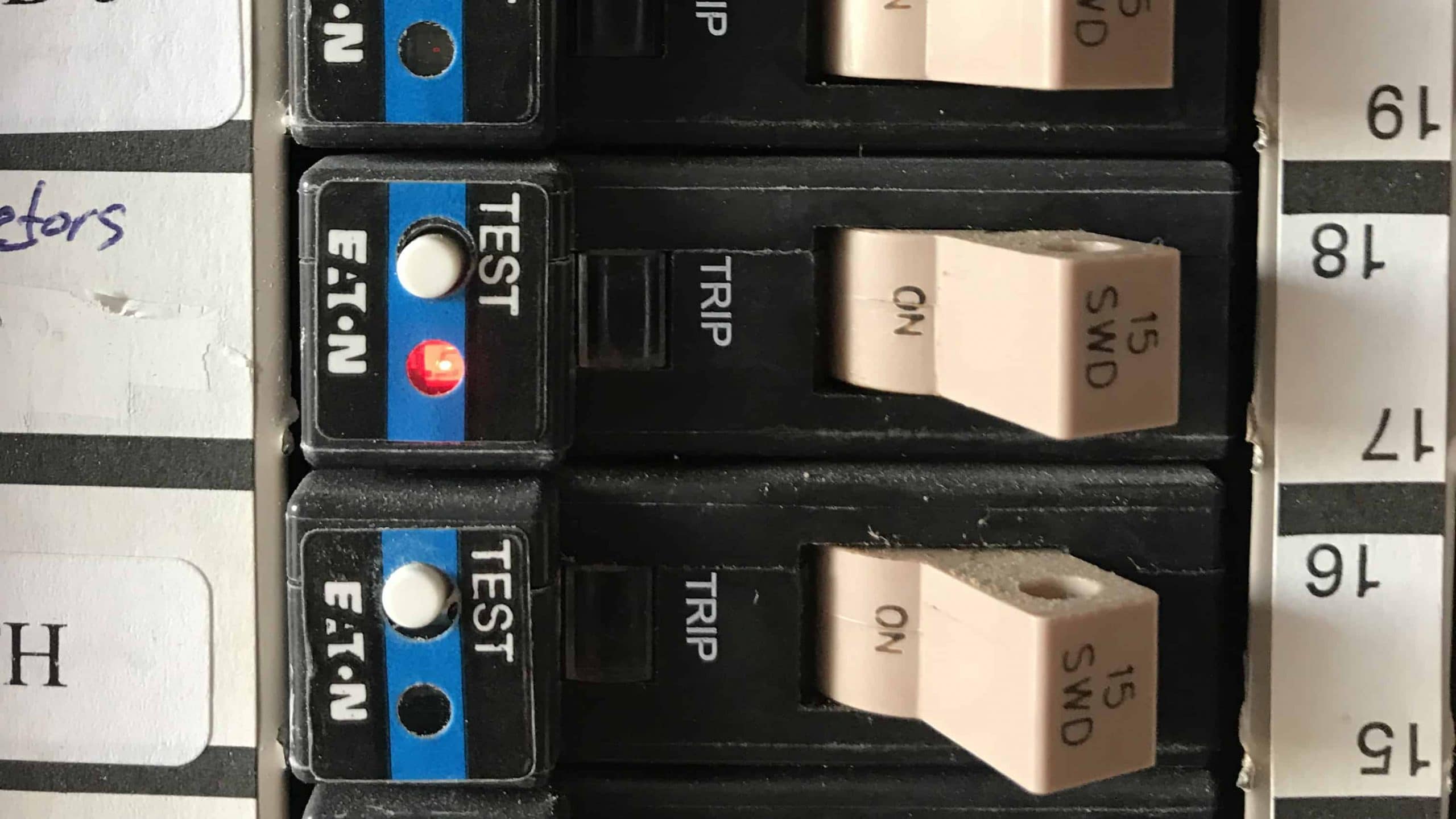
Eaton breakers are designed with built-in diagnostics. When they detect a problem, an LED on the breaker flashes a certain number of times to show a specific error. If you see 5 red blinks, this is not random—it’s a code that points to a particular issue.
Most commonly, 5 red blinks on an Eaton breaker mean a ground fault has occurred. A ground fault is when electrical current takes an unexpected path to the ground. This can be dangerous, causing electric shock or fire if not fixed. However, it’s not always a wiring error. Sometimes, the breaker itself is warning you about other conditions related to ground faults. Knowing the exact cause is key to solving the problem.
Here are the 5 main issues that can trigger the 5-blink code on Eaton breakers:
- Actual ground fault in your wiring or device
- Faulty or damaged breaker
- Moisture or water in the breaker panel
- Nuisance tripping from sensitive electronics or appliances
- Incorrect installation or wiring
Next, we’ll look at each cause, how to identify it, and what steps to take.
1. Actual Ground Fault In Your Wiring Or Device
A ground fault happens when electricity escapes its intended path and flows directly to the ground. This often occurs due to damaged insulation, loose wires, or a problem with a connected device. If your Eaton breaker blinks red 5 times right after you turn on a certain appliance, that device or its wiring is a likely suspect.
How To Identify A Ground Fault
- The breaker trips and blinks after a specific device is plugged in or turned on.
- You may notice burning smells or see blackened outlets.
- Devices may feel warm or tingly to the touch.
Steps To Fix
- Unplug all devices from the affected circuit.
- Reset the breaker and see if it trips again.
- Plug devices in one by one to find the faulty item.
- If the breaker trips with no devices connected, the issue is likely in the wiring.
- Call a qualified electrician to inspect and repair any damaged wiring.
Practical Example
If you have a kitchen outlet that trips the breaker when you use your toaster, but not when you use a blender, your toaster or its plug may have a ground fault. Replacing or repairing the faulty device usually solves the problem.

Credit: www.youtube.com
2. Faulty Or Damaged Breaker
Breakers can wear out, just like any other electrical component. A damaged Eaton breaker may show the 5-blink code even if your wiring and devices are fine. This is more common in older homes or panels that experience frequent power surges.
Signs Of A Faulty Breaker
- The breaker trips with no load or devices connected.
- It feels hot to the touch.
- The LED blinks 5 times even after you check all wiring and devices.
How To Test
- Turn off all power to the panel before touching anything inside.
- Remove the suspected breaker and swap it with another of the same type (if possible).
- If the blinking follows the breaker (not the circuit), the breaker is faulty.
What To Do Next
- Replace the breaker with a new, matching Eaton model.
- Always use breakers with the correct ratings for your panel and wiring.
- If unsure, have an electrician handle the replacement.
Hidden Insight
Many people replace breakers without first checking their warranty. Eaton breakers often have warranties of up to 10 years. Check your paperwork before buying a new one; you might get a free replacement.
3. Moisture Or Water In The Breaker Panel
Water is one of the most dangerous things in an electrical panel. Moisture can cause ground faults, corrosion, and false tripping. Even a small leak or condensation can lead to the 5-blink warning.
Common Signs Of Moisture
- Rusty or discolored metal inside the panel
- Water droplets, dampness, or a musty smell
- Breaker trips during or after heavy rain
How To Fix Moisture Issues
- Turn off main power before inspecting the panel.
- Look for leaks in the wall, ceiling, or around the panel door.
- Dry the area completely—use a fan or hairdryer if needed.
- Seal any leaks with waterproof caulk or get professional help.
- Replace any corroded breakers or wiring.
Table: Moisture Warning Signs Vs. Normal Panel Conditions
| Moisture Warning Signs | Normal Panel Conditions |
|---|---|
| Rust, corrosion, or discoloration | Clean, shiny metal parts |
| Dampness, droplets, or musty odor | Dry interior, no smell |
| Frequent tripping during rain | Breaker only trips during overloads |
Non-obvious Tip
If you live in a humid area, installing a small dehumidifier near your panel can help prevent moisture build-up and reduce nuisance tripping.
Credit: www.thegeekpub.com
4. Nuisance Tripping From Sensitive Electronics Or Appliances
Modern homes are filled with smart devices, chargers, and energy-efficient appliances. Some of these can cause nuisance tripping, which means the breaker trips even though there’s no real danger. This can trigger the 5 red blinks, especially if your Eaton breaker has advanced ground fault detection.
Why This Happens
- Devices with motors or switching power supplies (like computers or LED lights) can create tiny electrical “leaks” that confuse the breaker.
- Older or low-quality appliances may not be fully compatible with new AFCI/GFCI breakers.
How To Identify Nuisance Tripping
- The breaker trips only when certain devices are used, but those devices work fine on other circuits.
- No burning smell, heat, or visible damage.
How To Solve
- Identify the device causing the trip. Try using it on another circuit.
- Replace or upgrade old appliances if possible.
- Use surge protectors to filter out electrical noise.
- If the problem continues, ask an electrician to test the circuit.
Data Table: Common Devices And Nuisance Tripping Risk
| Device | Risk of Nuisance Tripping |
|---|---|
| Laser printers | High |
| LED bulbs | Medium |
| Laptops/tablets | Low |
| Refrigerators | Medium |
| Old fans/heaters | High |
Extra Insight
Some AFCI breakers can be adjusted for sensitivity, but this should only be done by a licensed electrician. Tuning the breaker too low can create safety risks.
5. Incorrect Installation Or Wiring
The final main cause for the Eaton breaker blinking red 5 times is incorrect installation or wiring. Even professionals can make wiring mistakes, especially in busy or older homes where wires have been moved or updated several times.
Common Installation Errors
- Neutral and ground wires are reversed or crossed.
- The breaker is installed in the wrong slot.
- Using the wrong type of breaker for the panel.
How To Spot Wiring Issues
- The breaker blinks 5 times immediately after installation.
- Other circuits in the panel work fine.
- An inspection reveals mixed-up or loose wires.
How To Fix
- Turn off all power and remove the panel cover.
- Check that all wires are connected to the correct terminals.
- Verify the breaker model matches your panel specifications.
- Tighten all connections securely.
- If you’re not trained in electrical work, hire a professional—wrong wiring can be deadly.
Table: Proper Vs. Improper Breaker Installation
| Proper Installation | Improper Installation |
|---|---|
| Correct breaker type and amp rating | Wrong breaker size or brand |
| Neutral and ground wires separated | Wires crossed or doubled up |
| Secure, tight connections | Loose or exposed wires |
Hidden Insight
If your home has recently been remodeled or had new circuits added, check for wiring mistakes. Electricians sometimes leave notes or diagrams inside the panel that can help you understand the setup.
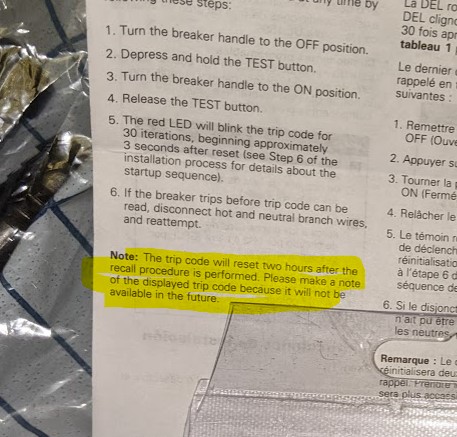
How To Reset An Eaton Breaker After 5 Red Blinks
Once you’ve found and fixed the cause, you’ll need to reset your Eaton breaker. Here’s how to do it safely:
- Switch the breaker fully to the OFF position.
- Wait at least 10 seconds to allow the internal sensor to reset.
- Flip the breaker back to ON.
- Watch the LED—no blinks means the issue is solved.
- If it blinks 5 times again, repeat the troubleshooting steps.
If the breaker won’t reset after several tries, it could be permanently damaged or the fault is still present.
When To Call A Professional
You should always call a licensed electrician if:
- You’re not comfortable working inside an electrical panel.
- The same breaker keeps blinking and tripping after you tried all fixes.
- There are signs of burning, smoke, or water damage.
- Your home’s wiring is old or hasn’t been inspected in years.
A professional can use special tools to test for hidden faults and ensure your home is safe. Never risk your safety to save a few dollars—electricity can be deadly.
Preventing Future Breaker Problems
Fixing the cause of a 5-blink warning is important, but preventing future problems is even better. Here are some tips:
- Have your panel inspected every 3–5 years, especially in older homes.
- Label all circuits in your breaker box for easy troubleshooting.
- Replace old or damaged appliances that cause frequent tripping.
- Install whole-home surge protection to reduce wear on breakers.
- Keep the area around your panel dry and clean.
These steps will reduce the risk of ground faults and other issues that lead to blinking warnings.
How Eaton Breaker Diagnostics Compare To Other Brands
Eaton isn’t the only brand with LED diagnostic codes. Other companies like Siemens, Square D, and Leviton use similar systems, but their codes may differ. Eaton’s 5-blink code is specific to their ground fault protection. Some brands use beeps instead of blinks, or different numbers for the same problem.
Table: Diagnostic Code Comparison (eaton Vs. Competitors)
| Brand | 5 Blinks/Beep Code Meaning | Reset Method |
|---|---|---|
| Eaton | Ground fault detected | Switch OFF, wait 10 sec, switch ON |
| Siemens | AFCI/GFCI trip (varies) | Switch OFF, then ON |
| Square D | Arc fault or ground fault | Switch OFF, press test, switch ON |
| Leviton | Varies by model | Follow on-breaker instructions |
If you’re unsure about your breaker’s blink codes, check the label on the breaker or consult the manual. You can also find detailed guides on Eaton’s official website.
Credit: diy.stackexchange.com
Frequently Asked Questions
What Does It Mean When My Eaton Breaker Blinks Red 5 Times?
This code means the breaker detected a ground fault or a similar electrical issue. It’s a warning that electricity is leaking to the ground or the breaker senses a safety problem. You should unplug devices, check for wiring issues, and call an electrician if you can’t find the cause.
Can I Keep Resetting The Breaker If It Blinks 5 Times?
No, repeatedly resetting the breaker without fixing the root problem is unsafe. The breaker trips to protect you from electrical shock or fire. Always find and fix the cause before resetting more than once.
How Do I Tell If The Problem Is The Breaker Or My Wiring?
If the breaker trips and blinks 5 times with no devices connected, it could be a faulty breaker. Try swapping it with another breaker or testing the circuit with a new one. If the problem moves with the breaker, replace it; if not, check your wiring.
Is It Safe To Use My Appliances After A 5-blink Warning?
No, you should not use appliances on the affected circuit until the problem is fixed. Using devices on a faulty circuit can cause shocks, fires, or damage to your equipment.
Do Eaton Breakers Have A Warranty?
Yes, most Eaton breakers come with a warranty—often 10 years. Check your purchase documents or Eaton’s website for details. If your breaker is under warranty and fails, you may get a free replacement.
Eaton breakers are designed to keep your home safe, but only if you pay attention to their warnings. If you see your breaker blinking red 5 times, don’t ignore it—investigate, fix the issue, and your home will stay safer and more reliable for years to come.