
Many users who own a Lost Mary vape sometimes notice a blinking blue light while charging. This small detail can cause confusion, worry, or even frustration, especially if you’re new to disposable vapes or electronic cigarettes. Is this blinking blue light a sign of a problem, or is it normal? Understanding what your device is telling you can help you avoid mistakes, fix issues, and extend your vape’s life. Let’s explore what a blinking blue light means, how to fix common problems, and what you should know about charging Lost Mary vapes.
What Is Lost Mary And Why Is Charging Important?
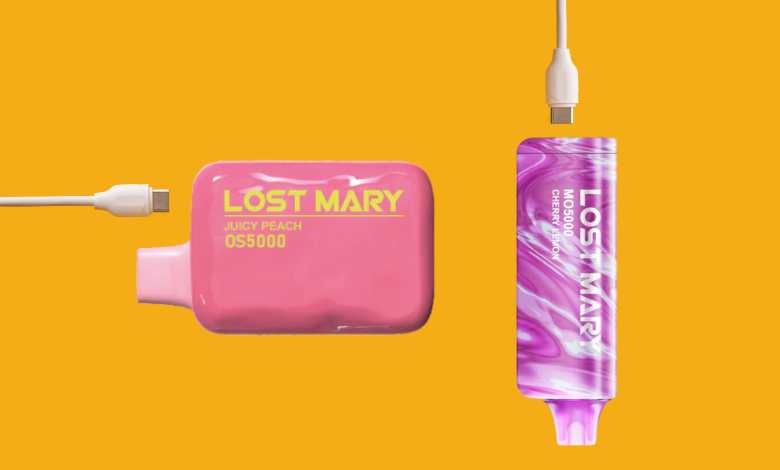
Lost Mary is a popular brand of disposable vape devices. These vapes are compact, easy to use, and designed for people who want a simple vaping experience. Unlike refillable vapes, Lost Mary devices usually come pre-filled with e-liquid and a built-in battery. When the battery runs low, you recharge the device using a USB-C cable.
Charging is important because the battery powers everything: the heating coil, the LED lights, and the internal controls. If the battery or charging system fails, you won’t be able to use your Lost Mary vape.
Understanding The Blinking Blue Light
When you connect your Lost Mary vape to charge, you may see a blinking blue light. This light is not just for decoration—it’s a signal from your device. But what does it mean?
- Normal charging: Some models blink blue to show that charging has started.
- Battery issue: A blinking blue may indicate a problem with the battery, such as low voltage or an internal error.
- Connection issue: If the cable is loose or the charging port is dirty, the blue light may blink to warn you.
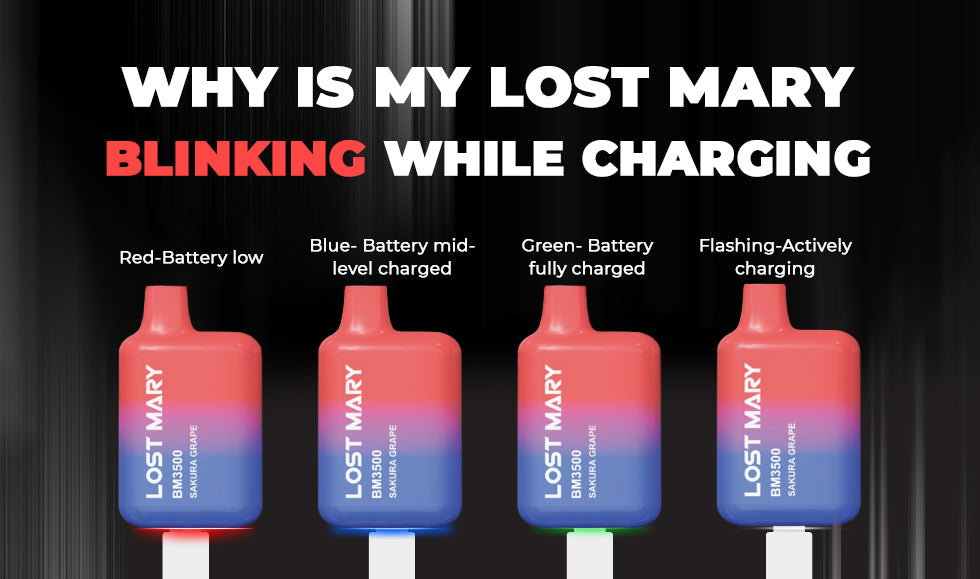
Most Lost Mary vapes use a color code for their LED lights. Here’s a quick comparison of what different colors mean:
| LED Color | Meaning During Charging |
|---|---|
| Blue (Blinking) | Charging started / Battery issue / Connection problem |
| Green | Fully charged / Charging complete |
| Red | Battery low / Error / End of device life |
Understanding these colors helps you know if your Lost Mary is charging correctly or if you need to take action.
Common Reasons For Blinking Blue While Charging
Let’s look at the most frequent causes for a blinking blue light on Lost Mary vapes:
1. Battery Is Very Low
When the battery drops below a safe level, the device blinks blue to warn you. It may take a few minutes for the light to turn solid once charging begins.
2. Charging Cable Issue
If the USB-C cable is damaged, old, or not fully inserted, the blue light may blink. Try switching to a different cable.
3. Dirty Charging Port
Dust, lint, or liquid inside the charging port can block power. Carefully clean the port with a dry cotton swab.
4. Device Malfunction
Sometimes, internal circuits fail. If the blinking blue light doesn’t stop after 30–60 minutes of charging, your device may be faulty.
5. Overheating
If you vape too much before charging, the device can get hot. The blinking blue light may indicate overheating. Let it cool down before charging again.
These issues are common but often easy to fix. If your device continues blinking blue after trying these solutions, it may need professional help or replacement.
How To Fix Lost Mary Blinking Blue While Charging
A blinking blue light doesn’t always mean your Lost Mary vape is broken. Here are practical steps to solve the problem:
1. Check The Charging Cable
Use a new, high-quality USB-C cable. Poor cables cause weak connections.
2. Clean The Charging Port
Gently remove any dust or dirt from the port. Avoid using water or metal objects.
3. Let The Device Cool
If the vape feels warm, let it rest for 15–20 minutes before charging.
4. Try A Different Charger
Wall adapters are usually better than computer USB ports. Use a charger rated for 5V and 1A (standard for most vapes).
5. Wait And Observe
Some devices blink blue for a few minutes, then switch to solid blue or green. Wait up to 30 minutes to see if the light changes.
6. Reset The Device
Some Lost Mary models have a reset option. Check the manual or press the button (if present) for 10 seconds.
If none of these steps help, your Lost Mary vape may have a deeper battery issue. Disposable vapes are not meant to be repaired, so you may need a new device.
Comparing Lost Mary Charging Behavior To Other Vapes
Lost Mary is not the only brand with LED signals for charging. Other disposable vapes use similar lights, but the behavior can be different. Here’s a quick comparison:
| Brand | Charging Light Behavior | What Blinking Blue Means |
|---|---|---|
| Lost Mary | Blinking blue during charging | Charging started / Battery issue |
| Elf Bar | Solid blue, then green | Charging / Fully charged |
| Vuse | Flashing white | Charging / Connection issue |
| Puff Bar | No light | Device not rechargeable |
Knowing these differences helps you understand that blinking blue is not always a sign of trouble, but it’s unique to Lost Mary and some similar brands.
What To Avoid When Charging Lost Mary
Many beginners make mistakes when charging their Lost Mary vape. Here are things you should not do:
- Don’t use fast chargers (higher than 5V 1A). They can damage the battery.
- Don’t charge in very hot or cold places. Extreme temperatures can make the battery unstable.
- Don’t force a cable if it doesn’t fit. This can break the charging port.
- Don’t use water or metal objects to clean the port.
- Don’t ignore blinking lights for hours. If the blue light never stops blinking, your device may need replacing.
These tips can save you time and prevent damage to your Lost Mary device.
Credit: vapejuicedepot.com
How Long Should Lost Mary Take To Charge?
Charging time depends on the model and battery size. Most Lost Mary vapes take 30–60 minutes to fully charge. If your device blinks blue for much longer, there may be a problem.
For comparison, here’s how charging times differ across disposable vapes:
| Device | Average Charging Time | Battery Capacity |
|---|---|---|
| Lost Mary BM600 | 45 minutes | 500mAh |
| Elf Bar BC5000 | 1 hour | 650mAh |
| Vuse Alto | 50 minutes | 350mAh |
If your Lost Mary takes much longer than 1 hour to charge, it’s wise to check for blinking lights or other issues.
Safety Tips For Charging Lost Mary Vapes
Charging any electronic device comes with safety risks. Here are proven ways to charge your Lost Mary vape safely:
- Use original or certified charging cables.
- Plug into a wall socket, not a computer or power bank.
- Keep the device in a cool, dry place while charging.
- Never leave the vape charging overnight.
- Check the device for signs of swelling, leaking, or overheating before plugging in.
If your Lost Mary shows unusual behavior while charging, such as a blinking blue light for several hours, unplug immediately and contact support or dispose of the device safely.
Credit: lostmarydirect.com
Insights Beginners Often Miss
Many first-time users don’t realize these points:
- LED blinking can be normal: If the blue light blinks for a few minutes after plugging in, it’s often just the battery waking up. Don’t panic unless it lasts too long.
- Dirty ports are a major cause: Even tiny dust particles can block charging. Cleaning the port gently can solve most blinking blue issues.
These insights can help you avoid unnecessary worry and keep your device working smoothly.
When To Replace Your Lost Mary Vape
Disposable vapes like Lost Mary are not built for long-term use. If you see the blue light blinking during charging, and it doesn’t stop after trying the fixes above, it’s probably time to buy a new device.
Other signs you need a replacement:
- The vape doesn’t turn on after charging.
- The LED light stays off, even with a new cable.
- The device feels hot, smells strange, or leaks.
Disposable vapes are safer to replace than repair. Don’t risk your health by using a faulty device.
Credit: goldenvape.co.uk
Frequently Asked Questions
Why Does My Lost Mary Blink Blue When Charging?
A blinking blue light usually means the device is starting to charge, but it can also signal a battery issue or loose connection. Check your cable, clean the port, and wait a few minutes. If the blinking doesn’t stop, the battery may be faulty.
Is It Safe To Use A Lost Mary Vape That Blinks Blue While Charging?
If the blue light blinks briefly, it’s safe. If it blinks for a long time or the device feels hot, unplug and let it cool. Continuous blinking may mean the battery is damaged, so avoid using until you fix the issue.
Can I Fix A Lost Mary Vape That Keeps Blinking Blue?
You can try changing the cable, cleaning the port, or using a different charger. If these steps don’t work, the device is likely faulty. Disposable vapes are not meant to be repaired, so buying a new one is the best solution.
How Long Should The Blue Light Blink When Charging?
For most Lost Mary vapes, the blue light blinks for 5–10 minutes, then turns solid or switches to green. If it blinks for more than 30 minutes, check for cable or port issues.
Where Can I Find Official Guidance For Lost Mary Vapes?
For more details, you can visit the official Lost Mary support page or read trusted guides from vape industry sites. A reliable resource is Vaping Post.
Conclusion
A blinking blue light on your Lost Mary vape is often easy to fix. By understanding what your device is telling you and following these steps, you can enjoy safe and smooth charging every time. If problems continue, don’t hesitate to replace your vape for the best experience.