
When your Ooze battery starts blinking red, it can feel confusing and even a bit frustrating. Many users, both new and experienced, have faced this problem and wondered what it really means. A blinking red light usually signals that something needs attention, but the exact reason can vary. Understanding the cause helps you fix the issue quickly, avoid damage, and keep your vaping experience smooth.
This article will explain why your Ooze battery might blink red, what each blinking pattern means, and how to troubleshoot common problems. You will learn about battery basics, safe charging, and maintenance tips to extend the life of your device.
If you follow these steps, you can solve most issues yourself and know when it’s time to seek help.
What Is An Ooze Battery And How Does It Work?
An Ooze battery is a popular type of vape pen battery used for oil cartridges and concentrates. It powers the heating element that turns oil into vapor. Most Ooze batteries are rechargeable and use simple LED indicator lights to communicate status to the user.
These batteries work by connecting to a cartridge. When you press the button or inhale (depending on the model), the battery sends power to the coil. The coil heats up, vaporizing the oil inside the cartridge. Ooze batteries come in different capacities (measured in mAh), shapes, and colors, but their basic function remains the same.
Ooze batteries are designed to be user-friendly, but their LED lights can display several colors and patterns. Understanding these signals helps you use and maintain your device correctly.
Common Reasons For Ooze Battery Blinking Red
A blinking red light is the most common warning sign you will see on an Ooze battery. However, not all red blinks mean the same thing. Here are the main reasons:
1. Low Battery Charge
The most frequent reason is a low or empty battery. The red light usually blinks 10-15 times when the power is almost gone.
2. Connection Issues
If the battery cannot connect to the cartridge or charger, it may blink red. This often happens due to dirt, oil, or debris on the contact points.
3. Short Circuit Or Overload
A short circuit inside the cartridge or battery can cause rapid blinking. This is a safety feature to prevent damage or overheating.
4. Charger Problems
Sometimes, the charger or charging cable is faulty or not connected properly. The battery will blink red to signal it cannot charge.
5. Battery Error Or End Of Life
If the battery is damaged or very old, it may blink red even when fully charged. This means the battery may need to be replaced.
What Do Different Blinking Patterns Mean?
Ooze batteries use different blinking patterns to signal various issues. Here is a quick guide:
| Blinking Pattern | Meaning | Action Required |
|---|---|---|
| 10-15 slow red blinks | Low battery | Recharge the battery |
| Continuous rapid red blinks | Short circuit or cartridge error | Check/replace cartridge |
| Red light while charging | Charging in progress | Wait until light turns green |
| Red blinks when connecting charger | Charging error | Try different charger or cable |
| Red blinks with no cartridge | No load detected | Attach cartridge |
Understanding these patterns can save you time and avoid unnecessary frustration.
How To Fix Ooze Battery Blinking Red
If your Ooze battery is blinking red, follow these steps:
1. Charge The Battery
Connect your battery to a reliable charger. Wait at least one hour. Most Ooze batteries will show a solid red light while charging, and switch to green when finished.
2. Check Connections
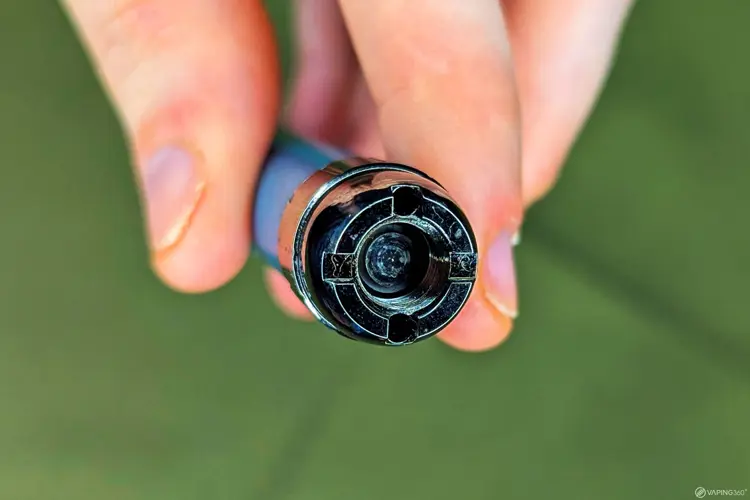
Remove the cartridge and look at the metal contact points on both the battery and cartridge. If you see oil, dirt, or residue, clean it gently with a cotton swab and isopropyl alcohol. Dry fully before reassembling.
3. Inspect The Charger And Cable
Try using a different charger or USB cable. Sometimes the charger is the real problem, not the battery.
4. Test With A Different Cartridge
If the battery blinks red only when a certain cartridge is attached, the cartridge may be faulty. Try another cartridge to see if the problem continues.
5. Reset Or Restart The Battery
Some Ooze batteries can be reset by clicking the main button five times quickly. Check your model’s instructions to see if this works.
6. Replace The Battery
If none of these steps work and the battery is old (over 1-2 years), it may be time to buy a new one. Batteries lose capacity and reliability over time.
Example Troubleshooting Scenario
Suppose you attach a cartridge and your Ooze battery blinks red 10 times. You clean the contacts, try a new cartridge, and still see the red blinking. You then try a new charger and cable, but nothing changes. The battery is two years old and has been charged over 300 times.
In this case, the battery has likely reached the end of its life.
Credit: vaping360.com
Cleaning And Maintenance Tips
Regular maintenance can prevent most blinking red issues. Here’s how to keep your Ooze battery in top condition:
- Clean contact points weekly with a cotton swab and isopropyl alcohol.
- Store the battery upright to avoid oil leaks into the contact area.
- Avoid over-tightening cartridges, which can damage threads or compress the center pin.
- Charge only with the correct charger designed for your battery model.
- Keep away from extreme heat or cold as this can shorten battery life.
A well-maintained battery will last longer and perform better.
Safety Precautions
Using vape batteries safely is important for your health and safety. Here are some basic tips:
- Never use a damaged battery or charger.
- Do not leave charging batteries unattended for long periods.
- Do not use water to clean the battery—always use alcohol and a dry cloth.
- Avoid charging overnight or in direct sunlight.
- Dispose of old batteries properly, according to your local recycling rules.
If your battery gets hot, swells, or smells strange, stop using it immediately.

Credit: www.reddit.com
Comparing Ooze Batteries To Other Brands
How does an Ooze battery compare to other popular vape pen batteries? Here’s a simple comparison:
| Feature | Ooze Battery | Other Brands |
|---|---|---|
| LED Indicator | Multi-color, blinking patterns | Varies (some single-color, some multi-color) |
| Typical Capacity | 350-900 mAh | 250-1100 mAh |
| Price Range | $15-$30 | $10-$50 |
| Button or Draw-Activated | Both types available | Both types available |
| Common Issues | Blinking lights, connection problems | Blinking lights, charger issues |
Ooze batteries are known for their reliability and easy-to-understand signals, but all vape pen batteries can have similar issues if not maintained properly.
When To Replace Your Ooze Battery
No battery lasts forever. Here are signs it is time to replace your Ooze battery:
- Frequent red blinking even after charging and cleaning
- Battery will not hold a charge for more than a few hours
- Physical damage such as dents, cracks, or swelling
- Strange smells or overheating
Most vape pen batteries last between 300-500 charge cycles. If you use your battery daily, this could be 1-2 years.

Credit: www.oozelife.com
How To Choose A New Ooze Battery
If you need a replacement, consider these factors:
- Battery capacity (mAh): Higher numbers last longer but are larger.
- Activation type: Button-activated models offer more control; draw-activated are simpler.
- Thread type: Most Ooze batteries use 510-thread, which fits most cartridges.
- Voltage settings: Some models let you adjust power for different oils.
- Warranty: Check for at least a 1-year warranty for peace of mind.
A common mistake is buying a battery that does not fit your cartridge or using a charger not designed for your battery.
Non-obvious Insights For Beginners
- Most red blinking problems are caused by dirty contact points, not the battery itself. Cleaning your battery and cartridge regularly can solve and prevent many issues before they start.
- Ooze batteries have a safety cutoff to prevent overheating, so if you hold the button too long (usually more than 10 seconds), it will blink red and stop firing. This protects both you and the device.
- Using a charger that is too powerful or not made for vape pens can permanently damage your battery. Always use a charger with the correct voltage and current.
- Oil leaks from cartridges can cause connection errors that look like battery problems. Always check for leaks if you see unexpected blinking.
Real-world Example: User Story
Maria has been using her Ooze Slim Pen for eight months. One morning, she notices her battery is blinking red every time she tries to vape, even though she charged it overnight. She removes the cartridge and sees some oil on the battery contact.
She cleans it with alcohol, waits for it to dry, and attaches the cartridge again. The battery stops blinking and works normally. Maria learned that a simple cleaning could fix what looked like a big problem.
Resources For More Help
If you have tried these steps and your Ooze battery still blinks red, check the official Ooze support page or visit a vape shop. Sometimes, manufacturer defects or rare problems require expert help. For more information about lithium-ion battery safety and recycling, you can visit the official EPA battery recycling guide.
Frequently Asked Questions
Why Is My Ooze Battery Blinking Red 10 Times?
A red blink 10 times usually means low battery. Recharge your battery. If it still blinks after charging, check the cartridge and clean the contacts.
Can I Use Any Charger With My Ooze Battery?
No, always use the charger that came with your battery or a compatible one. Using the wrong charger can damage your battery and even be dangerous.
What Should I Do If My Ooze Battery Blinks Red With A New Cartridge?
Clean both the battery and cartridge contacts. If it still blinks, try a different cartridge. Sometimes, new cartridges have factory defects.
How Often Should I Clean My Ooze Battery?
Clean the contacts at least once a week or whenever you notice residue. Regular cleaning prevents most connection problems.
Is It Safe To Use My Ooze Battery If It Blinks Red While Charging?
If the battery blinks red while charging and does not stop, unplug it and check the charger and cable. If the problem continues, stop using the battery and contact support.
A blinking red light on your Ooze battery is usually easy to fix with a few simple steps. Most problems come from low charge, dirty contacts, or cartridge issues. With regular cleaning and careful charging, you can enjoy your Ooze battery for a long time.
If you ever feel unsure, ask for help from a trusted vape shop or the official support team.