
If you own an Ooze pen, you expect it to be simple: charge, use, and enjoy. But sometimes, things get confusing—especially when the Ooze pen charger blinks red and green. Many users worry this means the pen or charger is broken. But what do these lights really mean? Is your battery dying, is there a connection issue, or is it something else? Understanding these signals can save you time, money, and frustration. This article will guide you through everything you need to know if your Ooze pen charger is blinking red and green, from the most common causes to practical solutions and smart prevention tips.
What Does The Ooze Pen Charger Blinking Red And Green Mean?
When you plug your Ooze pen into its charger, you expect a steady light—maybe red for charging or green for fully charged. But if you see blinking red and green lights, your device is trying to tell you something. In most cases, this warning means one of three things:
- Connection issue: The pen and charger may not be connecting properly.
- Battery problem: The battery could be damaged, depleted, or near the end of its life.
- Charger or cable issue: The charger itself may have a fault.
The blinking is a built-in safety feature. It warns you before real damage occurs. Ignoring it can make things worse, so it’s important to know what to do next.
Common Causes For Blinking Red And Green
Knowing why the lights blink can help you fix the problem faster. Here are the most common reasons:
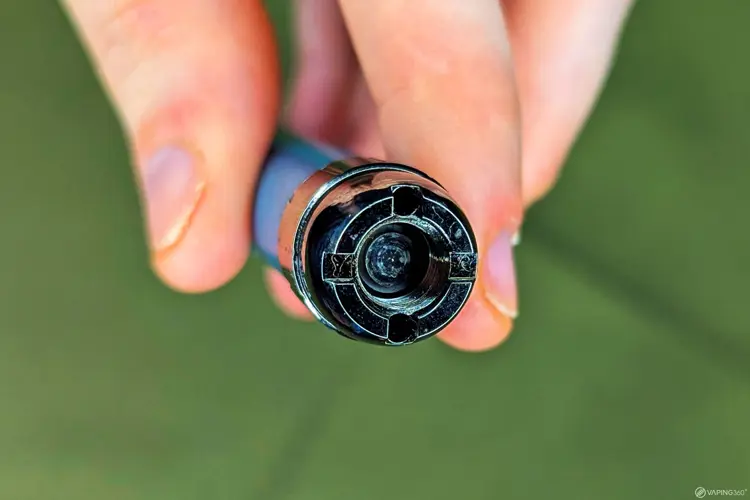
1. Dirty Or Damaged Contacts
Ooze pens rely on clean, tight contact between the battery and charger. Dust, oil, or e-liquid residue can break this connection. Over time, even small amounts can cause blinking lights. If the contacts are bent or corroded, the problem becomes worse.
2. Over-tightening The Battery
Many users think tightening the pen to the charger is good. But over-tightening can actually damage the threads or push the connection pins too deep. This disrupts the flow of power and makes the lights blink.
3. Wrong Charger Or Cable
Ooze pens need a specific voltage and current. Using a charger that’s too strong or weak can confuse the pen’s safety system. Generic USB chargers may not match the requirements, triggering the red and green blink.
4. Low Or Faulty Battery
If your battery is completely drained or has a defect (like a bad cell), the charger might not recognize it. Instead of charging, you’ll see flashing lights.
5. Internal Short Circuit Or Fault
Sometimes, an internal issue inside the pen or charger causes the safety system to activate. This is less common but can happen with older or dropped devices.
Credit: vaping360.com
Step-by-step Troubleshooting Guide
If your Ooze pen charger is blinking red and green, don’t panic. Here’s a clear process to find and fix the issue:
Step 1: Check And Clean The Connections
- Remove the pen from the charger.
- Look at the metal contacts on both the pen and charger. Are they dirty, oily, or sticky?
- Use a cotton swab with a little rubbing alcohol to clean both ends. Let them dry before reconnecting.
- Try charging again.
Step 2: Inspect For Physical Damage
- Check the pen and charger for visible damage or bent pins.
- Make sure the threads (where pen and charger screw together) are not cross-threaded or stripped.
- If you see damage, avoid forcing them together.
Step 3: Use The Official Charger
- Only use the charger that came with your Ooze pen.
- Avoid generic USB cables or phone chargers.
- If you lost the original, order a replacement from a trusted retailer.
Step 4: Try A Different Power Source
- Plug the charger into a different USB port or wall adapter.
- Some computers or low-power adapters may not provide enough power.
Step 5: Test With Another Battery
- If you have another Ooze pen or compatible battery, try charging it with the same charger.
- If the other battery charges normally, your original pen may have a battery problem.
- If both blink red and green, it’s likely the charger or power source.
Step 6: Let The Battery Rest
- If you recently drained the battery completely, let it sit unplugged for 20–30 minutes before trying to charge again. Sometimes, lithium-ion batteries need a short rest to recover.
Step 7: Replace Damaged Parts
- If after trying the steps above, the blinking continues, you may need to replace the battery or charger.
- Never try to repair a damaged battery yourself; it’s not safe.
Understanding What The Lights Mean
Lights on your Ooze pen and charger are more than decoration. Here’s a quick comparison of what different colors and blinking patterns mean:
| Light Color/Pattern | Meaning |
|---|---|
| Solid Red | Charging |
| Solid Green | Fully charged |
| Blinking Red and Green | Connection or error issue |
| Rapid Flashing Red | Battery problem or short circuit |
| No Light | Not connected or dead battery |
Recognizing these signals helps you act fast and avoid bigger problems.
Preventing Charger And Battery Issues
To reduce the risk of seeing those blinking red and green lights, follow these practical tips:
- Clean your pen and charger contacts regularly—at least once a week if you use the pen daily.
- Do not over-tighten the pen when connecting it to the charger.
- Only use the official charger or one approved by Ooze.
- Store your pen in a clean, dry place. Avoid leaving it in hot cars or humid bathrooms.
- Charge your pen before it’s completely dead. Lithium-ion batteries last longer if you avoid deep discharges.
- Inspect your pen for damage after drops or spills.
- Unplug the charger when not in use to avoid overcharging.
When To Replace Your Ooze Pen Or Charger
Even with the best care, batteries and chargers don’t last forever. Here’s how to know it’s time for a replacement:
- The battery no longer holds a charge, even after cleaning and troubleshooting.
- The charger becomes hot, smells burnt, or shows physical damage.
- You see repeated blinking lights, even with different power sources and cables.
- The pen works for only a few minutes after charging.
A typical Ooze pen battery lasts about 300–500 charge cycles. That means if you charge it every day, you’ll likely need a new one in about a year and a half.

Credit: www.oozelife.com
What Not To Do When You See Blinking Lights
Some common mistakes can make the problem worse—or even cause injury. Avoid these:
- Do not use water to clean the contacts. Only use rubbing alcohol or specialized electronics cleaners.
- Never force a charger onto a pen with damaged threads.
- Do not use third-party “fast chargers” designed for phones. These can damage the pen.
- Never open the battery case or try to “fix” the inside yourself.
Real-world Example: How One User Solved The Blinking Issue
Jessica, a regular Ooze pen user, noticed her charger started blinking red and green after a month of use. She first tried charging with a phone cable, but the blinking continued. After searching online, she learned about contact cleaning. Using a cotton swab and a drop of rubbing alcohol, she cleaned both the battery and charger contacts.
She also made sure not to over-tighten the pen. The next time she plugged in, the light turned solid red—charging as normal. This simple fix saved her the cost of a new battery.

Credit: www.oozelife.com
Comparison: Ooze Pen Vs. Other Vape Pens (charger Issues)
Many vape pens use similar charging systems, but the way they signal problems can differ. Here’s a quick look at how Ooze compares with other popular brands:
| Brand | Error Light Pattern | Common Cause | Fix |
|---|---|---|---|
| Ooze | Blinking red and green | Connection, battery, or charger issue | Clean, check charger, replace if needed |
| Vape Pen 22 | Flashing white or red | Short circuit or low battery | Replace coil or battery |
| 510 Thread | Flashing red | Low battery or connection issue | Clean, recharge, or replace |
| Puff Bar | No light | Dead battery | Replace device |
This shows the importance of knowing your device’s specific signals.
Advanced Troubleshooting Tips
If the basic steps don’t help, try these expert strategies:
- Check for software updates: Some advanced Ooze pens can be updated through an app or website. Updates can fix charging glitches.
- Try a different outlet: Sometimes, your wall socket can be the problem.
- Contact customer support: If your Ooze pen is still under warranty, reach out to the manufacturer. They may offer a replacement or repair.
- Look for recalls: In rare cases, a batch of batteries or chargers may be recalled for safety reasons. Check the official Ooze website for news.
Are Ooze Pens Safe? Understanding Battery Safety
Most vape pen batteries, including Ooze, use lithium-ion cells. These are safe when used correctly, but misuse can cause problems. Here are some important safety facts:
- Never charge overnight or leave charging pens unattended.
- Avoid extreme temperatures: Don’t charge or use your pen in very hot or cold places.
- If you notice swelling, leaking, or a burnt smell, stop using the battery immediately.
According to the U.S. Consumer Product Safety Commission, most vape pen accidents happen because of misuse, not manufacturing defects. Follow the guidelines above to stay safe.
For more in-depth battery safety information, visit the Consumer Reports battery safety guide.
Frequently Asked Questions
Why Does My Ooze Pen Charger Keep Blinking Red And Green Even After Cleaning?
If you’ve cleaned the contacts and the lights still blink, the problem may be inside the battery or charger. Try using a different charger or battery to isolate the issue. If the problem continues, replacement is usually the best option.
Is It Safe To Use My Ooze Pen While It’s Charging?
No. Most Ooze pens are not designed for “pass-through” charging, which means using them while plugged in can cause damage or increase the risk of battery problems.
Can I Use My Phone Charger To Charge My Ooze Pen?
It’s not recommended. Phone chargers may provide too much or too little power, which can confuse the pen’s safety circuit. Always use the charger made for your device.
What Should I Do If My Ooze Pen Gets Wet?
Immediately remove the battery from the charger and dry both parts thoroughly. Do not use or charge the pen until you are sure it’s completely dry. Water inside the battery can cause shorts or permanent damage.
How Long Should My Ooze Pen Take To Fully Charge?
Most Ooze pens take about 1–2 hours to charge. If it takes much longer, or never reaches a full green light, the battery or charger may be failing.
When you understand what your Ooze pen’s blinking lights mean, you can solve problems quickly and safely. Don’t ignore these signals—most fixes are simple and can save you time, money, and stress. With the right care and attention, your Ooze pen will last longer and work better, giving you a smoother and safer experience every time.