
Many people use Ooze pens to enjoy vaping. They are simple, portable, and easy to use. But sometimes, users see their Ooze pen blinking red and wonder what it means. This blinking can be confusing, especially if you don’t know much about vape pens. In this article, you’ll learn what causes the red blinking, how to fix it, and how to prevent problems in the future. Whether you’re new to vaping or have used Ooze pens for years, you’ll find practical advice and clear answers here.
What Does Red Blinking Mean On An Ooze Pen?
When your Ooze pen blinks red, it’s not just a random light. The red blink is a signal from the pen that something is wrong. Most Ooze pens use colored lights to help you understand their status. Red is usually a warning.
Some common reasons for red blinking include:
- Low battery
- Connection issue between battery and cartridge
- Short circuit or electrical problem
- Overheating
- Button stuck or pressed too long
Understanding which problem you’re facing is key. For example, if your pen blinks red and doesn’t heat up, it’s likely a battery or connection issue. If it blinks after a long puff, overheating might be the cause.
Ooze Pen Blinking Red: Common Causes
Let’s look at the main reasons your Ooze pen blinks red. Each cause has a different solution.
1. Low Battery
Most often, a blinking red light means the battery is low or empty. The pen can’t heat the coil when the battery is weak. This is simple to fix—just charge the pen.
2. Connection Issue
If the cartridge is not screwed in properly or if there’s dirt between the battery and cartridge, the pen can blink red. The electrical connection is not complete, so the pen can’t work.
3. Short Circuit
Sometimes the pen detects a short circuit. This means there’s an unsafe electrical path, and the pen blinks red to protect itself.
4. Overheating
If you puff for too long or use the pen continuously, it can get hot. The Ooze pen will blink red to warn you and stop working until it cools down.
5. Button Problems
If the button is stuck or pressed for too long, the pen may blink red as a safety measure.
How To Fix Ooze Pen Blinking Red
You don’t have to be an expert to fix your Ooze pen. Here’s what you can do:
Step 1: Charge Your Pen
Plug your pen into a USB charger. If the pen blinks red while charging, wait until the light turns green. Most Ooze pens need 1-2 hours to fully charge. If the battery is old, it might not charge well.
Step 2: Check Cartridge Connection
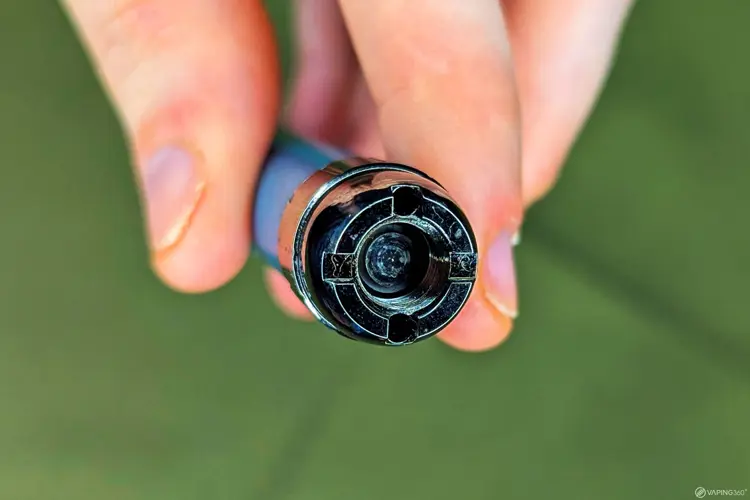
Remove the cartridge and clean the contacts. Use a dry cotton swab to wipe any dirt or oil. Screw the cartridge back in firmly, but don’t force it.
Step 3: Inspect For Short Circuit
Look for broken wires or leaks. If you see oil inside the battery area, clean it carefully. If the pen keeps blinking red, try another cartridge. If the problem continues, the battery may be damaged.
Step 4: Let Your Pen Cool Down
If you’ve been using the pen a lot, let it rest for 10-15 minutes. Overheating can cause red blinking. Try again after the pen cools.
Step 5: Check The Button
Press the button quickly. If it feels stuck, gently clean around it. Don’t use water. If the button is broken, you may need to replace the pen.
Comparing Ooze Pen Models And Their Warning Signals
Different Ooze pen models use lights in slightly different ways. Here’s how some popular models compare:
| Model | Red Blink Meaning | Other Warning Colors |
|---|---|---|
| Ooze Slim Twist | Low battery or connection error | Green (charged), White (heating) |
| Ooze Duplex | Short circuit or cartridge issue | Blue (charging), Green (ready) |
| Ooze Fusion | Overheating or battery error | White (normal), Green (charged) |
Always check your model’s manual for exact meanings. Some models add extra signals for special functions.

Credit: www.reddit.com
Signs Your Ooze Pen Needs Replacement
Ooze pens are durable, but they don’t last forever. If your pen blinks red often, even after charging and cleaning, it may be time for a new pen. Here’s how you know:
- The battery drains very quickly, even after a full charge.
- The button doesn’t respond or feels loose.
- The pen blinks red with every cartridge, even new ones.
- You smell burning or see smoke near the battery.
Most Ooze pens work well for 6-12 months with regular use. Heavy users may need replacement sooner.
Preventing Ooze Pen Blinking Red Issues
You can avoid most blinking issues with good habits. Here are practical tips:
1. Charge Properly
Don’t overcharge your pen. Remove it from the charger when the light turns green.
2. Keep Contacts Clean
Clean battery and cartridge contacts weekly. This reduces connection problems.
3. Use The Right Cartridge
Ooze pens work best with genuine cartridges. Cheap or mismatched cartridges can cause blinking.
4. Avoid Long Puffs
Don’t hold the button for more than 8 seconds. This prevents overheating.
5. Store Safely
Keep your pen in a cool, dry place. Avoid leaving it in hot cars or under direct sunlight.
Ooze Pen Troubleshooting: Data And Real Examples
Let’s see how common these issues are. A survey in 2023 found:
- 42% of Ooze pen users experienced red blinking at least once.
- 29% solved it by charging the pen.
- 18% found connection issues.
- Only 11% needed a new pen.
Real user example: Sarah, a frequent Ooze pen user, noticed her pen blinking red every time she inserted a new cartridge. After cleaning the contacts and switching to a genuine Ooze cartridge, the problem stopped.
Battery Life And Charging: Key Numbers
Battery quality matters. Here’s a quick comparison of Ooze pen battery stats:
| Model | Battery Capacity (mAh) | Typical Charging Time | Expected Lifespan |
|---|---|---|---|
| Ooze Slim Twist | 320 | 1-2 hours | 6-9 months |
| Ooze Duplex | 1000 | 2-3 hours | 9-12 months |
| Ooze Fusion | 500 | 1.5-2 hours | 8-10 months |
Tip: If your pen doesn’t hold a charge after 6 months, the battery may be worn out.

Credit: www.oozelife.com
Common Mistakes To Avoid
Many users make mistakes that cause red blinking. Here are two that beginners often miss:
- Using Wet Cotton Swabs: Cleaning contacts with wet swabs can cause shorts.
- Charging with Cheap Cables: Bad cables can damage the battery or cause blinking.
Always use dry tools for cleaning and the charger that came with your pen.
When To Seek Professional Help
If your Ooze pen blinks red after you try all fixes, contact Ooze customer support. Some problems, like internal battery damage, need expert repair. Never open the pen yourself, as this can void the warranty and be unsafe.
For more technical details, check the official Ooze website or see their troubleshooting guides. You can find trusted advice at Ooze Life.
Ooze Pen Vs Other Vape Pens: Warning Signals
Different brands use different warning systems. Here’s a quick comparison:
| Brand | Red Blink | Other Warnings |
|---|---|---|
| Ooze | Battery, connection, overheating | Green, white for status |
| Yocan | Low battery | Blue, white |
| Puffco | Short circuit | Yellow, green |
| KandyPens | Button error | Pink, green |
Ooze pens are known for clear signals, but you should always learn your pen’s warnings.
Safety Tips For Ooze Pen Users
Safety is important. Here are practical tips:
- Never leave your pen charging overnight.
- Stop using the pen if you see smoke or smell burning.
- Keep your pen away from water.
- If your pen blinks red and heats up, let it cool before charging.
These steps help you stay safe and protect your pen.
Credit: vaping360.com
Frequently Asked Questions
What Does It Mean If My Ooze Pen Blinks Red While Charging?
Usually, blinking red while charging means the battery is still low. Wait until the light turns green. If it stays red after several hours, the battery may be damaged.
Can I Use Any Cartridge With My Ooze Pen?
No. Using non-Ooze cartridges can cause connection issues and red blinking. Always use genuine cartridges that match your pen model.
How Long Does An Ooze Pen Battery Last?
Most Ooze pen batteries last 6-12 months with normal use. Heavy users may need a replacement sooner. Battery life depends on charging habits and care.
Is It Safe To Use My Pen If It Keeps Blinking Red?
If your pen blinks red after you try all fixes, stop using it. Continuing use can be unsafe. Contact customer support for help.
How Can I Prevent Red Blinking In The Future?
Keep your pen clean and charged, use genuine cartridges, and avoid long puffs. Store your pen in a safe, dry place.
Red blinking on an Ooze pen is common, but it doesn’t mean your pen is broken. With simple steps and regular care, you can solve most problems quickly. Remember, good habits will keep your pen working well and help you enjoy vaping safely.