
When your Samsung dishwasher’s Heavy light starts blinking, it’s more than just a minor annoyance. This signal means your appliance needs attention—and sometimes, quick action. Many people worry their dishwasher is broken, but a blinking Heavy light usually points to a specific problem you can often solve yourself. In this article, you’ll learn why this happens, how to fix it, and what steps to take if the problem keeps coming back. You’ll also see clear comparisons and practical advice, so you can handle the situation confidently.
What Does The Samsung Dishwasher Heavy Light Blinking Mean?
The Heavy light on Samsung dishwashers is designed to alert you to a fault. When this light blinks, your dishwasher is telling you something is wrong, usually connected to water supply, drainage, or sensor errors. The blinking pattern is not random—it’s a coded warning.
Most commonly, the blinking Heavy light means:
- Water is not draining
- Water is not filling
- Sensor or leak error
- Cycle interruption
Understanding the cause is the first step to solving the issue. Some models may combine the Heavy light with other indicator lights, which can help you narrow down the exact problem.
Common Causes Of The Heavy Light Blinking
Several issues can trigger the Heavy light on your Samsung dishwasher. Here are the most frequent reasons:
1. Clogged Or Blocked Drain Filter
If the filter is blocked, water can’t drain, causing the Heavy light to blink.
2. Drain Pump Problems
A faulty or jammed drain pump will trigger the warning.
3. Water Supply Issues
Low water pressure or a kinked hose can stop water from filling.
4. Leak Sensor Error
Some dishwashers have sensors to detect leaks. If moisture is found under the unit, the Heavy light may blink.
5. Door Not Closed Properly
If the door is ajar, the cycle won’t start.
6. Control Board Malfunction
Sometimes the electronics themselves fail, causing false alarms.
Samsung dishwashers are equipped with error codes, but the blinking Heavy light is one of the most common signals for these problems.

Credit: www.partselect.com
How To Diagnose The Problem
Start with basic checks:
- Is the dishwasher plugged in and getting power?
- Is the water supply on and hoses connected?
- Is the door fully closed?
If these basics are fine, move on to a more detailed diagnosis.
| Check | What to Look For | Tools Needed |
|---|---|---|
| Drain Filter | Blockage, food debris | None |
| Drain Pump | Humming sound, water not moving | Screwdriver |
| Water Inlet | Kinks, leaks, low pressure | Pliers |
| Leak Sensor | Moisture under unit | Flashlight |
| Door Latch | Loose or misaligned latch | None |
If you’re comfortable, you can remove the lower rack and filter to check for clogs. For pump issues, listen for humming or grinding noises. If you see water under the dishwasher, there might be a leak.
Step-by-step Solutions For Heavy Light Blinking
Let’s break down the solutions for each common cause:
1. Clearing The Drain Filter
- Remove the lower rack.
- Locate the filter at the bottom.
- Twist and lift out the filter.
- Rinse it under running water.
- Remove any visible debris.
A blocked filter is the most frequent cause. Cleaning takes less than five minutes.
2. Checking And Fixing The Drain Pump
- Listen for unusual noises during the drain cycle.
- If the pump hums but doesn’t drain, it might be jammed.
- Remove the filter and look for objects (glass, food) blocking the impeller.
- If needed, unplug the dishwasher and remove the pump cover (usually a few screws).
- Spin the impeller gently to check for movement.
If the pump is faulty, you may need a replacement. This is a common repair for dishwashers over five years old.
3. Resolving Water Supply Issues
- Check the inlet hose for kinks or bends.
- Make sure the water valve is fully open.
- Run water in the sink to check pressure.
- Inspect for leaks around hose connections.
Low water pressure often happens in older homes or during peak usage times.
4. Addressing Leak Sensor Errors
- Unplug the dishwasher.
- Tilt the unit slightly to see if water drains from underneath.
- Dry any visible moisture with a towel.
- Let the unit air dry for at least 24 hours.
If the sensor keeps triggering, you might have a slow leak in a hose or seal.
5. Ensuring The Door Is Properly Closed
- Check for obstructions.
- Make sure the latch clicks.
- Inspect the gasket for cracks or damage.
A door that doesn’t close firmly can cause the Heavy light to blink, especially after a wash cycle.
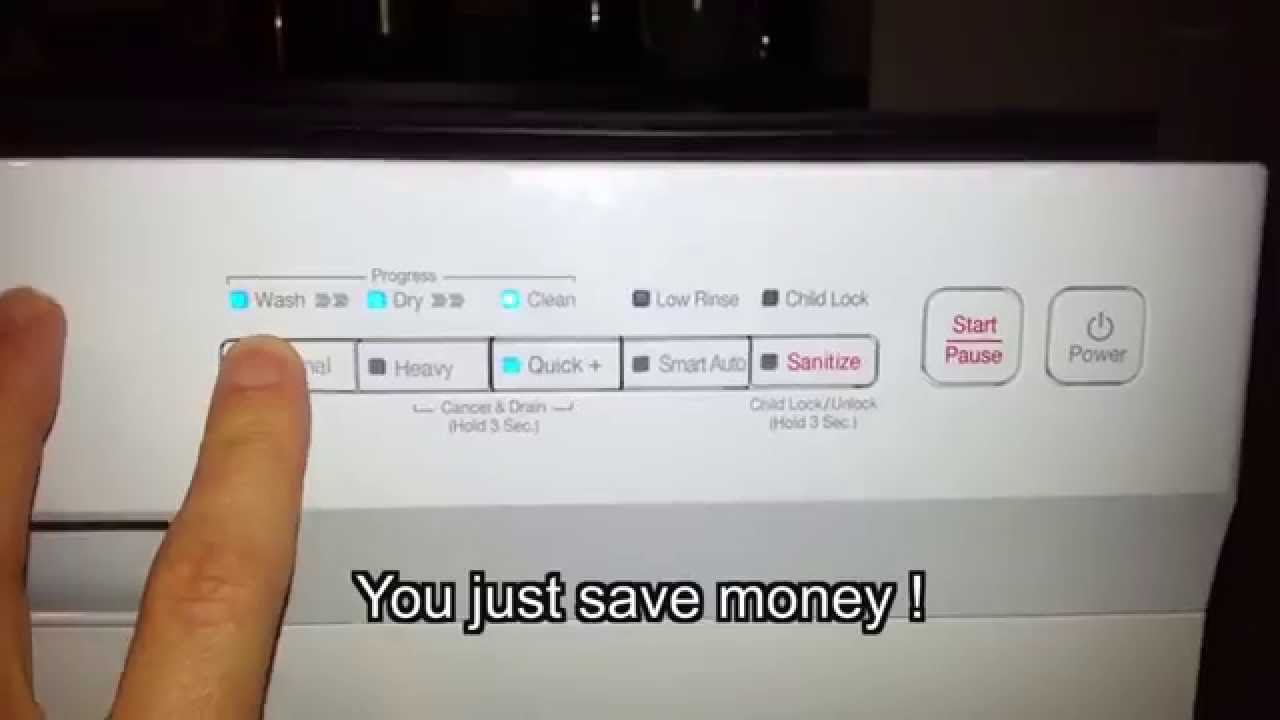
6. Resetting The Dishwasher
If you’ve checked everything and the light still blinks, try a reset:
- Unplug the dishwasher for 5–10 minutes.
- Plug it back in.
- Start a new cycle.
Many users report that a simple reset solves software glitches.
Credit: www.youtube.com
Samsung Dishwasher Error Codes Related To Heavy Light
Samsung dishwashers also show error codes that may appear with the blinking Heavy light. Understanding these codes helps you pinpoint the problem faster.
| Error Code | Meaning | Action |
|---|---|---|
| OE | Overflow Error | Check for leaks |
| LE | Leakage Error | Dry moisture, check hoses |
| 4E | Water Supply Error | Inspect inlet hose |
| HE | Heater Error | Call technician |
| AE | Communication Error | Reset dishwasher |
If you see a code along with the Heavy light, follow the recommended action.
When To Call A Professional
Sometimes, your own efforts aren’t enough. Here’s when you should consider calling a technician:
- The Heavy light keeps blinking after all basic checks.
- You see visible water leaking from the unit.
- There are electrical issues or burning smells.
- The error code suggests a hardware failure (like HE or AE).
Samsung recommends professional help for electrical or mechanical problems. Attempting repairs on these components can void your warranty or cause more damage.
Comparing Samsung Dishwasher Models And Their Error Signals
Different Samsung dishwasher models use slightly different signals and codes. Here’s how the Heavy light warning compares across popular models:
| Model | Heavy Light Warning | Additional Indicators | Reset Method |
|---|---|---|---|
| DW80K7050 | Blinks for drain/pump errors | Flashing Auto light | Power cycle |
| DW80R5060 | Blinks for water supply/leak | Flashing Smart Auto | Control panel reset |
| DW80M2020 | Blinks for filter blockage | Flashing Normal light | Unplug and restart |
If your model shows other blinking lights, check the manual or Samsung’s official website for specifics.
Preventing Heavy Light Blinking In The Future
Once you solve the problem, prevention is key. Here are practical steps:
- Clean the drain filter every two weeks.
- Check hoses for leaks or kinks monthly.
- Keep the area under the dishwasher dry.
- Close the door firmly after loading dishes.
- Run a self-clean cycle every month if your model offers it.
Many users ignore routine maintenance, which leads to repeated errors. Taking these steps will keep your Samsung dishwasher running smoothly for years.
Non-obvious Insights Most People Miss
- Moisture under the dishwasher often comes from small leaks in the hose or seal. Even minor leaks can trigger the Heavy light, so check under the unit with a flashlight if you suspect moisture.
- Power surges can cause blinking lights and error codes. If your area has unstable electricity, use a surge protector to avoid repeated errors.
Some users waste time replacing parts that aren’t faulty. Always check for moisture and power issues before spending money.
Real-world Example
A homeowner in Chicago noticed the Heavy light blinking after every cycle. After cleaning the filter and checking hoses, the problem continued. A technician found a small crack in the drain hose, causing slow leaks. Replacing the hose solved the issue for good.
This shows that even hidden problems can trigger the blinking light.

Credit: www.samsung.com
Samsung Dishwasher Heavy Light Blinking And Warranty
If your dishwasher is still under warranty, avoid opening panels or removing parts. Samsung covers most repairs for new models. Instead, document the issue with photos and contact support. You can find more information on Samsung’s warranty at their official site:
Frequently Asked Questions
Why Does The Heavy Light Blink When The Dishwasher Is New?
A new Samsung dishwasher may blink the Heavy light if installation is incomplete. Common reasons include a loose hose, door not closed firmly, or missing filter. Double-check installation steps.
Can I Run The Dishwasher If The Heavy Light Is Blinking?
It’s best not to use the dishwasher when the Heavy light blinks. Running cycles can worsen leaks or blockages. Fix the problem first to avoid damage.
How Often Should I Clean The Drain Filter?
Clean the drain filter at least once every two weeks. If you wash greasy dishes or have hard water, clean it weekly. This prevents most common errors.
What Should I Do If Resetting Doesn’t Fix The Blinking Light?
If a reset doesn’t work, inspect for leaks, check hoses, and clean the filter. If these steps fail, call a technician. Persistent blinking often points to a deeper issue.
Where Can I Find Official Samsung Error Codes?
Samsung lists error codes and troubleshooting steps on their support site. For full details, visit Samsung Support.
Final Thoughts
Solving the Heavy light blinking problem on a Samsung dishwasher isn’t always simple, but armed with the right information, you can fix most issues yourself. If you follow the steps above, you’ll save time and possibly avoid expensive repairs. Regular maintenance and careful checks keep your dishwasher running efficiently and error-free.