
When your Samsung refrigerator temperature display starts blinking, it can feel confusing or even alarming. Is your food safe? Is the fridge broken? Many people run into this issue, but the blinking display is actually a helpful warning, not just a random problem. Learning what causes the blinking and how to respond can save you time, money, and stress. In this article, you’ll find clear explanations, practical solutions, and expert tips to handle a Samsung refrigerator temperature blinking issue confidently.
What Does Samsung Refrigerator Temperature Blinking Mean?
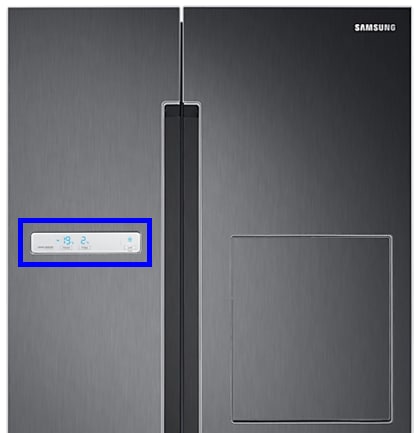
The blinking temperature display on a Samsung refrigerator is an alert. It’s the fridge’s way of telling you something is wrong with the temperature inside. Usually, this means the refrigerator or freezer is not as cold as it should be. Sometimes, it’s a simple fix. Other times, it needs more attention.
Samsung designed their digital displays to make problems easy to see. When the temperature blinks, the fridge wants you to check and fix something quickly. A common misconception is that blinking always means a serious breakdown. In fact, it can be triggered by minor issues, like a door left open for too long, or after a power outage.
Common Causes Of Temperature Blinking
Understanding why your Samsung refrigerator temperature is blinking is the first step to fixing it. Here are the most frequent reasons:
- Door left open: If the door doesn’t close properly or is left open, warm air goes inside. The fridge works harder to cool down, and the temperature display may blink.
- Power outage or surge: After losing power or during voltage changes, the refrigerator’s sensors may take time to reset. The display blinks until the temperature returns to normal.
- Faulty temperature sensor: If the sensor that monitors temperature fails, it can’t send correct information. The display blinks as a warning.
- Dirty or blocked condenser coils: Dust or obstructions prevent the fridge from cooling efficiently. The temperature rises, triggering the blinking.
- Overloading with warm food: Placing many room-temperature or hot items inside can push the temperature above safe levels.
- Broken door seal: If the rubber gasket is damaged, cold air escapes, and the fridge struggles to keep cool.
- Freezer or fridge overpacked: Airflow is important. Overpacking blocks vents and causes uneven cooling.
Non-obvious Insights
- Humidity can trigger blinking: High humidity can cause excess condensation inside the fridge, confusing the sensors and leading to a blinking display.
- Location matters: Placing your refrigerator near heat sources, like ovens or direct sunlight, can make it harder for the appliance to stay cool, making blinking more likely during hot weather.

Credit: www.spinchill.com
Step-by-step Troubleshooting Guide
Fixing a blinking temperature display doesn’t always require a technician. Follow these steps to diagnose and solve the problem:
1. Check The Doors
- Make sure both the fridge and freezer doors are closed completely.
- Look for items blocking the doors or shelves sticking out.
- Inspect the rubber gasket for cracks, gaps, or dirt. Clean or replace if damaged.
2. Wait After Power Outages
- If you recently had a blackout or unplugged the fridge, give it a few hours to stabilize.
- Most Samsung models reset the display automatically once the right temperature is reached.
3. Reduce Overloading
- Remove excess food, especially hot or room-temperature items.
- Allow new groceries to cool before placing them inside.
4. Clean Condenser Coils
- Unplug the refrigerator for safety.
- Locate the coils (usually at the back or underneath).
- Use a vacuum or soft brush to remove dust and debris.
5. Check Temperature Settings
- Ensure the controls are set to the recommended levels (usually 37°F for the fridge, 0°F for the freezer).
- Some models let you adjust settings with a button inside the door or on the control panel.
6. Inspect For Error Codes
- Samsung fridges sometimes display error codes along with blinking. Look in the manual for code meanings.
- Common codes like “5E” or “8E” point to sensor or freezer issues.
7. Test For Sensor Problems
- If blinking continues after basic steps, the temperature sensor may be faulty.
- Contact Samsung support or a technician for sensor testing or replacement.
8. Let The Fridge Stabilize
- After making changes, give the fridge time to reach the right temperature. This can take several hours.
Tip: If you just installed the fridge or recently moved it, wait at least 8–12 hours for temperatures to settle.
When To Call A Technician
While many blinking issues are easy to fix, some need professional help. Call a technician if:
- The display keeps blinking after you’ve tried the steps above for 24 hours.
- There are loud noises, leaks, or the fridge is not cooling at all.
- Error codes suggest a hardware issue, like a broken compressor or control board.
Common mistake: Replacing parts without proper diagnosis. Always confirm the issue before buying new components.
How Temperature Blinking Affects Food Safety
A blinking temperature display means your fridge is not at the best temperature. Food safety depends on keeping perishable items below 40°F (fridge) and 0°F (freezer). If the temperature is too high for over two hours, bacteria can multiply quickly.
Here’s a quick look at how long food stays safe at unsafe temperatures:
| Food Type | Safe at Room Temp | When to Discard |
|---|---|---|
| Milk, yogurt, cheese | 2 hours | If above 40°F for 2+ hours |
| Cooked meat/poultry | 2 hours | If above 40°F for 2+ hours |
| Frozen food | 24–48 hours (if freezer full and closed) | If thawed and above 40°F for 2+ hours |
If in doubt, it’s safer to throw away questionable food than risk illness.
How To Prevent Temperature Blinking Issues
Prevention is easier than repair. Here’s how to avoid future temperature blinking problems:
- Keep doors closed: Don’t leave the fridge or freezer open for long when loading groceries.
- Check door seals monthly: Clean and inspect the rubber gasket.
- Avoid overpacking: Leave space for air to circulate.
- Clean coils twice a year: Dust slows cooling.
- Set correct temperatures: Too low or high can cause issues.
- Allow leftovers to cool: Don’t put hot pots directly inside.
- Place fridge in a cool spot: Keep away from ovens or direct sunlight.
Placement And Airflow Comparison
Placement and airflow make a bigger difference than most people think. Here’s a comparison:
| Placement | Airflow | Temperature Stability | Risk of Blinking |
|---|---|---|---|
| Near oven/sunlight | Poor | Low | High |
| Cool, shaded area | Good | High | Low |
Samsung Refrigerator Models And Blinking Display Differences
Different Samsung refrigerator models have unique features and behaviors. Some show the temperature blinking in red, others in blue or white. The response and error codes may also change.
Here’s a quick look at how popular models handle blinking:
| Model | Blinking Color | Common Causes | Reset Method |
|---|---|---|---|
| French Door RF28 | Blue | Door open, power loss | Auto after cooling |
| Side-by-Side RS25 | Red | Sensor error, overloading | Manual reset button |
| Top Freezer RT18 | White | Door seal, coil dirt | Auto after problem fixed |
Non-obvious insight: Some Samsung models have a hidden reset function. Check the manual for a “reset” button or combination (like holding “Power Cool” and “Power Freeze” for 10 seconds).
Practical Tips For Long-term Fridge Health
Keeping your Samsung refrigerator in top shape prevents many problems, not just blinking displays. Here are practical, experience-based tips:
- Level your fridge: An uneven fridge can cause the door to stay slightly open, letting air escape and causing blinking.
- Don’t ignore strange noises: Clicking, buzzing, or rattling can signal cooling problems before the display blinks.
- Update firmware if possible: Some smart models offer software updates that improve temperature control.
- Label shelves: Organize food by type and date, so you open the door less often and for shorter periods.
- Regularly check for ice buildup: Excess ice can block vents and affect cooling, especially in frost-free models.
Credit: www.samsung.com
Should You Reset Your Samsung Refrigerator?
A reset can sometimes clear a blinking display, but it’s not always the solution. Resetting clears temporary errors but doesn’t fix the cause. Only reset after checking doors, cleaning coils, and ruling out sensor problems. To reset most Samsung refrigerators:
- Unplug the fridge or turn off the breaker for 5 minutes.
- Plug back in and wait for the display to power on.
- Check if the blinking stops after a few hours.
If the problem returns quickly, there’s an underlying issue that needs fixing.
Where To Find More Help
If you’re still unsure or your fridge shows unusual error codes, consult your user manual or visit the official Samsung support page. For in-depth repair guides and error code lists, the Samsung Official Support website is a reliable resource.

Credit: www.youtube.com
Frequently Asked Questions
Why Is My Samsung Refrigerator Temperature Blinking After A Power Outage?
After a power outage, the fridge sensors may detect that the inside temperature is too high. The blinking warns you that the fridge is working to cool down. It usually stops once the temperature returns to a safe level, which can take a few hours.
How Do I Know If My Food Is Safe When The Temperature Display Blinks?
If the fridge has been above 40°F for more than two hours, perishable foods like milk, meat, and leftovers should be discarded. Frozen foods are safe if ice crystals remain. When in doubt, it’s safer to throw food away.
Can I Fix A Blinking Temperature Display Myself?
Yes, many causes are easy to fix. Close the doors, check the seals, clean the coils, and avoid overloading. If the display still blinks after 24 hours or shows error codes, call a technician.
What Error Codes Appear With A Blinking Display?
Common codes include “5E” (fridge sensor error), “8E” (freezer sensor error), and “22E” (fan error). Check your manual or the Samsung website for a full list of codes.
Should I Unplug My Samsung Refrigerator To Stop The Blinking?
Unplugging can reset the display, but it’s better to fix the cause first. Only unplug if you’ve checked for open doors, dirty coils, and overloading, and the display keeps blinking.
Conclusion
A blinking temperature display can be stressful, but it’s usually fixable with a few smart steps. By understanding what your Samsung refrigerator is telling you, you can keep your food safe and your appliance running smoothly for years to come.