
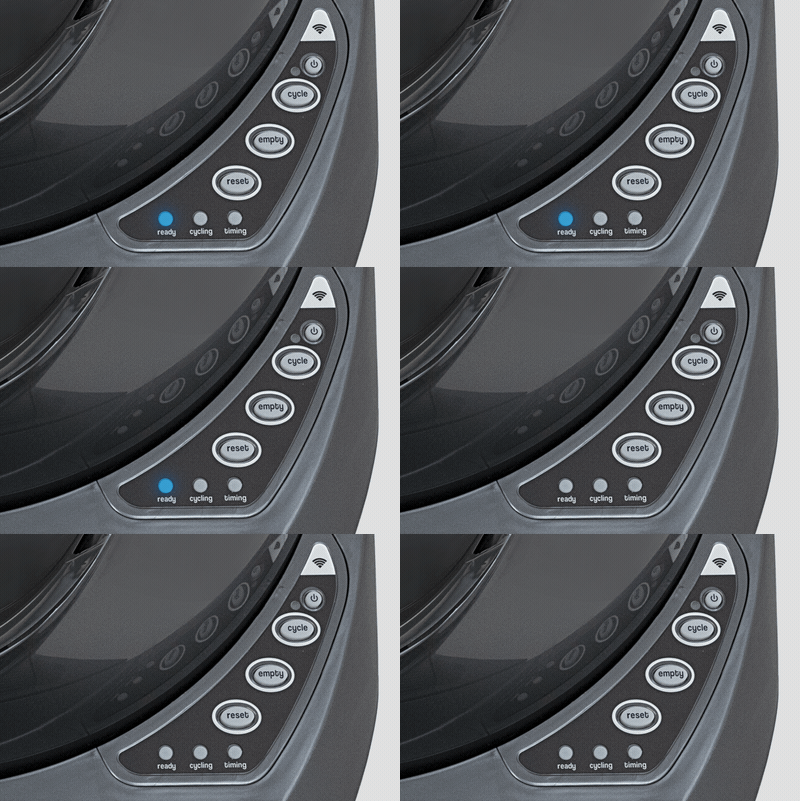
If you own a Litter Robot 3, you probably enjoy the convenience and cleanliness it brings. But sometimes, you might see a blinking blue light on the control panel. This small light can cause big confusion, especially if your cat is waiting to use the litter box. What does it mean? Is your machine broken? Is it a simple fix? Let’s break down the reasons behind the blinking blue light, how to solve each one, and ways to keep your Litter Robot 3 running smoothly.
What Does The Blinking Blue Light Mean?
The blinking blue light on your Litter Robot 3 is not random. It’s a built-in signal that tells you the status of the machine. Most of the time, the blue light means the waste drawer is full. But in some cases, it can show other problems like a disconnected drawer, sensor error, or software issue.
Understanding this signal can save you time, keep your Litter Robot working, and prevent stress for both you and your cat.
The Three Main Causes For Litter Robot 3 Blinking Blue Light
There are three main reasons why your Litter Robot 3 shows a blinking blue light. Each cause has its own solution. Let’s look at them one by one.
1. Waste Drawer Is Full Or Bag Is Misaligned
The most common reason for a blinking blue light is a full waste drawer. The machine uses sensors to check the drawer. When it’s full, the blue light blinks to warn you.
But sometimes, the sensor thinks the drawer is full when it isn’t. This usually happens if:
- The waste bag is not placed flat
- The bag is covering the sensors
- The drawer is not pushed in properly
How To Fix
- Pull out the waste drawer.
- Remove the full bag and throw it away.
- Check if the bag covered the sensors (small black windows on the sides).
- Put in a new bag, making sure it lies flat against the bottom.
- Slide the drawer back in fully.
After you do this, the blinking blue light should turn solid blue.
Non-obvious insight: Many owners forget to check the sensor windows for dust or litter. If the sensors are dirty, clean them gently with a dry cloth.
2. Drawer Is Not Detected
The Litter Robot 3 has drawer sensors that detect if the drawer is in place. If the drawer isn’t fully inserted, or if something blocks the sensors, the machine can’t “see” the drawer. This triggers the blinking blue light even if the drawer is empty.
How To Fix
- Pull out the waste drawer and slide it back in, making sure it clicks into place.
- Remove any clumps or litter that might block the sensors.
- Check for warping or damage on the drawer edges.
Non-obvious insight: Sometimes, using generic trash bags that are too thick or have drawstrings can block the sensors. Try using thinner bags or the official bags from the manufacturer.
3. Sensor Or Software Error
If you’ve checked the waste drawer and sensors but the blue light still blinks, there might be a sensor malfunction or a software glitch.
This can happen due to:
- Build-up of dust on the sensors
- Software needing a reset
- Electrical problems after a power outage
How To Fix
- Reset the unit: Press and hold the Reset button until you hear a beep.
- Clean the sensors: Open the drawer and gently wipe the black sensor windows with a soft, dry cloth.
- Power cycle: Unplug the Litter Robot for 1 minute, then plug it back in.
- Firmware update: If you have the WiFi version, check for updates using the app.
If none of these steps work, you may need to contact customer support.
How The Drawer Full Sensor Works
The Litter Robot 3 uses infrared sensors to check if the waste drawer is full. These sensors are located on both sides, near the top of the drawer cavity. When waste or the bag rises high enough, it blocks the beam, which triggers the blue light.
This is a clever system, but it’s sensitive to how you place the bag or if debris covers the sensor.
Sensor Sensitivity: A Quick Comparison
Here’s a look at how common issues affect the sensor accuracy:
| Issue | Effect on Sensor | Solution |
|---|---|---|
| Bag covers sensor | Sensor thinks drawer is full | Adjust bag so it lays flat |
| Dirt or dust on sensor | Sensor gives false alert | Clean sensor window |
| Drawer not fully in | Sensor can’t detect drawer | Push drawer in firmly |
Step-by-step Troubleshooting For Blinking Blue Light
If you see the blinking blue light, here’s a practical way to solve it:
- Check the waste drawer. Is it full? Is the bag placed flat?
- Remove and replace the bag if needed.
- Clean the sensor windows.
- Reinsert the drawer, making sure it locks into place.
- Press the Reset button.
If the light still blinks:
- Unplug the unit, wait 60 seconds, and plug it back in.
- Check for firmware updates if your model supports it.
If all else fails, reach out to Litter Robot support. Sometimes, sensor hardware can fail and need replacement.

Credit: www.reddit.com
Preventing Blinking Blue Light Problems
A little regular care can stop most problems before they start. Here are some tips for smooth operation:
- Empty the waste drawer every 2–3 days, or more often for multiple cats.
- Use the right bags—thin, non-drawstring bags are best.
- Keep sensor windows clean—wipe them weekly.
- Avoid overfilling the globe with litter (fill to the line only).
- Check for firmware updates if you use the WiFi model.
- Place the Litter Robot on a level floor to avoid sensor confusion.
These small steps can prevent both the blinking blue light and other common issues.
When To Replace Sensors Or Call For Help
If you have followed all the steps above and the blue light still blinks, the sensors may be faulty. Litter Robot’s sensors can wear out over time, especially in high-use homes or dusty environments.
Signs you may need a new sensor:
- Light keeps blinking after cleaning and reset
- Drawer is empty, but machine does not detect it
- Other warning lights appear at the same time
What to do next:
- Contact Litter Robot’s support team for guidance
- Order replacement sensors if needed
- Follow online guides or official instructions for safe replacement
It’s best not to ignore ongoing problems. A simple sensor fix can extend the life of your Litter Robot and keep your cat happy.
Comparing Litter Robot 3 Blinking Blue Light With Other Warning Lights
The blinking blue light is just one of several signals your Litter Robot 3 can show. Here’s how it compares with other common lights:
| Light Color | Blinking? | Main Cause | Action Needed |
|---|---|---|---|
| Blue | Blinking | Drawer full or misaligned | Empty drawer, check sensors |
| Yellow | Blinking | Cycle interrupted or jam | Check for blockage, reset |
| Red | Solid or blinking | Globe jam or sensor error | Clear jam, check sensors |
Understanding these lights helps you respond quickly and avoid bigger problems.
Real User Experiences And Common Mistakes
Many new owners run into the blinking blue light within the first month. Some panic and think the machine is broken. In most cases, it’s a simple fix—adjusting the bag or cleaning the sensors.
Common mistakes:
- Forgetting to flatten the bag inside the drawer
- Using extra-large or thick trash bags
- Not cleaning the sensor windows
- Overfilling the globe with litter
Experienced users suggest keeping extra bags and a soft cloth nearby for quick fixes. Some even set a phone reminder to empty the drawer before it fills up.

Credit: www.reddit.com
The Importance Of Routine Maintenance
Your Litter Robot 3 is a smart device, but it needs a little human help. Regular cleaning and checks can stop most blinking blue light issues. It also keeps the unit smelling fresh and working for years.
Here’s a quick maintenance schedule:
- Daily: Check and empty the waste drawer if needed.
- Weekly: Wipe the sensor windows and base.
- Monthly: Deep clean the globe and base.
Spending just a few minutes each week can save you from headaches and keep your cat’s bathroom spotless.
Litter Robot 3 Vs. Other Self-cleaning Litter Boxes: Sensor Reliability
How does the Litter Robot 3 compare to other models when it comes to sensor issues? Let’s look at a quick overview.
| Brand/Model | Sensor Type | Common Error | Fix Complexity |
|---|---|---|---|
| Litter Robot 3 | Infrared | Bag misalignment | Easy |
| PetSafe ScoopFree | Pressure | Tray not flat | Medium |
| CatGenie | Weight | Moisture error | Hard |
The Litter Robot’s sensor system is generally reliable and easy to fix compared to competitors. This is one reason it’s popular among cat owners.
Credit: www.litter-robot.com
When To Seek Professional Help
If you’ve tried every troubleshooting tip and the problem stays, it may be time to seek expert help. The manufacturer offers support and detailed guides on their website. Sometimes, a factory reset or new sensors are needed.
You can find more details at the official Litter Robot Help Center.
Frequently Asked Questions
What Does The Blinking Blue Light On Litter Robot 3 Mean?
The blinking blue light usually means the waste drawer is full or the bag is blocking the sensors. It can also signal a sensor or software error.
How Do I Reset The Blinking Blue Light?
First, empty or adjust the drawer and bag. Then press the Reset button. If the light keeps blinking, unplug and replug the unit.
Can The Sensors In Litter Robot 3 Be Replaced?
Yes, the drawer full sensors can be replaced. If cleaning and resetting do not work, contact support for a replacement kit.
Why Does The Blue Light Blink Even When The Drawer Is Empty?
This is often caused by the bag covering the sensors, dust on the sensor windows, or the drawer not being fully pushed in.
Is The Blinking Blue Light Dangerous For My Cat?
No, the blinking blue light is just a warning for you. The unit will not cycle if the light is blinking, so your cat will not be harmed or startled.
Your Litter Robot 3 is designed to make life easier. A blinking blue light can seem annoying, but it’s usually a quick fix. By understanding the causes and solutions, you can keep your machine running smoothly and your cat happy.
Regular care and quick action make all the difference.