
If you own a Litter Robot, you already know how much easier it makes life with cats. This self-cleaning litter box saves time and keeps your home smelling fresh. But when you see a blinking blue light on your Litter Robot, it can be confusing. What does it mean? Should you worry, or is it an easy fix? This article explains the reasons behind the blinking blue light, how to solve the problem, and what to do if it keeps coming back. You’ll also find tips, data, and answers to common questions—all in clear, simple English.
What Does The Blinking Blue Light Mean?
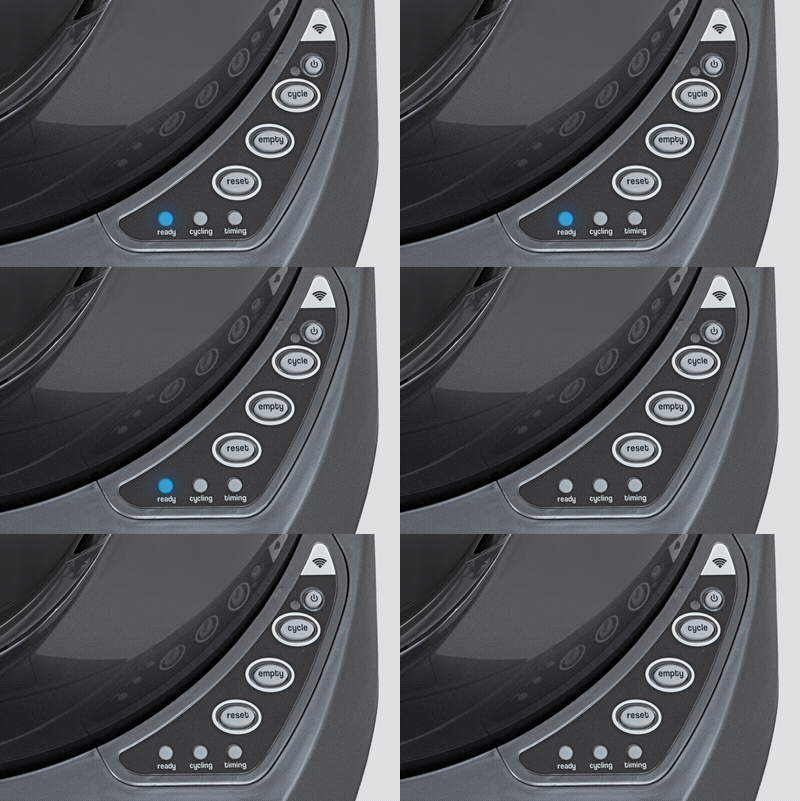
The blinking blue light on a Litter Robot is a signal from the machine. It’s not random. It usually means there is an issue with the waste drawer. This drawer collects the clumped litter and must be emptied regularly. When the blue light blinks, the Litter Robot is telling you that the drawer is either full, not in place, or the sensor cannot detect it properly.
Common Causes
- Full waste drawer: The most common reason is that the drawer is full of litter and needs to be emptied.
- Drawer out of place: If the drawer is not pushed in all the way, the sensor can’t detect it.
- Dirty sensors: Sensors that detect the drawer may be blocked by dust or litter, causing a false alert.
- Liner issues: If the liner or bag inside the drawer is not flat, it can block the sensor.
- Wrong installation: If you recently assembled or moved your Litter Robot, a part may not be fitted correctly.
Most users see the blinking blue light after about 5-7 days of normal use with one cat, but this can change based on how many cats you have.
How To Fix The Blinking Blue Light
Solving the blinking blue light is often simple. Follow these steps to fix the issue:
1. Check The Waste Drawer
- Pull out the waste drawer completely.
- Empty the drawer and replace the liner or bag.
- Make sure the new bag is tucked in flat and does not hang over the sensor area.
- Push the drawer back in firmly until it clicks into place.
2. Clean The Sensors
- Locate the drawer sensors. They are usually inside the base, just above the drawer.
- Use a dry cloth or cotton swab to clean dust, litter, or debris from the sensors.
- Never use water on the sensors.
3. Reset The Unit
- Press the Reset button on the control panel.
- Wait for the blue light to stop blinking.
- If the light still blinks, repeat the process and check the drawer again.
4. Check For Liner Or Bag Issues
- Make sure the liner or bag is not bunched up or blocking the sensor.
- Use the right size bag for your Litter Robot model.
5. Inspect For Mechanical Problems
- Remove and replace the waste drawer again.
- Look for any signs of damage or loose parts.
- If you just moved the unit, make sure it is on a flat surface.
Example: Step-by-step Quick Fix
Imagine you come home and see the blinking blue light. First, you pull out the drawer and see it’s full. You empty it, check the bag is flat, and put it back. The light stops blinking. If not, you gently clean the sensors.
Nine out of ten times, this solves the problem.

Credit: www.reddit.com
Advanced Troubleshooting
Sometimes, the blinking blue light keeps coming back even after you empty the drawer and clean the sensors. This can be frustrating. Here are some less obvious causes and solutions:
Sensor Malfunction
If the drawer sensors are faulty, the Litter Robot may think the drawer is always full. In this case:
- Unplug the unit for 5 minutes, then plug it back in.
- Check if the issue returns.
- If yes, the sensors may need to be replaced. Contact Litter Robot support for guidance.
Firmware Issues
Modern Litter Robots have firmware that controls how the machine works. If the firmware is outdated or corrupt, strange errors like the blinking blue light can happen.
- Visit the Litter Robot support website to check for firmware updates.
- Some models let you update at home; others need service.
Power Problems
A weak or unstable power supply can cause sensor errors.
- Plug your Litter Robot directly into a wall outlet, not a power strip.
- Make sure the outlet works with other devices.
Comparison: Blinking Blue Vs. Other Litter Robot Lights
Litter Robots use colored lights to show different statuses or errors. Here is a quick reference:
| Light Color | Status/Error | What to Do |
|---|---|---|
| Solid Blue | Ready/Standby | No action needed |
| Blinking Blue | Drawer full/sensor issue | Empty drawer, check sensors |
| Solid Yellow | Cycle in progress | Wait for cycle to finish |
| Blinking Yellow | Pinch detector issue | Check for jams or blockage |
| Red | Cat detected or error | Wait or reset the unit |
Understanding these lights helps you act fast and prevent bigger problems.

Credit: www.reddit.com
Data: How Often Does The Blue Light Blink?
How often the blue light blinks depends on your household:
| Number of Cats | Average Days Until Drawer Full | Blue Light Frequency |
|---|---|---|
| 1 Cat | 7-9 days | Once per week |
| 2 Cats | 3-5 days | Twice per week |
| 3+ Cats | 1-2 days | Every other day |
If you notice the blue light blinking more often than expected, check for sensor or liner problems.
Preventing The Blinking Blue Light
You can avoid the blinking blue light with some simple habits:
- Empty the drawer regularly: Set a schedule based on how many cats you have.
- Clean sensors weekly: Wipe sensors with a dry cloth to prevent dust buildup.
- Check the liner: Always make sure the bag is flat before closing the drawer.
- Proper assembly: If you move or reassemble the unit, double-check all parts are in place.
- Use recommended litter: Fine clumping litter works best and causes fewer sensor errors.
Non-obvious Tips
- Don’t overfill the globe: Putting too much litter in the globe can cause extra waste and overflow, confusing the sensors.
- Avoid scented liners: Strongly scented or thick liners can block sensors. Use plain, thin bags.
Credit: www.litter-robot.com
When To Contact Support
If you’ve tried everything above and the blinking blue light won’t go away, it’s time for help. Contact Litter Robot customer support if:
- The blue light blinks with an empty, clean drawer.
- The unit will not cycle even after a reset.
- You see other error lights at the same time.
- You suspect a sensor or circuit problem.
Having your model number and a photo of your unit ready will speed up the process.
Cost And Warranty Factors
Litter Robot units are not cheap. The blinking blue light is usually a simple fix, but if you need parts or service, check your warranty first. Most units come with an 18-month warranty. Extended plans are also available. Sensor replacement usually costs $20–$40 if not covered.
Here’s how costs compare:
| Problem | DIY Fix | Replacement Cost | Covered by Warranty? |
|---|---|---|---|
| Dirty Sensor | Yes | $0 | Not needed |
| Broken Sensor | No | $20-40 | Usually |
| Firmware Update | Sometimes | $0 | N/A |
| Major Repair | No | $100+ | Maybe |
It’s smart to register your Litter Robot and keep your purchase details handy.
Real-life Example
Maria, a cat owner from Texas, noticed her Litter Robot’s blue light blinking after only two days. She emptied the drawer, but the light came back. After cleaning the sensors, the problem stopped for a week. She later found out she was using a thick, scented liner that blocked the sensor.
Switching to a thin, clear bag fixed the issue. This is a common story—sometimes, the solution is a small change.
Why Understanding The Blue Light Matters
Ignoring the blinking blue light can lead to bigger problems:
- Overflowing waste drawer: Waste can back up into the globe, causing bad smells and more cleaning work.
- Stressed cats: Some cats may stop using the box if it’s full or not working right.
- Shorter machine life: Problems left unfixed can damage the sensors or motor over time.
Learning what the blue light means keeps your Litter Robot running smoothly and your cats happy.
Frequently Asked Questions
Why Does My Litter Robot’s Blue Light Keep Blinking Even After I Empty The Drawer?
If the blue light keeps blinking after you empty the drawer, check for dirty sensors, a bag that is not flat, or a misaligned drawer. Clean the sensors with a dry cloth and make sure all parts are in place.
If the problem stays, a sensor could be broken.
Can I Use Any Type Of Bag Or Liner In The Waste Drawer?
It’s best to use thin, unscented liners that fit the drawer well. Thick or scented bags can block the sensors, causing the blue light to blink. Some users find that simple kitchen trash bags work as long as they fit flat.
What Should I Do If The Blue Light Blinks And Another Light Flashes Too?
If you see two or more lights blinking, this often signals a bigger problem like a jam or sensor failure. Unplug the unit, check for blockages, and try a full reset. If the error returns, contact support.
How Do I Know If My Litter Robot Needs A New Sensor?
If cleaning and resetting do not fix the blinking blue light, and the unit works fine otherwise, the sensor may be worn out. Replacing the sensor usually solves the problem. Most sensors last 1–3 years with normal use.
Where Can I Find Official Help And Support?
For official troubleshooting guides, firmware updates, and replacement parts, visit the Litter Robot Support page.
Conclusion
A blinking blue light on your Litter Robot is common and usually easy to fix. With the steps in this article, you can quickly get your machine working and keep your cat’s bathroom clean and fresh. If you follow these tips and still have trouble, professional help is just a call or click away.