
When you use Quantum Fiber internet and see the blinking blue light on your modem or gateway, it can feel confusing or even stressful. What does that blue blinking mean? Is your internet down? Do you need to fix something? These questions are common, especially for those who are not tech experts. But understanding the blinking blue light can save you time and frustration. This article explains everything you need to know about the Quantum Fiber blinking blue light, including what it means, why it happens, how to solve it, and how to prevent future problems. Whether you are new to Quantum Fiber or have used it for years, this guide will help you handle blue light issues with confidence.
What Does The Blinking Blue Light Mean On Quantum Fiber?
The blinking blue light on a Quantum Fiber modem or gateway is a status indicator. It shows what is happening with your device and connection. When the light is blinking blue, it usually means your device is trying to establish an internet connection. This is a normal part of the startup or reboot process.
However, if the blue blinking continues for more than a few minutes, it may signal a problem. Normally, after a short time, the light should turn solid blue or green to show that the internet is working. If it keeps blinking, your device may be stuck trying to connect.
Quantum Fiber uses these lights as a simple way to communicate. But not all blinking blue lights mean the same thing. The pattern, speed, and how long the light blinks all matter. In most cases:
- Short blue blinking (less than 2 minutes): Normal booting up or reconnecting.
- Long blue blinking (over 5 minutes): Possible connection problem or setup issue.
Understanding this can help you decide what to do next and avoid unnecessary stress.
Common Reasons For Blinking Blue Light
There are several reasons your Quantum Fiber device may show a blinking blue light. Some are simple and easy to fix, while others may need more troubleshooting.
1. Device Startup Or Reboot
Every time you power on or restart your modem/gateway, it will blink blue as it tries to connect to the network. This usually takes 1–3 minutes.
2. Internet Service Outage
If Quantum Fiber’s network is down in your area, your device may keep blinking blue as it cannot reach the server. This could be due to:
- Maintenance by the service provider
- Weather-related damage
- Unexpected technical faults
3. Loose Or Damaged Cables
If cables are not plugged in tightly or are damaged, your device may not get the signal needed to connect.
4. Account Or Setup Problems
Sometimes, your Quantum Fiber account may not be fully activated, or the device is not set up properly. This can block the connection.
5. Firmware Update
When your modem or gateway is updating its software, it may blink blue. This is normal, but if it lasts too long, something could be wrong.
6. Fiber Line Issues
Physical problems with the fiber line—like cuts or bends—can stop the device from connecting.
Pro tip: Many users miss the fact that a firmware update or loose cable can cause a blinking blue light, not just internet outages.

Credit: www.reddit.com
Troubleshooting The Blinking Blue Light
If you see a blinking blue light on your Quantum Fiber device for more than 5 minutes, follow these steps to find and fix the problem:
Step 1: Check All Cables
- Make sure all cables are plugged in tightly.
- Look for visible damage or fraying.
- If possible, use another cable to test.
Step 2: Restart The Device
- Unplug the power cable.
- Wait 30 seconds.
- Plug it back in and wait for the device to boot up.
Step 3: Check For Outages
- Visit the Quantum Fiber website or call their support to see if there is an outage in your area.
- You can also check for local news or community forums.
Step 4: Verify Account Activation
- Log in to your Quantum Fiber account.
- Make sure your service is active and paid for.
- Double-check your installation steps if you are setting up for the first time.
Step 5: Inspect The Fiber Line
- Look at where the fiber enters your home.
- Make sure the fiber cable is not bent sharply or damaged.
Step 6: Factory Reset (if Needed)
- Only do this if other steps fail.
- Find the reset button (usually small and needs a pin).
- Hold for 10 seconds, then release.
- Note: This will erase custom settings.
Step 7: Contact Quantum Fiber Support
- If none of the above work, contact Quantum Fiber support for help.
Example Troubleshooting Scenario
Let’s say your Quantum Fiber modem has been blinking blue for 20 minutes after a storm. First, check the cables—maybe they got loose or wet. Next, look for news about an area outage. If all looks normal, restart the device.
If it still blinks blue, contact support. Sometimes, storms damage fiber lines, so a technician may need to visit.
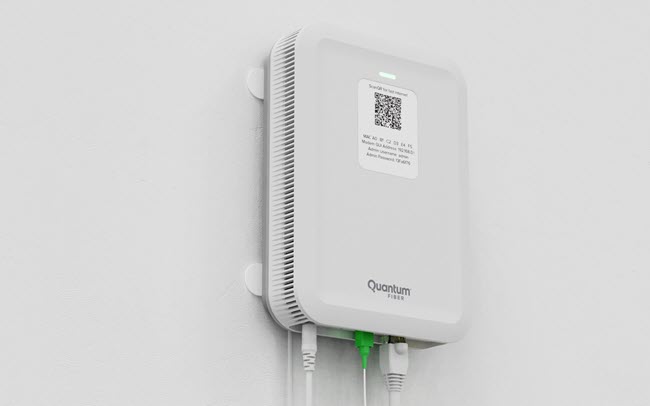
How The Quantum Fiber Status Lights Compare
Different internet providers and even different Quantum Fiber devices use their own status light colors and patterns. Here’s a simple comparison for understanding what each color means on most Quantum Fiber modems:
| Light Color | Status | What It Means |
|---|---|---|
| Blinking Blue | Connecting | Trying to connect to the network |
| Solid Blue | Connected | Internet is working |
| Blinking Red | Error | Problem with the connection |
| Solid Green | Normal | Device is working correctly |
| No Light | Off | Device is powered off or unplugged |
Knowing these basic color codes can help you quickly understand what your device is telling you.
Credit: www.quantumfiber.com
Quantum Fiber Vs. Other Providers: Status Light Differences
It can be helpful to see how Quantum Fiber’s status lights compare to some other popular internet providers:
| Provider | Blinking Blue Meaning | Solid Green Meaning | Blinking Red Meaning |
|---|---|---|---|
| Quantum Fiber | Connecting | Online/Normal | Error/No Connection |
| AT&T Fiber | WPS Pairing | Online/Normal | Critical Error |
| Xfinity | Pairing/Setup | Online | Connection Lost |
| Google Fiber | Pairing/Connecting | Connected | Network Error |
This shows that a blinking blue light does not always mean the same thing for every provider. Always check your device’s manual or provider’s website for exact meanings.
How To Prevent Future Blinking Blue Light Problems
You can avoid many blinking blue light issues with some simple habits and checks:
- Check Cables Regularly: Make sure all connections are tight and in good shape.
- Protect from Power Surges: Use a surge protector for your modem/gateway.
- Avoid Moving the Device Often: Unplugging and moving the device can loosen cables.
- Update Firmware: Let your device update its software when prompted.
- Keep Fiber Lines Safe: Avoid bending, stepping on, or placing objects on fiber cables.
- Monitor for Outages: Sign up for provider alerts about service outages.
- Pay Bills on Time: Service may stop if your account is not current.
A common mistake is ignoring small signs, like a cable that feels slightly loose or a fiber line that is bent. Fixing these early can prevent bigger problems later.

Credit: www.reddit.com
When Should You Replace Your Quantum Fiber Device?
Most Quantum Fiber devices last for years with good care. But sometimes, the device itself is the problem. Here are signs you may need a new modem or gateway:
- The blinking blue light never stops, even after resets and cable checks.
- The device feels hot or smells burnt.
- You hear buzzing or crackling sounds.
- The device is over 5 years old and often loses connection.
If you notice these signs, call Quantum Fiber support for advice. They can confirm if you need a replacement.
The Role Of Firmware Updates
Firmware is the software that controls your Quantum Fiber device. Updates can fix bugs, improve performance, and add new features. Sometimes, during a firmware update, the light may blink blue for a longer time. If this happens:
- Do not unplug or reset the device during an update.
- Wait at least 10–15 minutes.
- If the light is still blinking blue after 20 minutes, try restarting.
Many people miss that interrupted updates can cause serious issues, sometimes making the device unusable. Always let updates finish before taking any action.
Real-world Example: Solving A Persistent Blinking Blue Light
Maria, a Quantum Fiber user, noticed her gateway was blinking blue for over 30 minutes. She checked cables, restarted the device, and even tried a factory reset—nothing worked. She called Quantum Fiber support, who found her area had a fiber line cut due to construction. The technician fixed the line the next day, and her internet worked again. The lesson: Sometimes, the problem is outside your home, and only the provider can fix it.
Quantum Fiber Blinking Blue Light: Myths Vs. Facts
Some common myths confuse users. Let’s clear them up:
- Myth: Blinking blue always means a broken device.
- Fact: It usually means the device is trying to connect, not always broken.
- Myth: You should reset the device immediately if it blinks blue.
- Fact: Wait a few minutes first; often, it’s a normal process.
- Myth: Only outages cause blinking blue lights.
- Fact: Many things, like firmware updates or loose cables, can cause it.
Understanding these facts can help you troubleshoot smarter and avoid unnecessary resets or calls to support.
Frequently Asked Questions
Why Is My Quantum Fiber Modem Blinking Blue For A Long Time?
The most common reason is the device is having trouble connecting to the network. This could be due to an outage, loose cables, or a setup problem. Try checking cables and restarting your device. If it keeps blinking blue for over 10 minutes, contact Quantum Fiber support.
Can I Use My Internet While The Blue Light Is Blinking?
No, while the blue light is blinking, your device is not fully connected. You will not have internet access until the light turns solid blue or green.
What Should I Do If Restarting The Modem Does Not Fix The Blinking Blue Light?
If a simple restart does not work, check for outages, make sure your account is active, inspect cables, and look for damage to the fiber line. As a last step, perform a factory reset or contact Quantum Fiber support for help.
Does A Blinking Blue Light Mean My Device Is Broken?
Not always. Most of the time, it is a connection issue, not a hardware failure. However, if the light never changes after following all troubleshooting steps, your device may be faulty and need replacement.
Where Can I Find Official Information On Quantum Fiber Modem Lights?
You can visit the official Quantum Fiber support page for the latest and most accurate information.
Conclusion
Staying informed about what the blinking blue light means and how to fix it can save you time and frustration. With these tips and clear steps, you can keep your Quantum Fiber connection running smoothly and avoid unnecessary downtime.