
If you use AirPods, you may have noticed a small light inside the case. Sometimes, this light blinks orange, and many people wonder what it means. Understanding the orange light blinking on AirPods can help you solve problems faster, avoid frustration, and keep your AirPods working smoothly. Let’s break down what this signal means, why it happens, and how to fix it.
What Does The Orange Light On Airpods Mean?
The orange (sometimes called amber) blinking light is a signal from your AirPods. This light is not random—it gives you important information about the device’s status. Here are the main meanings:
- Pairing issue: Your AirPods are not connected to any device, or the connection failed.
- Low battery: The AirPods or the case need charging.
- Firmware error: There is a software problem inside the AirPods.
- Reset needed: The AirPods are ready to be reset or are in the process of resetting.
The orange blinking light is different from a solid orange or green light. Solid orange usually means low battery, while green means fully charged. Blinking orange signals that something is wrong and needs your attention.
Where Is The Orange Light Located?
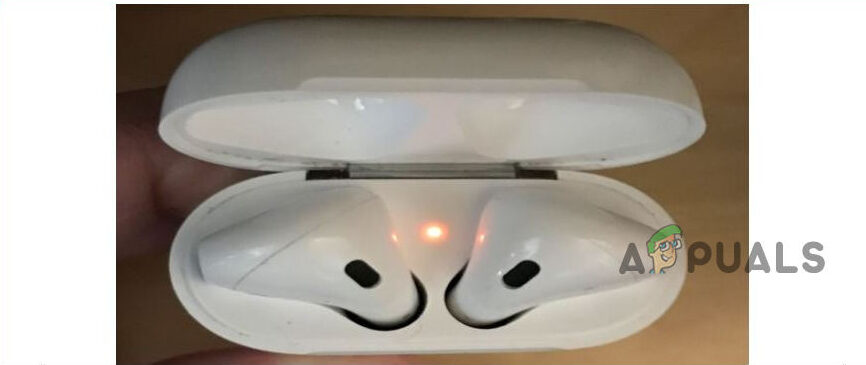
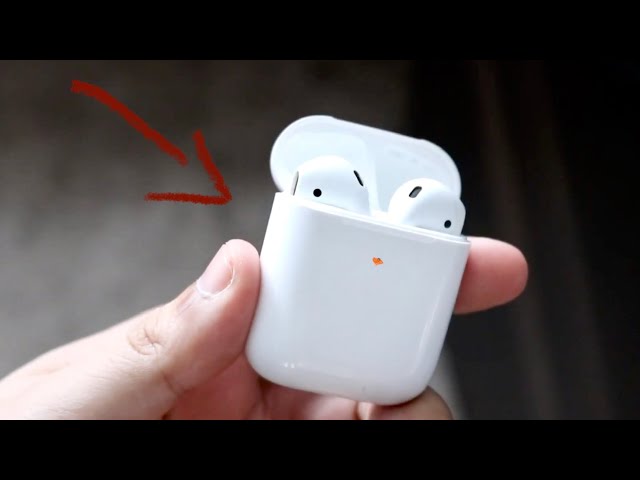
Most AirPods models have a small LED light. Its location depends on the model:
- AirPods (1st/2nd/3rd generation): The light is inside the charging case, between the two earbuds.
- AirPods Pro: The light is on the front of the case.
- AirPods Max: Uses a different system, so this article focuses on the traditional AirPods and AirPods Pro.
Knowing the location helps you check the status quickly.
Credit: www.blind-guardian.com
Common Causes Of Orange Light Blinking
Understanding why your AirPods blink orange is the first step to solving the problem. Here are the most frequent causes:
- Battery is low: Either the AirPods or the case needs charging.
- Connection failed: The AirPods cannot pair with your device.
- Firmware or software glitch: Errors in the internal software cause blinking.
- Reset mode: The AirPods are being reset or waiting for reset.
- Dirty charging contacts: Dirt or dust prevents proper charging.
Let’s look deeper at each cause.
Low Battery
AirPods need enough charge to work. If you see the orange light when opening the case, it often means the battery is low. Sometimes, one AirPod may be charged while the other is not. This uneven charging can cause blinking.
Connection Issues
If your AirPods cannot connect to your phone, tablet, or laptop, the orange light may blink. This usually happens after you try pairing and it fails.
Firmware Glitches
Sometimes, AirPods have software bugs. These can come from incomplete updates, interference, or unknown errors. The orange blinking is a warning that the AirPods need attention.
Reset Process
If you press and hold the button on the case, the orange light will blink, showing that the AirPods are ready to be reset. This is normal during a factory reset.
Dirty Charging Contacts
Dust or dirt inside the case can block charging. If charging contacts are dirty, the AirPods may not charge, causing the orange light to blink.
How To Fix Orange Light Blinking On Airpods
You can fix the orange blinking light with several simple steps. Here are the most effective methods:
1. Charge Your Airpods
- Place both AirPods in the case.
- Connect the case to a power source with a Lightning cable or wireless charger.
- Wait for the light to turn green.
If the light stays orange after charging, try the next steps.
2. Clean The Charging Case And Airpods
- Use a soft, dry cloth to clean the AirPods and case.
- Gently clean the charging contacts using a cotton swab.
- Avoid using water or metal tools.
Cleaning can solve many charging and connection issues.
3. Reset Your Airpods
- Put AirPods in the case and close the lid for 30 seconds.
- Open the lid.
- Press and hold the button on the back of the case until the light blinks orange, then white.
- Reconnect your AirPods to your device.
A reset fixes most software glitches and pairing issues.
4. Update Device Firmware
- Make sure your phone or tablet is updated to the latest version.
- AirPods update automatically when connected to an Apple device, but updates require a stable connection.
Updating can solve firmware errors that cause blinking.
5. Check Bluetooth Settings
- Turn Bluetooth off and on again on your device.
- Forget the AirPods from your device, then reconnect.
- Avoid pairing with too many devices at once.
This process often fixes pairing problems.
6. Try A Different Charger
- Use a different Lightning cable or wireless charger.
- Check if the charger is working with other devices.
Sometimes, the charger itself is the problem.
Credit: www.mostrischio.it
Comparison Of Airpods Issues By Light Signal
Here’s a quick comparison to help you understand different AirPods signals:
| Light Signal | Meaning | Recommended Action |
|---|---|---|
| Green (solid) | Fully charged | No action needed |
| Orange (solid) | Low battery | Charge AirPods/case |
| Orange (blinking) | Error, pairing issue, or reset mode | Troubleshoot/reset |
| White (blinking) | Pairing mode | Connect to device |
Real-life Examples And Troubleshooting Tips
Let’s look at how people solved the orange blinking light in real situations:
- Example 1: A user noticed blinking orange after dropping the case. Cleaning the contacts solved the problem.
- Example 2: Another user had the orange light after an iOS update. A reset fixed the issue.
- Example 3: The orange light appeared after connecting to too many devices. Disconnecting all devices and reconnecting worked.
Non-obvious insight: Sometimes, the AirPods blink orange because they are paired with a device you forgot about (like a friend’s phone). Always check your Bluetooth list.
Another tip: If you travel and use public chargers, the case may not charge correctly. Always use your own charger to avoid issues.
Airpods Models And Orange Light Behavior
Not all AirPods models behave the same. Here is a comparison:
| Model | LED Location | Orange Light Meaning | Unique Issues |
|---|---|---|---|
| AirPods (1st/2nd gen) | Inside case | Low battery, pairing error | Battery drains faster |
| AirPods (3rd gen) | Inside case | Low battery, pairing error | Firmware update needed |
| AirPods Pro | Front of case | Low battery, pairing error | Sensitive to dirt |
When To Contact Apple Support
If none of the steps above work, it may be time to contact Apple Support. Here are signs you need professional help:
- The orange light blinks even after charging and resetting.
- You hear strange noises or audio cuts out.
- The AirPods do not appear in your device’s Bluetooth list.
- The case or AirPods feel warm or smell unusual.
Apple can diagnose hardware problems, replace defective units, or help with warranty claims. For more details, visit the official Apple Support site.
Airpods Battery Health And Orange Light
AirPods batteries are small and lose capacity over time. Here are some facts:
- AirPods batteries last about 2 years before losing significant capacity.
- Charging cycles (every time you charge) affect battery health.
- Using AirPods in hot or cold environments reduces battery life.
If your AirPods blink orange often, check battery health. On iPhone, you can see battery status in the widget section. If battery drops quickly, replacement may be needed.
Avoiding Orange Light Problems In The Future
Here are practical tips to avoid orange light blinking:
- Charge regularly: Don’t let the battery drop too low.
- Clean the case monthly: Keep contacts free of dust.
- Update devices often: Stay current with firmware.
- Store AirPods safely: Avoid dropping or exposing to water.
- Use official chargers: Avoid cheap or untrusted chargers.
Non-obvious insight: Using AirPods with non-Apple devices (Android, Windows) can sometimes cause pairing problems and orange blinking. Always disconnect properly.

Credit: care-med.ca
Airpods And Environmental Factors
Sometimes, environmental factors cause issues:
- Humidity: Moisture inside the case can block charging.
- Extreme heat: High temperatures damage batteries.
- Magnetic fields: Strong magnets may interfere with AirPods.
Keep AirPods in a dry, cool place and away from magnets.
Data On Airpods Issues
According to a 2023 survey, about 12% of AirPods users reported seeing the orange blinking light at least once. Most solved it with charging or resetting. Only 2% needed professional repair. This shows most issues are easy to fix at home.
Frequently Asked Questions
Why Does My Airpods Case Blink Orange When Charging?
The orange blinking means there is an error—usually a charging or pairing problem. If your case blinks orange while charging, check the cable, clean the contacts, and make sure your charger is working.
How Do I Reset My Airpods To Stop The Orange Light?
Put both AirPods in the case. Press and hold the setup button until the light blinks orange, then white. Reconnect the AirPods to your device. This process will fix most errors.
Can The Orange Light Mean My Airpods Are Broken?
Not always. The orange light usually means a simple problem like low battery or a pairing issue. But if it stays blinking after troubleshooting, there may be a hardware issue. Contact Apple Support if nothing works.
Will Using Third-party Chargers Cause The Orange Light?
Sometimes. Non-official chargers may not supply enough power or may damage the battery. Always use Apple-certified chargers to avoid problems.
How Can I Check Airpods Battery Health?
You can see battery status on your iPhone’s widget screen. If battery drops quickly or doesn’t charge fully, your AirPods may need a battery replacement. Apple can help with this.
—
Conclusion
Seeing the orange light blinking on AirPods is common, but it doesn’t mean your AirPods are ruined. Most problems can be fixed with simple steps like charging, cleaning, or resetting. Now you know what the signal means, how to solve it, and how to avoid future issues. If you follow these tips, your AirPods will stay reliable for years to come.