
If you’re using a Porter Cable charger and see a blinking red light, you might wonder what’s going wrong. Many people worry when their charger flashes red, especially if their tools are important for daily work. Understanding what this blinking red signal means, and how to fix it, will help you get back to using your tools quickly. This guide explains the reasons behind the blinking red light, what you can do about it, and how to prevent problems in the future.
What Does The Porter Cable Charger Blinking Red Mean?
The blinking red light on a Porter Cable charger is a warning. It usually means the charger has detected an issue with the battery or charging process. Here are some main reasons:
- The battery is too hot or too cold
- The battery is not properly inserted
- The battery is damaged
- There’s a connection problem
- The charger itself may have a fault
A steady red light means the battery is charging normally. A blinking red light means something needs attention.
Common Causes Of The Blinking Red Light
Understanding the reasons behind the blinking red light helps you know what to check first. Let’s look at the most frequent causes:
1. Battery Temperature Issues
Lithium-ion batteries, which are common in Porter Cable tools, are sensitive to temperature. If a battery is too hot or too cold, the charger stops charging and flashes red. This protects the battery from damage.
- Too hot: This happens after heavy use or exposure to sunlight.
- Too cold: This can happen if you leave the battery in a garage or cold workshop.
2. Improper Battery Placement
If the battery isn’t pushed all the way into the charger, the contacts may not connect correctly. The charger senses this and flashes red.
3. Damaged Or Old Battery
Batteries have a limited lifespan. If your battery is old, dropped, or damaged, the charger might detect an internal fault and blink red.
4. Charger Connection Problems
Sometimes, dust, debris, or corrosion can stop the charger from connecting to the battery. Even a loose electrical outlet can cause problems.
5. Charger Malfunction
If your charger is old or has been exposed to moisture or drops, it might itself be the problem.

Credit: www.youtube.com
How To Fix Porter Cable Charger Blinking Red
The blinking red light is not always the end for your battery or charger. You can try several steps to solve the issue.
Step 1: Check Battery Placement
Remove the battery, clean the contacts, and reinsert it firmly. Make sure it clicks into place.
Step 2: Let The Battery Cool Down Or Warm Up
If the battery is hot, let it cool for 15–30 minutes in a safe spot. If it’s cold, bring it indoors and wait until it’s at room temperature.
Step 3: Inspect Battery For Damage
Look for cracks, bulges, or leaks. If you see any, stop using the battery. Damaged batteries can be dangerous.
Step 4: Clean Charger Contacts
Use a dry cloth or soft brush to wipe the metal contacts on both battery and charger. Avoid using water or chemicals.
Step 5: Try A Different Charger Or Battery
If you have another Porter Cable charger or battery, swap them. If the new battery charges fine, your old battery may be at fault. If the charger still blinks red with a good battery, the charger may need replacing.
Step 6: Check Power Source
Plug the charger into another outlet. Sometimes, a weak or unstable power supply can trigger errors.
Step 7: Reset The Charger
Unplug the charger for 30 seconds, then plug it back in. This can sometimes clear simple faults.
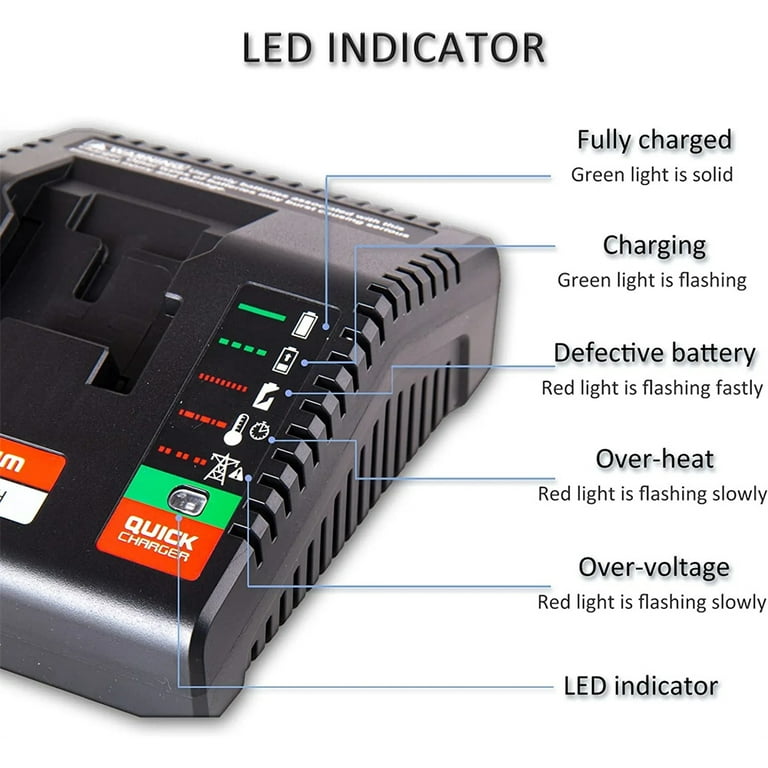
Porter Cable Charger Status Lights Explained
Understanding the charger’s lights makes troubleshooting easier. Here’s a simple comparison:
| Light Color | State | Meaning |
|---|---|---|
| Red (steady) | On | Charging |
| Red (blinking) | Flashing | Fault or error |
| Green (steady) | On | Fully charged |
| Green (blinking) | Flashing | Maintenance mode |
| No light | Off | No battery detected |
Preventing Charger And Battery Problems
Avoiding problems is easier than fixing them. Here are practical ways to keep your Porter Cable charger and batteries working well.
1. Store Batteries At Room Temperature
Don’t leave batteries in hot cars or cold garages. Aim for 50–77°F (10–25°C).
2. Avoid Overcharging
Unplug the charger once the battery is fully charged. This can extend battery life.
3. Keep Contacts Clean
Dust and dirt can block connections. Wipe contacts regularly with a dry cloth.
4. Use Only Genuine Porter Cable Batteries
Imitation batteries may not match the charger’s safety features. Stick with originals.
5. Don’t Drop Batteries Or Chargers
Physical shocks can damage internal parts, leading to errors.
6. Charge In A Safe, Dry Place
Moisture can cause short circuits and damage.
Real-life Example: Diagnosing A Blinking Red Light
Let’s look at a typical situation. Sarah, a home DIY enthusiast, notices her Porter Cable charger flashing red after a day of building shelves. She’s worried her battery is broken.
Sarah checks:
- The battery is hot after long use. She lets it cool for 30 minutes.
- After cooling, she reinserts the battery. The red light stays steady—charging resumes.
- If the problem had continued, Sarah would check the contacts for dirt and try another battery.
This shows how temperature is often the cause, but checking other steps can solve the issue.

Credit: www.premierwellbeing.ie
Data: Battery Lifespan And Charger Reliability
How long do Porter Cable batteries and chargers last? Here’s a summary:
| Component | Average Lifespan | Common Causes of Failure |
|---|---|---|
| Battery | 2–5 years | Overheating, drops, age |
| Charger | 3–7 years | Moisture, power surges, physical damage |
Most users report batteries last about 3 years with regular use. Chargers can last longer if kept dry and clean.
Comparing Porter Cable Charger With Other Brands
How does Porter Cable’s charger compare with other brands like DeWalt or Makita?
| Brand | Charger Fault Detection | Battery Protection | Average Price |
|---|---|---|---|
| Porter Cable | Basic (blinking red) | Temperature & short circuit | $25–$35 |
| DeWalt | Advanced (diagnostic lights) | Temp, overcharge, deep discharge | $40–$60 |
| Makita | Advanced (digital display) | Full protection suite | $45–$70 |
Porter Cable chargers are simpler and more affordable. They offer basic protection but not detailed diagnostic features like DeWalt or Makita.
Credit: www.walmart.com
Two Non-obvious Insights For Beginners
- Battery age matters: Even if a battery looks fine, its chemistry can change after years of use. Chargers may blink red for old batteries, not because of visible damage, but because internal resistance rises. Replacing batteries every 2–4 years can prevent issues.
- Charger resets work: Many users don’t realize that unplugging the charger for 30 seconds can clear simple errors, especially after a power surge. This “reset” is a quick fix before buying new equipment.
When To Replace Your Battery Or Charger
If you’ve tried all troubleshooting steps and the blinking red light won’t go away, it may be time to replace either the battery or the charger. Here are signs to look for:
- Battery doesn’t charge in any charger
- Charger blinks red with all batteries
- Physical damage (cracks, leaks)
- Charger smells burnt or makes strange noises
Buying a new battery or charger from a trusted dealer ensures safety and reliability. For technical details and safety guidelines, you can check Porter Cable’s official support.
Frequently Asked Questions
What Should I Do If My Porter Cable Charger Blinks Red But The Battery Seems Fine?
First, check the battery’s temperature. Let it rest at room temperature for 30 minutes. Clean the contacts and reinsert. If the light still blinks, try another battery or charger to see which one is faulty.
Is It Safe To Use A Battery That Causes The Charger To Blink Red?
No, it’s not safe. A blinking red light can mean internal battery damage. Using it might cause overheating, leaks, or even fire. Replace the battery if you see physical damage or if it fails in other chargers.
Can I Fix A Porter Cable Charger That Blinks Red With All Batteries?
Try resetting the charger by unplugging it for 30 seconds. Clean the contacts. If nothing changes, the charger might need to be replaced. Repairs are often not cost-effective for basic chargers.
Why Does My Charger Blink Red After Charging For Several Hours?
This usually means the battery is overheating or has become faulty during charging. Remove the battery and let it cool. If it happens often, the battery may be reaching the end of its life.
How Do I Know If The Charger Or Battery Is Faulty?
Test with a known good battery or charger. If the charger blinks red with all batteries, it’s likely the charger. If the battery causes blinking in different chargers, the battery is probably faulty.
Conclusion
Porter Cable chargers are reliable, but a blinking red light is a signal to check your equipment carefully. With these steps, you can quickly find the cause, fix simple issues, and decide when to replace parts. Taking good care of your batteries and chargers keeps your tools ready for work, and saves money and time.