
If your hearing aid is blinking orange while charging, you might feel confused or even worried. This small light can be a helpful signal, but only if you know what it means. Many people rely on hearing aids every day, so it’s important to understand what your device is telling you.
Let’s explore the reasons behind this blinking orange light, how to respond, and what you can do to avoid future problems.
Understanding Hearing Aid Charging Lights
Modern hearing aids are smart devices with features to help users. Most use a charging case with indicator lights to show what’s happening. These lights can be green, red, or orange, and each color means something different.
- Green usually means the hearing aid is fully charged or charging normally.
- Red often shows a problem, like a low battery or charging error.
- Orange is less common and often confuses users.
The exact meaning of the orange light depends on the brand and model. Reading your user manual helps, but let’s look at what it usually means.
What Does A Blinking Orange Light Mean?
For most hearing aids, a blinking orange light in the charger signals one of these issues:
- Charging Error – The device is not charging correctly.
- Overheating – The hearing aid or charger is too hot.
- Battery Problem – There may be a battery issue.
- Firmware Update Needed – Some devices use this signal for updates.
- Device Not Seated Properly – The hearing aid is not correctly placed in the charger.
Manufacturers use different light codes. For example, Phonak and ReSound both use blinking orange, but with different meanings. Always check your manual for the exact meaning. If you don’t have it, most brands have support websites.
Common Causes Of A Blinking Orange Light
Understanding the main reasons helps you solve the problem faster. Below are the most common causes:
1. Hearing Aid Not Inserted Correctly
If the hearing aid isn’t fully in the charging slot, the charger may blink orange. This can happen if:
- You put the device in upside down.
- There’s debris or wax on the charging contacts.
- The charger is on an uneven surface.
Tip: Always check that the hearing aid is sitting flat and the contacts are clean before closing the lid.
2. Dirty Or Blocked Charging Contacts
Over time, charging contacts can get dirty from earwax, dust, or moisture. This blocks the electrical connection, causing a charging error and the orange blinking light.
Solution: Clean the contacts gently with a dry, soft cloth or a small brush made for hearing aids.
3. Overheating
If your charger or hearing aid gets too hot, it may blink orange as a safety warning. Overheating can be caused by:
- Charging in direct sunlight.
- Placing the charger near heat sources.
- A faulty battery.
Let the charger cool down before trying again. Never use a wet cloth to cool it.
4. Battery Issues
Sometimes, the hearing aid battery is too low or has reached the end of its life. When the charger cannot start the charging process, it flashes orange.
Note: Rechargeable hearing aid batteries usually last 2-5 years. If yours is older, consider a battery replacement.
5. Charger Malfunction
Less common, but possible: the charger itself may have a problem. This can happen if:
- The charger’s cable is damaged.
- There’s a problem with the power outlet.
- The charger’s internal electronics have failed.
Try a different outlet or cable. If the problem remains, you may need a new charger.
6. Firmware Or Software Updates
Some hearing aids have smart features that update software via the charger. During this process, the orange light may blink.
Don’t remove your hearing aid during an update. Wait until the light changes to green or off.
How Different Brands Use The Orange Light
Manufacturers do not always use the same light codes. Here’s how some major brands use the blinking orange light:
| Brand | Orange Light Meaning | User Action |
|---|---|---|
| Phonak | Charging error or poor contact | Re-seat, clean contacts |
| ReSound | Battery fault or device not placed correctly | Check seating, contact support if needed |
| Signia | Device overheating | Cool down, check environment |
| Widex | Firmware update in progress | Wait until update finishes |
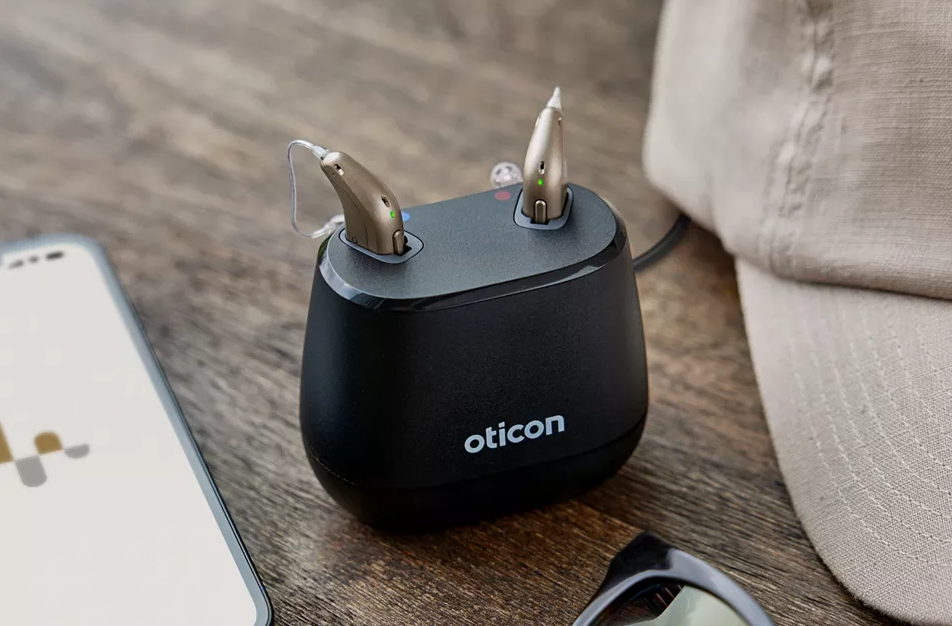
| Oticon | Unknown error | Try reset, contact support |
If your brand is not listed, check the user manual or the manufacturer’s website.
What To Do When You See A Blinking Orange Light
When you notice the blinking orange light, follow these steps:
1. Remove And Reinsert The Hearing Aid
Take the hearing aid out and put it back in, making sure it fits snugly and the contacts are clean.
2. Check The Charger And Cables
Inspect the charging cable, plug, and charger for any damage.
3. Clean The Charging Contacts
Use a dry cloth or brush to gently clean both the hearing aid and charger contacts.
4. Let Everything Cool Down
If the charger or hearing aid feels hot, unplug the charger and let it cool for 10-15 minutes.
5. Try A Different Power Outlet
Plug the charger into another outlet to rule out power issues.
6. Check For Software Updates
Some brands have smartphone apps that alert you to updates. Follow app instructions if needed.
7. Read The User Manual
Look up the orange light code in your manual for brand-specific advice.
8. Contact Customer Support
If the light stays orange, call your hearing aid provider or manufacturer for help.
Preventing Future Charging Issues
A few simple habits can help keep your hearing aids charging normally:
- Clean contacts weekly with a soft, dry cloth.
- Keep the charger dry and away from heat sources.
- Charge in a cool, dry place—never in the bathroom or direct sunlight.
- Check the charger cable for fraying or damage.
- Update software regularly if your hearing aids support it.
- Replace batteries at the end of their service life.
By making these habits routine, you reduce the risk of future orange light warnings.

Credit: massachusettshearinggroup.com
When Is It Time To Replace Batteries Or Hearing Aids?
Rechargeable hearing aid batteries lose their capacity over time. You might notice the device lasts less through the day or doesn’t charge at all. Here’s when to consider replacement:
| Symptom | Likely Cause | What to Do |
|---|---|---|
| Device won’t hold charge | Battery end of life | Replace battery or device |
| Frequent orange light | Battery or contact issue | Check contacts, consider service |
| Shorter battery life | Worn battery | Service or replace battery |
| Charger heats up | Battery fault or charger issue | Contact support |
Most rechargeable batteries last between 2 and 5 years. If your hearing aids are older, talk to your audiologist about options.
Examples And User Experiences
Many hearing aid users have faced this blinking orange light. Here are two real-world examples:
- Maria’s story: She noticed the orange light after her charger got wet. Cleaning the contacts and letting it dry overnight fixed the problem. She now charges her hearing aids away from the bathroom.
- John’s experience: After a year of use, his hearing aid would not charge past 50%. The orange light kept blinking. His audiologist found a battery fault, replaced it, and the device worked perfectly again.
Sometimes the fix is simple—other times, you need expert help.
What Beginners Often Miss
Many new hearing aid users don’t realize that charging contacts can get dirty quickly, especially if you wear your device all day. Even a little wax or dust can cause connection issues. Cleaning contacts gently once a week can prevent most problems.
Another common mistake is charging in the wrong environment. High humidity, heat, or even strong sunlight can trigger overheating warnings, including the blinking orange light. Always charge your hearing aids in a safe, cool place.
When To Seek Professional Help
If you’ve tried all the steps above and the orange light keeps blinking, don’t ignore it. A persistent orange light can mean a serious battery or internal fault. Professional help is needed when:
- The hearing aid won’t turn on after charging.
- The orange light appears every time, even after cleaning.
- The device gets hot during charging.
- You hear crackling or static sounds after charging.
A hearing care professional can test your device, check the battery, and offer repairs or replacements.
Comparing Hearing Aid Charging Lights Across Brands
To show how different brands use their charging lights, here’s a comparison of common charging light signals:
| Light Color | Phonak | ReSound | Signia |
|---|---|---|---|
| Green (solid) | Fully charged | Charging complete | Charging complete |
| Green (blinking) | Charging | Charging | Charging |
| Red (solid) | Error | Error | Low battery |
| Orange (blinking) | Charging error | Battery fault | Overheating |
This table shows that the blinking orange light often means trouble, but the details differ. Always check your specific model.
Useful Resources
When you’re unsure, it helps to use official resources. Most hearing aid manufacturers have online manuals, troubleshooting guides, and customer support. You can find reliable information at the American Speech-Language-Hearing Association website.
If you need a quick answer, search for your hearing aid brand and model plus “blinking orange light. ” You’ll usually find a support page or PDF manual.
Credit: harleysthearing.co.uk
How To Extend The Life Of Your Hearing Aid And Charger
Taking care of your hearing aid and charger can prevent many problems, including the orange blinking light. Here are some best practices:
- Store devices in a dry, protective case when not in use.
- Avoid dropping the charger—shocks can damage internal parts.
- Do not force the hearing aid into the charger—it should fit easily.
- Unplug the charger when not in use to avoid power surges.
- Use only original chargers and cables—generic ones may not work correctly.
Following these tips can add years to your hearing aid’s life and save money on repairs.
Signs Your Hearing Aid Needs Servicing
Sometimes, blinking orange is just one sign of a bigger problem. Other signs your hearing aid needs professional service include:
- Reduced sound quality or muffled hearing.
- Frequent connection problems with the charger.
- Random shutdowns or restarts.
- Physical damage like cracks or loose parts.
If you notice these signs, schedule a checkup with your audiologist.

Credit: www.youtube.com
Frequently Asked Questions
Why Does My Hearing Aid Charger Blink Orange Instead Of Green?
A blinking orange light usually means there is a charging problem, such as dirty contacts, an overheated device, or a battery fault. It’s a warning that something is not working as it should. Check your device’s manual for the exact meaning.
Is It Safe To Use My Hearing Aid If The Orange Light Blinks In The Charger?
It’s best to avoid using the hearing aid if the orange light is blinking. This could mean the device is not fully charged, has a battery issue, or is overheating. Using it in this state could lead to more serious problems.
How Often Should I Clean My Hearing Aid Charging Contacts?
Clean the charging contacts at least once a week, or more often if you notice dirt, wax, or charging issues. Use a dry, soft cloth or a brush made for hearing aids. Avoid liquids or harsh chemicals.
Can I Fix A Blinking Orange Light Myself, Or Do I Need A Professional?
You can try basic fixes like cleaning the contacts, reseating the device, or letting it cool down. If these steps don’t work, or if the light stays orange, contact a hearing care professional for help.
How Long Do Rechargeable Hearing Aid Batteries Last?
Most rechargeable hearing aid batteries last between 2 and 5 years. If your device is older or not holding a charge, it might be time for a replacement.
If your hearing aid blinks orange in the charger, don’t panic. Most problems are easy to fix with careful cleaning and good habits. When in doubt, reach out to a professional—protecting your hearing is always worth it.