
If you own a Tesla, you probably love the convenience of charging at home. But what happens when your Tesla charger starts blinking red instead of the usual green or blue? That red blinking light can be confusing, even stressful, especially if you depend on your car every day. You might wonder, “Is my charger broken? Is it dangerous? Can I fix this myself, or do I need help?”
Let’s take a calm, practical look at what a blinking red light means on your Tesla charger, why it happens, and how you can get back to smooth charging. We’ll break down the technical details, give you real-world examples, and help you avoid common mistakes that can make the problem worse. Whether you’re charging a Model 3, Model Y, Model S, or Model X, the information here will help you troubleshoot with confidence.
Understanding Tesla Charger Light Signals
Tesla chargers use colored lights to communicate with you. Each color and pattern tells a different story. The red blinking light is usually a warning, but the meaning can change depending on the charger model and the number of blinks.
What Do The Colors Mean?
- Green: Charging is working normally.
- Blue: Preparing to charge or scheduling.
- Amber/Orange: Charging is limited, often due to temperature or voltage.
- Red (Solid): Fault detected.
- Red (Blinking): Error or safety issue—requires attention.
Tesla Wall Connectors and Mobile Connectors both use these signals, but the exact blink patterns may differ. Always check your charger’s user manual for the most accurate guide.
Blinking Red—a Quick Overview
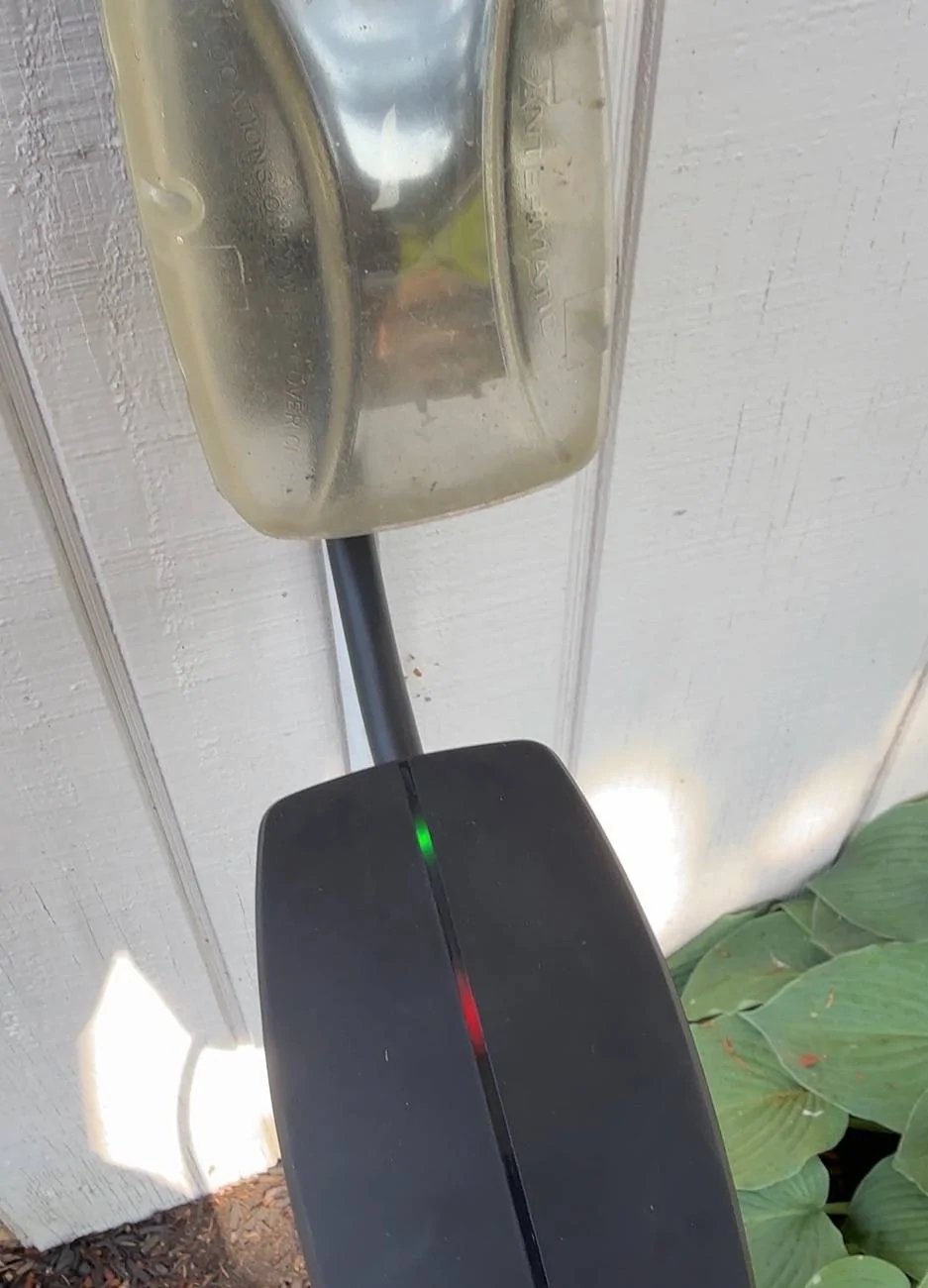
A blinking red light is Tesla’s way of telling you, “Something’s not right.” The charger has detected a problem that could be electrical, hardware-based, or environmental. The number of blinks before a pause is a key clue. For example, two red blinks mean a different problem than five blinks.
If you see a blinking red light, don’t panic. Most issues are fixable, and many do not require a professional electrician. In some cases, however, safety comes first—never ignore a persistent red blinking light.
Main Reasons Your Tesla Charger Is Blinking Red
There are several possible causes for a red blinking light. Here are the most common, along with examples and troubleshooting steps.
1. Power Supply Issues
Your charger needs a stable, high-quality power source. Problems with the supply can trigger a red blink.
- Loose wiring: If the electrical connection is not tight, the charger detects instability.
- Overvoltage or undervoltage: Power that is too high or too low can damage equipment.
- Breaker tripped: Overcurrent protection may have shut off the circuit.
Example: You recently had electrical work done at home. The electrician did not tighten the wires enough. Now, your charger blinks red as soon as you plug in.
How to respond: Check your home’s breaker panel. Reset any tripped breakers. If the issue returns, call a licensed electrician. Never open the charger yourself unless you are trained.
2. Ground Fault Detected
Tesla chargers have ground fault protection for safety. A ground fault means electricity is leaking to the earth, which can be dangerous.
- Wet or damp conditions: Water in the charger or outlet can cause a ground fault.
- Damaged wiring: Rodents, wear, or poor installation can expose wires.
Example: After heavy rain, your garage floor is wet near the charging area. When you plug in, the charger blinks red.
How to respond: Unplug the charger. Dry the area completely. Inspect for visible damage. If the problem persists, call a professional.
3. Overheating
Chargers have temperature sensors. If things get too hot, charging stops and the red light blinks.
- Direct sunlight: Chargers mounted outdoors can overheat in summer.
- Poor ventilation: Clutter or objects around the charger trap heat.
Example: Your Wall Connector is installed on the south wall, where the sun hits all afternoon. During a heatwave, you see the red blinking light.
How to respond: Allow the charger to cool. Try charging at night. Move objects away from vents. For outdoor units, consider adding shade.
4. Hardware Failure
Internal faults can also cause red blinks.
- Relay failure: The relay switches charging on and off. If it fails, charging can’t start.
- Control board error: Electronics inside the charger have failed.
Example: Your charger worked fine for months. Now, even after resetting power, the red blink continues.
How to respond: This usually requires Tesla service. Do not try to open or repair the charger yourself.
5. Cable Or Plug Issues
Problems with the charging cable or plug can trigger safety faults.
- Bent prongs: The plug is damaged.
- Dirt or debris: Blockage in the connector.
- Cable wear: The cable is cut, pinched, or frayed.
Example: You notice dirt inside the charging handle after a camping trip. When you try to charge, the red light blinks.
How to respond: Clean the plug gently with a dry cloth. Do not use water or metal objects. Inspect for visible damage. Replace the cable if necessary.
6. Firmware Or Software Problems
Sometimes, the charger’s internal software can glitch after updates or power outages.
- Failed firmware update: Update did not install correctly.
- Memory error: Software cannot start charging safely.
Example: After a storm, your area loses power. When electricity returns, the charger blinks red.
How to respond: Try a power cycle—turn off the charger’s circuit breaker, wait 60 seconds, then turn it back on. If the issue remains, contact Tesla support.
How To Decode Tesla Charger Red Blink Patterns
Tesla chargers use the number of red blinks to show different problems. Here’s a practical guide:
| Blink Count | Likely Cause | Recommended Action |
|---|---|---|
| 1 Blink | Internal error | Reset power, contact Tesla if persists |
| 2 Blinks | Ground fault | Check for moisture, unplug and dry area |
| 3 Blinks | High temperature | Allow to cool, check ventilation |
| 4 Blinks | Over/undervoltage | Check electrical panel, call electrician |
| 5 Blinks | Relay or hardware issue | Service required, contact Tesla |
Non-obvious insight: Not all Tesla chargers use the same blink codes. The Mobile Connector and Wall Connector may behave differently. Always check your specific product’s support page if you’re unsure.
Step-by-step Troubleshooting Guide
You don’t need to be a technical expert to try a few safe steps first. Here’s how to approach a red blinking light.
1. Safety First
Before touching anything:
- Make sure your hands are dry.
- Stand on a dry surface.
- If you smell burning or see smoke, stop and call emergency services.
2. Check The Charging Environment
- Is there water near the charger or outlet?
- Is the unit in direct sunlight or an enclosed space?
- Are there visible signs of damage (burn marks, melted plastic)?
Tip: Even a small amount of moisture can cause a ground fault. Always dry the area completely before testing again.
3. Inspect The Cable And Plug
- Look for bent pins, dirt, or foreign objects.
- Is the cable pinched, cut, or frayed?
- Try another outlet (for Mobile Connector) or another charger (if available).
4. Reset The Charger
- Turn off the breaker or unplug the Mobile Connector.
- Wait at least 60 seconds.
- Restore power and check the lights.
Practical example: Many users solve transient errors with a simple reset. This works if a recent power surge or glitch confused the charger’s internal computer.
5. Read The Blink Pattern
- Count how many times the red light blinks before a pause.
- Write it down.
- Refer to your charger’s manual or the table above for meaning.
6. Try A Different Power Source
- For Mobile Connectors: Plug into a different outlet.
- For Wall Connectors: Try charging at a friend’s house or public station to rule out car issues.
7. Update Firmware (if Possible)
Some Wall Connectors allow firmware updates through Wi-Fi.
- Open the Tesla app and check for firmware updates.
- Follow on-screen instructions if an update is available.
8. Contact Support
If the problem does not go away, gather:
- The blink count and color sequence.
- Photos of the charger and installation.
- Information about recent changes (weather, electrical work).
Contact Tesla support or your electrician with this information for faster help.
Credit: www.cybertruckownersclub.com
Tesla Charger Models And Their Red Blink Behavior
Different Tesla chargers have unique features and error codes. Here’s a quick comparison.
| Charger Model | Common Red Blink Causes | User Serviceable? |
|---|---|---|
| Wall Connector (Gen 3) | Ground fault, overheat, relay error | No, call Tesla for hardware |
| Mobile Connector | Outlet issue, cable damage, temperature | Yes, replace cable/adapter |
| High Power Wall Connector (Legacy) | Wiring, internal error, overvoltage | No, electrician required |
Non-obvious insight: Some early Tesla Mobile Connectors are more sensitive to voltage fluctuations. If you have an older unit, even minor power dips can trigger a red blink.
Common Mistakes To Avoid
When you see a red blinking light, it’s easy to make mistakes that can delay repairs or even create danger.
1. Ignoring The Problem
A red blink is a warning. Continuing to use the charger without fixing the cause can damage your car or home wiring.
2. Diy Electrical Repairs
Unless you are a licensed electrician, do not open the charger, wall panel, or try to fix wiring yourself. Modern chargers have high voltage.
3. Overlooking The Blink Pattern
Many owners only notice “red light” and skip counting the blinks. The pattern is your best clue—write it down!
4. Restarting Too Quickly
If you reset the breaker too quickly, the charger’s internal computer may not clear the error. Always wait at least 60 seconds.
5. Not Checking The Car
Sometimes, the problem is in the car, not the charger. Try charging at another location to rule out a vehicle issue.
When To Call A Professional
Some problems need expert help:
- Persistent red blinking after resets
- Burnt smells, melted parts, or smoke
- Visible wire damage
- Repeated breaker trips
A licensed electrician or Tesla service can safely diagnose and repair these issues.
How Tesla Support Handles Red Blinking Lights
Tesla’s support team will ask for:
- Blink count and pattern
- Charger model and installation photos
- Recent electrical or weather events
- Any troubleshooting steps you’ve tried
They may recommend:
- Remote diagnostics (for Wi-Fi enabled Wall Connectors)
- Scheduling a service visit
- Providing a replacement cable or charger
If your charger is under warranty, repairs are often covered.
Real-world Data: How Often Do Tesla Chargers Blink Red?
According to user surveys and Tesla forums:
- About 5-10% of Tesla home chargers experience a red blinking error in their first three years.
- The most common cause is ground faults after rain or moisture exposure.
- Hardware failures are rare, but more likely after five years of use.
Most red blinking problems are resolved with proper installation, good ventilation, and regular inspection.
Preventing Future Red Blinking Issues
You can reduce the risk of red blinking lights by following some simple practices:
- Use a dedicated circuit: Do not share the charger’s power line with other heavy appliances.
- Inspect cables regularly: Replace worn or damaged parts immediately.
- Protect from moisture: Seal outdoor outlets, and keep chargers dry.
- Allow airflow: Do not block vents or install in tight spaces.
- Schedule periodic checks: Have an electrician inspect wiring every few years.
Pro tip: Install a surge protector in your home’s electrical panel to prevent damage from power spikes.
Credit: www.reddit.com
Tesla Charger Red Blinking Vs. Other Brands
How does Tesla compare to other EV charging brands in terms of red blinking error rates and troubleshooting?
| Brand | Red Blinking Error Rate | Typical Troubleshooting | Support Quality |
|---|---|---|---|
| Tesla | 5-10% (3 years) | Manual blink codes, app support | High |
| ChargePoint | 6-9% (3 years) | App error messages, LED codes | Medium |
| JuiceBox | 7-11% (3 years) | App, LED codes, Wi-Fi reset | Medium |
| ClipperCreek | 4-8% (3 years) | LED codes, manual reset | Medium |
Tesla’s system is among the most user-friendly, but the red blinking light can still be confusing without the manual.
Where To Find Official Help
Tesla provides clear support resources:
- The Tesla Owner’s Manual for your car and charger
- The Tesla Support website
- Tesla’s 24/7 customer service line
You can also visit the official Tesla support page at Tesla Support for up-to-date troubleshooting guides and firmware news.

Credit: www.reddit.com
Frequently Asked Questions
Why Does My Tesla Charger Blink Red Only At Certain Times Of Day?
This could be due to power fluctuations in your local grid. High demand (for example, during evening hours) can cause voltage drops or surges. Try charging during off-peak hours, or ask your utility company if they are doing maintenance.
Can A Red Blinking Light Damage My Tesla Car Battery?
No, your Tesla’s onboard charging system will not allow unsafe charging. The car will not accept power if the charger is reporting a red error. However, repeated power surges or unstable charging could stress the charger itself.
Is It Safe To Continue Using The Charger If The Red Light Stops Blinking After A Reset?
If the red blinking light goes away after a reset and does not return, it’s usually safe. However, if it comes back regularly, there may be an underlying issue. Frequent red blinks are a sign you should get the charger checked.
Will A Firmware Update Fix A Red Blinking Charger?
Sometimes. If the blinking is caused by a software glitch, a firmware update may help. But if the cause is hardware (like a damaged cable or ground fault), you need physical repair, not just a software update.
How Long Does It Take For Tesla Support To Fix A Red Blinking Charger?
Simple cases (like cable replacement) can be resolved in a few days. More complex issues (like hardware failure) may require a service visit, which can take a week or more depending on your location and service center availability.
—
A blinking red light on your Tesla charger can be unsettling, but it’s almost always fixable. Understanding what the blink patterns mean, troubleshooting step-by-step, and knowing when to call for help will save you time and stress. Stay safe, keep your charger maintained, and enjoy the benefits of driving electric with confidence.