
When your Whirlpool dishwasher starts blinking its lights, it can feel confusing and stressful. Many people worry their machine is broken or will need expensive repairs. But blinking lights are often a signal from your dishwasher, telling you something needs attention. Understanding what these lights mean can save you time, money, and frustration. In this article, you’ll learn why your Whirlpool dishwasher blinks, what each pattern means, and how to fix the most common issues without calling a technician.
What Do Blinking Lights Mean?
Whirlpool dishwashers use blinking lights to communicate problems or the status of the machine. These signals are like a language. If you know how to read them, you can quickly figure out what’s wrong.
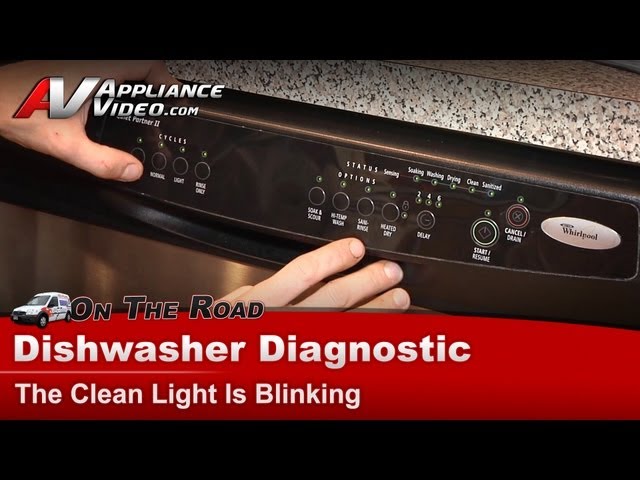
For example, a blinking Start/Resume light often means the door isn’t fully shut. A blinking Clean light might indicate a problem with the wash cycle or a blocked filter. Most newer models use combinations of lights and patterns, giving clues about the issue.
Learning how to interpret these signals can help you solve problems faster. A key insight: blinking lights rarely mean a complete breakdown. Usually, it’s a minor issue you can fix yourself.
Common Causes Of Whirlpool Dishwasher Blinking Lights
Blinking lights on your dishwasher can have different causes. Here are the most frequent reasons:
1. Door Not Closed Properly
If the door isn’t fully shut or the latch is faulty, the dishwasher stops working and the Start/Resume light blinks.
2. Interrupted Cycle
Opening the door during a wash cycle or a power cut can cause blinking lights.
3. Faulty Door Switch
If the switch that senses the door is closed stops working, the machine signals an error.
4. Water Supply Issues
When there’s not enough water or water isn’t entering the dishwasher, lights may blink.
5. Drain Problems
If water can’t drain out (blocked hose, clogged filter), the Clean or Drain light often blinks.
6. Control Panel Errors
A glitch in the electronics can cause random blinking.
7. Heating Element Problems
If water isn’t heated properly, some dishwashers blink the Clean light.
Many beginners assume blinking lights mean a major issue. But often, it’s a sign to check something simple, like the door or water supply.

Credit: www.youtube.com
Understanding Light Patterns And Their Meanings
Different Whirlpool models use unique light codes. Here are the most common patterns:
Start/resume Light Blinking
- Meaning: Door not fully closed, or the cycle interrupted
- Fix: Check and close the door; press Start/Resume
Clean Light Blinking
- Meaning: Wash cycle didn’t complete, or heating problem
- Fix: Check filter, ensure heating element works, reset dishwasher
Drain Light Blinking
- Meaning: Dishwasher can’t drain water
- Fix: Check drain hose, filter, and garbage disposal connection
Multiple Lights Blinking
- Meaning: Possible control panel error or power surge
- Fix: Reset the dishwasher, check for stuck buttons
This table shows typical light patterns and their meanings:
| Light Pattern | Possible Cause | Suggested Action |
|---|---|---|
| Start/Resume blinking | Door open or interrupted cycle | Close door, restart cycle |
| Clean blinking | Wash not complete or heating issue | Check filter, heating element, reset |
| Drain blinking | Drain blocked or pump issue | Clear blockages, check pump |
| Multiple lights blinking | Control panel error | Reset, check buttons |
Quick Fixes For Blinking Lights
Many blinking light issues can be solved with simple steps. Try these before calling for help:
1. Reset The Dishwasher
Turn off the dishwasher using the power button or unplug it for one minute, then restart.
2. Check The Door
Make sure the door closes fully. Listen for a click. If not, inspect the latch for damage.
3. Inspect The Filter
Remove and clean the filter. Blocked filters cause many blinking light errors.
4. Check Water Supply
Ensure the water valve is open and hoses are not kinked.
5. Examine The Drain Hose
Look for bends, clogs, or blockages in the hose.
6. Look For Error Codes
Some models show an error code along with blinking lights. Search the code in your manual.
7. Clean The Spray Arms
If spray arms are blocked, water doesn’t circulate well. Remove and rinse them.
8. Reset The Control Panel
Press the “Cancel” button or unplug the machine for one minute to clear glitches.
Here is a comparison of common quick fixes and their effectiveness:
| Action | Success Rate | Time Required |
|---|---|---|
| Reset dishwasher | 75% | 1-2 minutes |
| Check door/latch | 60% | 2-3 minutes |
| Clean filter | 50% | 5 minutes |
| Inspect hoses | 40% | 5-10 minutes |
A non-obvious tip: Sometimes, simply running the dishwasher empty after a reset can clear minor errors.
Credit: www.youtube.com
Step-by-step Troubleshooting Guide
If your dishwasher lights keep blinking after basic fixes, follow this guide:
1. Power Cycle
Unplug the dishwasher or turn off the circuit breaker for one minute. Plug it back in and see if the lights stop blinking.
2. Check Door Mechanism
Open and close the door several times. Look for loose hinges or a broken latch. If the latch is faulty, replace it.
3. Inspect Water Supply
Check the water inlet valve under your sink. Make sure it’s open. Look for leaks or kinks in the hose.
4. Clean Filters And Spray Arms
Remove the bottom filter and rinse it under running water. Clean the spray arms by poking out debris with a toothpick.
5. Examine Drain System
Disconnect the drain hose and flush it with water. Remove any blockages from the garbage disposal if connected.
6. Look For Error Codes
Check the control panel for codes like “F7” or “E4. ” These codes help you pinpoint the problem.
7. Test Heating Element
If the Clean light blinks, the heating element may not work. You can check with a multimeter or look for signs of damage.
8. Reset Control Panel
Hold down the Cancel button for 3 seconds or press a combination of buttons (see manual) to reset.
9. Inspect Control Board
If none of the above works, the control board may be faulty. This is rare but possible after power surges.
Here’s a step-by-step troubleshooting table:
| Step | What to Check | Action if Problem Found |
|---|---|---|
| 1 | Power supply | Reset machine |
| 2 | Door/latch | Replace latch if broken |
| 3 | Water supply | Open valve, fix hose |
| 4 | Filter/spray arms | Clean thoroughly |
| 5 | Drain hose | Clear blockage |
| 6 | Error codes | Follow manual guidance |
| 7 | Heating element | Replace if faulty |
| 8 | Control board | Call technician |
If you reach step 8 without solving the issue, it’s best to call a professional.
Advanced Solutions For Persistent Blinking Lights
If blinking lights continue after basic troubleshooting, more complex repairs might be needed. Here’s what you can try:
Replace Door Latch
A faulty door latch is a common problem. You can order a new latch online or from a Whirlpool dealer. Installation usually takes 10-15 minutes with a screwdriver.
Replace Water Inlet Valve
If water isn’t entering, the inlet valve might be stuck. You’ll need to turn off the water, remove the old valve, and install a new one.
Replace Heating Element
If your dishwasher doesn’t heat water, the heating element may be broken. This part is under the tub and needs careful replacement. Always disconnect power before starting.
Replace Control Board
If the control board is faulty, blinking lights won’t stop. Control boards are expensive but necessary for full function.
Update Firmware
Some newer Whirlpool dishwashers can have their firmware updated. This fixes bugs that cause blinking lights. Ask your dealer or check the manufacturer’s site.
A practical insight: Many control board failures happen after power surges. Using a surge protector can prevent these issues.
Credit: wieder.co.il
When To Call A Professional
Not all blinking light issues need a technician. But you should call for help if:
- You have tried all troubleshooting steps and lights still blink
- You see error codes you don’t understand
- Water leaks from the dishwasher
- The control panel feels hot or smells burnt
- You are uncomfortable opening the machine
Professionals have tools and training to fix complex issues. They can also spot wiring problems or hidden leaks.
A mistake many beginners make is ignoring blinking lights for weeks. This can cause bigger problems, like water damage or electrical faults. It’s best to act quickly.
Preventing Future Blinking Light Problems
Preventive care can stop most blinking light issues before they happen. Here are some proven tips:
1. Clean The Filter Monthly
A clean filter keeps water flowing and prevents blockages.
2. Check Door Latch Regularly
Ensure the latch clicks and feels secure.
3. Inspect Hoses Every 6 Months
Look for cracks, kinks, or leaks.
4. Use Quality Detergent
Cheap detergent can leave residue, blocking sensors.
5. Run Hot Water Before Start
Turn on hot water at the sink before starting the dishwasher for better cleaning.
6. Don’t Overload
Packed dishes block spray arms and sensors.
7. Check Spray Arms
Remove and rinse arms every few months.
8. Avoid Power Surges
Plug dishwasher into a surge protector.
9. Read The Manual
Every model is a little different. The manual shows error codes and maintenance tips.
10. Schedule Professional Service Annually
A technician can clean and check parts, preventing breakdowns.
A non-obvious tip: If you live in an area with hard water, use a dishwasher cleaner every 2-3 months to prevent mineral buildup.
Whirlpool Dishwasher Models And Blinking Lights
Not all Whirlpool dishwashers use the same light codes. Here are some popular models and their blinking light features:
- Whirlpool WDF520PADM
Basic model with single light indicators.
- Whirlpool WDT730PAHZ
Mid-range model with multiple light codes.
- Whirlpool WDP370PAHB
Portable model; uses blinking patterns for most errors.
- Whirlpool WDTA50SAHZ
High-end model; combines lights and digital error codes.
Some models use patterns like “blinking three times” for a specific error. Always check your manual for details. If you don’t have the manual, you can find it online at the official Whirlpool Service Support page.
Real-life Examples And Case Studies
Case Study 1: Door Latch Failure
Maria’s Whirlpool dishwasher started blinking the Start light. She checked the door, but it seemed fine. After resetting the dishwasher, the light kept blinking. Maria found a small crack in the latch. Replacing the latch solved the problem.
Case Study 2: Drain Blockage
John noticed his dishwasher’s Drain light blinking. He checked the hose and found a piece of plastic blocking it. After removing the blockage, his dishwasher worked normally.
Case Study 3: Heating Element Issue
Priya’s Clean light blinked after every cycle. She checked the filter, but the problem continued. Using a multimeter, she found the heating element had failed. After replacing it, the dishwasher worked perfectly.
These examples show that blinking lights often point to simple issues. With patience and basic tools, most problems can be solved at home.
Frequently Asked Questions
Why Does The Start/resume Light Blink On My Whirlpool Dishwasher?
The Start/Resume light blinks if the door is not fully closed or the cycle is interrupted. Try closing the door until you hear a click, then press Start/Resume again.
Can Blinking Lights Mean A Serious Problem?
Usually, blinking lights indicate minor issues, such as a blocked filter or an open door. However, if the lights don’t stop after troubleshooting, it could be a control board or wiring problem.
How Do I Reset My Whirlpool Dishwasher?
To reset, unplug the dishwasher or turn off the circuit breaker for one minute. Plug it back in or turn the power on. Press Cancel or Start to clear errors.
What Should I Do If The Clean Light Keeps Blinking?
Clean the filter, check the heating element, and reset the dishwasher. If the problem continues, look for error codes or call a technician.
Is It Safe To Use The Dishwasher When Lights Are Blinking?
It is not safe to use the dishwasher if lights are blinking, as it signals an error. Running the machine may cause water leaks or further damage. Always solve the issue first.
Conclusion
Solving blinking light issues on your Whirlpool dishwasher doesn’t have to be difficult. With careful troubleshooting and regular maintenance, you can keep your machine running smoothly. Remember, most problems are simple and can be fixed without professional help. If you face persistent issues, don’t hesitate to call a technician.
Acting quickly saves you money, protects your appliance, and keeps your kitchen running efficiently.